This is the sixth and final article in our series on selecting the right engineering platform. In the first article, How to Know When OpenBOM Is the Right Engineering Platform for Your Business, we mapped the engineering software landscape and its categories. Since then we have compared OpenBOM with enterprise PLM platforms such as Teamcenter, Windchill, ENOVIA, and Aras; with cloud-native PLM systems such as Arena, Fusion Manage, Propel, Duro, and Bild; with ERP systems such as SAP, Oracle, NetSuite, Odoo, and Dynamics 365; and with spreadsheets and flexible databases such as Excel, Google Sheets, Airtable, and Smartsheet.
At the end of that last article, we promised one more comparison — the category engineering teams stretch furthest beyond its intended purpose: application lifecycle management (ALM), source control, and work management tools.
This is that article.
Software is becoming part of almost every product.
Cars are software-defined. Industrial equipment includes embedded software and connectivity. Electronics combine mechanical design, PCBs, firmware, cloud services, and mobile applications. Even relatively simple products increasingly contain some combination of hardware and software.
That change is reshaping the tools engineering teams use.
GitHub is everywhere. Jira is used well beyond software development. Linear is popular with modern product teams. Notion has become an informal company knowledge system. Monday.com, Asana, and ClickUp organize projects and processes. Azure DevOps ties source code, builds, and releases together.
Which creates a reasonable question for companies developing physical products:
Why do we need PDM, PLM, or a product data platform such as OpenBOM? Why can’t we manage everything in GitHub, Jira, Linear, or Notion — tools our team already uses every day?
It is a fair question, and it deserves a real answer rather than a defensive one.
These tools are modern, fast, collaborative, and frequently already adopted inside engineering organizations. Software teams have genuinely solved problems that mechanical and electrical teams still struggle with: distributed collaboration, traceable change, automated verification, and continuous delivery. As software becomes a larger share of every product, the influence of these tools will only grow.
But there is a fundamental distinction:
GitHub, Jira, Linear, Monday.com, and Notion manage code, work, documents, and projects. OpenBOM manages the structure and lifecycle of a physical product.
The difference isn’t primarily about collaboration or user experience.
It is about the data model.
Software Tools Are Becoming Engineering Tools
Software development has had an enormous influence on how modern companies think about collaboration.
GitHub made distributed source control, branching, pull requests, and collaborative development mainstream. Jira became a standard environment for managing development work and processes. Linear introduced a faster, more focused model for software product development — and has since expanded well beyond issue tracking into planning, code review, and agent-driven workflows. Notion combined documents, relational databases, and collaboration, and now positions itself as a workspace where people and AI agents work side by side.
The broader landscape includes many other products:
- GitHub, GitLab, and Bitbucket for source control and software collaboration
- Azure DevOps for source code, builds, releases, and software projects
- Jira and Linear for development work, planning, and ALM processes
- Monday.com, Asana, and ClickUp for project and work management
- Notion and Confluence for documentation and knowledge
- Airtable and Smartsheet for flexible structured information and workflows
These systems have substantial advantages. They are popular. People already know how to use them. Collaboration is easy. APIs are widely available. Integrations are plentiful.
There is a great deal that manufacturing companies can learn from this model — and we say that as a company whose own thinking has been shaped by it.
The vendors themselves are also expanding their scope. Atlassian has been repositioning Jira as a general work management platform rather than a purely developer-facing tool, and in the process renamed its core objects: what used to be called Projects are now Spaces, and what used to be called Issues are now Work Items. Notion has added relational databases, rollups, and a developer platform for syncing external data. Monday.com and ClickUp market themselves to every department in the company.
So the expansion is real, and it is heading toward engineering.
The problem begins when companies attempt to extend these tools into something they were never designed to manage:
the product itself.
Managing Work About a Product Is Not Managing the Product
Consider a relatively straightforward electromechanical product.
It might contain:
- a mechanical assembly designed in SOLIDWORKS
- machined and purchased components
- a PCB designed in Altium
- electronic components with manufacturer and supplier information
- firmware stored in GitHub
- drawings, PDFs, STEP files, and other manufacturing derivatives
- an engineering BOM
- a manufacturing BOM
- approved manufacturers and suppliers
- revisions and engineering changes
- inventory information
- RFQs and purchase orders
A Jira space can contain work items related to all of these things.
A Notion page can document them.
A GitHub repository can contain the firmware.
Monday.com can track the activities required to release the product.
But none of these things represents the actual product structure.
This distinction is fundamental:
Managing work about a product is different from managing the product.
A project plan tells you what people intend to do. A product structure tells you what the product actually is. Both matter. They are not interchangeable, and one cannot be derived from the other.
Git Has a Graph. Products Need a Different Graph.
Git deserves special attention, because the comparison between software configuration management and product data management is where the argument becomes genuinely interesting.
Software developers have excellent revision control.
Git can tell you what changed, who changed it, maintain complete history, create branches, merge changes, tag releases, and reproduce an earlier software configuration with certainty. Mechanical and electrical teams often look at that and ask why their world can’t work the same way.
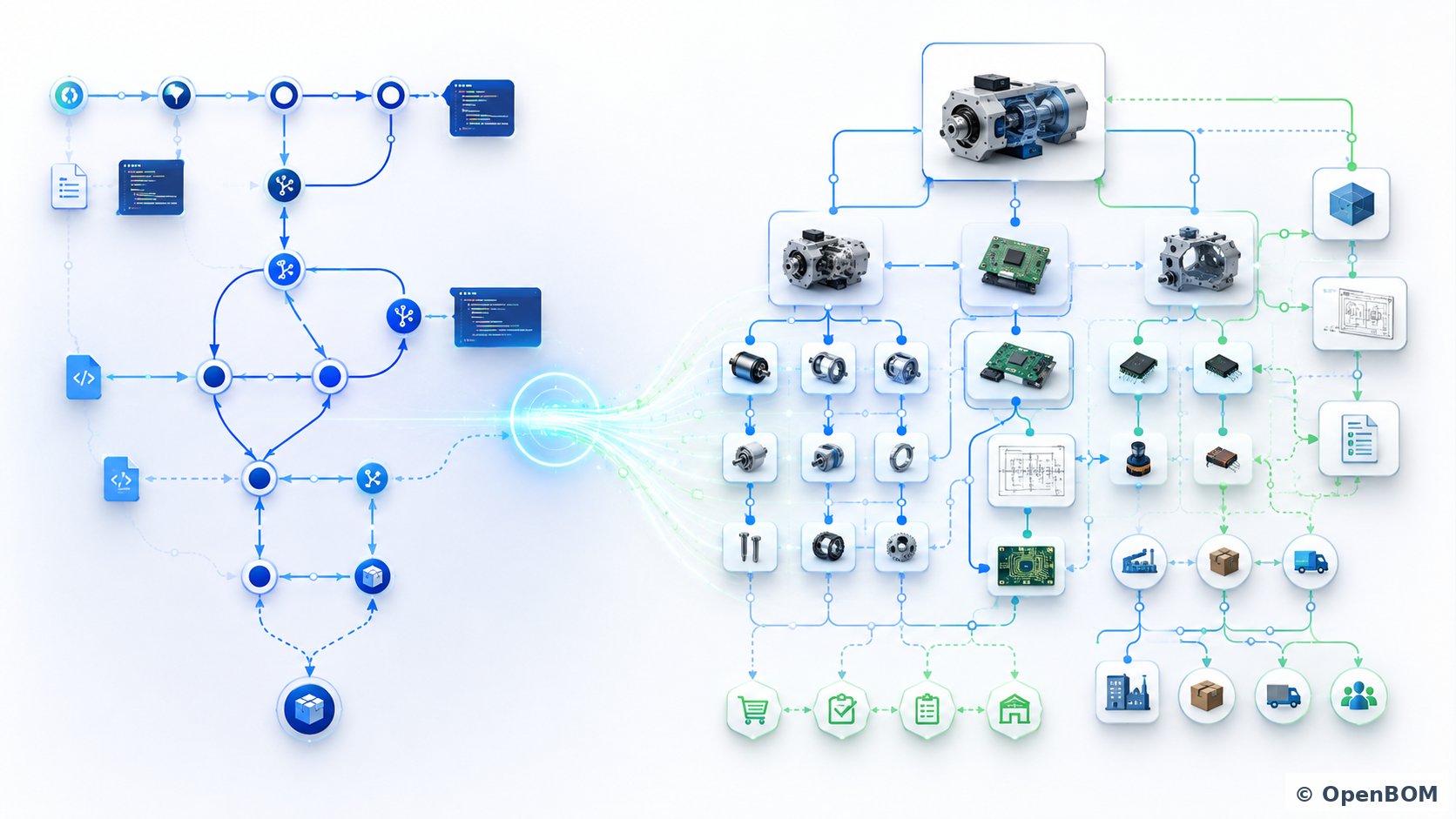
The answer becomes clearer when we look at the underlying graphs.
Git itself is built on a directed acyclic graph, or DAG. The Git graph describes relationships between commits, and therefore the history and ancestry of software changes.
Conceptually:
This graph is extremely powerful, because it lets software developers answer questions such as:
What came before this commit?
What changed?
Where did this branch originate?
Where were two branches merged?
What exact software state corresponds to this release?
Physical product development also has a natural graph.
But it is a different graph.
Consider a product structure:
A BOM is naturally represented as a directed structure describing how components are used to build assemblies and ultimately a product.
But product information extends far beyond the BOM.
An Item can be connected to a CAD model. A CAD model can have versions. An Item can have a revision. A revision can be connected to a drawing. A component can have manufacturer and supplier information. The same Item can be used in multiple assemblies and multiple products. An engineering change can affect many Items at once. A released BOM becomes the foundation for information sent to an ERP system.
The result is a much richer network of product information.
Git DAG vs. Product Graph
This leads to the central distinction.
Git uses a graph primarily to represent how software changed.
Product data management needs a graph that represents what the product is and how everything is connected.
| Git | Product Data / PLM | |
|---|---|---|
| Primary object | Commit / file | Item / Part |
| Graph represents | Change history | Product structure and relationships |
| Main relationship | Commit ancestry | Contains / uses / references |
| Configuration | Commit / branch / tag | BOM / revision / release |
| Change mechanism | Commit | Engineering change |
| Primary question | What changed? | What is the product? |
| Dependency question | Where did this code change? | Where is this component used? |
| Release context | Software release | Product configuration |
Which gives us a useful formulation:
Git gives software teams a graph of how code changed. Product data management gives engineering teams a graph of what the product is, how it got there, and which changes made it so.
Both are graphs. Both record history. The semantics of those graphs are fundamentally different.
A CAD File Is Not Source Code
This distinction also explains why putting CAD files into Git doesn’t produce PDM.
Software source files are predominantly text-based and designed for comparison, branching, and merging. Mechanical CAD models, drawings, assemblies, and PCB designs have very different characteristics.
A CAD assembly can reference hundreds or thousands of files. Those files have relationships to Parts, Item numbers, revisions, drawings, BOM structures, and manufacturing derivatives. Change one file and the meaning of many others changes with it.
A PDM environment needs to understand relationships such as:
CAD File → Item → Revision → Assembly → BOM → Drawing → Derivative
It needs to maintain CAD references, file versions, product structures, engineering revisions, and controlled releases.
A Git repository can store files — and Git LFS makes storing large binaries practical.
But storing engineering files and understanding the engineering relationships between those files are different problems. The second one is what PDM exists to solve.
Jira and Linear Manage Work Items, Not Engineering Items
The same distinction applies to Jira and Linear, and a recent terminology change makes it worth stating carefully.
Jira now calls its primary objects “work items.” That vocabulary collides with engineering language in a way that can create real confusion during a software selection process.
A Jira work item is not an engineering Item.
A work item has an owner, status, priority, description, comments, and a workflow. It represents something a person needs to do.
An engineering Item represents something the product is made of — a motor, PCB, fastener, enclosure, cable, or complete assembly.
It can have:
- a Part Number
- description
- revision
- lifecycle state
- CAD files
- drawings
- manufacturer information
- supplier relationships
- cost
- inventory information
- BOM relationships
Most importantly, Items form product structures.
That allows engineering and manufacturing organizations to ask questions that work management systems weren’t designed to answer:
Where is this component used?
Which products will be affected if we change it?
Which revision belongs in this released assembly?
What is the rolled-up cost of this product?
Which supplier provides this component?
Which product structures are affected by this engineering change?
A Jira work item can describe a change. It doesn’t represent the product configuration being changed.
This is also the sharpest way to state the ALM vs. PLM distinction. ALM manages the lifecycle of software development work. PLM manages the lifecycle of the product definition. For a modern connected product, you need both.
What About Notion, Monday.com, and ClickUp?
Flexible database and work-management platforms present a more interesting comparison.
Notion, Monday.com, ClickUp, and similar systems allow users to create tables, custom properties, relations, rollups, views, and workflows. Notion’s relational databases in particular can model genuine parent-child structures, and teams routinely build surprisingly capable internal systems with them.
With enough configuration, you can create something that looks like a parts database or even a BOM.
For simple use cases, that can work.
But there is an important difference between building a table that looks like a BOM and using a system that understands BOMs natively.
A product data platform needs to understand hierarchical product structures, quantities, units of measure, reference designators, revisions, alternates and substitutes, where-used relationships, CAD data, engineering changes, suppliers, inventory, procurement, and downstream ERP connections.
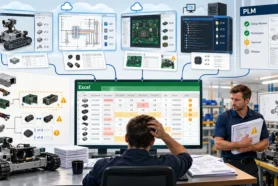
The further a company extends a generic database or work management platform in this direction, the more it starts building its own PLM system — and then maintaining it, documenting it, and hoping the person who designed it doesn’t leave.
We covered the closely related case of Airtable and Smartsheet in the previous article on spreadsheets and flexible databases. The conclusion is the same here. Flexibility is extremely useful right up until the organization has to recreate all the domain logic that specialized software already provides.
Everyone Is Building a Graph. They Aren’t the Same Graph.
Here is a development that makes this comparison more interesting than it would have been a few years ago.
The work management vendors are building graphs too.
Atlassian has been building what it calls a Teamwork Graph, aggregating work items, code, decisions, incidents, and collaboration history into shared organizational context — increasingly to give AI agents something to reason over. Notion has relations, rollups, and a developer platform that syncs external data sources into its workspace. Linear connects issues to pull requests and releases automatically.
This is a genuine architectural trend, and it validates the underlying premise: connected, graph-shaped information is more valuable than isolated records.
But notice what these graphs contain.
They are graphs of work context: tickets, commits, documents, conversations, and decisions. They describe how an organization works and what it has discussed.
They are not graphs of product definition: Items, assemblies, quantities, reference designators, revisions, effectivity, CAD relationships, approved manufacturers, and released configurations.
A graph of everything your team said about the enclosure is not a model of the enclosure.
Both graphs are legitimate. Neither substitutes for the other. And a company that has one but not the other still cannot answer the question that matters most on the manufacturing floor: what exactly are we building, in which revision, from which parts, supplied by whom?
The Data Model Is the Real Difference
The easiest way to understand these systems is to look at their primary objects.
| Platform category | Primary object | What the platform understands |
|---|---|---|
| GitHub / GitLab / Azure DevOps | Repository / commit | Software and source-code history |
| Jira / Linear | Work item / issue | Development work, planning, ALM workflow |
| Monday / Asana / ClickUp | Task / project | Work and project execution |
| Notion / Confluence | Page / database record | Knowledge, documentation, flexible data |
| OpenBOM | Item / BOM / CAD Assembly / Part / Product Structure / Order | Engineering and manufacturing product data |
OpenBOM starts from a different assumption.
The primary thing being managed isn’t a task, page, ticket, or source-code file.
It is the product.
The product consists of Items connected into structures and associated with CAD files, revisions, changes, suppliers, inventory, purchasing information, and lifecycle processes.
OpenBOM and the Product Graph
The graph concept is particularly relevant to OpenBOM, because OpenBOM uses graph database technology as part of its data foundation.
This isn’t simply an implementation detail. It reflects the nature of the information OpenBOM manages.
A product isn’t a collection of records stored in flat tables. It is a network of relationships.
Consider these connections:
Product → Assembly → Subassembly → Item
Item → CAD File → Revision → Drawing
Item → Manufacturer Part → Supplier
Item → BOM → Where-Used
Engineering Change → Affected Items → New Revisions
Released BOM → Procurement → ERP
The same Item can participate in multiple products. The same supplier can provide multiple components. A change can affect many assemblies. A revision connects engineering files with a specific released product configuration.
This is naturally graph-shaped information.
A BOM on its own can be understood as a DAG. But once the model includes where-used relationships, revisions, changes, suppliers, files, inventory, purchasing, and ERP objects, it is more useful to think about the broader Product Graph.
OpenBOM’s graph foundation is aligned with the structure of the problem it is designed to solve. It provides a foundation for navigating product relationships, where-used queries, impact analysis, configuration management, and connecting engineering and business information into a digital thread.
Change History Is Part of the Graph
There is an important point that often gets lost when people compare product data management with software configuration management. And this is where companies usually come with the ideas of using Git for product development. History matters also for product models too. The product graph is not only a picture of the product as it exists today. Change is embedded in it.
Item revisions, file versions, BOM history, lifecycle transitions, and engineering change records are not a separate audit log bolted onto the side of the system. They are connected elements of the same graph, attached to the specific Items, structures, and files they affect.
That connection is what makes the history useful rather than merely available. Because a change record is linked to the Items it modifies, and those Items are linked to the assemblies that use them, the history inherits the structure of the product.
So the questions an engineering team can ask become:
What did this BOM look like when it was released last March?
Which engineering change moved this Item from revision B to revision C?
Who approved it, and when?
Which other assemblies and products were affected by that same change?
Which revision of this component was in the configuration we shipped to that customer?
The last two questions are the ones worth pausing on. Git can tell you with complete precision that a file changed and who changed it. It cannot tell you which released product configurations that change reached, because a repository has no concept of where-used.
In OpenBOM, structure and change live in the same graph. A change is not just an event in a timeline — it is a node connected to everything it touched.
This is the difference between having a history and being able to navigate one.
Where OpenBOM Fits
OpenBOM provides several capabilities built specifically around this product model.
Structured Item and BOM management
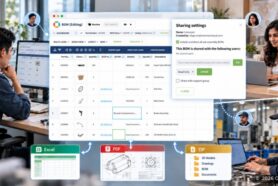
OpenBOM manages Items, multi-level BOMs, properties, revisions, quantities, alternates, substitutes, and where-used relationships. Items are reusable records rather than copied rows, so the same component can appear in many assemblies while its core information stays managed in one place.
The BOM isn’t a document attached to a project. The BOM is structured product data.
Real-time collaborative editing
OpenBOM brings the collaboration model modern teams expect into structured product data. Multiple users can edit the same BOM simultaneously and see each other’s changes instantly — the Google Sheets experience, but with items, revisions, and relationships intact behind the grid. There is no file locking, no synchronization delay, and no question about who has the latest version.
Multi-tenant collaboration across companies
Product development rarely happens inside one organization. OpenBOM’s multi-tenant data model allows catalogs, items, and BOMs to be shared directly across company boundaries with controlled access. An OEM can share a BOM with a contract manufacturer. A supplier can maintain a catalog its customers reference. This is a different model from inviting an external partner as a guest user into your project tracker, and it matters when the design is being built by someone else.
Cloud PDM
OpenBOM connects CAD files and product information rather than treating CAD documents as generic file attachments. Cloud PDM capabilities manage engineering files, versions, CAD relationships, and product structures together.
Native CAD and ECAD integrations
OpenBOM’s native CAD integrations capture product structures and engineering information directly from mechanical and electrical design environments. Instead of manually copying information from CAD into Jira, Notion, or spreadsheets, product information flows from design tools into the product data model.
PLM and change management
Engineering changes aren’t simply tasks. A change modifies Items, revisions, BOM structures, files, and lifecycle states. OpenBOM change management connects the process of approving a change with the actual product information being changed.
Procurement, inventory, and ERP integration
The product ultimately needs to be purchased and manufactured. OpenBOM connects product information to sourcing, inventory, purchasing, and ERP workflows, creating a path from CAD and engineering BOMs into manufacturing and enterprise processes.
When GitHub, Jira, and Notion Are Enough
Honesty about where OpenBOM isn’t the answer matters as much as anything above.
You probably don’t need OpenBOM — or any PDM/PLM system — when:
- The product is pure software. No BOM, no CAD, no suppliers, no physical parts. GitHub plus Jira or Linear is the correct stack, and adding a product data platform would create overhead with no return.
- You are a solo hardware developer with a handful of parts. A well-maintained spreadsheet and a folder structure may be entirely sufficient until part reuse, revisions, or a second person enters the picture.
- The immediate problem is project execution, not product definition. If what hurts is task visibility, deadlines, and coordination, a work management tool is the right purchase. OpenBOM will not fix a project management problem.
- The engineering work is one-off and never revised. Custom, build-once projects with no reuse and no field support obligation get less value from structured item management.
It is equally important to be clear about what OpenBOM is not. OpenBOM is not a source control system, not a wiki, and not a replacement for a dedicated issue tracker or project management platform. It includes lightweight capabilities for issue management and production planning, but if your team lives in sprints, backlogs, and code review, Jira, Linear, and GitHub are doing a job OpenBOM does not attempt to do better.
The case for OpenBOM becomes strong when:
- The same part is copied into multiple files, tickets, and spreadsheets.
- People regularly ask which BOM revision is current.
- CAD exports must be manually reconciled with BOM data.
- Engineering changes are communicated through email, chat, or ticket comments.
- Purchasing receives outdated quantities or superseded revisions.
- Multiple companies must coordinate around the same evolving product definition.
- You need to answer “where is this component used?” across the whole product portfolio.
Don’t Replace These Tools. Connect Them.
The conclusion shouldn’t be that engineering organizations need to replace GitHub, Jira, Linear, Notion, or Monday.com.
Quite the opposite.
Use each system for what it does best.
GitHub can manage software and firmware. Jira or Linear can manage development work and ALM processes. Notion or Confluence can manage knowledge and documentation. Monday.com, Asana, or ClickUp can manage projects and activities.
OpenBOM can manage the physical product definition — CAD files, Items, BOMs, revisions, engineering changes, suppliers, procurement, inventory, and the connection between engineering and ERP.
For modern multidisciplinary products, these systems increasingly need to work together.
Git DAG + Product Graph + Work Graph
This is where the comparison becomes much more interesting than a feature checklist.
A modern product might contain mechanical engineering, electronics, firmware, cloud software, mobile applications, and services. Each domain has its own information model.
Software development has its graph:
Git DAG → Software history and configuration
Engineering and manufacturing have another:
OpenBOM Product Graph → Product structure, configuration, and change history
Work and issue management provide a third:
Work Graph → Tasks, work items, decisions, and processes
The future isn’t about forcing all three into one database.
The opportunity is to connect them.
Imagine a digital thread such as:
Now it becomes possible to answer questions that are extremely difficult when these systems remain disconnected.
Which firmware release belongs to Product Revision B?
Which GitHub changes were associated with this engineering change?
Which PCB revision was released with firmware version 3.8?
Which physical products in the field contain a component affected by this change?
Which software and hardware changes together constitute the next product release?
For a software-defined product, these are not academic questions. They are recall questions, warranty questions, and compliance questions.
This is the beginning of a much broader digital thread.
Comparison
| Capability | GitHub / GitLab | Jira / Linear | Notion / Monday / ClickUp | OpenBOM |
|---|---|---|---|---|
| Software source control | Excellent | No | No | No |
| Work / issue management | Basic | Excellent | Strong | Limited |
| Documentation / knowledge | Basic | Basic | Excellent | Product-focused |
| Flexible tables | Limited | Moderate | Strong | Strong |
| Item management | No | No | Custom build | Native |
| Multi-level BOM | No | No | Custom / limited | Native |
| Where-used | No | No | Custom build | Native |
| CAD PDM | No | No | No | Native |
| CAD and ECAD integrations | No | No | No | Native |
| Engineering revisions | File / commit based | No | Custom build | Native |
| Engineering change management | No | Workflow only | Custom workflow | PLM function |
| Supplier / sourcing data | No | No | Custom build | Native |
| Inventory | No | No | Custom build | Native |
| Procurement / ordering | No | No | Custom build | Native |
| Cross-company data sharing | Repo access | Guest users | Guest users | Multi-tenant sharing |
| ERP integration for product data | No | No | Generic automation | Native product integration |
| Underlying relationship graph | Software graph | Work graph | Generic relations | Product Graph |
The table illustrates why a simple feature comparison can be misleading. These systems solve fundamentally different problems, and the rows where each one wins are the rows it was designed for.
From Software Configuration Management to Product Configuration Management
There is a useful historical analogy.
Software engineers learned decades ago that source files scattered across personal computers and shared drives weren’t sufficient. Software became too complex. Teams needed repositories, version control, branching, traceability, dependencies, and automated processes. Git ultimately became foundational infrastructure for software development.
Physical product development faces a similar problem, but the information being managed is different.
The fundamental object isn’t a repository of source files.
It is a product structure, the network of relationships around it, and the record of how it changed over time.
That network connects CAD, Items, BOMs, revisions, engineering changes, suppliers, manufacturing information, procurement, and enterprise systems. Software teams needed traceability across commits and branches. Engineering teams need traceability across revisions, configurations, and every assembly a component touches.
This is the role of the Product Graph. And this is where OpenBOM fits.
Conclusion: Connect the Graphs
GitHub, Jira, Linear, Notion, Monday.com, and other modern collaboration platforms are powerful tools. Their popularity is deserved, and their importance will keep growing as software becomes a larger part of every physical product.
But popularity doesn’t eliminate domain-specific information models.
A Jira work item isn’t a Part.
A Notion database isn’t automatically a BOM.
A Git commit isn’t an engineering revision.
A Git repository isn’t PDM.
And a project plan isn’t a product structure.
The question therefore shouldn’t be:
Should we use OpenBOM or GitHub, Jira, and Notion?
The better question is:
Where should the authoritative product definition live, and how should it connect to the tools the organization already uses?
There is a larger architectural idea behind that question.
Git uses a graph to understand the history of software. OpenBOM uses a graph to understand the structure, configuration, change history, and relationships of a product.
As hardware and software become increasingly inseparable, neither graph replaces the other.
The future is about connecting them:
Git DAG + Product Graph + Work Graph → Digital Thread
That connection between software history, physical product information, engineering work, and enterprise systems may ultimately matter far more than trying to make any one of these tools manage everything.
This article completes our category comparison series. Over six articles we have compared OpenBOM with enterprise PLM, cloud-native PLM, ERP, spreadsheets and flexible databases, and now source control and work management tools. If you are still deciding which category fits your business, start with the hub article: How to Know When OpenBOM Is the Right Engineering Platform for Your Business.
Next, we are moving from categories to specific head-to-head comparisons — starting with the systems engineers most often ask about directly, such as Teamcenter and Windchill. If there is a specific comparison you would find useful, tell us and we will prioritize it.
If you have questions about how OpenBOM works alongside the tools your team already uses, please contact us. Meantime, REGISTER FOR FREE and check how quickly you can build a structured BOM from your CAD design.
Best, Oleg
FAQ
Can I use GitHub as PDM for CAD files?
You can store CAD files in GitHub, and Git LFS makes handling large binary files practical. But storing files is not the same as managing product data. PDM needs to understand CAD assembly references, file-to-Item relationships, engineering revisions and released baselines, drawings and derivatives, and where a part is used across products. Git tracks the history of file content; PDM tracks the structure and state of a product definition. Teams that put CAD in Git typically end up maintaining part numbers, BOMs, and revision state somewhere else — usually a spreadsheet.
Can Jira or Linear replace PLM software?
No, though they solve adjacent problems well. Jira and Linear manage work items: tasks, bugs, sprints, and development workflow. PLM manages the product definition: Items, multi-level BOMs, revisions, effectivity, CAD relationships, suppliers, and released configurations. A Jira work item can describe an engineering change, but it cannot represent the product configuration being changed, answer where-used queries, or roll up cost and quantity through an assembly. Most hardware companies need both — a work management tool for the process and a product data platform for the product.
What is the difference between ALM and PLM?
ALM (application lifecycle management) manages the lifecycle of software development work — requirements, planning, issues, builds, testing, and releases. PLM (product lifecycle management) manages the lifecycle of the product definition — items, BOMs, CAD files, revisions, engineering changes, and the transition into manufacturing and supply chain. For a software-defined physical product, the two are complementary: ALM governs how the software gets built, PLM governs what the physical product is. The valuable engineering question is how to connect a software release to a specific product revision.
Is Notion good enough for BOM management?
Notion’s relational databases, rollups, and views can model a parts list and even a parent-child structure, and small teams do use it this way. The limits appear as products grow: no native multi-level BOM behavior, no engineering revision baselines, no CAD integration or file-to-item relationships, no where-used analysis, no alternates and substitutes, and no procurement or ERP connections. Everything beyond a simple list must be designed, built, and maintained by your team. Notion is excellent for documentation and knowledge; product data management asks for domain logic that a general-purpose database does not supply.
Does OpenBOM replace Jira, GitHub, or Monday.com?
No, and it isn’t intended to. OpenBOM is not a source control system, a wiki, or a dedicated project management platform. It includes lightweight issue management and production planning capabilities, but teams that live in sprints, backlogs, and code review should keep using the tools built for that. OpenBOM manages the product definition — Items, BOMs, CAD files, revisions, changes, suppliers, inventory, and ERP connections — and connects to the other systems through its REST API and integrations.
How do I connect a GitHub firmware release to a hardware revision?
This is one of the most common gaps in software-defined product development. The practical approach is to treat the software release as a controlled element of the product definition rather than something tracked only in the software toolchain. In OpenBOM, a firmware or software release can be managed as an Item with its own part number and revision and included in the product structure, so a released product configuration references both the hardware components and the specific software version. GitHub continues to own the commit history and build process; OpenBOM records which release is part of which product revision. The connection can be maintained manually for low volumes or automated through the OpenBOM API.
References
- OpenBOM CAD integrations
- OpenBOM integrations
- OpenBOM change management
- OpenBOM item management
- OpenBOM revision control
- OpenBOM product tour and cloud PDM
- OpenBOM REST API documentation
- Git documentation — Git objects and the commit graph
- Git Large File Storage
- Atlassian — Jira terminology changes
- Linear features
- Notion database relations
Join our newsletter to receive a weekly portion of news, articles, and tips about OpenBOM and our community.