The engineering frontend workflow across disciplines
This is the third article in the series of articles about OpenBOM engineering frontend. Here are previous articles – An Engineering Ontology for Complex Products and OpenBOM Engineering Frontend for Complex Product Development.
A conveyor combines a mechanical assembly, an electrical harness, a controller printed circuit board (PCB), and firmware. A roller change can affect several product configurations. A controller update may require review of both board and firmware states. Manufacturing and purchasing need to know which combination engineering has accepted.
How does design data become a manufacturing product definition
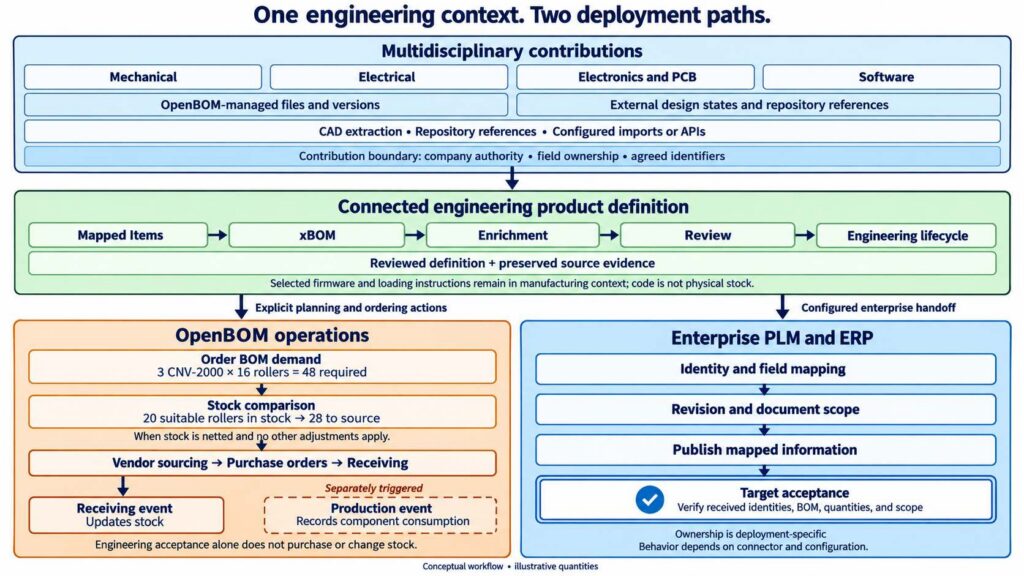
OpenBOM Engineering Frontend captures design information, maps it to engineering Items and bills of materials (BOMs), and supports review and revision control. The accepted definition then supports OpenBOM inventory and purchasing or a configured handoff to enterprise product lifecycle management (PLM) and enterprise resource planning (ERP). Source capture, engineering acceptance, and receiving-system acceptance are separate events.
- Configure identities, properties, source authority, and integration mappings.
- Capture files or source references and establish the relevant design states.
- Assemble mechanical, electrical, PCB, and software contributions in the Engineering BOM (EBOM).
- Enrich and review the product definition, including the selected hardware and software combination.
- Preserve the accepted engineering revision and its source evidence.
- Use that definition in OpenBOM planning and ordering, or publish mapped data and verify acceptance in enterprise PLM or ERP.
The earlier articles explain OpenBOM Engineering Frontend architecture and Design BOM vs Engineering BOM. Here, I want to follow those connections through a release and its next business use.
We will use the same illustrative conveyor. One SOLIDWORKS assembly has a one-meter configuration, CNV-1000, and a two-meter configuration, CNV-2000. They use different frames and motors, with eight and sixteen rollers respectively. The filenames, Part Numbers, and change scenario below are examples.
Configure the model and the design source
The workflow starts with the company’s information requirements. Engineering defines the properties and catalogs it needs, how Part Numbers identify products and components, and which properties describe an Item versus its use in a BOM. The integrations determine how supported source data populates that model. Electrical and electronic components need their own properties and source identifiers; software needs an engineering identity and a selected release reference.
For the conveyor, configuration mapping must distinguish CNV-1000 from CNV-2000 and frame Items FRM-1000 from FRM-2000. The shared roller remains one reusable Item, ROL-050, with a different quantity in each product. Required engineering properties and supporting file formats should also be configured before the first capture.
With desktop CAD, the team maps a local folder to an OpenBOM Design Folder. With cloud CAD, connected product data management (PDM), electrical and PCB tools, or software repositories, it selects the relevant source context and connection settings. That choice determines where source states are managed and how OpenBOM accesses their engineering information.
The team also assigns authority. Which company maintains the controller definition? Which source owns a component property? Who accepts a firmware release for this product? When two tools contribute to the same Item, the mappings must prevent one source from unintentionally overwriting another’s fields. Shared access and collaboration operate within those assignments.
Does CAD synchronization create an approved engineering revision
No. Synchronizing a changed CAD file records a managed file version. Importing a CAD BOM updates working engineering data. An approved engineering revision requires the company’s applicable review and lifecycle process. A design revision preserves an assembly state and has a different purpose from engineering approval.
In the desktop path, engineers work with local CAD files. OpenBOM’s Workspace Manager and Smart Sync synchronize the mapped workspace with cloud storage. File locks control who can upload changes to an existing managed file, and the synchronization report helps the engineer inspect differences between local and cloud data.
When a changed file is synchronized to the cloud, OpenBOM records a new file version. The capture event is the managed synchronization operation. An engineer may save several local iterations before synchronizing the result.
For cloud CAD or a connected PDM source, the source can manage its own objects and version history. The integration captures supported engineering information and source links. For example, the Onshape integration creates Items and BOMs from the selected design context. The workflow uses that source’s state and configuration mechanisms, without requiring local folder synchronization.
Establish the assembly design state
For OpenBOM-managed CAD files, the Design BOM (DBOM) records the assembly’s file reference structure. Link to Design connects its rows to particular file versions in the Design Folder. When updated parts and their parent assemblies are captured, the working reference structure can reflect those new states.
A design revision deliberately captures a state of this structure. A top-down revision starts at the assembly and captures the structure beneath it. A bottom-up revision starts at a changed part and propagates through parents that are up to date with that part. Parents still referencing older versions retain their existing revisions.
The captured scope needs to be understood. In this file-based model, references outside the mapped Design Folder are excluded from the DBOM. The team should account for external library components when reviewing the design context.
For a connected cloud CAD or PDM source, the corresponding assembly state can reside in that source. Its representation and links depend on the integration. A DBOM revision is useful for preserving a managed file structure; it is not a required precursor to every CAD BOM import.
Create the engineering product structure
The CAD integration creates or updates the Engineering BOM from the selected configuration and configured mapping rules. In the SOLIDWORKS integration, this operation populates BOMs and Item catalogs from CAD data.
For CNV-1000, the result includes FRM-1000, eight rollers identified by Item ROL-050, and the smaller motor. CNV-2000 includes FRM-2000, sixteen rollers, and the larger motor. The assembly fixture remains a design reference but is excluded from the EBOM through the CAD inclusion rules. The virtual belt can appear as an engineering Item even though it has no separate part file.
The engineer reviews the resulting identities and quantities. The roller’s description belongs to its reusable Item definition. Its quantity belongs to its usage in each conveyor. The EBOM is the engineering product structure within OpenBOM’s broader xBOM model, which connects different bill-of-materials types.
Bring discipline outputs into the product definition
Mechanical CAD (MCAD) capture is one contribution to the full product. Electrical CAD (ECAD), PCB, and software sources provide the other discipline context. OpenBOM’s multidisciplinary Digital BOM workflow connects information from several design environments. Electrical component data can come from AutoCAD Electrical; PCB assembly data can come from Altium or KiCad through their supported integrations. The team maps the resulting Items and structures into the conveyor definition.
For firmware Item FW-CTRL, the team records the selected release or commit reference. The GitHub connection approach keeps code management in the repository. OpenBOM supplies the relationship to the engineering product. Additional automation requires its configured API or integration workflow.
Consider an illustrative selection of PCB-CTRL-100 revision B with firmware release 2.4. Those source states and engineering identities have different counters. The review establishes which combination belongs in the accepted conveyor definition; one MCAD update does not refresh or approve every discipline.
Add engineering information and review the result
CAD captures only part of the engineering definition. The team can add grease to the EBOM, specify make or buy information, and add properties required by manufacturing or procurement. OpenBOM’s flexible data model gives these additions a place alongside the imported structure.
Refresh behavior matters here. OpenBOM’s documented CAD merge rules update CAD-supplied properties by Part Number while retaining properties and rows added in OpenBOM that do not originate in CAD. Editing a CAD-controlled value directly in OpenBOM can therefore be temporary: the next CAD update can overwrite it. Removing a CAD-derived row can also be temporary if the source still includes it.
For the conveyor, grease is an engineering addition, while roller quantity comes from the selected CAD configuration. The team should establish ownership of these fields and check the selected connector’s settings before relying on refresh behavior.
Review can include participants from other companies. OpenBOM supports sharing BOMs and catalogs with configured permissions. An electronics partner and manufacturer can review selected controller information while each maintains authority over its own records. The manufacturer reviews the combined product state, including interfaces, electrical requirements, and the selected board and firmware combination. These checks require the relevant engineering evidence and people; a connected graph provides context for their decisions.
What must be preserved in a multidisciplinary engineering release
A multidisciplinary release needs a product identity and engineering revision, together with the selected mechanical, electrical, PCB, and software states and their supporting evidence. Links to external sources must remain stable and accessible to the intended recipients. The preserved information should make it possible to determine which combination was accepted.
Once the team accepts the engineering definition, it captures the appropriate Item and BOM revisions through the agreed lifecycle process. OpenBOM’s revision and change management functions preserve revision records and support change requests, change orders, and approvals. The company decides which process applies to its work.
The accepted definition should identify the product and engineering revision, together with the relevant design state, configuration, and supporting documents. In the documented SOLIDWORKS workflow, files held in OpenBOM storage can be preserved with Item revisions. For externally managed design data, the team should verify whether the linked source state remains stable and accessible to the intended recipients.

A multidisciplinary baseline needs the selected mechanical state, electrical and PCB context, and software reference as well as the engineering revision. The relevant sources can remain authoritative for their artifacts. A reviewer can establish which combination was accepted from the states and links actually preserved. An overall product revision does not require every source to use the same revision identifier.
How does a released BOM support inventory and purchase planning
For a small manufacturer or engineering teams, the reviewed product definition can continue into OpenBOM’s own planning and ordering workflows. Engineering manages Items, BOMs, and changes; purchasing adds vendor and sourcing information; inventory records provide Quantity on Hand. An Order BOM calculates the component requirements for a planned batch and supports purchase planning.
Consider an illustrative batch of three CNV-2000 conveyors. Each requires sixteen rollers, giving a total demand of forty-eight. If twenty suitable rollers are available and the selected planning settings net that stock against demand, the shortage is twenty-eight before other adjustments. The engineering definition establishes which roller the product requires; the planning process determines what must be sourced.
OpenBOM’s Order BOM and purchase order process uses the configured vendor and inventory information. Purchase order receiving updates stock; release to production accounts for component consumption. These operational events follow their own triggers. Accepting an engineering revision alone does not perform them.
The planning perspective identifies what must be purchased across the physical disciplines and any separately procured software licenses. Manufacturing also needs the selected firmware and loading instructions where those are part of the build process. Product participation and purchase demand have different meanings.
Together, design management, engineering lifecycle, inventory, and ordering give a midsize company a connected workflow into purchasing. The company defines the product state used for a batch and its rules for availability, substitutions, and changes to existing orders.
What must be verified when engineering data is published to ERP
Verify that the receiving system contains the intended Item identities, BOM structure, quantities, mapped properties, revision treatment, and required documents or source references. An integration response alone does not establish that the expected product definition is present. The agreed connector scope and acceptance checks determine what the team must confirm.
In an enterprise PLM environment, OpenBOM can provide the agreed design management, engineering collaboration, and product-definition functions while supplying mapped information to the enterprise system. The deployment defines where formal release, configuration control, and other governance responsibilities reside.
In an ERP-connected workflow, OpenBOM organizes the agreed engineering definition and supplies the Item and BOM data accepted by the connector. The ERP manages its assigned operational records and transactions. Manufacturing may need a Manufacturing BOM (MBOM) or other transformation before the engineering structure can be used for production.
For CNV-2000, mapping must define how the destination represents software references and the selected electrical and PCB definitions alongside mechanical content. OpenBOM’s ERP integration workflow connects engineering Items and structures to operational systems; the actual transfer depends on the selected connector and configuration.
Publication is complete when the receiving system contains the expected product definition according to that mapping. A preserved OpenBOM revision and a successful downstream transfer are separate results to verify.
Evaluate the next change in engineering context
Now return to the roller change. Both conveyor products use ROL-050, so both require an impact review. Assume the team decides that the change retains the roller’s Part Number and requires a new engineering revision.
The engineer captures the updated roller and the relevant assembly states. Design dependencies identify parent assemblies; Item usage identifies the products using the roller. Engineering reviews each configuration, refreshes the affected EBOMs, checks the added information, and follows the revision and publication process for each accepted product change.
| Record | After capturing the CAD change | After accepting the engineering change |
|---|---|---|
| Roller file | New managed file version | The selected design state supports the reviewed change |
| Assembly design structure | Working references require review | Explicit design revisions preserve the chosen structure states |
| Conveyor EBOMs | Each affected product requires review and refresh | Item and BOM revisions identify accepted engineering definitions |
| Controller and firmware context | Source updates require interface and compatibility review | The definition records the reviewed PCB state and software reference |
| OpenBOM operational planning | Existing batches and purchasing records require an impact review | Selected planning records are updated through the agreed process |
| Connected PLM or ERP | The existing accepted data remains the starting point | The agreed publication updates are checked in the receiving system |
The earlier captured revisions remain available for their recorded scope. New working data can continue to evolve. The links help the team decide what needs review; they do not automatically approve every affected product or update every destination. For a planned batch, the team also reviews whether available stock remains suitable and whether the accepted change affects sourcing or existing orders.
This continuity is what makes the integrations seamless in practice: product identity, source context, and the intended engineering state remain understandable as information moves between activities. Synchronization, review, revision capture, and receiving-system acceptance remain explicit events.
To evaluate this workflow, bring one configured product to an OpenBOM demonstration. Identify the authoritative source for each contribution, the person or process responsible for release, and the downstream mapping. Then follow one accepted engineering change into its next use. For a manufacturer using OpenBOM’s operational functions, that use may be inventory and purchase planning. In an enterprise deployment, it may be publication to PLM or ERP. Include the electrical, PCB, and software contributions needed to understand that product. Use the architecture article to agree on the deployment and the Design BOM vs Engineering BOM article to check the identities and states. The same engineering frontend then connects the reviewed definition across disciplines and companies, with source authority and process responsibilities made explicit.
Meantime REGISTER FOR FREE to check how OpenBOM can help you.
Best, Oleg
Join our newsletter to receive a weekly portion of news, articles, and tips about OpenBOM and our community.