This is the fifth article in our series on selecting the right engineering platform. In the first article, How to Know When OpenBOM Is the Right Engineering Platform for Your Business, we mapped the full engineering software landscape and its five categories. Since then, we have compared OpenBOM with enterprise PLM platforms such as Teamcenter, Windchill, Enovia, and Aras; with cloud-native PLM systems such as Arena and Propel, and with ERP systems such as Oracle, SAP, Odoo, NetSuite, and Dynamics 365.
This article covers the category that is, by far, the most widely used product data management tool in the world: the spreadsheet. Excel, Google Sheets, Airtable, Smartsheet, and similar tools manage more BOMs today than every PLM system combined. So this comparison deserves a different approach.
Manufacturing companies are constantly told they need to stop using spreadsheets.
The argument is familiar. Excel files become messy. BOMs are copied between folders. Suppliers receive outdated information. Purchasing teams spend hours reconciling different versions of the same product. Engineering changes are communicated through email, file names, and colored cells.
These problems are real. But the usual conclusion is too simplistic.
Most manufacturers cannot tell every engineer, buyer, supplier, contractor, and manufacturing partner to abandon Excel and move into a new system. Spreadsheets are embedded in established processes. Suppliers use them for quotations. Purchasing teams use them for analysis. Contract manufacturers expect them as part of technical data packages. Some companies have security or procedural rules that make spreadsheet exchange the only practical option.
At the same time, spreadsheets alone are not designed to manage product structure, revisions, CAD files, engineering changes, inventory, and the connection between design and production.
The real question is not how to eliminate spreadsheets.
It is how to preserve everything useful about them while creating a structured and connected foundation for product information.
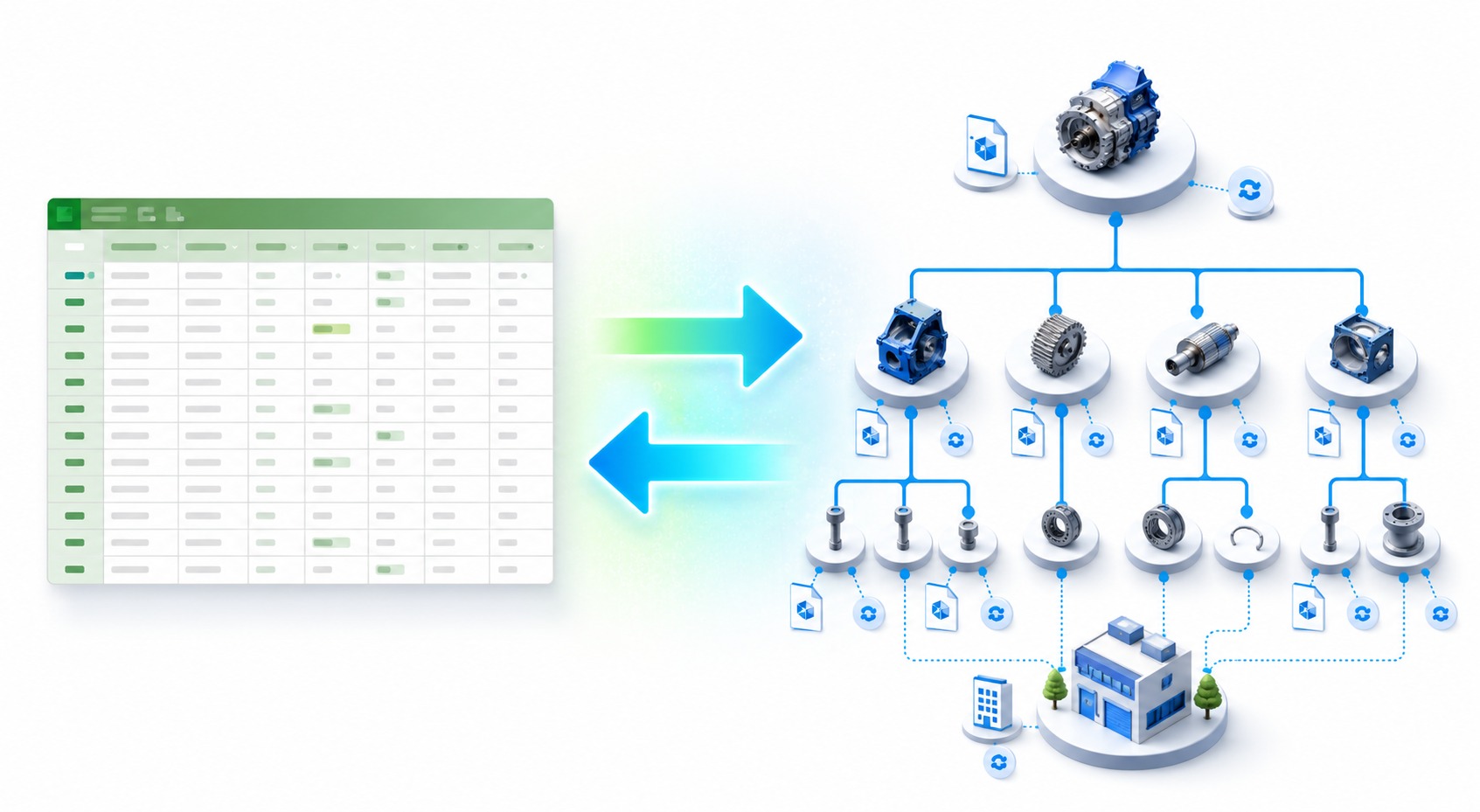
This is where OpenBOM offers a different approach. Start with the spreadsheets you already have. Import their data into OpenBOM. Manage items, BOMs, files, revisions, and lifecycle processes in a structured environment. Continue exporting spreadsheets whenever established processes require them. When your company and partners are ready, expand into direct cloud collaboration across organizational boundaries.
You do not need to choose between spreadsheets and PLM. You can use each where it works best.
Spreadsheets Are Not the Problem
Excel, Google Sheets, Airtable, Smartsheet, and similar tools remain popular for good reasons.
They are familiar. Almost everyone knows how to enter data, add a column, apply a filter, create a formula, and share a file.
They are flexible. A user can create a list or calculation immediately without configuring a data model or asking an administrator for help.
They are accessible. Many companies already have Microsoft 365 or Google Workspace, and many spreadsheet-like products provide inexpensive entry options.
They are also effective communication tools. A spreadsheet can move easily between departments, companies, suppliers, and contractors. It provides a common format even when participants use different engineering and business systems.
Modern spreadsheet products have also improved collaboration. Google Sheets provides real-time editing and version history. Microsoft supports Excel co-authoring through OneDrive and SharePoint. Airtable adds linked records and flexible views. Smartsheet adds workflow automation, dashboards, and project coordination.
These are valuable capabilities. The problem begins only when a spreadsheet is expected to become the complete product information system.
The problem is not that companies use spreadsheets. The problem is that spreadsheets become the only place where product information exists.
A Spreadsheet Can Show a BOM, but It Does Not Understand the Product
A bill of materials may look like a table, but it is not simply a collection of rows and columns.
A BOM represents a hierarchy of assemblies, subassemblies, and components. Items are reused in multiple products. Quantities roll up through multiple levels. Parts are connected to manufacturers, suppliers, drawings, CAD files, revisions, and purchasing information.
In a spreadsheet, these relationships are usually represented through indentation, repeated rows, separate tabs, formulas, links, or conventions understood by the person who created the file.
This approach can work for a simple product. It becomes increasingly difficult when a company needs to answer questions such as:
- Where is this component used?
- Which products are affected by a proposed change?
- What is the total quantity required across all levels of the assembly?
- Is the same item described consistently in every BOM?
- Which revision was approved and sent to manufacturing?
- Which CAD file and drawing define this item?
- Which supplier information belongs to the current product revision?
These questions require structured relationships, not only cells.
A spreadsheet can display the BOM. OpenBOM understands the BOM.
Keep the Spreadsheet, but Change What It Is Responsible For
The practical goal is not to remove spreadsheets from engineering and manufacturing. It is to give them the right role.
Spreadsheets remain excellent for:
- Temporary analysis and calculations.
- Supplier quotations and pricing requests.
- Lead-time and availability collection.
- Management reports and presentations.
- One-time data exchange with contractors.
- Established purchasing and manufacturing procedures.
- Communication with organizations that are not ready to use a shared cloud platform.
But spreadsheets should not carry the full responsibility for:
- Maintaining reusable item records.
- Managing multi-level BOM relationships.
- Controlling engineering revisions and released baselines.
- Connecting CAD files, drawings, and product structures.
- Tracking where-used relationships and product impact.
- Coordinating engineering changes and approvals.
- Maintaining consistent data across products and projects.
- Connecting engineering information to inventory, purchasing, and ERP.
Under this model, the spreadsheet remains a flexible interface. OpenBOM becomes the structured product-data foundation behind it.
The Easiest Place to Start: Import the Spreadsheet You Already Have
Many companies postpone moving beyond spreadsheets because they assume that adopting a product data system requires a large implementation project and an immediate redesign of their processes.
OpenBOM provides a more incremental path.
- Start with an existing Excel or spreadsheet BOM.
- Import the data into OpenBOM using out-of-the-box import tools.
- Map columns to properties and organize rows into structured items and BOM relationships.
- Add revision control, CAD connections, supplier data, purchasing information, and lifecycle processes when needed.
- Export information back to spreadsheets for existing workflows and external communication.
This allows a company to improve the foundation without changing every business process on the first day. The initial value comes from turning disconnected rows into reusable, connected product information. More advanced capabilities can be added at the company’s own pace.
An additional advantage helps here: OpenBOM’s user experience is intentionally spreadsheet-like. Engineers and purchasing teams coming from Excel work in a familiar grid of rows and columns — but the grid is backed by a structured product model rather than a flat file.
OpenBOM does not begin by asking companies to change how everyone works. It begins by making their existing product information structured and connected.
Import and Export Create a Practical Bridge
Spreadsheet import and export should not be treated only as migration utilities. They are part of an ongoing operating model.
OpenBOM can import existing spreadsheet data and transform it into structured items and BOMs. Once the information is managed in OpenBOM, users can export the appropriate view for analysis, reporting, supplier communication, or an established internal process.
| Spreadsheet World | OpenBOM World |
|---|---|
| Familiar files and tables | Structured items and product relationships |
| Flexible analysis | Controlled product information |
| Supplier-friendly exchange | BOM, PDM, and PLM functions |
| Existing business procedures | Revisions, changes, and traceability |
| Easy external communication | CAD, procurement, inventory, and ERP connections |
Exported spreadsheets no longer need to become independent product databases. They can be views, working documents, or exchange packages generated from a controlled product structure. Information collected externally can then be reviewed and incorporated back into the structured environment.
Example 1: A Conservative Supplier Process That Uses Excel
Consider an engineering team that manages its product structure, item information, and revisions in OpenBOM.
One of its suppliers requires quotation requests to be submitted using an approved Excel template. The supplier has an established commercial process, and asking it to adopt another platform would delay the project without creating immediate value.
The purchasing team exports the relevant BOM information from OpenBOM using a flexible Export export mechanism with customizable header and columns and prepares the spreadsheet required by the supplier. The supplier adds prices, lead times, minimum order quantities, and availability using its existing process. The purchasing team reviews the response and incorporates the relevant information into OpenBOM, where it can be associated with the correct items and product structure.
The supplier continues using Excel. The manufacturer continues managing structured and controlled product information. Both organizations work according to their established rules.
The value is not that the spreadsheet disappears. The value is that spreadsheet exchange no longer defines the company’s entire product record.
Example 2: Preserve an Established Internal Spreadsheet Process
A manufacturing company may already have a weekly purchasing review based on an Excel workbook shared across engineering, procurement, and operations.
The workbook may be deeply embedded in the organization. People understand its layout, management expects its reports, and replacing it immediately would create unnecessary resistance.
The company can import its product data into OpenBOM and begin managing items, BOMs, revisions, and CAD relationships in a structured way. It can then export the information required for the existing weekly review.
The familiar process continues, but the data behind it becomes more reliable.
Over time, the company can decide which activities should remain in Excel and which should move into OpenBOM. Adoption becomes gradual and based on business value rather than a forced system replacement.
Example 3: Advanced Collaboration Across Multiple Companies
Spreadsheet exchange is valid for conservative organizations, one-time interactions, and partners with established procedures. But some companies are ready for a more connected way of working.
OpenBOM’s multi-tenant architecture supports direct data sharing across organizational boundaries. An OEM, contract manufacturer, engineering contractor, and supplier can work with shared product information using controlled access — without exporting files or emailing spreadsheets for every handoff.
In this sense, OpenBOM provides an experience similar to Google Sheets: people from different organizations can connect through the cloud and edit the same data simultaneously, seeing each other’s changes in real time. The important difference is that OpenBOM places a structured product model behind the collaborative interface. It understands items, assemblies, BOM relationships, revisions, and engineering context. Engineering changes become visible through the shared environment, and manufacturing and purchasing teams can review the appropriate product structure without creating another disconnected copy.
This advanced model does not need to be imposed on every supplier. A company may collaborate directly in OpenBOM with a strategic contract manufacturer while continuing to exchange Excel files with smaller suppliers. The collaboration method can match the maturity, importance, and rules of each relationship.
Two Valid Models for External Collaboration
| Collaboration Need | Spreadsheet Exchange | Direct OpenBOM Collaboration |
|---|---|---|
| Supplier has an established Excel procedure | Well suited | May require unnecessary process change |
| Partner cannot access an external cloud system | Well suited | May be restricted by policy |
| One-time quotation or data request | Simple and practical | May be unnecessary |
| Ongoing work with a strategic partner | Repeated exchanges become difficult to coordinate | Well suited |
| Shared visibility into product changes | Requires sending updated files | Information remains connected in the shared environment |
| Maintaining a common product structure | Depends on file exchanges and reconciliation | Managed through structured product data |
| Adoption requirements | Minimal for the external participant | Requires participation in the shared process |
| Best role | Familiar communication and flexible exchange | Advanced collaboration across companies |
Neither model is universally correct. The right approach depends on the relationship, security requirements, established procedures, and willingness of participating companies to collaborate directly.
OpenBOM provides value because it supports both.
What OpenBOM Adds Behind the Spreadsheet
The integration between spreadsheets and OpenBOM is useful because OpenBOM provides the product-management capabilities that a general-purpose table does not.
Structured item and BOM management
Items are reusable records rather than copied rows. BOMs preserve parent-child relationships and multi-level product structures. The same component can be used in multiple assemblies while its core information remains managed in one place.
This supports where-used analysis, quantity and cost rollups, alternates and substitutes, and consistent product information across teams.
Revision and change management
Google Sheets and modern Excel environments provide file history and collaboration. This is useful, but document history is not the same as engineering revision control.
Engineering revision control must preserve an approved product baseline, identify affected items and BOMs, record the reason for a change, and support review and approval. OpenBOM provides change history, item and BOM revisions, change requests, change orders, and approval processes.
Real-time collaborative editing
OpenBOM brings the collaboration model that Google Sheets introduced to spreadsheets into structured product data. Multiple users — including users from different companies — can edit the same BOM at the same time and see each other’s changes instantly. There is no document locking, no waiting for synchronization, and no question about who has the latest version. Unlike a shared spreadsheet, every edit happens against a controlled product structure with items, revisions, and relationships intact.
Cloud PDM
OpenBOM extends beyond BOM management to engineering files. Cloud PDM capabilities connect CAD documents, versions, releases, and revision history with the items and product structures they define.
CAD and ECAD integrations
Instead of relying only on repeated CAD-to-Excel exports, OpenBOM’s native CAD integrations capture product structures and related information from desktop and cloud CAD systems. This reduces manual data entry and connects design information to downstream processes.
Procurement, inventory, and ERP connections
OpenBOM connects product information with sourcing, inventory, order planning, purchasing, and ERP workflows. A spreadsheet can still be used for analysis or communication, but it no longer needs to serve as the manual integration layer between engineering and production.
Excel, Google Sheets, Airtable, and Smartsheet Still Have Different Strengths
| Tool | Where It Is Strongest | How OpenBOM Complements It |
|---|---|---|
| Microsoft Excel | Calculations, analysis, offline work, templates, and broad supplier adoption | Imports and exports data while managing the underlying items, BOMs, revisions, and engineering files |
| Google Sheets | Real-time cloud collaboration and accessible sharing | Adds structured product relationships, lifecycle control, and engineering context |
| Airtable | Flexible tables, linked records, views, and no-code applications | Provides out-of-the-box BOM, PDM, CAD, change, procurement, and product-lifecycle functions |
| Smartsheet | Project coordination, workflow automation, dashboards, and work management | Connects project activities to a structured product definition and engineering data |
| Other spreadsheet and no-code tools | Rapid setup and specialized team workflows | Provides a controlled product foundation while allowing flexible data exchange |
The goal is not to argue that OpenBOM should perform every job better than these tools. Each has areas where it excels. The OpenBOM advantage is the ability to preserve those useful interfaces while managing the product itself in a connected environment.
A Practical Adoption Path
Companies can adopt OpenBOM according to their readiness rather than following a rigid transformation program.
| Adoption Level | How the Company Works | Role of OpenBOM |
|---|---|---|
| 1. Existing spreadsheet processes | Teams and suppliers continue exchanging Excel files and established templates | Import current data, create structured items and BOMs, and export information for familiar workflows |
| 2. Structured internal collaboration | Engineering, purchasing, and manufacturing work from controlled product information while spreadsheets remain part of external communication | Manage BOMs, revisions, CAD files, sourcing, inventory, and lifecycle processes |
| 3. Connected cross-company collaboration | Selected customers, suppliers, contractors, and manufacturing partners collaborate directly through the cloud | Provide shared, controlled access to connected product information across organizational boundaries |
These levels are not mutually exclusive. A company can use all three at the same time for different products, departments, and partners.
This flexibility makes it easier to begin. The organization does not need to wait until every process is standardized and every supplier is ready.
When Is a Spreadsheet Alone Still Enough?
A spreadsheet may remain sufficient when:
- The BOM is small and temporary.
- One person controls the information.
- The product has few revisions and little part reuse.
- The main requirement is analysis rather than operational control.
- The data does not need to remain connected to CAD, procurement, inventory, or ERP.
- An error can be corrected without affecting production, quality, cost, or customers.
The case for OpenBOM becomes stronger when:
- People regularly ask which BOM is current.
- The same part is copied into multiple files.
- Engineering changes are communicated through email or chat.
- Purchasing receives outdated quantities or revisions.
- CAD exports must be manually reconciled with BOM spreadsheets.
- The organization needs approved product baselines and traceable changes.
- Multiple companies must coordinate around the same evolving product definition.
- Spreadsheet maintenance depends on one person who understands all the formulas and conventions.
These are signs that the company needs more than a better spreadsheet. It needs a structured product foundation that can still work with spreadsheets.
Conclusion: Start With What You Have and Connect When You Are Ready
The future of engineering and manufacturing collaboration is not a world without spreadsheets.
Excel and other spreadsheet tools will remain useful because they are familiar, flexible, and widely accepted across organizational boundaries. For many suppliers and established company processes, spreadsheet exchange is completely valid.
At the same time, spreadsheets alone are not designed to manage structured product information, engineering revisions, CAD relationships, change processes, purchasing, inventory, and the connection between design and production.
OpenBOM connects these two realities.
Companies can begin by importing their existing spreadsheets and organizing items and BOMs without disrupting every established process. They can continue exporting spreadsheets for supplier communication, analysis, and internal procedures. As their needs evolve, they can add CAD integration, cloud PDM, revision control, procurement, inventory, and ERP connectivity. When selected partners are ready, they can move beyond file exchange and collaborate directly across companies using shared, structured product information.
Some participants will continue working in Excel. Others will collaborate directly in OpenBOM. Both approaches can coexist. The important point is that product information remains structured and connected regardless of how each participant chooses to engage.
Start with the spreadsheets you already have. Build the connected collaboration your business is ready for.
In upcoming articles in this series, we will look at how OpenBOM compares with application lifecycle management (ALM) tools such as Jira and with project management platforms such as Monday.com — tools that engineering teams often stretch far beyond their intended purpose. If you have not read the earlier articles yet, start with How to Know When OpenBOM Is the Right Engineering Platform for Your Business.
If you have questions about how OpenBOM can work alongside your existing spreadsheet processes, please contact us. Meantime, REGISTER FOR FREE and check how easy it is to import your existing Excel BOM into OpenBOM.
Best, Oleg
FAQ
Can I manage a BOM in Excel or Google Sheets?
Yes, and many companies do — especially for small, simple, or short-lived products managed by one person. Excel and Google Sheets can display a BOM as a table and support basic calculations and sharing. The limitations appear as products grow: spreadsheets do not maintain reusable item records, multi-level product structures, where-used relationships, engineering revision baselines, or connections to CAD files and purchasing data. If your team regularly asks “which BOM is current?” or copies the same part into multiple files, you have outgrown spreadsheet-only BOM management.
What is the difference between spreadsheet version history and engineering revision control?
Version history (available in Google Sheets and Excel co-authoring) records who changed a file and when, and lets you restore earlier versions. Engineering revision control does something different: it preserves an approved product baseline, identifies which items and BOMs are affected by a change, records why the change was made, and supports formal review and approval before a new revision is released to manufacturing. File history tracks edits to a document; revision control governs the state of a product. OpenBOM provides item and BOM revisions, change requests, change orders, and approval workflows.
Do I have to stop using Excel if I adopt OpenBOM?
No. OpenBOM provides out-of-the-box import from Excel and other spreadsheets and export back to spreadsheet formats. Companies typically continue using Excel for supplier quotations, analysis, reports, and established procedures, while OpenBOM manages the underlying items, BOMs, revisions, and CAD connections. Many suppliers and partners never need to touch OpenBOM at all — they continue receiving and returning spreadsheets, while the manufacturer maintains a structured product record behind them.
Is Airtable or Smartsheet a good alternative to PLM software?
Airtable and Smartsheet are stronger than plain spreadsheets for structured data: Airtable provides linked records, flexible views, and no-code applications; Smartsheet provides workflow automation, dashboards, and project management. Some teams build BOM-like databases in them. However, neither provides out-of-the-box BOM management, engineering revision control, CAD integrations, cloud PDM, or procurement and ERP connections — you would need to build and maintain those capabilities yourself. They are good choices for project coordination and general team databases; for product data management, a purpose-built system requires far less custom construction.
When is a spreadsheet alone enough for BOM management?
A spreadsheet alone is often enough when the BOM is small and temporary, one person controls the data, the product has few revisions and little part reuse, and an error would not disrupt production, cost, or customers. In these situations, adopting a dedicated system may add process overhead without proportional value. The equation changes when multiple people and companies depend on the same evolving product definition, when parts are reused across products, or when engineering data must stay connected to CAD, purchasing, inventory, and ERP.
Can multiple companies work on the same BOM in OpenBOM, like a shared Google Sheet?
Yes. OpenBOM’s multi-tenant data model allows catalogs, items, and BOMs to be shared directly across company boundaries — an OEM can share a BOM with a contract manufacturer, or a supplier can maintain a catalog its customers reference — with real-time collaborative editing, so participants in different companies see each other’s changes instantly. The experience is similar to sharing a Google Sheet, but the shared data is a structured product model with items, revisions, and relationships rather than a flat table. Companies that are not ready for direct collaboration can continue participating through spreadsheet exchange.
References
- OpenBOM data import
- OpenBOM data export
- OpenBOM integrations
- OpenBOM change management
- OpenBOM product tour and cloud PDM
- OpenBOM CAD integrations
- Google Sheets version history
- Microsoft Excel co-authoring
- Airtable linked records
- Smartsheet platform features
Join our newsletter to receive a weekly portion of news, articles, and tips about OpenBOM and our community.