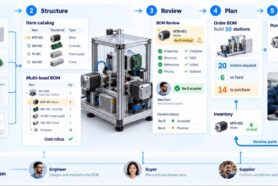
Product development depends on people working together across engineering, purchasing, manufacturing, and suppliers. Each participant brings different information and often uses different tools. Engineers work in CAD and manage product structures. Buyers evaluate suppliers and costs. Manufacturers need clear instructions. Suppliers respond with quotations, drawings, availability, and technical questions.
Many of these exchanges happen through Excel spreadsheets, PDF documents, ZIP packages, and email. These formats are familiar, practical, and deeply embedded in how companies operate.
The difficulty appears when the information becomes disconnected. Engineering updates a part, purchasing works from an earlier BOM, and a supplier quotes against a drawing received last month. Everyone is doing their job, but the work is no longer aligned around the same product definition.
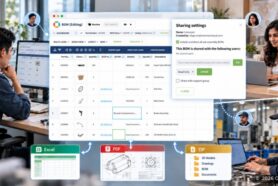
At OpenBOM, we focus on connecting that work. Our multi-tenant data management and real-time collaboration capabilities help teams and companies work together around shared product information. Through a familiar Google Docs-style Share function, customers can give colleagues and partners access to catalogs, BOMs, and Order BOMs. Flexible import and export provide a practical path to adopt this approach while continuing to use familiar tools and supplier processes.
Different processes have different strengths
Supplier collaboration covers several kinds of work. An early design discussion, a quotation request, a manufacturing handoff, and a purchase order each have different requirements.
Email can be effective for a quick question. Excel provides a familiar format for reviewing quantities and comparing quotations. PDF drawings communicate technical requirements. ZIP packages bring related files together. Purchasing systems and ERP manage commercial transactions, while PDM and PLM systems support engineering information and controlled product changes.
These approaches can work well together. Their usefulness depends on the process and on how information moves between them.
| Approach | Where it fits | What needs to stay connected |
|---|---|---|
| Email and chat | Questions, clarification, and coordination | The item, request, or decision being discussed |
| Excel | BOM exchange, cost analysis, and supplier responses | Item identifiers, quantities, revisions, and reviewed updates |
| PDF and ZIP packages | Drawings, specifications, and manufacturing handoffs | The applicable product definition and its supporting files |
| Purchasing and ERP systems | Quotes, orders, receipts, and business transactions | The engineering definition used for the transaction |
| PDM, PLM, and BOM platforms | Design information, product structures, revisions, and changes | The information and responsibilities shared with other participants |
A practical collaboration strategy starts by understanding these roles. Then it connects the information needed at each handoff.
Keep the work connected to the product
A supplier question usually relates to a specific part or assembly. Someone needs to confirm a dimension, clarify a quantity, propose an alternative, or explain a delivery constraint.
The team should be able to find the context behind that question: the item identifier, its place in the BOM, the applicable revision, and the supporting drawing or specification. The result should also return to the relevant product or sourcing record.
For example, if a supplier proposes a different motor, engineering needs to assess its technical suitability. Purchasing needs to understand cost and availability. Manufacturing may need to review mounting or assembly implications. Keeping these activities connected makes it easier to understand how one proposal affects the product and who must act next.
OpenBOM connects items, BOMs, files, revisions, and sourcing information in a shared product workspace. This provides a common reference for work that crosses departmental and company boundaries. Learn more about OpenBOM supplier collaboration.
Multi-tenant data management supports work across companies
Engineering and manufacturing frequently involve several organizations. An OEM may work with an independent design contractor, a contract manufacturer, and multiple component suppliers. Each organization has its own people, data, and responsibilities.
OpenBOM’s multi-tenant data architecture supports controlled sharing between these participants while allowing companies to maintain their own data administration. A company can share selected catalogs, BOMs, and Order BOMs with external collaborators, using permissions and views to define access to the relevant information.
For a customer, the practical benefit is that collaboration can extend beyond the internal team. A contractor or supplier can access a shared product record without requiring a separate exported copy for every interaction.
The scope of sharing remains an explicit choice made by the data owner.
Share product data as easily as a Google Doc
If you have shared a Google Doc or Google Sheet, the basic idea will feel familiar: choose the information, add the people who need it, and decide what they can do. OpenBOM brings this familiar interaction to structured product data.
The everyday workflow is straightforward:
- Open the data you want to share: a catalog, BOM, or Order BOM, then select Share.
- Add the participants: enter the email addresses associated with their OpenBOM accounts, whether they are colleagues, contractors, or suppliers.
- Choose the access: use Read Only for review, Edit for authorized contributors, or By View to limit access through selected properties and filters.
Participants access the same shared data in OpenBOM, and permitted updates appear in real time. This gives a conversation a dependable reference that everyone involved can return to. Explore the Share workflow.
The information shared can follow the work:
| Shared data | Example of connected work |
|---|---|
| Catalog | Engineering and purchasing review reusable item properties and sourcing information. |
| BOM | A design contractor and internal engineers review an assembly’s components and supporting references. |
| Order BOM | Manufacturing and purchasing review the quantities needed for a planned build. |
For a supplier review, a buyer can share a BOM using an appropriate view so the supplier sees the information needed for that exchange. Internal participants can retain access to the broader data relevant to their responsibilities.
For ongoing internal work, automatic team sharing can provide access according to configured roles and Team Views. The team can establish repeatable sharing rules as collaboration expands. Learn about team sharing.
Real-time collaboration helps people act on shared information
OpenBOM allows multiple users to access shared BOMs and catalogs simultaneously, see updates in real time, and edit according to their permissions. Engineers, buyers, and other authorized participants can work together as questions arise, with less need to circulate and reconcile copies.
Consider a BOM review before a prototype build. Engineering checks the product structure and supporting files. Purchasing adds sourcing information. A contractor reviews the data shared for its responsibilities. Participants can see updates in the shared workspace as the review progresses.
This can shorten the distance between identifying a problem and getting the right person involved. It also helps the team keep the information used for a decision close to the product being reviewed. See how team collaboration works in OpenBOM.
The team still identifies the revision applicable to a quotation or build and follows its review and approval process. A supplier’s proposal needs engineering review before becoming an accepted product change. Real-time access supports that process; the responsible people make the decision.
Adopt connected work through familiar formats
Adoption becomes easier when a company can begin with the information and practices it already has. A team may have years of BOMs in Excel, suppliers who expect PDF drawings, and manufacturing partners who request ZIP packages.
OpenBOM’s import and export capabilities provide a bridge between those processes and a connected workspace:
- Excel: Import existing BOM and catalog spreadsheets into structured product records. Export BOM information for supplier exchanges, analysis, and established reporting processes.
- PDF: Keep drawings and specifications connected to the relevant items and export BOM information as PDF reports. Suppliers can continue receiving the documents they use today.
- ZIP: Import supported files from archives and export a BOM together with its referenced attachments, such as drawings, STEP files, and specifications, in a single package.
See the guides to data import, data export, and ZIP import.
For teams extracting product information from drawings, OpenBOM also offers AI-powered PDF drawing import in private beta with an AI license. Users review the recognized information before importing it as structured Items and BOM data. This is a separate workflow from attaching a PDF drawing or exporting a PDF report. Read about PDF drawing import.
These capabilities let companies introduce OpenBOM gradually. Internal teams can begin collaborating on shared data while suppliers continue receiving Excel, PDF, or ZIP deliverables. Partners can join the shared workspace when direct collaboration fits their work.
Exported files are snapshots. When an issued definition changes, the team needs to communicate the change and provide the appropriate updated package. Incoming spreadsheet updates and file associations also need review against the intended items and revisions. Keeping that connection clear makes familiar file exchanges more useful.
One product, two practical supplier workflows
Imagine a manufacturer preparing an assembly for production. The team imports its existing Excel BOM into OpenBOM and connects the relevant drawings and specifications. Engineering and purchasing review the data together.
One supplier participates directly in OpenBOM. The buyer uses Share to grant access to the BOM with the appropriate permissions and view. The supplier reviews the information made available for its work and provides input through the agreed process. Internal participants can work from the same shared context.
A second supplier prefers its established quoting process. The buyer exports the selected BOM information and referenced drawings in a ZIP package. The supplier returns its quotation in Excel, and the buyer reviews the response and records the accepted sourcing information against the corresponding items.
Both suppliers can participate in the overall workflow. The company chooses the exchange method that fits each relationship while keeping its internal review connected to the product definition.
A short checklist for evaluating collaboration
Use one real assembly and one supplier interaction to evaluate how the process works:
- Product context: Can participants identify the correct item, quantity, revision, and supporting files?
- Shared access: Can users share catalogs, BOMs, and Order BOMs through familiar Share controls, with permissions and views appropriate to each participant?
- Connected review: Can engineering and purchasing work together as questions and updates arise?
- Familiar exchanges: Can the team import its existing data and produce the Excel, PDF, or ZIP deliverables partners need?
- Decision ownership: Is it clear who reviews supplier input and approves changes to the engineering definition?
- Process continuity: Can the workflow fit the company’s existing CAD, purchasing, and ERP responsibilities?
Start with one product or supplier relationship. Measure whether people spend less time finding the right information, rebuilding file packages, and reconciling responses. Expand the workflow as the team establishes a repeatable way to work.
Connected collaboration gives people a dependable product context while accommodating the different ways companies work. OpenBOM brings multi-tenant data management, real-time collaboration, and flexible file exchanges together so customers can build that connection step by step.
REGISTER FOR FREE to explore OpenBOM supplier collaboration with your own product data.
Best, Oleg
Join our newsletter to receive a weekly portion of news, articles, and tips about OpenBOM and our community.