This is the third article in our series on selecting the right engineering platform. In the first article, How to Know When OpenBOM Is the Right Engineering Platform for Your Business, we mapped the full engineering software landscape and its five categories. In the second, OpenBOM vs. Enterprise PLM, we looked at enterprise platforms such as Teamcenter, Windchill, and ENOVIA. This article examines the category where OpenBOM competes most directly: cloud-native PLM.
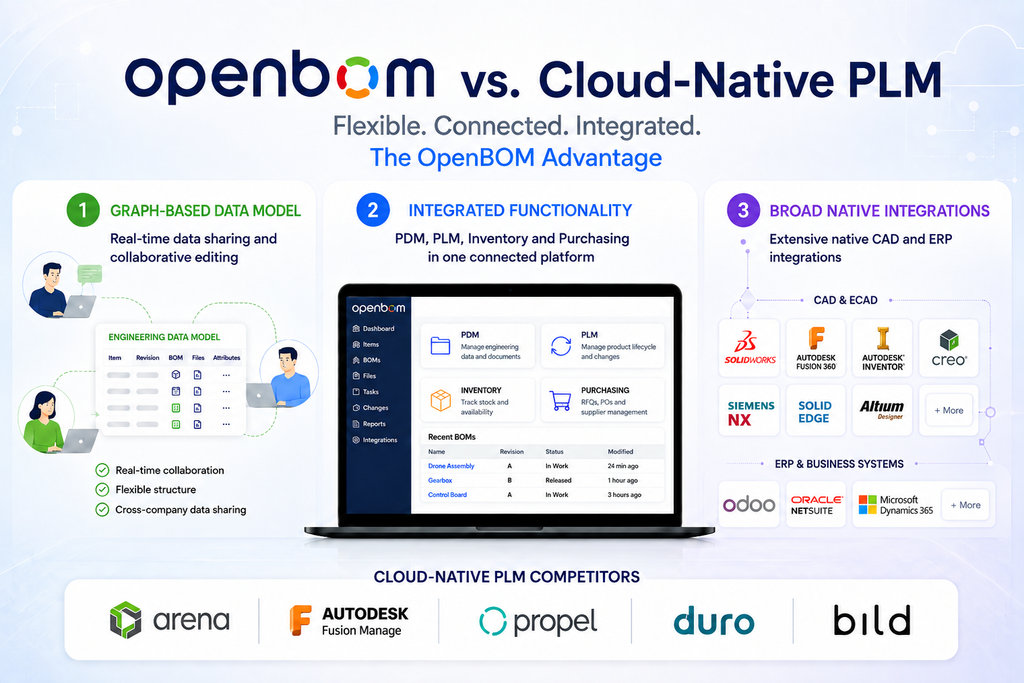
Cloud PLM is no longer a single product category. Although Arena, Autodesk Fusion Manage, Propel, Duro, Bild, and OpenBOM are all delivered as cloud solutions, they differ substantially in architecture, engineering integration, data modeling, collaboration, and functional scope.
Arena is primarily focused on controlled BOM and change management. Fusion Manage emphasizes configurable business processes within the Autodesk ecosystem. Propel provides robust item, BOM, and lifecycle processes on the Salesforce platform. Duro offers a streamlined, out-of-the-box approach to the hardware team, now acquired by Altium and might drift towards PCB BOMs product data and lifecycle management. Bild began with collaborative design review and has expanded into PDM and lighter BOM management. OpenBOM takes a broader, engineering-connected approach that combines PDM, PLM, BOM management, inventory, procurement, and ERP integration.
The right choice depends on the problem a company is trying to solve, which always brings me to the main recommendation I always give to customers – start from your problems and not tools, learn what you can do, do trials (OpenBOM gives to everyone an automatic 14 day trial – you don’t need to call us to start it)
What Cloud-Native PLM Does Well
Cloud-native PLM systems remove much of the infrastructure and deployment complexity traditionally associated with enterprise PLM. They provide browser-based access, centralized data management, workflow automation, and easier collaboration across distributed teams.
However, each system defines the scope of PLM differently.
Some platforms concentrate on controlled records and formal processes. Others focus on configurability or a specific technology ecosystem. OpenBOM focuses on connecting engineering data with downstream manufacturing, procurement, and business processes.
This creates an important distinction:
- Arena, Fusion Manage, and Propel are primarily BOM and process-centric PLM platforms.
- Duro emphasizes an opinionated, ready-to-use PLM experience for hardware teams
- Bild begins with collaborative design review and extends into engineering data management.
- OpenBOM is an engineering-data-centric platform that combines PDM, PLM, and selected operational functions.
High-Level Comparison
Scroll right on mobile to see all columns.
| Platform | Primary strength | Engineering and PDM scope | Operational scope | Main tradeoff |
|---|---|---|---|---|
| OpenBOM | Connected engineering and manufacturing data; cross-company data sharing and real-time collaborative editing | Cloud PDM and broad native MCAD and ECAD integrations | PLM, inventory, RFQs, orders, purchasing, and ERP integrations | Less sophisticated process support than Arena and Propel; no native design review functions comparable to Bild |
| Arena | Robust BOM, change, quality, and supplier processes | No broad native cloud PDM; limited native CAD connectivity | Primarily item, BOM, change, quality, and supplier processes | Narrower engineering and operational scope |
| Fusion Manage | Configurable lifecycle applications and workflows | Connected most closely with Autodesk Fusion and Vault; no cloud PDM (Upchain discontinued) | PLM process management rather than inventory or purchasing | No cloud PDM, no inventory and purchasing, limited multi-CAD reach outside Autodesk |
| Propel | Robust item, BOM, quality, and lifecycle processes on Salesforce | No native cloud PDM; limited native CAD integration | Strong connection to Salesforce business processes | Engineering connectivity and operational functions require additional systems or integrations |
| Duro | Streamlined, opinionated, out-of-the-box PLM for hardware teams | Engineering-oriented product data and BOM management, designed around CAD files | More focused PLM scope without OpenBOM’s breadth of inventory and purchasing functions | Preconfigured approach can limit data-model and workflow flexibility, configuration, and customization |
| Bild | Collaborative CAD design review | Design review with expanding PDM and lighter BOM capabilities | Limited ordering, purchasing, and inventory scope | Less comprehensive PLM and manufacturing operational coverage |
OpenBOM: Broad, Connected, and Engineering Focused
OpenBOM is designed around the idea that product information should move seamlessly from engineering into manufacturing, procurement, inventory, and ERP systems.
Across every comparison in this article, three OpenBOM advantages come up repeatedly: multi-tenant data sharing across companies, real-time collaborative editing (a-la Google Docs), and a broad set of native engineering (MCAD, PCB and ECAD) and ERP integrations. OpenBOM spreadsheet like user experience differentiate for everyone who is coming to OpenBOM from Excel. Each platform in this comparison offers some of the pieces; no other combines all three.
Its main advantage is the breadth of its integrated, out-of-the-box capabilities:
- Cloud PDM and file management
- Item and catalog management
- Multi-level BOM management
- Change management
- Native MCAD and ECAD integrations
- Inventory control
- RFQs, orders, and purchase orders
- Supplier collaboration
- Cost calculation and rollups
- Native ERP integrations
- Flexible data modeling
- Instant, Google Docs–style simultaneous data sharing
Multi-Tenant Data Sharing Across Companies
Most cloud PLM products are multi-tenant in the infrastructure sense: many customers run on the same service, but each company’s data remains isolated inside its own account. OpenBOM’s multi-tenant data model goes further. Product data — catalogs, items, and BOMs — can be shared across company boundaries, the same way a Google Doc can be shared with anyone who needs access.
A manufacturer can share a BOM with a contract manufacturer, a supplier can maintain a catalog that customer companies reference directly, and an engineering service provider can collaborate with multiple clients — all without exporting files, emailing spreadsheets, or requiring every participant to operate inside the same walled account. To the best of our knowledge, no other cloud-native PLM product provides this cross-company data-sharing model.
Real-Time Collaborative Editing
The second capability unique to OpenBOM in this category is simultaneous collaborative editing. Multiple users can edit the same BOM at the same time and see each other’s changes instantly — the same experience Google Sheets brought to spreadsheets. There is no full-document locking, no waiting for synchronization, and no question about who has the latest version.
Together, these two capabilities are particularly valuable for distributed engineering teams, contractors, suppliers, and manufacturing partners, where product information constantly crosses organizational boundaries.
Broad Native Engineering and ERP Integrations
The third pillar is integration breadth. OpenBOM provides native integrations with desktop and cloud CAD systems across mechanical and electronic design. This allows companies to capture product structure, metadata, files, and derivatives directly from engineering tools instead of manually recreating BOMs inside PLM.
On the other side of the lifecycle, OpenBOM offers multiple out-of-the-box ERP integrations, connecting engineering data with the business systems where purchasing, manufacturing, and inventory transactions actually run. Among the platforms in this comparison, the others typically rely on partner connectors, middleware, or custom integration services for one or both sides of this bridge.
The primary limitation is process depth. OpenBOM supports lifecycle and change-management processes, but these capabilities are generally less sophisticated than the process frameworks offered by Arena or Propel. Companies with highly regulated, deeply customized, or complex processes may require functionality beyond OpenBOM’s current process scope.
OpenBOM also does not currently provide a GovCloud deployment option.
OpenBOM vs. Arena
Arena is one of the most established cloud PLM platforms (came back to bom.com). It is particularly strong in electronics, medical devices, high-tech manufacturing, and environments that rely extensively on contract manufacturers. Arena also provides QMS capabilities
Where Arena Is Strong
Arena provides robust item, BOM, and change-management capabilities. Its controlled processes are well suited to companies that need formal approvals, revision management, supplier participation, quality processes, and regulatory traceability.
Arena’s strengths include:
- Mature BOM management
- Robust engineering change processes
- Strong support for electronics-oriented product structures
- Good alignment with contract manufacturing processes
- Formal supplier and quality workflows
- Integrated PTC visualization capabilities
- GovCloud options for organizations with specific security requirements
Arena’s Limitations
Arena is primarily centered on items, BOMs, changes, and controlled processes. It does not provide a native cloud PDM environment for managing engineering files and CAD work-in-progress.
Its data model is also less flexible for companies that want to create product-information structures extending beyond Arena’s traditional item and BOM model.
Other limitations include:
- No broad native cloud PDM capability
- Limited direct integration with MCAD and ECAD authoring tools
- No integrated inventory-management function
- No native purchasing and ordering environment comparable to OpenBOM
- ERP integrations that often require custom development, partners, or middleware
When to Choose Each Platform
Arena is a strong choice when formal BOM control, quality processes, and sophisticated change management are the primary requirements, especially in electronics and contract manufacturing.
OpenBOM is a stronger fit when the company needs to connect CAD, engineering files, BOMs, inventory, procurement, suppliers, and ERP systems within a single collaborative environment.
The tradeoff is straightforward: Arena offers deeper process control, while OpenBOM provides broader engineering and operational connectivity.
OpenBOM vs. Autodesk Fusion Manage
Fusion Manage is Autodesk’s cloud PLM offering. Its primary strength is configurability. Organizations can create applications, workspaces, fields, workflows, and approval processes to support a wide range of lifecycle-management use cases.
Where Fusion Manage Is Strong
Fusion Manage offers:
- Flexible and customizable workspaces
- Configurable lifecycle workflows
- Strong process-management capabilities
- Integration with Autodesk Vault
- Integration with Autodesk Fusion
- Alignment with the broader Autodesk organization and product portfolio
It can be a logical option for companies already standardized on Autodesk technology, particularly when Vault is used to manage desktop CAD files.
Fusion Manage’s Limitations
Fusion Manage’s cloud PDM story requires a closer look. Autodesk acquired Upchain, a cloud PDM and PLM product, in 2021 and later combined it with Fusion 360 Manage under the single Fusion Manage brand. As a result, cloud PDM capabilities exist under the Fusion Manage umbrella, but they come from a separately acquired product with its own database, architecture, and user experience rather than a unified environment where files, product structures, and processes live in one data model.
Although Autodesk provides connections with Fusion and Vault, Fusion Manage does not offer the same range of direct MCAD and ECAD integrations as OpenBOM. OpenBOM Fusion integration is simpler and robust if you need to get BOMs out of Fusion Design. It is primarily a PLM process platform rather than an engineering data capture and multi-CAD integration platform.
The history explains the architecture. Fusion Manage originated from Autodesk’s acquisition of Datastay, which became the foundation of PLM 360 (later Fusion Lifecycle and Fusion 360 Manage). Its PLM database and architecture remain distinct from Upchain (which was acquired and discontinued by Autodesk), Autodesk Vault, and other parts of the Autodesk platform, even though Autodesk continues to connect these products.
Other limitations include:
- No Cloud PDM (Upchain discontinued)
- Limited direct CAD-to-BOM integration outside the Autodesk ecosystem
- No integrated inventory control
- No native procurement and ordering environment
- Additional configuration may be required to connect engineering and business processes
When to Choose Each Platform
Fusion Manage is a good fit for companies that want a highly configurable PLM process platform and are committed to Autodesk Vault, Fusion, or the broader Autodesk ecosystem.
OpenBOM is a stronger fit for companies that use multiple CAD systems, need cloud PDM, want a more collaborative user experience, or need to connect engineering data directly with inventory, procurement, and ERP.
The main OpenBOM limitation in this comparison is that it is not an Autodesk-native product. However, OpenBOM integrates with Autodesk applications and Autodesk Platform Services while also supporting a much broader range of engineering systems.
OpenBOM vs. Propel
Propel provides cloud PLM and product information capabilities built on the Salesforce platform. Its strengths are robust data management, item and BOM control, configurable processes, and connectivity with customer-facing business functions. Propel also provides QMS capabilities.
Where Propel Is Strong
Propel offers:
- Robust item and BOM management
- Mature lifecycle and change processes
- Configurable workflows
- Strong data-management capabilities
- Native alignment with Salesforce
- Connections between product, quality, commercial, and customer information
For companies already standardized on Salesforce, Propel can provide a consistent platform for managing product processes alongside customer and commercial data.
Propel’s Limitations
Propel is not primarily an engineering-data-management platform. It does not provide native cloud PDM or broad direct integration with CAD authoring systems.
This can leave a gap between the engineering environment where product data is created and the PLM environment where items, BOMs, and processes are controlled. Filling that gap may require third-party connectors, custom integration, or a separate PDM system. Propel’s own 2025 partnership with Bild and Razorleaf (Design Hub), positioning Bild as a cloud PDM layer connected to Propel, is a good illustration of this architecture: engineering file management is delivered by a separate product rather than natively within Propel. Propel also introduced Manufacturing hub (also using 3rd party partner for ERP integrations using Razorleaf Clover)
Its primary limitations compared with OpenBOM include:
- No native cloud PDM
- Limited native MCAD and ECAD integration
- No direct multi-CAD engineering data capture
- Limited inventory and purchasing capabilities
- Dependence on Salesforce architecture and administration
- ERP integrations that may require additional integration services
When to Choose Each Platform
Propel is a strong choice when a company prioritizes sophisticated processes and wants PLM to operate within its Salesforce environment.
OpenBOM is a better fit when engineering connectivity is the starting point and the company needs PDM, BOM management, inventory control, procurement, and ERP integration in one platform.
Propel provides greater process sophistication. OpenBOM provides a broader connection between engineering and manufacturing operations.
OpenBOM vs. Duro
Duro is a cloud PLM platform designed to provide hardware teams with a streamlined and out of the box way to manage product data, BOMs, revisions, and lifecycle processes. In 2025, Duro relaunched its product as Duro Design, rebuilt as an AI-native platform with configuration through YAML-based definitions and AI-assisted workflows. The core value proposition remains the same: reducing the amount of configuration and PLM expertise required to get started.
Where Duro Is Strong
Duro’s strength is its out-of-the-box tuning. The platform provides predefined concepts and workflows that can help a company establish product-data discipline without designing an extensive PLM data model or implementation framework.
Duro’s strengths include:
- A streamlined, modern cloud user experience
- Product data and BOM management for hardware teams
- Preconfigured workflows and lifecycle practices
- Faster adoption when company requirements match the platform’s intended model
- Less initial PLM configuration and administration
This opinionated approach can be valuable for a company that wants the system to provide a clear operating model instead of building one from scratch.
Duro’s Limitations
The same out-of-the-box tuning can become a limitation when a company needs to adapt the system to its own terminology, product structures, data relationships, or operating processes. Duro Design introduces configuration mechanisms such as YAML-based definitions, but the platform’s operating model remains more predefined than OpenBOM’s flexible, user-defined data modeling. A more opinionated platform is easier to deploy when the requirements fit, but less adaptable when they do not.
Compared with OpenBOM, Duro provides a narrower functional scope. OpenBOM combines flexible data modeling with cloud PDM, PLM, inventory control, RFQs, ordering, purchasing, and ERP integration.
Duro’s primary limitations compared with OpenBOM include:
- Less flexibility in data modeling and product-information structures
- Greater dependence on predefined workflows and operating concepts
- A narrower range of connected PDM, PLM, inventory, and purchasing capabilities
- Less support for extending product data into operational procurement processes
When to Choose Each Platform
Duro is a good fit when a hardware company starts their operation and wants a focused, ready-to-use PLM system and its processes align with the platform’s predefined model. Once you would like to change and adjust it, you might face challenges for configuration and customization.
OpenBOM is a stronger fit when the company needs greater data-model flexibility or wants to manage a broader digital thread connecting CAD, PDM, BOMs, changes, inventory, orders, purchasing, suppliers, and ERP systems.
The tradeoff is between opinionated simplicity and adaptable scope. Duro offers more out-of-the-box tuning, while OpenBOM provides greater flexibility and a broader set of connected functions.
OpenBOM vs. Bild
Bild began as a collaborative design-review platform. Its original strength was helping engineering teams review CAD designs, capture feedback, and collaborate around visual product information. Bild has since expanded into PDM and lighter BOM-management capabilities.
Where Bild Is Strong
Bild’s core strength remains collaborative design review. It helps teams bring people into the engineering review process without requiring every participant to work directly inside the CAD authoring system.
Bild’s strengths include:
- Collaborative CAD design review
- Visual feedback and engineering discussions in product context
- Easier participation by non-CAD users
- Review workflows built around engineering designs
- Expanding PDM and BOM capabilities
This makes Bild attractive when the primary problem is fragmented design feedback, review coordination, or communication between engineers and other stakeholders. Bild’s 2025 partnership with Propel, in which Bild provides the cloud PDM layer connected to Propel’s PLM, also reflects how the product is positioned in the market: an engineering-facing data and review environment that complements process-centric PLM platforms.
Bild’s Limitations
Bild’s PDM and BOM functions have grown from its design-review foundation, but its overall scope remains narrower than OpenBOM’s combination of PDM, PLM, BOM management, ordering, purchasing, inventory control, and ERP integration.
Its primary limitations compared with OpenBOM include:
- Lighter BOM and PLM capabilities
- Less flexible product data modeling
- Limited inventory-management scope
- Limited RFQ, ordering, and purchasing functions
- A narrower connection between engineering data and downstream operational systems
OpenBOM’s limitation in this comparison is equally important: OpenBOM provides integrated Autodesk Platform Service CAD viewer, but does not provide the native collaborative design-review experience that has been Bild’s core function from the beginning. Companies may still use other visualization and review tools with OpenBOM, but design review is not currently an equivalent native OpenBOM capability.
When to Choose Each Platform
Bild is a strong choice when collaborative design review is the primary requirement and PDM or lightweight BOM management is an extension of that process.
OpenBOM is a stronger fit when the company needs flexible product data management and a broader environment spanning PDM, PLM, BOMs, change management, inventory, ordering, purchasing, and ERP integration.
The tradeoff is between review depth and data management, lifecycle breadth. Bild provides a stronger purpose-built design-review experience, while OpenBOM manages a wider range of engineering and manufacturing information and processes.
The Fundamental Difference
The most important difference is not whether these products run in the cloud. They all do. The difference is where each platform begins and how far it extends.
Arena begins with controlled BOMs and change processes.
Fusion Manage begins with configurable lifecycle applications and Autodesk-connected workflows.
Propel begins with enterprise data and processes on Salesforce.
Duro begins with an opinionated, out-of-the-box model for hardware product data and lifecycle management.
Bild begins with collaborative design review and extends into PDM and lightweight BOM management.
OpenBOM begins with engineering data and extends it into PDM, BOM management, collaboration, change management, inventory, procurement, and ERP integration.
This broader scope can reduce the number of disconnected systems a company needs. Instead of deploying separate tools for PDM, BOM management, supplier collaboration, inventory visibility, purchasing, and ERP connectivity, OpenBOM provides these capabilities within a connected data environment.
There is also an architectural difference that scope comparisons miss. OpenBOM’s multi-tenant data model allows product information to be shared across companies and edited collaboratively in real time – a Google Docs–like model applied to product data. The other platforms in this comparison keep each customer’s data inside its own account, and collaboration with suppliers or contract manufacturers happens through exports or guest access to a single company’s system. Combined with OpenBOM’s broad set of native CAD and ERP integrations, this creates a continuous flow of product data from design tools, across company boundaries, and into business systems. When the daily reality of a business involves product data constantly moving between engineering teams, contractors, suppliers, and manufacturing partners, these architectural differences matter as much as any feature list.
The tradeoff is that OpenBOM does not yet match Arena or Propel in the sophistication of highly complex process and change-management scenarios.
Which Cloud PLM Is the Best Fit?
There is no single answer for every company.
Choose Arena when the main requirement is mature BOM control, formal change management, electronics-industry processes, quality, compliance, or contract-manufacturer collaboration.
Choose Fusion Manage when configurability and alignment with Autodesk Vault and Fusion are the highest priorities.
Choose Propel when Salesforce is the strategic enterprise platform and the company needs robust item, BOM, quality, and lifecycle processes connected with commercial data.
Choose Duro when the company wants a streamlined, opinionated PLM environment and its product-data processes fit the platform’s out-of-the-box model.
Choose Bild when collaborative CAD design review and contextual engineering feedback are the primary problems to solve, with PDM and lightweight BOM management as related requirements.
Choose OpenBOM when the goal is to connect engineering files, CAD data, items, BOMs, suppliers, inventory, purchasing, and ERP systems through a flexible and collaborative cloud platform — and when multi-tenant data sharing across companies, real-time collaborative editing, and native CAD and ERP integrations match the way your teams and partners actually work.
Conclusion
Cloud-native PLM platforms offer different answers to the same fundamental question: how should companies manage product information and processes across the lifecycle?
Arena and Propel emphasize structured control and process sophistication. Fusion Manage emphasizes configurability within the Autodesk ecosystem. Duro emphasizes a streamlined and opinionated out-of-the-box PLM model. Bild emphasizes collaborative design review and is extending that foundation into PDM and lighter BOM management. OpenBOM emphasizes flexible data modeling, multi-tenant data sharing across companies, real-time collaborative editing, broad native CAD and ERP integrations, and a wide range of connected PDM, PLM, inventory, and procurement functions.
For companies with highly sophisticated approval, quality, or regulatory processes, Arena or Propel may provide greater depth. For companies prioritizing an opinionated, ready-to-use PLM experience, Duro may be attractive. For teams focused primarily on collaborative design review, Bild provides capabilities that OpenBOM does not currently offer natively. For companies trying to eliminate spreadsheet-driven BOM management, connect multiple CAD systems, manage engineering files, collaborate instantly, and link product data with inventory, procurement, and ERP, OpenBOM offers a broader and more flexible approach.
In upcoming articles in this series, we will publish detailed head-to-head comparisons, including OpenBOM vs. Arena and OpenBOM vs. Autodesk Fusion Manage. If you have not read them yet, start with the first two articles: How to Know When OpenBOM Is the Right Engineering Platform for Your Business and OpenBOM vs. Enterprise PLM.
If you have questions about how OpenBOM compares to any of these platforms in your environment, please contact us. Meantime, REGISTER FOR FREE and check how OpenBOM can help you.
Best, Oleg
FAQ
What is the difference between Arena, Propel, and OpenBOM?
Arena and Propel are process-centric cloud PLM platforms: their core strength is controlled items, BOMs, changes, quality, and formal approval processes. Propel additionally runs on the Salesforce platform, connecting product data with commercial processes. OpenBOM is engineering-data-centric: it starts from CAD files and product structures and extends into BOM management, inventory, RFQs, purchasing, and ERP integration. Neither Arena nor Propel provides native cloud PDM or broad direct MCAD and ECAD integrations, while OpenBOM’s change-management processes are less sophisticated than theirs.
Does Autodesk Fusion Manage include PDM?
No. Autodesk acquired Upchain, which was later discontinued and you can probably expect Autodesk to come with the replacement, but no announcement was made. Autodesk Vault remains the only PDM option (which is traditional on-premises PDM option) for desktop CAD files. OpenBOM provides cloud PDM and product structures in one data model across multiple CAD systems, not only Autodesk tools.
Which cloud-native PLM works best in a multi-CAD environment?
If a company uses several MCAD and ECAD systems — for example, SOLIDWORKS, Inventor, Onshape, Fusion, and Altium — the key question is which platform captures product data directly from each design tool. Arena and Propel rely on third-party connectors or partners for CAD connectivity, and Fusion Manage is strongest inside the Autodesk ecosystem. OpenBOM provides native integrations with a broad range of desktop and cloud CAD systems, which is why multi-CAD environments are one of its strongest fits.
Does OpenBOM provide design review like Bild?
No. Collaborative design review — visual feedback and annotations on CAD models — has been Bild’s core function from the beginning, and OpenBOM does not currently offer an equivalent native capability. OpenBOM natively integrates with Autodesk online Viewer. OpenBOM can also integrate with your viewer or open source viewer. Companies can use other visualization and review tools alongside OpenBOM. The reverse is also true: Bild’s BOM, inventory, purchasing, and ERP-integration scope is narrower than OpenBOM’s. The right choice depends on whether design review or connected product data is the primary problem.
Should I choose Duro or OpenBOM?
Choose Duro if you want an opinionated, ready-to-use PLM model and your processes fit its predefined structure — the out-of-the-box tuning means less setup when the fit is right. Choose OpenBOM if you need flexible data modeling adapted to your own terminology and product structures, or a broader scope that includes cloud PDM, inventory control, RFQs, purchasing, and ERP integration. The tradeoff is opinionated simplicity versus adaptable breadth.
Can OpenBOM share CAD Files. BOMs, RFQ, PO, and catalogs with suppliers and contract manufacturers?
Yes, and this is one of OpenBOM’s most distinctive capabilities. OpenBOM’s multi-tenant data model allows catalogs, items, and BOMs to be shared directly across company boundaries — a manufacturer can share a BOM with a contract manufacturer, or a supplier can maintain a catalog that customer companies reference, without exports or emailed spreadsheets. Shared data also supports real-time collaborative editing, so multiple users in different companies can work in the same BOM simultaneously, the way teams work in Google Sheets. Other cloud-native PLM platforms keep each customer’s data inside its own account and handle external collaboration through exports, portals, or guest access.
Do cloud-native PLM platforms include inventory and purchasing?
Most do not. Arena, Fusion Manage, and Propel focus on items, BOMs, changes, and lifecycle processes, and expect inventory and purchasing to live in ERP or other operational systems. OpenBOM provides “ERP light” functions and this is OpenBOM’s exception in this category: it includes inventory control, RFQs, orders, and purchase orders connected directly to engineering data, which allows growing manufacturers to run procurement without a full ERP implementation. If deep warehouse management or financials are required, ERP is still the right system.
Which platform offers ITAR GovCloud deployment?
Among the platforms compared here, Arena offers a GovCloud option for organizations with specific security and compliance requirements, Bild offers ITAR-regulated environments. OpenBOM does not currently provide a GovCloud deployment option and ITAR support. If GovCloud is a hard requirement, that constraint should filter the shortlist before any feature comparison.
Join our newsletter to receive a weekly portion of news, articles, and tips about OpenBOM and our community.