Every day brings another example of AI at work: reading documents, writing code, analyzing data, generating content, or helping someone complete a task through conversation. Teams are evaluating what AI can do across the applications they use and asking where it can make their own work easier and more effective.
Engineering and manufacturing teams are asking the same questions. Their work involves specialized information, several disciplines, different software tools, and decisions that affect a physical product. They want help bringing information in, understanding what it means, finding problems, and deciding what to do next.
At OpenBOM, our AI strategy is to make your work smarter in many practical ways. AI can help import product information from engineering documents, analyze BOM data, support decisions, and change how you interact with the information. Conversation becomes another way to ask questions, investigate a finding, and prepare a useful result alongside the product views and tables you already use.
We are bringing individual AI features into OpenBOM while also developing focused functions and workflows that help you get a specific job done. Build readiness is one example: bring the relevant information together, determine what is missing or inconsistent, and help the team prepare for its next build. This connects AI for product lifecycle management to a concrete engineering and manufacturing outcome.
From AI features to getting a job done
An AI feature can make an individual step easier. Drawing import reduces transcription work. BOM analysis surfaces observations that deserve attention. A conversational assistant helps people explore information and prepare reports. Each can be useful in everyday work.
We also want to connect these capabilities around the jobs teams need to complete. A build-readiness workflow brings product information, quantity calculations, validation, and review into one process. Its result is an understandable assessment of what supports the planned build and what needs action.
The distinction matters because teams often have the information but still spend considerable effort assembling an answer. Engineering has the design, purchasing has sourcing records, and manufacturing has the build requirement. Someone must connect those contributions and resolve the gaps.
OpenBOM’s product model provides the shared context. Software performs explicit calculations and checks. AI helps interpret incoming information, investigate findings, and explain the results. People resolve ambiguity and make consequential decisions. Together, these capabilities can help a team complete a defined job with less preparation and clearer evidence.
AI can help create the product data foundation
Connected product data gives AI useful context. But getting information into that foundation is often the first obstacle.
A supplier sends a PDF drawing. Another supplier sends an Excel workbook with unfamiliar column names. A design partner delivers a package containing CAD files, drawings, and STEP derivatives. The information exists, but turning it into manageable product data requires preparation.
This is why AI-assisted import matters. It can reduce the effort required to recognize what incoming information represents and prepare it for the product model.
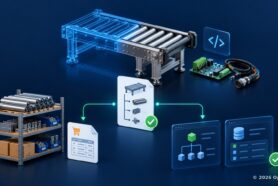
OpenBOM’s AI-powered PDF drawing import provides an early example. A drawing can contain a part number in its title block and component information in a BOM table. OpenBOM can recognize that information and turn it into structured Items and BOM data.
The October 2026 update describes the preview and confirmation workflow. Users review the recognized information before importing it. The PDF importer is currently in private beta and requires an AI license.
Once accepted, the information can participate in the normal product workflow: reviewing a BOM, adding properties, attaching supporting files, managing revisions, and preparing downstream work. That is the connection between document understanding and PLM.
From Excel and file packages to connected product information
PDF drawing import is the first step in a broader AI-powered ingestion strategy we are developing.
The direction is to accommodate the different ways engineering and manufacturing information arrives, including spreadsheets, supplier documents, legacy exports, and packages of related files.
For an unfamiliar Excel workbook, AI could help identify relevant tables, interpret column names, recognize quantities and units, and propose a product hierarchy. The proposed mapping would establish which values belong to reusable Items and which describe their use in an assembly.
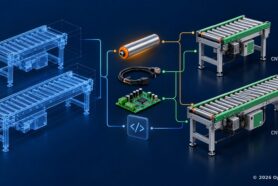
For a file package, AI could help classify the contents and propose connections between the engineering definition, CAD sources, drawings, and derivatives. Supported CAD extraction would remain important for establishing actual design dependencies. File names alone do not establish an assembly structure or an engineering identity.
Our goal is to progressively reduce manual preparation and mapping. Universal AI-powered import remains a development direction; different formats and sources will require different levels of support and review.
I believe the import experience should preserve the original sources, make proposed mappings inspectable, and ask specific questions when identity, revision, or structure is ambiguous. An unresolved match should remain visible until the team has enough evidence to accept it.
The product model gives imported information engineering meaning
Recognizing information is one part of the work. Establishing what it means in the product is the next.
OpenBOM’s flexible data model lets companies organize Items, properties, catalogs, product structures, and relationships according to their needs. The product knowledge graph connects these records so engineering and downstream teams can navigate their context.
Our Engineering Frontend architecture brings design sources together with a reviewed engineering definition. This matters for products that combine mechanical, electrical, electronics, and software contributions, often developed in several tools and companies.
A few distinctions are essential. A Design Folder organizes managed files and versions. A Design BOM describes captured design dependencies. An Engineering BOM describes engineering Items and their uses in a product. An Item’s identity differs from its quantity in a particular assembly.
As explained in Design BOM vs Engineering BOM, a CAD file can represent multiple configured Items, and several design representations can describe one Item. Drawings and software releases carry their own source context.
AI-assisted import should preserve these meanings. The model supplies a place to organize the recognized information; confirmed relationships make it useful for engineering work. A connection records context, while review establishes whether that context is appropriate for the product.
Combine repeatable checks with AI BOM Health
Once the product information is organized, the team can review it.
OpenBOM BOM Review combines deterministic check cards with AI-powered General BOM Health. Deterministic means the software evaluates an explicit rule consistently. Examples include required-property validation, part-number rules, structural loops, and quantity consistency with reference designators.
AI BOM Health adds a different kind of review. It can surface similar parts, unusually long lead times, missing data patterns, and other observations that deserve attention even when a fixed rule has not been violated.
AI BOM Health findings are informational insights. They are not presented as Errors or Warnings. A reviewer decides which observation deserves investigation, a comment, or an assigned task. The card is available with an AI subscription add-on.
These layers work together. Explicit rules establish whether defined conditions are satisfied. AI helps identify concerns that require interpretation. Engineers and other responsible people decide what the findings mean for the next business event.
Review can also improve the process. If the same AI observation repeatedly reveals a meaningful problem, the team can decide whether it should become a defined requirement and a repeatable check. This is one way experience from one review can improve the next.
From BOM Review to build readiness
BOM Review can also provide a starting point for a broader question: what is missing or inconsistent for a planned build? Build readiness is one of the focused jobs we want to help teams complete by combining import, product context, validation, and AI assistance. We are exploring this direction under the working name Launch Master, connecting a specific build commitment with the information that supports it. Launch Master remains a proposed application direction.
The approach brings incoming information into OpenBOM’s connected product model, uses deterministic calculations and checks to evaluate defined conditions, and uses AI to explain the findings and support investigation. Over time, it can extend review from the product definition to dependencies across the teams preparing the build. Each finding should expose its evidence and the action or decision it requires.
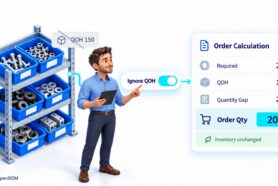
Consider an illustrative ten-unit build that requires twenty sensors when only sixteen are available. Another component has missing engineering documentation. A useful review makes both issues visible: purchasing needs to address the shortage, and engineering needs to supply or clarify the missing information. The team can see how these conditions relate to the same planned build, while keeping inventory coverage and engineering readiness distinct.
Let AI explain the findings and support exploration
The AI assistant can organize review findings for engineering, purchasing, or a build meeting. It can help people investigate which findings require engineering action, which components have shortages, and what changed after the latest correction. Its explanations should lead back to the affected Items, source information, and check results.
For a question such as “How many units can we build with current inventory?”, AI should request the appropriate calculation and explain its result. Arithmetic and defined validation belong in software tools; the assistant makes their outputs easier to understand and investigate.
As the available context and tools expand, scenario exploration can help teams compare options and identify which decisions or additional evidence they need.
Preserve the review as Product Memory
A useful review produces more than corrected data. It also produces decisions.
Why was a warning accepted for a prototype? Which source established the Item identity? Who resolved the drawing question? What evidence showed that the condition was corrected?
These decisions form part of the product’s history. OpenBOM’s collaborative review experience connects findings with comments and tasks. Our Product Memory direction is to preserve the evidence, reviewer decision, action, and recheck result together.
Completing a task and resolving its underlying condition are separate events. Updated evidence and a recheck should establish closure.
This is how Product Memory becomes practical: preserve what the team encountered, what it decided, and what changed. Future reviews can then use that context instead of reconstructing it from email and people’s recollections.
Start with one product and one useful result
The most useful first AI workflow has a manageable scope. Choose one product, one build quantity, and a small set of readiness conditions. Organize the source information, inspect the mappings, calculate demand, run the checks, and review the findings with the people responsible for the work.
Measure whether the process finds known problems, produces relevant observations, makes evidence easy to inspect, and reduces preparation and clarification time. Then correct the inputs and repeat the review.
That is the direction I see for practical AI in PLM: smarter ways to import, analyze, decide, and interact with product information, together with focused workflows that help teams get a job done. PDF import and AI BOM Health provide current examples. Universal ingestion and our exploration of build readiness show how we intend to extend the same foundation.
Explore OpenBOM with your own product data. Start with BOM Review, and contact our team about the AI add-on or access to the PDF drawing import beta.
Best,
Oleg
Join our newsletter to receive a weekly portion of news, articles, and tips about OpenBOM and our community.