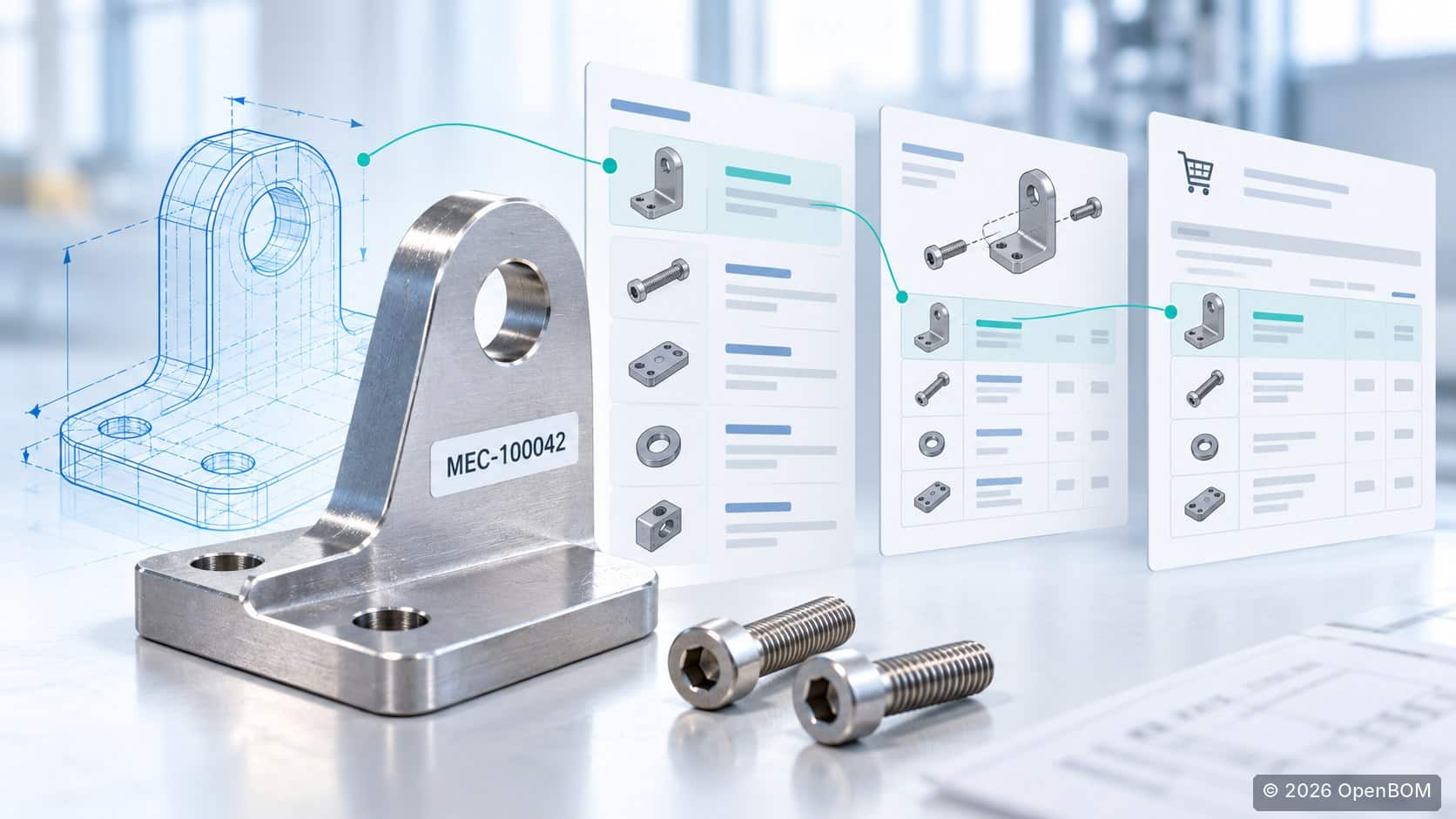
A buyer asks which bracket to order. Engineering sends a drawing. The BOM lists a part number, the supplier quotation uses another code, and someone has updated the CAD model since the drawing was shared. Before placing the order, the team has to reconstruct which records describe the same part and which definition is approved.
That is the practical problem part number management needs to solve.
Part number management connects item identifiers with the information people need to design, source, and use those items. In OpenBOM, that connection includes item catalogs, BOM structures, CAD integration, revisions, and purchasing workflows. You can keep existing part numbers and configure automatic numbering for new items.
This guide shows how to implement that workflow, using a small assembly as an example.
Understand what the part number identifies
A part number identifies an item within your company’s governed product data. Its description, specifications, sourcing information, and revisions provide the context needed to use it.
OpenBOM organizes reusable item information in catalogs. A BOM describes how items are used together, including parent-child relationships and quantities. A screw can have one catalog record and appear in many assembly BOMs, with a different quantity in each.
Keep the different identifiers associated with a purchased component explicit:
| Identifier | Purpose |
|---|---|
| Internal part number | Identifies the item in your company’s product records. |
| Manufacturer part number | Identifies the component offered by its manufacturer. |
| Supplier ordering code | Identifies the supplier’s listing or ordering reference. |
| ERP item code | Identifies the corresponding record in ERP when its code differs. |
These values may coincide, but each has a different owner. Record the relationships instead of assuming all systems and companies use the same code.
For the example below, consider a sensor mounting assembly containing a custom bracket and two purchased screws. All numbers, references, and quantities in this example are illustrative.
| Internal part number | Item | Quantity |
|---|---|---|
| ASM-100100 | Sensor mounting assembly | Top-level item |
| MEC-100042 | Custom mounting bracket | 1 |
| STD-200015 | M6 × 20 stainless steel screw | 2 |
1. Establish a simple numbering and ownership policy
Begin with a few decisions that people can apply during ordinary work. Identify who can create an item, who maintains its definition, and who approves changes for purchasing or production use. Include the process for checking whether an appropriate item already exists.
Choose a numbering scheme that fits your existing business:
| Scheme | Example | Practical consideration |
|---|---|---|
| Sequential | 100042 | Store classification and technical meaning in searchable attributes. |
| Hybrid | MEC-100042 | Use a stable prefix with a sequence; define the prefix’s scope. |
| Structured | BRK-AL-006 | Maintain the meaning of encoded fields and a process for exceptions. |
A useful description, material property, and searchable classification often help more than adding another meaningful character to the number. Our part numbering best practices cover these tradeoffs in more detail.
For the pilot, define three catalog categories: assemblies, manufactured components, and purchased components. Give each a named owner and an agreed minimum record. For the bracket, that might include description, material specification, unit of measure, and a drawing reference. The screw also needs manufacturer and sourcing references.
Treat this minimum record as a business requirement. Configure the applicable permissions and approval workflow separately; adding a property alone does not enforce a release rule.
2. Bring existing data into catalogs without losing its meaning
Start with one product and the items it uses. Review the relevant spreadsheets, CAD properties, and purchasing lists before importing them.
Retain established part numbers when they already identify the right items. Preserve old references in separate, searchable properties when consolidating records. Keep identifiers as text during spreadsheet preparation so leading zeros and formatting survive the transfer.
Review two different kinds of duplication: the same number assigned to different items, and different records describing the same physical part. A matching description is a reason to investigate, not sufficient evidence to merge records.
Map the source fields, import a small sample, and verify the resulting items and BOM quantities. OpenBOM’s spreadsheet import documentation explains the relevant import operations.
For our example, import the existing screw as STD-200015 and retain its manufacturer reference and supplier ordering code. Those references should help purchasing find the item without creating a second internal record.
3. Configure number generation and duplicate controls
OpenBOM provides catalog-based part number setup. For new items, you can configure automatic generation using a numeric sequence with optional prefixes, suffixes, and separators.
In the catalog’s Part Number Setup:
- Enable the applicable unique part number setting.
- Enable automatic generation for newly issued numbers.
- Create a template with the desired prefix, range, increment, and separator.
- Save the settings and create a test item.
In our manufactured-components example, a MEC prefix and configured sequence could issue MEC-100042 for the bracket. Existing imported identifiers should be handled according to the migration policy.
A fixed prefix does not automatically derive a code from material or classification properties. More complex, attribute-driven numbering requires additional logic; OpenBOM’s part number management guide describes the custom-command approach.

OpenBOM documentation example of Part Number Setup. Source and setup instructions.
Also review Company Catalogs. Administrators can select the catalogs used for company duplicate checking. Catalog template settings and company catalog controls serve different purposes; define both scopes deliberately.
Test a repeated number through the creation and import paths used by your team. Include CAD-created items in that test. The administration guide explains Company Catalogs configuration.
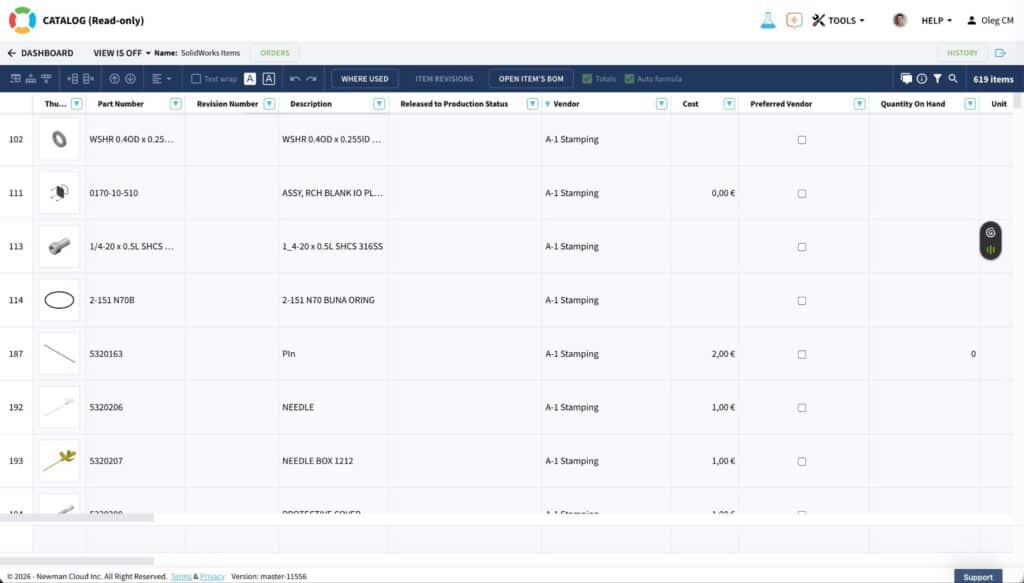
OpenBOM documentation example of a generated catalog item. The documentation’s sample data is separate from the sensor assembly example.
4. Map CAD identifiers to the intended items and BOM
Next, connect the numbering policy to the engineers’ actual CAD workflow.
With the SOLIDWORKS integration, part identity can come from the configured filename, configuration name, user-specified value, or mapped custom property. Choose the source explicitly. A file named sensor_mount_bracket.SLDPRT can legitimately map to item MEC-100042.
OpenBOM’s SOLIDWORKS add-in also provides part number generation from a catalog and writes the generated number to the CAD file. Configure the appropriate catalog and property mapping before using it for new designs.
Create the assembly BOM and verify the bracket and screw records, quantities, and design references. Then place MEC-100042 in a second assembly. Reusing that catalog item across two BOMs is expected; creating another item record for the same approved bracket would create unnecessary duplication.
Test configurations too. Configurations representing distinct, non-interchangeable components need distinct item identities. Configuration names alone should not decide that engineering question.
The SOLIDWORKS integration guide documents these mapping and generation options.
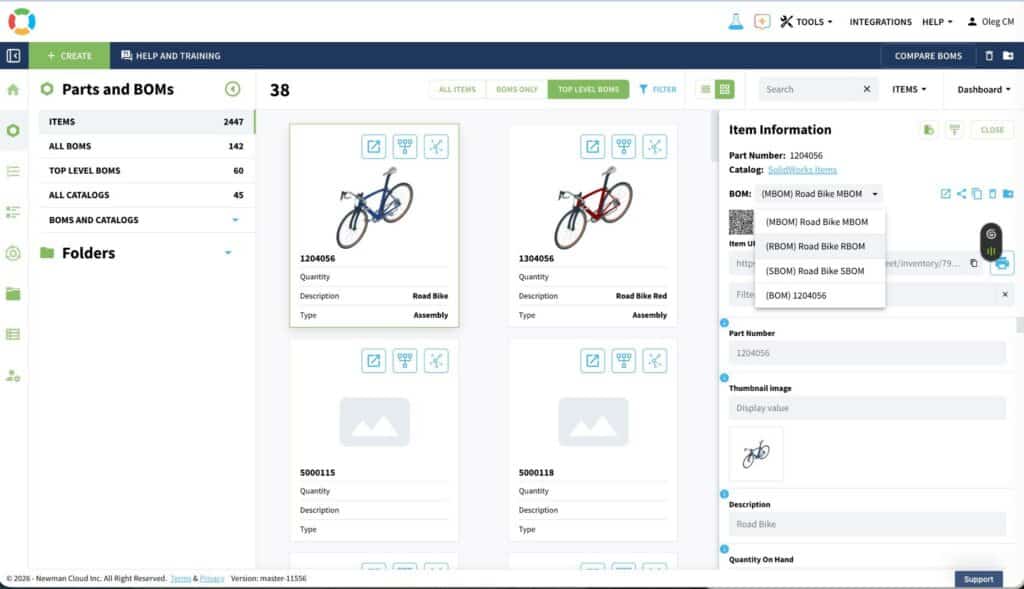
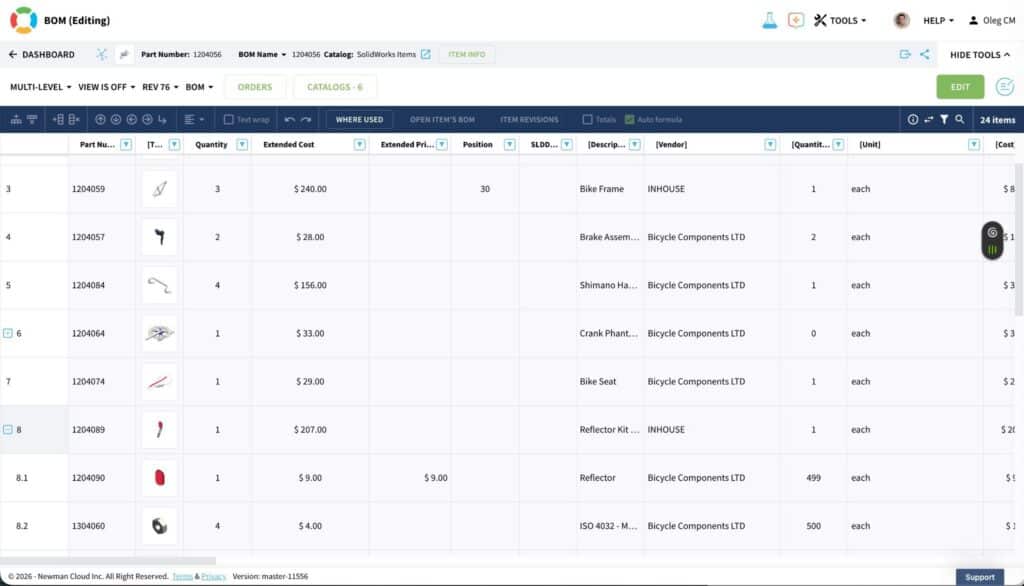
OpenBOM documentation example of an assembly BOM created through the SOLIDWORKS integration.
5. Distinguish file versions, item revisions, and new part numbers
A CAD save, a product revision, and a new item are different events.
OpenBOM uses versions for files managed in Design Folders and revisions for controlled product information, including items and BOMs. A newer working file does not automatically establish that purchasing should use a new approved definition.
For the bracket, suppose engineering clarifies a drawing note and confirms that the part remains interchangeable. The team can retain MEC-100042 and approve revision B through its change process.
Now suppose the mounting-hole spacing changes and the bracket no longer fits the original assembly. That generally calls for a new part number, such as MEC-100043, with the affected assembly updated and reviewed.
Engineering and quality determine the identity rule based on interchangeability, specifications, and traceability requirements. Keep the revision separate from the base number, and record the approved change.
Before downstream use, confirm the assembly’s intended component revision references. Finding the latest item record is different from establishing the approved product baseline.
See OpenBOM revision control and our guidance on part numbers and revisions.
6. Use the same item information for purchasing
Part number management becomes useful to purchasing when a buyer can connect the internal item with its supplier, ordering reference, specification, and required quantity.
OpenBOM supports vendor assignment, Order BOMs for batch purchasing planning, quantity-on-hand information, and purchase order creation and receiving.
Suppose the team plans ten sensor mounting assemblies:
| Item | Per assembly | Required for ten | Available stock | Illustrative shortage |
|---|---|---|---|---|
| MEC-100042 bracket | 1 | 10 | 4 | 6 |
| STD-200015 screw | 2 | 20 | 12 | 8 |
This simple example assumes consistent units and available stock, with no additional demand or purchasing adjustments. Review pack sizes, sourcing constraints, and other open requirements in the actual workflow.
Assign the appropriate vendors and confirm the product definition used for the order. Review the Order BOM’s required quantities and gaps, then generate and review the purchase orders. Carry the necessary internal and supplier references into the purchasing output. Receiving purchased items updates quantity on hand.
OpenBOM’s purchasing workflow documentation provides the operational details.
If ERP owns purchasing or inventory, agree which system owns each field. Define the internal-to-ERP identifier mapping, exchange direction, and conflict-resolution process. Item-code agreement should be tested alongside the engineering workflow.
An approved BOM describes the intended product. Establishing which components were actually installed in a specific unit additionally requires build, lot, or serial records and the appropriate operational process.
7. Validate the workflow before expanding it
Ask an engineer and a buyer to complete the pilot tasks together. A successful pilot should demonstrate that:
- An engineer can find an existing item by its number and descriptive properties.
- Purchasing can locate that item through its manufacturer or supplier reference.
- A new item receives a number from the configured template.
- A duplicate-number attempt is handled as intended within the selected scope.
- A CAD export maps to the correct catalog item and assembly quantity.
- The bracket can be reused in another BOM without another item record.
- Reviewers can identify the approved definition and explain a revision versus a new-number decision.
- Purchasing can review a batch requirement and prepare the intended order.
Include an incomplete import row and a suspected duplicate. Confirm who resolves each case and how the decision is recorded.
Monitor unresolved duplicate candidates, missing agreed attributes, failed CAD mappings, and purchasing clarification requests. These measures show where the process needs adjustment without inventing a universal performance target.
Set a cutover date for new work, preserve source exports and migration mappings, and name the owner of numbering exceptions. Train users with the pilot assembly, then expand to the next product family once the core tasks work consistently.
Start with one assembly
Choose a product your engineers and buyers already understand. Keep its useful identifiers, configure numbering for new items, map CAD data, and verify the path through BOM reuse, revisions, and purchasing.
Explore OpenBOM with your own product workflow.
REGISTER FOR FREE to check how OpenBOM can help.
Best, Oleg
Frequently asked questions
Can we keep our existing part numbers?
Yes. OpenBOM supports existing identifiers alongside configured generation of new numbers. Review duplicate conflicts and preserve legacy cross-references during migration.
Can different catalogs use different numbering templates?
Yes. Catalogs can have different templates. Coordinate their prefixes and ranges, and configure the company catalog scope used for duplicate checking.
Does every drawing update require a new part number?
No. Evaluate whether the item’s identity and interchangeability have changed. Manage working file versions and approved product revisions separately.
Does introducing OpenBOM require abandoning spreadsheets?
Useful spreadsheet data can be imported into catalogs and BOMs. Establish where authoritative item updates occur, then use exports and other exchanges with a clear purpose.
Join our newsletter to receive a weekly portion of news, articles, and tips about OpenBOM and our community.