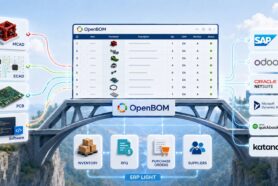
This is the fourth article in our series on selecting the right engineering platform. In the first article, How to Know When OpenBOM Is the Right Engineering Platform for Your Business, we mapped the engineering software landscape and its five categories. In the second, OpenBOM vs. Enterprise PLM, we compared OpenBOM with enterprise platforms such as Teamcenter, Windchill, and ENOVIA. In the third, OpenBOM vs. Cloud-Native PLM, we examined the category where OpenBOM competes most directly. This article turns to a category that is not PLM at all, but comes up in almost every conversation about product data: ERP systems.
Manufacturing companies frequently ask a reasonable question: if they already have an ERP system, why do they need OpenBOM (or PLM at all)?
ERP platforms such as Odoo, Oracle NetSuite, Microsoft Dynamics 365, SAP, Oracle, and many others provide essential capabilities for running a manufacturing business. They manage purchasing, inventory, production planning, operations, accounting, and financial control. For many companies, ERP is the operational backbone of the business.
However, ERP systems were not designed to manage the engineering process that defines what the company will manufacture. They usually expect product information to be sufficiently complete and stable before it enters production planning. Engineering data is different. It changes frequently, comes from multiple CAD systems, includes files and product structures, and must be reviewed, revised, and released before manufacturing can use it.
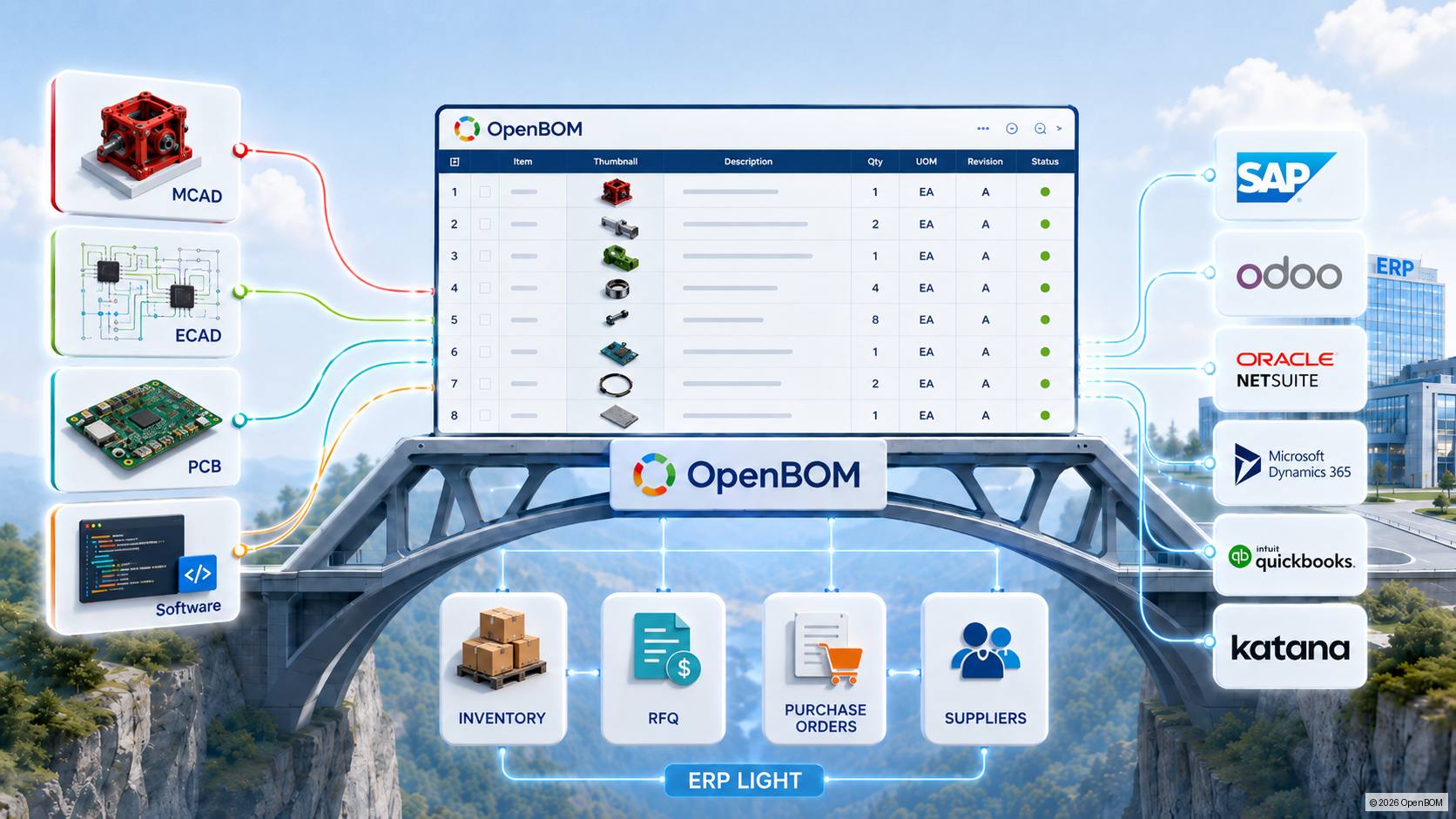
This is the gap OpenBOM is designed to address. It also addresses a second, equally important situation: companies and teams that need to manage engineering data, inventory, and purchasing but are not ready for the complexity of a full ERP implementation.
The question is therefore not simply whether OpenBOM can replace ERP, or whether ERP can replace OpenBOM. The more useful questions are how engineering and manufacturing information should move from design to production, when a company actually needs full ERP capabilities, and whether a simpler operational bridge can support the business in the meantime.
High-Level Comparison
Scroll right on mobile to see all columns.
| Capability | ERP Systems | OpenBOM alongside ERP | OpenBOM as ERP Light (no ERP) |
|---|---|---|---|
| Engineering BOM and product structures | Limited; item master and manufacturing BOM oriented | Core strength; EBOM managed in OpenBOM, released data transferred to ERP | Core strength |
| CAD integration and cloud PDM | Rarely native; third-party connectors | Core strength; native MCAD and ECAD integrations | Core strength |
| Engineering revisions and change management | Limited or module-dependent | Managed in OpenBOM before enterprise release | Managed in OpenBOM |
| Inventory control | Core strength; multi-location, warehouse-level | Owned by ERP; visibility shared with OpenBOM | Practical inventory control in OpenBOM |
| Purchasing, RFQs, and purchase orders | Core strength; full procurement depth | Owned by ERP; engineering-to-procurement handoff from OpenBOM | RFQs, POs, and supplier collaboration in OpenBOM |
| Production planning and scheduling | Core strength; MRP, capacity, work orders | Owned by ERP | Basic planning only; not a core OpenBOM capability |
| Shop-floor execution and warehouse operations | Core strength | Owned by ERP | Not an OpenBOM capability |
| Accounting and financial management | Core strength; general ledger, AP/AR | Owned by ERP | Separate accounting software required (e.g., OpenBOM integrates with QuickBooks or Xero) |
The rest of this article explains where these boundaries come from and how to decide which scenario fits your company.
What ERP Systems Do Well
ERP systems are built to manage business operations. Their strengths typically include:
- Manufacturing and production planning
- Material requirements planning
- Purchasing and supplier management
- Inventory and warehouse control
- Work orders and production execution
- Sales orders and fulfillment
- Cost accounting and financial management
- Connections between operational transactions and the general ledger
The depth of these capabilities varies by product. Odoo offers a broad and modular business platform. MRPeasy focuses on accessible manufacturing and MRP functionality for smaller manufacturers. NetSuite combines ERP, inventory, supply chain, and financial management in a cloud business system. Microsoft Dynamics 365 connects finance, supply chain, manufacturing, sales, and other business processes. Larger enterprise platforms such as SAP and Oracle extend these capabilities across global operations, factories, and complex supply networks.
The common strength is operational control. Once a product definition is released, ERP can plan what to buy, what to make, when it is needed, where it is stored, and how the resulting transactions affect cost and finance.
Where ERP Systems Struggle with Engineering Data
An ERP item master and manufacturing BOM are not the same as an engineering product definition.
Engineering teams work with CAD files, drawings, specifications, parts, assemblies, revisions, configurations, approved components, and design changes. A product structure may evolve repeatedly before it is ready for purchasing or production. Engineers also need to understand where a component is used, which files belong to a design, what changed between revisions, and whether the latest product definition has been approved.
Most ERP systems offer item and BOM records, but they generally do not provide the depth of engineering data management expected from PDM and PLM systems. Common limitations include:
- Limited management of engineering BOMs and product structures
- No native PDM workspace for CAD files, drawings, and design documents
- Weak support for CAD file relationships, versions, and design dependencies
- Limited engineering revision and lifecycle workflows
- Few native integrations with mechanical and electronic CAD tools
- Dependence on third-party connectors or custom integrations for CAD data
- Manual translation of an engineering BOM into an ERP manufacturing BOM
Some ERP vendors and implementation partners offer engineering extensions, product data modules, or CAD connectors. These can be useful, but their capabilities vary substantially. In many cases, the integration transfers selected item and BOM data without providing a complete collaborative environment for engineering work.
As a result, companies often manage the engineering side outside ERP using spreadsheets, shared drives, email, and CAD folders. The ERP system may contain the official production record, while the decisions and design information that created it remain fragmented.
When ERP Includes PLM: OpenBOM as the Engineering Front End
Some ERP platforms extend beyond production planning and financial management by providing PLM modules, engineering change management, product data management capabilities, or connected solutions within their broader enterprise ecosystems. SAP, Oracle, and Microsoft Dynamics environments are common examples, although the exact functionality depends on the products, modules, partners, and implementation selected.
Readers of our OpenBOM vs. Enterprise PLM article will notice that SAP and Oracle appeared there as well. That is not a contradiction — both companies offer enterprise PLM capabilities and ERP platforms within the same portfolio. In that article, we compared OpenBOM with their PLM offerings as engineering platforms. Here, we look at the same environments from the ERP side: what happens when the ERP system is the operational backbone and engineering data needs a practical way in.
This is not limited to large enterprise platforms. Odoo, for example, offers a PLM module that provides engineering change orders, BOM versioning, and document control integrated with its Manufacturing and Inventory apps. However, connecting CAD systems to Odoo typically depends on third-party bridges and connectors rather than native integrations, and the module does not provide a cloud PDM environment for managing CAD files and design work-in-progress. The engineering front-end pattern described below applies to these environments as well.
These environments can provide valuable enterprise capabilities, including:
- Enterprise item and product master management
- Product lifecycle and change processes
- Manufacturing BOM governance
- Approval workflows and controlled release
- Connections between product definition, procurement, production, and finance
- Visibility across business units, manufacturing sites, and enterprise functions
However, the presence of a PLM module does not automatically solve the engineering integration problem.
ERP-connected PLM capabilities are often designed around enterprise governance, formal product records, and downstream business processes. Engineering teams still need a practical environment for working with mechanical and electronic CAD systems, managing design files, developing engineering BOMs, collaborating on changes, and preparing information before it enters a formal enterprise workflow.
In these situations, OpenBOM serves as an engineering front end to the enterprise ERP and PLM environment.
OpenBOM provides the engineering-facing capabilities that connect product development tools with enterprise processes:
- Native integrations with mechanical and electronic CAD systems
- Engineering BOM creation and management directly from design data
- Cloud PDM for CAD files, drawings, and related documents
- Management of part numbers, attributes, product structures, and design revisions
- Collaborative engineering workflows across internal teams, contractors, and suppliers
- Review and preparation of product information before enterprise release
- Controlled transfer of approved items, BOMs, revisions, and documents to ERP or enterprise PLM
The architecture establishes a clear division of responsibility:
- Engineers create and modify designs in their preferred CAD systems.
- OpenBOM captures CAD data, manages design files, and organizes the engineering BOM.
- Engineering teams review, revise, and prepare the product definition.
- Approved product information is transferred to the enterprise ERP or PLM environment.
- The enterprise platform manages formal governance, manufacturing, procurement, production, and financial processes.
Scroll right on mobile to see all columns.
| Enterprise Environment | Typical Enterprise Role | OpenBOM Engineering Front-End Role |
|---|---|---|
| SAP with PLM or related product lifecycle capabilities | Enterprise product governance, manufacturing integration, change processes, and operational control | Connect CAD systems, manage engineering BOMs and design files, and deliver approved product data to the SAP environment |
| Oracle ERP with PLM or product lifecycle capabilities | Enterprise product records, lifecycle processes, supply chain coordination, and manufacturing handoff | Provide a collaborative engineering workspace, manage CAD-connected product structures, and prepare released items and BOMs |
| Microsoft Dynamics 365 with Engineering Change Management (in Supply Chain Management) or partner-provided PLM capabilities | Product and manufacturing data management, version control, and change workflows connected to finance, supply chain, and production | Capture engineering information from CAD, manage design files and product structures, and connect released data to Dynamics processes |
The important distinction is that OpenBOM does not need to replace an existing enterprise PLM module. It complements that module by creating a more effective engineering interface to the enterprise system.
For companies with multiple CAD platforms, distributed engineering teams, external contractors, or rapidly changing product definitions, this approach can reduce the custom integration effort required to connect engineering activity with enterprise governance. Instead of forcing engineers to manage early-stage design work directly inside an ERP-oriented environment, OpenBOM provides a specialized front end while the enterprise platform remains responsible for its established operational and lifecycle processes.
What OpenBOM Does Well
OpenBOM approaches the problem from the engineering side. It is designed to manage product data as it develops and to connect that information with downstream manufacturing and business systems.
Its main strengths include:
- Engineering BOM management
- Cloud PDM for CAD files and related documents
- Part, item, and product structure management
- Revision, lifecycle, and change-management processes
- Where-used analysis and product structure navigation
- Collaborative access for engineering teams, contractors, suppliers, and manufacturing users
- Integrations with mechanical and electronic CAD systems
- Inventory visibility, purchasing, ordering, and supplier collaboration
- Connections to ERP systems for transferring released items, BOMs, and related information
OpenBOM helps engineers capture product information directly from the design process instead of recreating it manually in spreadsheets or ERP. CAD integrations can extract item data, assembly structure, files, and other design information. Teams can then review, enrich, revise, and release the product definition before sending the appropriate information to ERP.
This creates a controlled path from engineering to operations:
- Engineers create and modify the design in CAD.
- OpenBOM captures the product structure, files, and engineering attributes.
- The team reviews revisions, changes, sourcing information, and release status.
- Released items and BOM data are transferred to ERP.
- ERP uses the released definition for purchasing, inventory, planning, production, and finance.
The objective is not simply to copy a BOM between systems. It is to maintain a clear boundary between the evolving engineering definition and the operational manufacturing record while preserving a connected flow of information. When a company does not yet have an ERP system, OpenBOM can also provide a practical bridge between engineering work and essential inventory and procurement activities.
When a Company Is Not Ready for ERP Complexity
Not every manufacturing organization needs a full ERP system immediately.
A fast-growing engineering team may need to know which components are required, what is already in inventory, what must be purchased, which suppliers are involved, and whether parts will arrive in time for a prototype or production run. Those are real operational needs, but they do not automatically justify a broad ERP implementation with complex configuration, accounting integration, production scheduling, warehouse processes, and organizational change.
For these companies, the choice is not necessarily between OpenBOM and a comprehensive ERP platform. It may be between continuing to coordinate operations through spreadsheets and email or using OpenBOM to connect engineering data with practical inventory and procurement workflows.
OpenBOM can provide an ERP Light bridge with its production planning and agile NPD capabilities by helping teams:
- Manage inventory
- Connect BOM requirements to available inventory.
- Identify missing components and purchasing needs.
- Manage supplier and manufacturer information.
- Prepare requests for quotations and purchase orders.
- Track ordering activity and component availability.
- Coordinate procurement around prototypes, engineering builds, and early production.
- Maintain a direct connection between product changes and the materials being purchased.
These capabilities do not turn OpenBOM into a full ERP system. They give organizations a lighter operational layer that is directly connected to engineering data and can be deployed without the complexity of a large enterprise implementation.
This approach is particularly relevant in three situations.
Fast-Growing Manufacturing Teams
Growing manufacturers often reach a point where spreadsheets are no longer sufficient, but a comprehensive ERP rollout would consume too much time, money, and management attention.
OpenBOM allows these teams to manage product structures, engineering changes, inventory, and purchasing in a connected environment while they continue to grow. If the organization later needs advanced planning, financial integration, or more sophisticated manufacturing operations, OpenBOM can integrate with an ERP system rather than requiring the engineering process to start over.
New Product Development Organizations
New product development teams operate in an environment where designs change frequently, quantities are uncertain, and prototypes require rapid sourcing and purchasing. Traditional ERP processes are often optimized for controlled production rather than exploratory engineering work.
OpenBOM connects design data, BOMs, component availability, and procurement activity, helping NPD teams move from design decisions to physical builds without forcing every early-stage change through a production-oriented enterprise workflow.
Innovation Teams Outside the Enterprise System Shadow
Large companies often create innovation groups, advanced engineering teams, and special product initiatives that need to move faster than established enterprise processes allow.
These teams may work outside the shadow of a large enterprise ERP system because the existing environment is too rigid, too slow to configure, or not appropriate for early-stage development. At the same time, they still need control over parts, BOMs, suppliers, purchasing, and inventory.
OpenBOM provides a connected environment for these activities without requiring the team to recreate the full enterprise ERP infrastructure. When a project matures and moves into mainstream manufacturing, its released product information can be transferred into the enterprise system through a defined handoff.
In all three cases, OpenBOM serves as a bridge: more structured and connected than spreadsheets, but lighter and faster to implement than a comprehensive ERP platform.
Where OpenBOM Does Not Replace ERP
OpenBOM includes purchasing, ordering, inventory, supplier collaboration, and related operational functions. These capabilities can be sufficient for engineering-driven procurement, prototype builds, early production, and growing teams that are not yet ready for ERP complexity.
However, OpenBOM does not provide the full production and financial depth of a comprehensive ERP system. Compared with established ERP platforms, its limitations include:
- Less robust production planning and scheduling
- Limited support for complex shop-floor and manufacturing execution processes
- Less comprehensive warehouse and logistics management
- Procurement capabilities that are not intended to replace the full purchasing depth of a large ERP platform
- No replacement for general ledger, accounts payable, accounts receivable, and broader financial management
For a company with mature manufacturing operations, multiple facilities, complex capacity planning, and integrated financial processes, ERP should remain the operational system of record. OpenBOM complements that environment by managing the engineering product definition and delivering released data to ERP. For a company that has not reached that level of operational complexity, OpenBOM can provide a practical intermediate step.
“Isn’t OpenBOM Just Another System to Manage?”
When a company already has ERP, OpenBOM is another system. That is a real concern and must be discussed.
Every additional business application introduces licensing, administration, integration, training, and governance requirements. Adding OpenBOM without defining system responsibilities can create more duplication instead of solving it.
But the absence of a dedicated engineering system does not mean the company has fewer systems. It often means the engineering process is already distributed across CAD applications, network drives, cloud folders, spreadsheets, email, and individual knowledge. These tools form an informal system that is difficult to control, search, revise, and connect to ERP.
The real comparison is therefore not:
One ERP system versus ERP plus OpenBOM.
It is more often:
ERP plus spreadsheets, shared folders, manual BOM entry, and disconnected CAD data versus ERP connected to a managed engineering information system.
OpenBOM creates value when it replaces fragmented engineering practices with a structured product data layer and reduces the manual effort required to prepare information for ERP.
For companies without ERP, the equation is different. OpenBOM may not be an additional layer on top of a major business platform. It may be the first connected system that brings together engineering data, inventory visibility, supplier information, and purchasing. In that case, OpenBOM can reduce the number of disconnected spreadsheets and manual coordination processes while postponing a more complex ERP implementation until the business genuinely needs one.
To avoid unnecessary duplication, the company should define ownership clearly based on whether it already operates an ERP system. Scroll right on mobile to see all columns.
| Information or Process | Company using OpenBOM as ERP Light | Company using OpenBOM with ERP or Enterprise PLM |
|---|---|---|
| CAD files, drawings, and design documents | OpenBOM | OpenBOM |
| Engineering items and engineering BOM | OpenBOM | OpenBOM |
| Engineering revisions and work-in-progress design changes | OpenBOM | OpenBOM |
| Formal enterprise lifecycle approvals and product governance | OpenBOM, when appropriate | Enterprise PLM or ERP, with engineering information provided by OpenBOM |
| Inventory visibility and component availability | OpenBOM | ERP, with relevant information shared with OpenBOM |
| Supplier information, purchasing, and ordering | OpenBOM | ERP, with an agreed engineering-to-procurement handoff |
| Manufacturing BOM and production planning | OpenBOM for basic requirements; ERP when complexity demands it | ERP, with an agreed handoff from OpenBOM |
| Advanced scheduling, shop-floor control, and warehouse operations | Not a core OpenBOM capability | ERP |
| Accounting and financial reporting | Separate accounting software or other business processes | ERP |
The exact boundary depends on the company. A growing business or NPD team may use OpenBOM’s purchasing and inventory capabilities as a lightweight operational bridge. A larger manufacturer may keep nearly all operational transactions in ERP. What matters is that each data object and process has a defined owner and, when multiple systems are involved, clear synchronization rules and a controlled handoff.
OpenBOM and ERP Integration
The integration between engineering and ERP should focus on released, relevant information rather than synchronizing every field in both directions. OpenBOM provides out-of-the-box ERP integrations as well as a REST API for custom connections (Note: a new ERP Sync Agent is coming later this year as part of our Product Memory Platform vision – ask us about it)
A practical integration may transfer:
- Approved part and item records
- Released BOM structures
- Quantities and units of measure
- Approved manufacturer and supplier information
- Cost and sourcing attributes
- Drawings, PDFs, or links to controlled documents
- Revision and release status
Depending on the process, ERP may return operational information such as inventory availability, supplier data, lead times, purchase status, or cost. This allows engineers to make better decisions without turning OpenBOM into an accounting or production-planning system.
Successful integration requires more than an API connection. Companies must define part-number rules, revision ownership, field mapping, BOM transformation, release criteria, error handling, and the conditions under which data can be updated. Without these rules, even a technically functional connector can produce duplicates and conflicting records.
Which System Should a Company Choose?
A company should prioritize ERP when its main problem is controlling transactions and operations: purchasing materials, planning production, managing inventory, scheduling work, fulfilling orders, and connecting these activities to finance.
A company should consider OpenBOM when its main problem is controlling product definition: managing CAD files, engineering BOMs, revisions, product structures, design changes, and the release of accurate engineering information to manufacturing.
A company that already uses an ERP platform with a PLM module should consider OpenBOM as an engineering front end when enterprise governance is established but CAD connectivity, cloud PDM, engineering BOM management, and day-to-day engineering collaboration remain difficult or fragmented.
A company should consider OpenBOM as an ERP Light bridge when it needs structured engineering data, practical inventory control, supplier coordination, and purchasing, but is not ready for the implementation cost and process complexity of a full ERP platform.
Many product-development and manufacturing companies eventually need both. Others can operate effectively with OpenBOM and lightweight accounting or business tools until production, financial, or operational complexity makes ERP necessary.
Conclusion
ERP systems are essential for running manufacturing operations, but they are generally not designed to manage the full engineering process. OpenBOM provides the missing engineering data foundation: CAD-connected PDM, engineering BOM management, PLM functions, revision control, and a structured path for releasing product information. Neither system replaces the other: OpenBOM does not match ERP’s production-planning, logistics, and financial depth, and ERP does not match OpenBOM’s engineering and product-data capabilities.
That leaves three workable architectures. Companies that need full operational and financial control connect both systems — OpenBOM defines and releases the product, ERP purchases, produces, and accounts for it. Companies whose ERP environment includes PLM capabilities use OpenBOM as the engineering front end, strengthening CAD connectivity and engineering collaboration without replacing established enterprise governance. And companies not yet ready for ERP complexity start with OpenBOM as an ERP Light bridge connecting engineering, inventory, and procurement. Across all three scenarios, the goal is the same: replace disconnected spreadsheets, files, and manual coordination with a structured process that connects product development to manufacturing.
Speaking of spreadsheets — the next article in this series takes on the tool that is still the most widely used BOM management and PLM system in the world: OpenBOM vs. Excel. We will also publish detailed head-to-head comparisons, including OpenBOM vs. Arena and OpenBOM vs. Autodesk Fusion Manage. If you have not read the earlier articles yet, start with How to Know When OpenBOM Is the Right Engineering Platform for Your Business, OpenBOM vs. Enterprise PLM, and OpenBOM vs. Cloud-Native PLM.
If you have questions about how OpenBOM fits with your ERP environment — or whether you need ERP at all yet — please contact us. Meantime, REGISTER FOR FREE and check how OpenBOM can help you.
Best, Oleg
FAQ
Can OpenBOM replace an ERP system?
For a company with mature manufacturing operations, no. OpenBOM does not provide the production planning, shop-floor execution, warehouse management, and financial depth of a full ERP platform, and it is not intended to. However, for startups, fast-growing manufacturers, and new product development teams that are not ready for ERP complexity, OpenBOM’s inventory control, RFQs, purchase orders, and supplier collaboration can serve as an “ERP Light” layer connected directly to engineering data. Many companies operate this way with lightweight accounting tools until operational complexity genuinely requires ERP.
Do ERP systems like NetSuite or Odoo manage engineering BOMs and CAD files?
Generally, no. ERP systems manage item masters and manufacturing BOMs for production, purchasing, and costing, but they do not provide an engineering environment for CAD files, drawings, design revisions, and evolving product structures. Odoo offers a PLM module with engineering change orders and BOM versioning, but CAD connectivity depends on third-party bridges, and there is no cloud PDM for design work-in-progress. This is why companies running ERP often still manage engineering data in spreadsheets and CAD files in shared folders — the gap OpenBOM is designed to close.
What is the difference between an engineering BOM and an ERP manufacturing BOM?
An engineering BOM (EBOM) reflects the product as it is designed: CAD structure, engineering part numbers, revisions, and design attributes. A manufacturing BOM (MBOM) reflects the product as it is built and purchased: production quantities, phantom assemblies, packaging, consumables, and routing-related information. ERP systems expect a stable MBOM as input; they are not designed to manage the frequent changes of an evolving EBOM. OpenBOM manages the engineering BOM and its transformation into released data that ERP can consume.
Do I need OpenBOM if my ERP already has a PLM module?
It depends on where your engineering friction is. ERP-connected PLM modules (in SAP, Oracle, Dynamics 365, or Odoo environments) are typically designed around enterprise governance and formal product records, not day-to-day engineering work. If your teams still struggle with CAD integration, design file management, engineering BOM creation, and collaboration with contractors and suppliers, OpenBOM serves as an engineering front end: it captures data from CAD, manages the engineering process, and delivers released items and BOMs to the enterprise environment. If your ERP’s PLM module already covers those needs, adding OpenBOM may not be justified.
Can a startup or small manufacturer use OpenBOM instead of ERP?
Yes, this is a common pattern. A growing team can manage catalogs, engineering BOMs, CAD files, inventory, RFQs, and purchase orders in OpenBOM, paired with standard accounting software for financials. This avoids the implementation cost and process overhead of ERP while the company is still changing quickly. When production volume, multi-site operations, or financial integration eventually demand ERP, OpenBOM integrates with the ERP system rather than being replaced, and the engineering process continues uninterrupted.
How does OpenBOM integrate with ERP systems?
OpenBOM provides out-of-the-box ERP integrations and a REST API for custom connections. A typical integration transfers released data one way: approved items, BOM structures, quantities, manufacturer and supplier information, cost attributes, and revision status flow from OpenBOM to ERP after engineering release. Depending on the process, ERP can return inventory availability, lead times, and purchase status so engineers can make decisions with operational context. Successful integrations also require agreed part-numbering rules, field mapping, and release criteria — not just an API connection.
Join our newsletter to receive a weekly portion of news, articles, and tips about OpenBOM and our community.