Team ownership is an administrative detail right up until the day it becomes a blocker. People change roles. An engineering manager moves to another program, a founder hands day-to-day operations to an operations lead, or the person who originally set up the OpenBOM account leaves the company. Until now, updating the Team Owner in OpenBOM meant contacting OpenBOM Support. That step is gone.
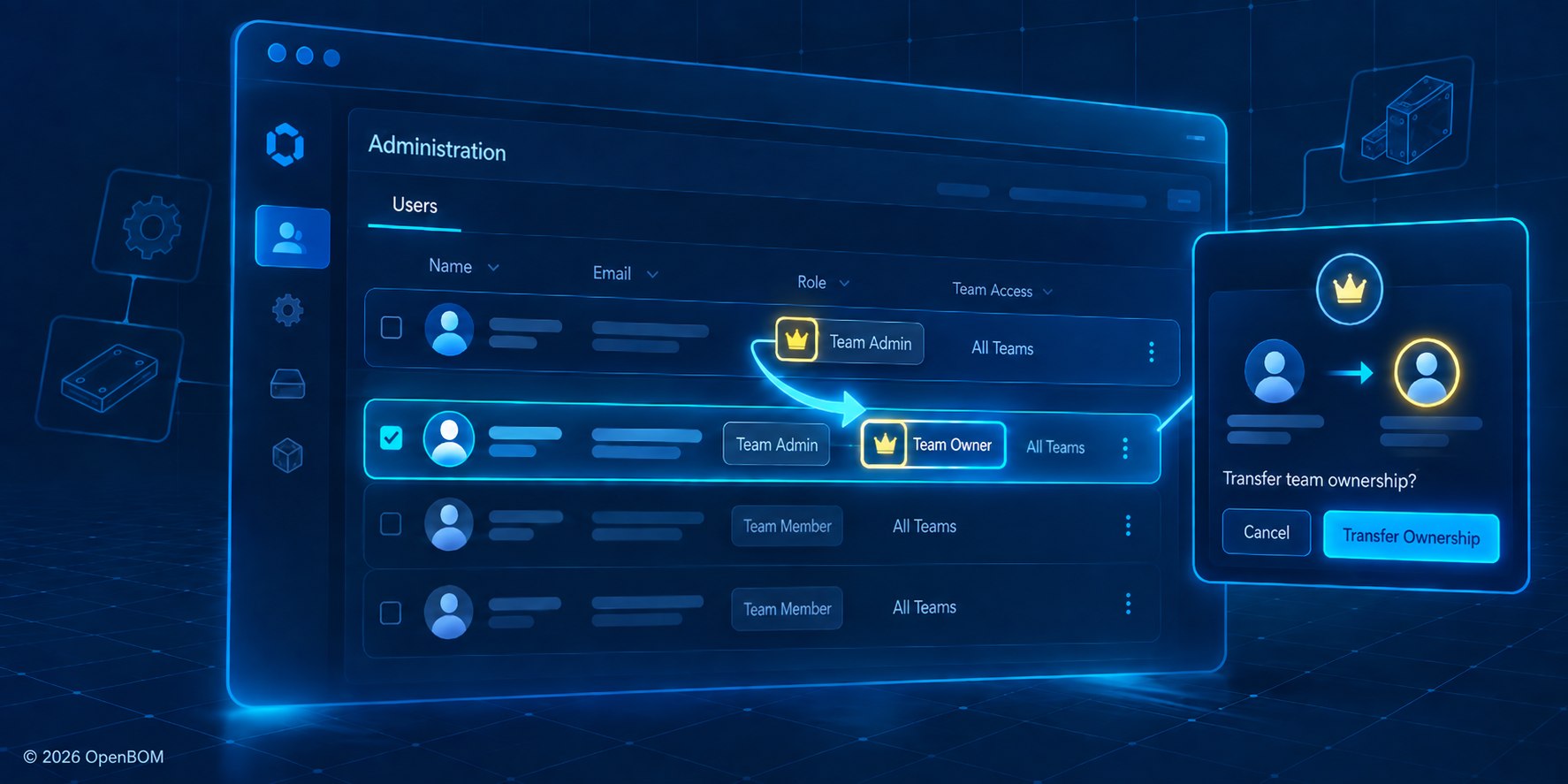
Self-service team ownership transfer in OpenBOM lets a Team Owner or Team Admin reassign team ownership to any member of the same team from Administration → Users, without contacting OpenBOM Support. After confirmation, the selected member becomes Team Owner, and the previous owner stays a Team Admin if an additional Core license is available or receives a Read-Only license if not.
Starting with this release, Team Owners and Team Admins can transfer team ownership themselves, directly from the existing Administration interface. No ticket, no waiting, no back and forth.
Cut the support from the administration
At OpenBOM we put a focus on how to improve the ability of the team to maintain it without external help. Administration is part of this function.
I have watched many engineering teams treat account administration as an afterthought, and I understand why. Nobody buys a BOM and product data platform to manage user roles. But when ownership is out of date, the cost shows up at the worst possible moment: during a reorganization, a supplier onboarding push, or a renewal conversation where the person listed as owner is no longer around.
The right model is simple. The people responsible for the team should be able to keep the account aligned with reality on their own schedule. Self-service ownership transfer does exactly that, and it does it inside the Users Dashboard your admins already know.
Any team member can become owner, and a Team Admin can claim the role directly
Ownership can be transferred to any member of the same team. There is no requirement to invite someone new or restructure the team first.
There is also a detail I particularly like. A Team Admin can select their own account and become the new Team Owner. In practice, this covers the most common real-world case: the admin who has been running the account day to day is the natural successor, and now they can complete the change themselves.
A confirmation step makes the change deliberate
Ownership is not something you want to change by accident. Before the transfer is completed, OpenBOM shows a confirmation dialog that identifies the selected member and summarizes the ownership change. Only after you confirm does the selected member become the Team Owner.
When the transfer is complete, both the previous owner and the new owner receive an email notification. Nobody discovers the change after the fact.
Your license availability decides what happens to the previous owner
This is the part I want every admin to read before clicking the button. After the transfer, the previous owner remains a Team Admin only when an additional Core license is available on the team. If no additional Core license is available, the previous owner is assigned a Read-Only license instead.
The practical advice is straightforward. If the outgoing owner still needs to edit data or administer the team after the handoff, check your Core license availability first. If they are stepping away from the account entirely, the Read-Only outcome is often exactly what you want.
How to transfer team ownership in five steps
- Open Administration → Users.
- Select the team member who should become the new owner. A Team Admin can select their own account.
- Click the Transfer Ownership button at the top of the Users Dashboard.
- Confirm the ownership transfer in the dialog.
- Verify that the selected member is now shown as Team Owner.
Watch the workflow in action
Conclusion: Small administrative improvements remove real friction
This is not a headline feature, and that is the point. Every time a routine task requires a support request, a team loses a little momentum. Moving ownership transfer into self-service gives Team Owners and Team Admins a flexible way to keep their account current, using the same administration interface they already work in.
If you are already an OpenBOM customer, open Administration → Users and you will find the Transfer Ownership button at the top of the Users Dashboard. If you are not yet using OpenBOM, register for free to OpenBOM and see how a cloud-native platform for BOM and product data management keeps both your data and your team administration under control.
REGISTER FOR FREE and check how OpenBOM can help you.
Best, Oleg
Join our newsletter to receive a weekly portion of news, articles, and tips about OpenBOM and our community.