For most of my career in engineering software, I have watched teams turn a bill of materials into purchase orders using one simple rule: order what you need, minus what you already have. It is a good rule. It keeps cash out of excess inventory and stops buyers from ordering parts that are sitting ten meters away. OpenBOM Orders have always worked this way, and for most orders that is still exactly what you want.
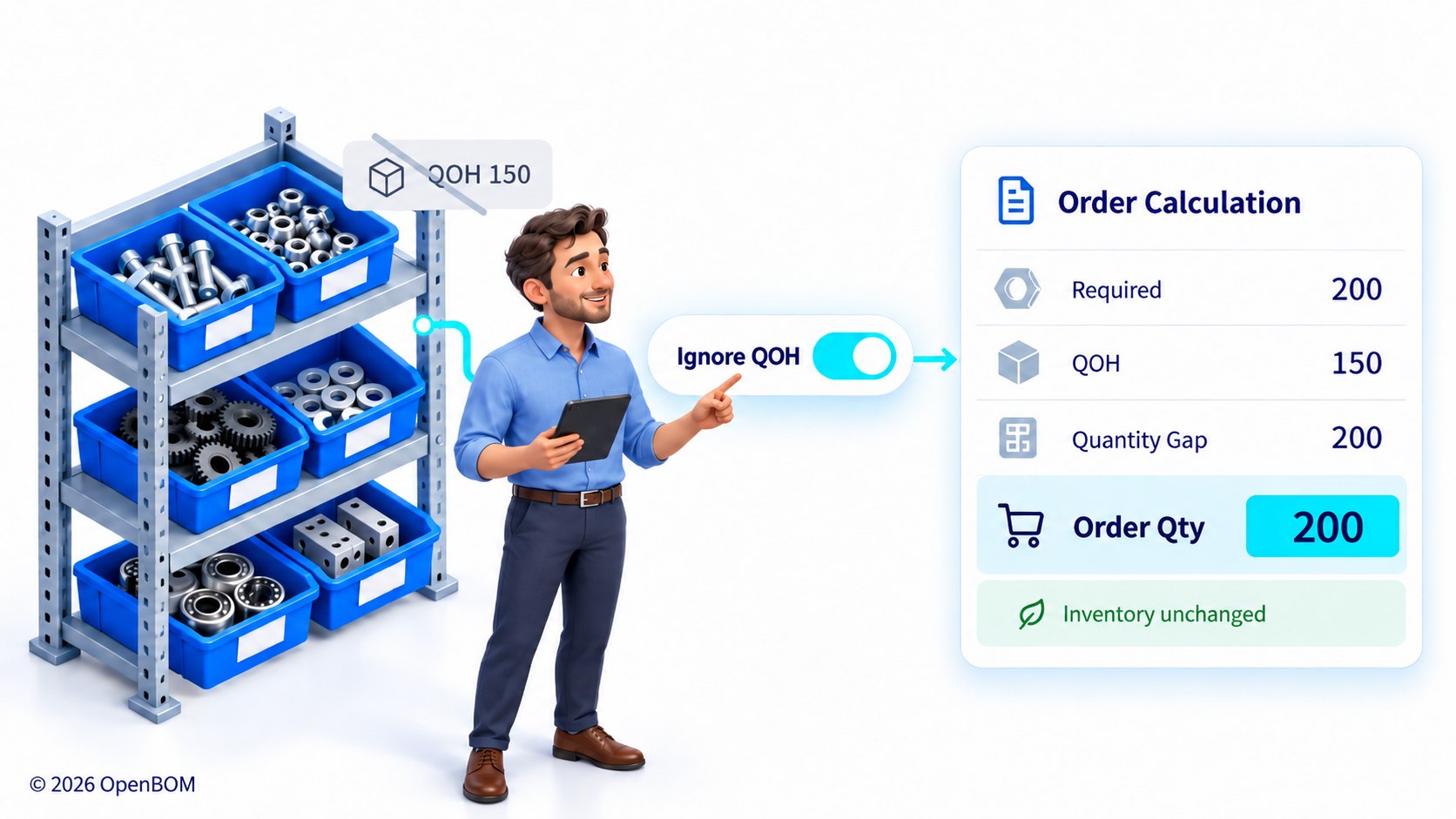
Ignore QOH is an option on OpenBOM Orders that recalculates the order as if Quantity on Hand were zero, so Orders and Purchase Orders carry the full required quantities instead of the shortfall. It is used for building ahead, rebuilding safety stock, ordering around committed inventory, and supplying complete kits to contract manufacturers. Actual inventory is not changed, and receiving updates QOH normally.
But a default is not a law. There are real, recurring situations where the inventory on the shelf is simply the wrong reference point for an order. Today I want to share a small but practical improvement in OpenBOM that handles those situations without workarounds: the new Ignore QOH option on Orders.
Netting demand against inventory is the right default, until it isn’t
When you create an Order in OpenBOM, the system calculates the quantity gap for every item. It takes the required quantity from the BOM and the order size, subtracts Quantity on Hand (QOH), and uses the shortfall to drive your Purchase Orders. If you need 200 brackets and 150 are in stock, you order 50.
That logic assumes the parts on the shelf are free to use for this order. In practice, that assumption breaks more often than most planning tools admit.
Four situations where the shelf is the wrong reference point
The first is building ahead. If you are buying material for next quarter’s production, the stock you hold today is already earmarked for this quarter’s builds. Netting against it makes the future order look smaller than it really is.
The second is rebuilding safety stock. Safety stock exists precisely so that you don’t consume it on regular demand. When you replenish it, you want the full quantity, not the difference between the target and whatever happens to be on the shelf after a busy month.
The third is committed inventory. The parts in your warehouse may already be allocated to another job. They are physically present but not available, and an order that nets against them will come up short at exactly the wrong moment.
The fourth is the one I hear most from hardware companies working with contract manufacturers. Many CMs want a complete kit for a build. They will not start from a partial kit plus a promise that the rest is sitting in your stockroom. In that case, the order you send has to carry every unit the build requires.
In all four cases, the right answer is the same: calculate the gap as if nothing were on the shelf, and give me the full quantity.
Ignore QOH changes one input to the calculation, not your inventory logic
Orders in OpenBOM now have an Ignore QOH option. When you turn it on, OpenBOM recalculates the Order as if Quantity on Hand were zero. Your Order and the Purchase Orders created from it carry the full required quantities instead of the shortfall.
When you leave it off, nothing changes. The default behavior still nets demand against actual inventory, exactly as it does today.
Just as important is what the option does not touch. Your real QOH values stay as they are. When you receive against Purchase Orders created with Ignore QOH, inventory is updated normally, the same way receiving works for any other PO. The option changes how the order is calculated, not how inventory is recorded.
Using it takes four steps
- Open an existing Order or create a new one.
- Enable Ignore QOH.
- Review the recalculated quantities and quantity gaps.
- Create the required Purchase Orders.
If you change your mind, disable the option and the Order returns to calculations based on actual QOH.
A switch on the order beats a workaround around the system
The workarounds I have seen for this problem all carry a cost. Buyers export the order to a spreadsheet and overwrite quantities by hand, which disconnects the purchase from the BOM it came from. Others temporarily zero out inventory to trick the calculation, which corrupts the very data the rest of the company relies on. Some simply keep a mental note to “add the stock back,” which works until the person who knows is on vacation.
Ignore QOH puts the decision where it belongs: on the order itself, visible and reversible, with the BOM connection and the inventory record both intact. It is a small feature, but it reflects something I care about a lot. Planning intent should live in the system, not in spreadsheets and people’s heads.
Try it on your next build-ahead or kit order
If you are planning a build for next quarter, replenishing safety stock, or preparing a complete kit for your contract manufacturer, try Ignore QOH on your next Order and compare the quantities side by side with the default calculation.
If you are not using OpenBOM yet, Register for free to OpenBOM and see how Orders, Purchase Orders, and inventory work together from a single source of BOM data.
Best, Oleg
Frequently Asked Questions
What does Ignore QOH do in OpenBOM?
Ignore QOH recalculates an OpenBOM Order as if Quantity on Hand were zero, so the Order and its Purchase Orders contain the full required quantities rather than only the shortfall.
Does Ignore QOH change my inventory?
No. Actual Quantity on Hand values are not changed. When you receive against Purchase Orders created with Ignore QOH, inventory is updated normally.
When should I use Ignore QOH?
Use Ignore QOH when on-hand stock should not reduce the order: building ahead for a future period, rebuilding safety stock, ordering when current stock is committed to another job, or supplying a complete kit to a contract manufacturer.
What happens if I leave Ignore QOH off?
Nothing changes. OpenBOM nets demand against actual inventory and orders only the shortfall.
Can I turn Ignore QOH off after enabling it?
Yes. Disabling Ignore QOH returns the Order to calculations based on actual Quantity on Hand.
Join our newsletter to receive a weekly portion of news, articles, and tips about OpenBOM and our community.