Here is a story I hear almost every week. Engineering export the bill of materials (BOM) in Excel. Procurement works from a spreadsheet that was emailed two weeks ago. CAD files are located on Google Drive and STEP files saved manually and stored at the same place. Nobody is sure which version is the latest, and something always gets missed. One engineer described his company’s process to me as “entirely Excel and in the mind of the engineer.”
He is not alone. Industry research shows that Excel still rely on spreadsheets for many data handovers and data management tasks. And this number doesn’t surprise because Excel is simple, free, and pragmatic approach Spreadsheets are how most companies start, and they quietly become the system of record until the day they fail.
But here is the thing: most of these teams don’t actually have a CAD design or BOM creation problem. They have a product data flow problem. Design data starts in CAD assemblies, drawings, and spreadsheets, and then it needs to move: into purchasing, inventory, change management, and ERP systems. The bill of materials sits at the center of that flow, but the real challenge is every handoff along the way: another export, another spreadsheet, another chance for the data to drift away from reality, while the knowledge that ties it all together lives in people’s heads.
In this article, I want to walk through five scenarios covering basic data management and data handoffs tasks – the places where product data management and flow breaks most often in engineering and manufacturing teams, and show what each one looks like when the data stays connected from design to ERP instead. Each section includes a short video.
These five scenarios cover what OpenBOM does in a very high level and the total watching time: about five minutes.
1. The CAD-to-Spreadsheet Ritual: Why the Engineering BOM Is Always Outdated
How to make engineering data available for business?
Every mechanical engineer knows this ritual. The assembly is finished in SOLIDWORKS (or similar CAD tool). Now the BOM needs to exist somewhere outside CAD, for purchasing, for assembly, for the contract manufacturer. So the engineer exports it to Excel, cleans it up, adds columns, and emails it.
Can SOLIDWORKS generate a BOM? Yes, as a table inside a drawing, and you can export that table to Excel. But the export is a snapshot. The moment the design changes, the spreadsheet is wrong, and someone has to remember to redo the ritual. Multiply that by every revision, every assembly, every engineer, and manual BOM creation becomes one of the most time-consuming tasks in engineering, and one of the least valuable.
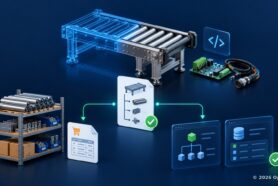
The alternative is a BOM that is born connected: extracted from the SOLIDWORKS assembly as a live, structured dataset — multi-level BOMs with thumbnails, a unique identifier for every item, and automatic quantity rollups across the structure. When the design changes, the BOM follows. In the video above, the whole process takes one click. One of our customers, Puro Lighting, reduced BOM reuse work from one hour to five minutes, not because anyone worked faster, but because the ritual disappeared.
2. Version Control for CAD Data Is Not an Enterprise Luxury
There is a moment every growing hardware team experiences: two engineers open the same CAD file, and one overwrites the other’s work. Or the shared drive fills up with “final_v3_ACTUAL_final.step” and nobody can say which one went to production.
Historically, the answer was a PDM vault, a server, an administrator, an implementation project. That model was built for large enterprises with a single CAD system and dedicated IT. There are still a few on premise PDM systems (eg. SolidWorks PDM or Autodesk Vault) – you need to install or host them… sounds crazy for 2026, right?
For small and mid-size manufacturing teams, the cost and complexity meant that many simply went without: 27% of companies that come to us say they had no revision control at all. No history of engineering changes, no traceability, no way to prove compliance status when a customer or auditor asks what exactly was shipped last March.
Modern cloud file management removes the excuse. Files are locked when a colleague is editing, changes sync automatically, and every save creates a version in the history, change tracking without a server, without renaming files by hand. The video shows what this looks like in practice: a warning before you touch a locked file, and a clean version history behind every design.
3. The Bill of Materials (BOM) Gap Between Engineering and Purchasing
If I had to name the single most expensive disconnection in manufacturing, it would be this one. Engineering releases a BOM. Procurement teams recreate it in another system, or work from an old email attachment. Part numbers get copy-pasted, orders get split across multiple vendors by hand, and the wrong drawing revision goes out with the purchase order.
This is not a niche problem. Research suggests 61% of procurement leaders have not yet adopted intelligent tools; most of the supply chain still runs on manual work. And the consequences are concrete: wrong quantities ordered, duplicate purchases, parts missed entirely, production waiting on a component nobody knew was short.
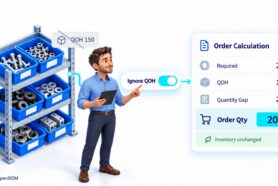
When purchasing works from the same live data as engineering, the gap closes. Quantity gaps are calculated across all assemblies, purchase orders are generated with line items grouped by vendor, supplier data and drawings attached, material costs visible in one place. A well-managed BOM minimizes errors and optimizes procurement, and this is usually the moment teams realize a spreadsheet cannot compete. One of our customers, OnQ, cut the time their engineering and purchasing team spends on BOMs and purchase orders by 50%.
4. Change Management by Email: Where Engineering Decisions Go to Die
Studies show 80% of designs require at least one part replacement before production. Engineering changes are not the exception: they are the process. Yet in most companies, change management runs through email: a part needs to change, someone starts a thread, replies pile up, attachments multiply, and the decision gets buried where nobody will find it three months later.
Files survive. Models survive. But the reasoning behind changes, why a supplier was switched, why a component was substituted, disappears. This is how product knowledge ends up living in people’s heads, and why growing companies discover that a process that worked for 2 people starts failing at 5. Tracking changes and revisions even for an assembly with 50 components is already a non trivial job.
The fix is structural, not disciplinary: put the conversation where the data is. A comment on the BOM item itself, assigned to a teammate with a due date, visible in their activity dashboard, real-time collaboration in context, whether the team sits in one room or works as global teams across time zones. Over time, these connected decisions become something bigger than task management. They become product memory: what changed, who changed it, and why, preserved with the product itself. One of our customers, VarTech Systems, saves two hours per engineer, every day, simply by taking BOM changes out of email.
5. Multi-disciplinary BOMs Across CAD Systems: MCAD, PCB, Electronics – One Product, Zero Shared Structure
Modern products are not just mechanical. The enclosure lives in SOLIDWORKS, the PCB in Altium. Each tool produces its own BOM, in its own format, with its own part numbering logic. The logic mixes – one mechanical part number can be a presented by several part numbers in PCB design. Someone, usually a senior engineer with better things to do, merges them by hand.
In electronics, the cost of getting this wrong is well documented: the average PCB re-spin costs around $46,000. A missed component, an outdated sub-assembly, a mechanical change that never reached the electrical BOM, these are exactly the errors that manual merging invites, and exactly the errors that hurt product quality.
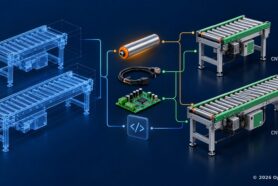
The video shows the alternative: MCAD, ECAD, and cloud CAD data merged into a single multi-level product structure, an element in SOLIDWORKS, an Altium BOM nested under the PCB part number, the entire BOM in one view.
This unified structure also supports the handoff to production. An engineering BOM (eBOM) reflects the designer’s intent; a manufacturing BOM (mBOM) is structured for the production process, organized for assembly, work instructions, and production planning. When both derive from the same connected data, the transformation from eBOM to mBOM keeps changes synchronized instead of creating two more documents to reconcile.
What Is a Digital BOM? Understanding Modern BOM Structures
A digital BOM is a live, connected dataset, not a static file. Unlike a spreadsheet, which is outdated the moment you export it, a digital BOM stays synchronized with CAD, carries item properties, supplier pricing, lifecycle status, and revisions, and gives engineering, purchasing, and manufacturing their own views of the same product data without duplication.
That is the thread running through all five problems above. None of them is really a BOM problem, and none of them is really a software problem, they are breaks in the flow of product data from design to execution. Teams reduce costs and accelerate time to market not by working harder, but by eliminating the manual reconciliation at every handoff. And when engineering data is structured and stable, the last handoff, connecting it to enterprise resource planning, becomes straightforward: stable product structures synchronize to ERP systems like NetSuite, QuickBooks, or Odoo when they are ready for execution, rather than forcing volatile early-stage design data into rigid legacy systems.
Over time, this connected flow becomes something bigger than better BOM management. Items, files, revisions, suppliers, orders, and decisions accumulate into product memory, a connected digital model of the product that can be reused across the company, by people and increasingly by AI. A spreadsheet is a snapshot that starts going stale the moment you save it. Connected product data compounds.
Frequently Asked Questions
What is modern cloud PDM software
Modern cloud PDM software helps engineering teams manage CAD files, revisions, documents, and product data online. It provides secure access from anywhere, improves collaboration, tracks changes, and connects design information with BOMs, purchasing, and manufacturing.
What is BOM management software?
BOM management software is a tool for creating, organizing, and sharing bills of materials — listing components, quantities, suppliers, and revisions in one structured system. Unlike spreadsheets, it connects to CAD, tracks changes, and gives every team access to the same up-to-date product data.
Can SOLIDWORKS generate a BOM?
Yes, SOLIDWORKS can generate a BOM table inside a drawing, and you can export it to Excel. But the export is a static snapshot that must be manually updated after every design change. A connected digital BOM stays synchronized with the assembly instead.
What is a BOM in ERP (Enterprise Resource Planning)?
In ERP systems, a BOM defines what materials are needed to manufacture a product — it drives purchasing, inventory, and production planning. The common failure mode is pushing unstable engineering data into ERP too early; a better pattern is to let product structures mature first and synchronize them when they are ready for execution.
What is the difference between an eBOM and an mBOM?
An engineering BOM (eBOM) reflects the designer’s intent — the product as designed in CAD. A manufacturing BOM (mBOM) is structured for factory use — organized for assembly sequence, work instructions, and production planning. Good BOM management keeps the two synchronized as changes occur.
Do I need a traditional PLM system to manage product data across the lifecycle?
No, there is a need to re-think traditional PLM software with modern cloud native alternatives. This is what OpenBOM does.
Most teams start by connecting CAD and BOM, then add procurement workflows and ERP integration later. For companies stuck between spreadsheets and heavyweight enterprise PLM, a lightweight digital BOM platform is often the right-sized step — product lifecycle management without the implementation project. And it opens the door to what comes next: as items, files, revisions, and decisions accumulate around the same connected data, teams move beyond traditional PLM toward Product Memory — a connected knowledge graph of the product that people and AI agents can reuse across the lifecycle.
How long does it take to get started?
Most teams start with OpenBOM in a matter of days. Synchronizing CAD files, generating BOMs, configuring orders, procurement and connection to ERP.
See It Yourself
Every problem in this article has the same root: broken product data flow. Together, the five videos form a simple journey — turn engineering files into a structured digital BOM, manage CAD data in the cloud without a vault, turn the BOM into purchasing action, control changes with full context, and bring mechanical and electronic data together for ERP. The best way to understand it is to try it with your own CAD data. REGISTER FOR FREE and extract your first BOM today, or read the complete guide, How to Start with OpenBOM, for the full adoption path.
Best, Oleg
Join our newsletter to receive a weekly portion of news, articles, and tips about OpenBOM and our community.