A Complete Guide to Managing CAD, BOM, Procurement, and ERP Data
Getting started with product data management is rarely a clean or planned process.
Most companies don’t begin with PDM or PLM systems. They begin with CAD files, spreadsheets, shared folders, and email threads. Engineering owns design data, procurement manages suppliers and pricing, and operations maintains financial records and invoices. Each system works reasonably well on its own, but decisions become fragmented over time. The problem is usually not missing information, it is missing connection between decisions.
This is exactly where many teams find themselves when they first look at OpenBOM.
OpenBOM was never intended to replace everything at once. Instead, it becomes a place where product information gradually connects, starting with engineering data and expanding toward purchasing, inventory, and ERP processes. The goal is not to introduce another system of control, but to create a shared workspace where product data evolves together with the team using it.
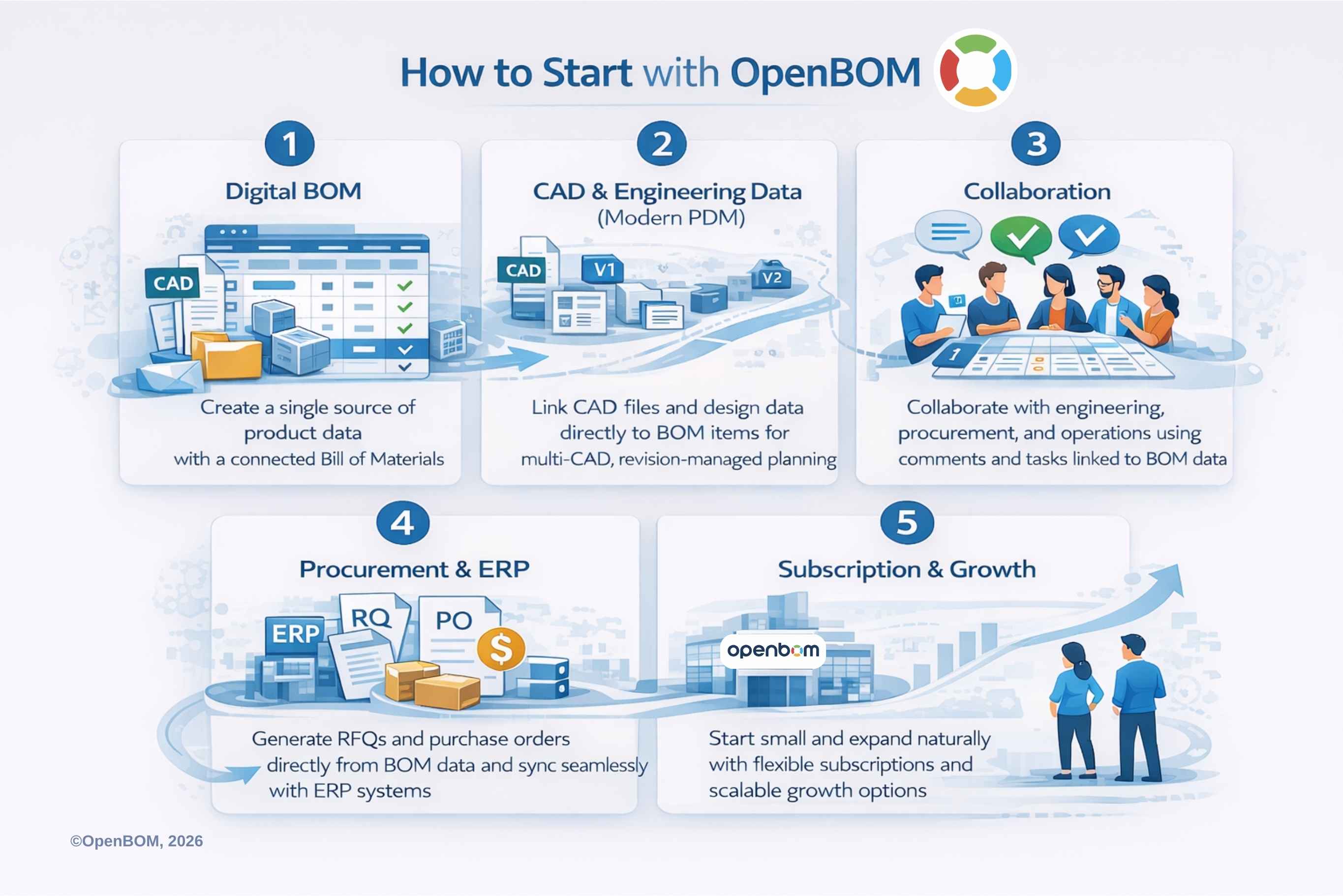
This article follows the same structure as the Getting Started with OpenBOM 2026 video playlist and guides. It explains how companies typically start, what problems they solve first, and how the system naturally expands as workflows mature.
Step 1: Understanding the Digital BOM
For most engineering organizations, the Bill of Materials is the natural starting point.
The BOM already exists in some form, often in Excel, sometimes exported from CAD, occasionally maintained in ERP. But these representations are usually static snapshots. Every change requires manual updates, and different teams maintain their own versions. Over time, discrepancies appear, and trust in the data decreases.
A digital BOM changes this model.
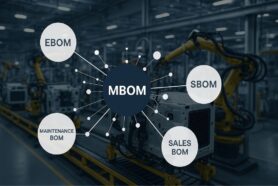
Instead of thinking about the BOM as a report, OpenBOM treats it as a living dataset. The product structure becomes dynamic, connected to items, properties, suppliers, and revisions. Engineering can maintain the product definition while procurement and manufacturing see the same structure from their own perspectives.
One product rarely has a single view. Engineering needs design structure. Purchasing needs supplier and cost visibility. Manufacturing needs assemblies organized for production. The Digital BOM allows multiple representations to exist without duplicating data.
This is often the first moment when teams realize that the BOM is not just a list of parts. It becomes the backbone of product knowledge. All history and revisions are connected there and all linked information is easily available.
For a deeper explanation, see the Digital BOM guide and the corresponding videos in the Getting Started playlist.
Step 2: Managing CAD Files and Engineering Data (Modern PDM)
Historically, PDM systems were designed around files. The goal was to control access, manage revisions, and prevent conflicts. This approach worked well when engineering relied on a single MCAD system and product development was largely mechanical.
That world has changed.
Today, companies use multiple CAD tools, ECAD and PCB systems, cloud design platforms, and increasingly software artifacts that are part of the product definition. File management alone no longer solves the problem because engineering data extends beyond files.
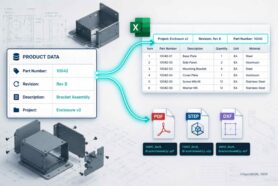
OpenBOM approaches PDM differently. CAD files remain important, but they are connected to items and product structures rather than isolated inside a vault. Revisions become part of the product context. Engineers can manage design changes while maintaining visibility across assemblies and related components.
This shift turns PDM from a simple file storage into coordination of engineering data. OpenBOM still organizes CAD files in Design Projects for simple version control. However, later design items are linked to product structures (digital BOMs) and connected versions of files with item revisions.
The OpenBOM CAD file management and PDM guide explains how this works across different CAD environments and why modern engineering workflows require more flexibility than traditional vault-based systems.
Step 3: Collaboration, Comments, and Tasks
One of the most underestimated problems in engineering organizations is the loss of decision context. In the era of AI, we started to think about context and data organization differently. Check my earlier article – Context graphs: Beyond System of Records.
Files survive. Models survive. But the reasoning behind changes often disappears. Why a supplier was changed, why a component was substituted, or why a design decision was made becomes difficult to reconstruct months later.
Most of this communication happens outside engineering systems, in meetings, emails, or chat messages.
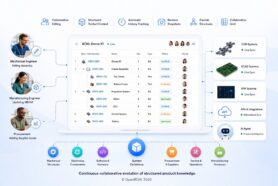
OpenBOM introduces collaboration directly into the product data environment. Comments, discussions, and tasks can be attached to items and BOM structures. Engineering, procurement, and operations teams can participate in the same conversation while looking at the same data.
This creates a feedback loop instead of a handoff. Engineering decisions become visible earlier, procurement constraints can be introduced sooner, and changes evolve collaboratively rather than sequentially.
Over time, this creates something more valuable than structured data alone. It creates product memory, the accumulated context behind decisions.
The Collaboration, Comments, and Tasks guide demonstrates how teams close this loop between engineering and procurement.
Step 4: From Engineering to Procurement: RFQ, Orders, and Inventory. Connecting OpenBOM to ERP Systems
The transition from design to purchasing is where many processes traditionally break down.
Engineering releases a BOM. Procurement recreates it in another system. Supplier quotes arrive in spreadsheets. Inventory visibility is partial. Changes require manual reconciliation.
Because OpenBOM already manages structured product data, procurement workflows can grow naturally from the engineering definition. RFQs can be generated directly from BOMs. Vendors and pricing can be compared within the same environment. Inventory and purchasing information becomes part of the product dataset rather than an external attachment.
This alignment eliminates a common source of friction. Engineering and procurement no longer operate on different versions of reality.
For many companies, this is also where measurable operational benefits appear, fewer mistakes in ordering, faster supplier communication, and improved visibility into cost and availability.
The Orders, RFQ, Inventory video guide walks through these workflows step by step.
ERP systems are essential, but they serve a different purpose.
ERP manages execution, inventory transactions, financial processes, and operational planning. Engineering data, however, changes continuously. Attempting to push early engineering structures directly into ERP often creates rigidity and unnecessary complexity.
OpenBOM acts as a preparation and synchronization layer between engineering and ERP. Product structures can evolve in OpenBOM until they reach stability. At that point, relevant data can be synchronized with ERP systems for execution.
This approach avoids tight coupling between CAD and ERP while maintaining consistency across systems. Engineering retains flexibility, and operations receives structured, validated data.
In practice, companies adopt this integration gradually. ERP connectivity becomes the next logical step once engineering and procurement workflows stabilize.
Step 5: Getting Started: Subscription and Pricing Model
One of the barriers to adopting PLM historically has been complexity at the starting point. Long implementations and large upfront commitments made experimentation difficult.
From the earlier beginning, OpenBOM was different by allowing everyone to start using OpenBOM with an instant trial, onboard online, and expand usage as workflows develop.
OpenBOM’s 2026 model removes even more friction. The subscription model aligns with collaboration and data usage rather than forcing organizations into large initial subscription.
This makes it possible to start small, often with a single project or engineering team, and grow organically as more departments participate.
The Getting Started subscription guide and pricing overview explain how teams can begin immediately without disrupting existing processes.
A Typical Adoption Path
In practice, companies rarely implement OpenBOM in a single step.
A typical journey looks like this: An engineer connects CAD and creates the first structured BOM. The BOM is shared with procurement for visibility. RFQ and supplier workflows are introduced. Inventory tracking follows. ERP integration happens later, once processes stabilize.
This gradual adoption mirrors how organizations actually work. Instead of forcing change, OpenBOM adapts to existing workflows and connects them over time.
Conclusion: From Files to Product Memory
The goal of starting with OpenBOM is not simply to manage files or organize BOMs better.
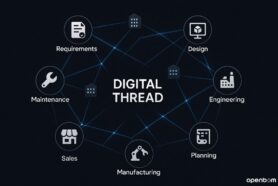
The real objective is to create a connected environment where engineering, procurement, and operations make decisions based on shared context. When product data remains connected, decisions accumulate instead of disappearing.
This is how product knowledge turns into a long-term asset rather than a collection of disconnected documents.
OpenBOM starts with a BOM, but over time it becomes something broader, a foundation for managing how product decisions are made, shared, and remembered across the lifecycle.
Frequently Asked Questions
Do I need to replace my existing CAD or ERP system to start using OpenBOM?
No. OpenBOM is designed to work alongside existing systems. Most companies start by connecting CAD data and organizing BOMs without changing their ERP environment. ERP integration typically happens later, once engineering and procurement workflows stabilize. OpenBOM acts as a bridge between systems rather than a replacement.
Can OpenBOM work with multiple CAD systems?
Yes. Modern product development rarely relies on a single CAD system. OpenBOM supports integrations with multiple MCAD and ECAD environments and can manage product data independently of a specific CAD tool. This allows engineering teams using different tools to work from the same product structure. Check OpenBOM integration page for more information.
Is OpenBOM only for engineering teams?
No. Engineering is usually where adoption starts, but OpenBOM is designed to connect engineering, procurement, and operations. Purchasing teams can use the same BOM data for RFQ and ordering, while operations teams can synchronize structured information with ERP systems.
How is a Digital BOM different from a spreadsheet BOM?
A spreadsheet is a static representation of a BOM at a specific moment in time. A Digital BOM is a connected dataset. Changes propagate across views, items maintain their properties and relationships, and different teams can see the same product from their own perspective without duplicating data.
When should ERP integration be introduced?
ERP integration typically comes after the engineering BOM and procurement workflows become stable. Pushing early engineering data directly into ERP often creates unnecessary complexity. OpenBOM allows product structures to evolve first and synchronizes data with ERP when it is ready for execution.
How long does it take to get started with OpenBOM?
Most teams can start within hours. A common first step is connecting CAD and generating the first structured BOM. From there, collaboration and procurement workflows are introduced gradually. OpenBOM is designed for incremental adoption rather than large implementation projects.
Does OpenBOM replace traditional PDM or PLM systems?
OpenBOM approaches the problem differently. Instead of focusing primarily on document control, it focuses on connected product data and collaboration. Some companies use OpenBOM alongside existing systems, while others use it as a modern alternative depending on their needs and workflow complexity.
How does OpenBOM help prevent data loss or lost decisions?
OpenBOM connects discussions, changes, and product data in one environment. Comments, revisions, and collaboration history remain attached to items and BOM structures. Over time this creates product memory, preserving not only what changed, but why decisions were made.
REGISTER FOR FREE and get started with OpenBOM.
Best,
Oleg
Join our newsletter to receive a weekly portion of news, articles, and tips about OpenBOM and our community.