Excel is not going away.
Let’s start there, because PLM vendors have always defined Excel as the problem. For years, you could find endless recommendations to kill Excel and replace it with a PLM system. At OpenBOM, we always looked at it differently. We built tools that can do what Excel cannot, for example, the OpenBOM flattened BOM with instant rollups across an entire product structure. But at the same time, we stayed very friendly with Excel: import and export at any time, no lock-in, no drama. Excel was never the enemy.
For the last few months, as we have been making progress on the OpenBOM Product Memory vision, we also started to transform the role of Excel spreadsheets and how we see them as part of new workflows. With this article, I want to start a series of conversations about how to rethink engineering workflows in the AI era.
After 3DEXPERIENCE World 2026, I wrote about the SolidWorks ecosystem and asked where the new center of gravity is for SolidWorks customers (read it here). My observation was simple. A large number of SolidWorks and desktop CAD customers still live in a strong Windows, files, folders, and spreadsheet environment. This is not because they are outdated. It is because the environment works. CAD runs on Windows. Files live in folders, shared drives, SharePoint, or a legacy PDM. BOMs are exported from CAD. Purchasing wants a spreadsheet, suppliers want a spreadsheet, ERP imports a spreadsheet, and managers review a spreadsheet.
I see this every week in onboarding calls. An engineer shares a screen showing a SolidWorks assembly on one monitor and a giant Excel file on the other. The spreadsheet has part numbers, quantities, costs, vendor names, and a column of notes that only two people in the company can decode. When I ask how they know the spreadsheet is current, the answer is almost always some version of the same sentence: “I know, because I made it.”
That sentence is the whole story. Excel carries the data. Humans carry the meaning.
And this is exactly what breaks in the AI era. The question is not how to eliminate Excel. The question is how to rethink the workflow around Excel.
Humans Carried the Context. AI Cannot.
The traditional workflow is linear. Create CAD data, export the BOM, clean it in Excel, send it to someone, review it manually, fix mistakes, release, revise, and pass it downstream as an Excel file, a STEP package, a PDF, or an ERP import.
It worked because people were the workflow engine. The engineer knew what the assembly meant. The buyer knew which vendor was preferred. The manufacturing lead knew which parts still needed drawings. Someone remembered why a quantity changed last week, and someone else knew the cost figure was outdated but good enough for now.
The spreadsheet may contain part numbers, descriptions, quantities, and revisions. But it rarely contains where the data came from, whether it is current, what assumptions were made, what is missing, what conflicts exist, who approved the change, and whether the product is ready for the next lifecycle step. The spreadsheet became the artifact of the process, but never the memory of the process.
For decades this was acceptable. AI changes the rules. An AI agent cannot safely reason over a disconnected spreadsheet without knowing what the data means, where it came from, what task is being performed, and what outcome is expected. Handing an LLM your exported BOM and asking for answers is asking it to guess.
This is why the old Excel workflow must be rethought, and not just accelerated.
You Can Vibe-Code a Prototype. You Cannot Vibe-Code Product Memory.
The AI era brings a new temptation. If AI can write code, why not build your own PDM or PLM workflow? Generate a BOM checker, a release dashboard, a spreadsheet validator, an app that compares two Excel exports. I hear these voices more and more, and I wrote about this earlier this year in AI, PLM, Vibe Coding and Product Memory.
Let me be clear. This is real, it is useful, and it will happen more. Engineering teams will use AI to build small tools, automate Excel cleanup, and expose problems faster. The ability to prototype quickly is a genuine shift.
But there is a difference between a prototype and a production workflow. Durable engineering workflows require product memory: structure, relationships, versions, revisions, history, traceability, approvals, ownership, security, and lifecycle continuity. The system must remember not only what the data is, but where it came from, how it changed, who changed it, why, and what it is connected to.
Here is the point most people miss. The problem is not that customers will build something wrong. The problem is that the workflow itself must change. The real question is not whether AI can help you build another tool. It is how to organize product context so AI can help you make better engineering and manufacturing decisions.
The New Workflow Starts With the Task, Not the File
Most Excel workflows start with the output. Export the BOM. Send me the spreadsheet. Prepare the Excel file for purchasing. In the AI era, starting with the output is the wrong move.
Nate B. Jones recently wrote about this problem in the context of AI-generated Office files (Nate’s Substack). His core observation is that an AI-generated file looks done long before it is true. A workbook can look like a financial model while the formulas are broken. A deck can look executive-ready while nobody can trace which source a chart came from. His answer is to build the truth layer first: inventory the sources, map claims to sources, log assumptions, and verify before anything ships. The output file is the last thing you make, not the first.
Now translate that discipline to product data, because the same failure mode lives in every engineering spreadsheet. A BOM export can look complete while drawings are missing. A part list can look ready while purchased components have no approved supplier. A cost rollup can look precise while half the values are old assumptions. A spreadsheet can travel downstream with confidence it has not earned.
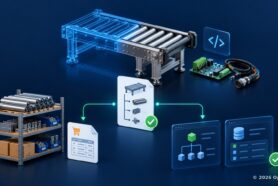
What is a context-first engineering workflow? A context-first workflow starts with the task, not the file. Instead of asking AI to produce a spreadsheet, it first collects the product context needed for the task, validates sources, identifies missing data and conflicts, and only then uses AI reasoning to produce the outcome. The outcome may be Excel, but it can also be a readiness report, an RFQ, a PO draft, documentation, or an ERP handoff.
The old workflow asks: what is the next step? The new workflow asks: what decision are we trying to make, and what context is required to make it safely?
The Task Is Not “Export a BOM.” The Task Is “Are We Ready to Release?”
Take a practical example. A SolidWorks customer is preparing a prototype release. In the old workflow, the engineer exports the BOM, cleans it in Excel, checks a few fields, and sends it to purchasing with drawings attached. CAD to Excel, Excel to review, review to release.
Rethink it. The task is not “export a BOM to Excel.” The task is “is this product ready for prototype release?” That is a completely different question, and answering it requires context: whether the BOM matches the CAD structure, whether part numbers and descriptions are complete, whether revisions are consistent, whether drawings and STEP files are attached, whether purchased parts have assigned suppliers and current costs, whether long-lead items are identified, and whether open comments and pending changes have been resolved.
This is not a spreadsheet problem. It is a product context problem. The output can still be Excel, but Excel is no longer the workflow. Excel is one possible result of the workflow.
The same logic applies to other classic handoffs. Preparing a supplier RFQ is not “make an Excel file for vendors.” It is “prepare a quote package for the right suppliers using current product context,” which means knowing which parts are purchased, which suppliers are approved, which files are current, and which quantities apply. An ERP handoff is not “clean the import spreadsheet.” It is “validate that items, revisions, vendors, and units meet the ERP rules before anything moves.” In every case the value is created before the file is produced, not inside it.
Spreadsheets and Folders Are a Vacuum, Not a System of Record
Why does this matter so much for SolidWorks and desktop CAD customers specifically?
Because for most mid-market engineering teams, there is no incumbent system to displace. Product data starts in CAD files, folders, and spreadsheets, then moves into purchasing, suppliers, and ERP through manual handoffs. These teams are too small for enterprise PLM, not ready to migrate their CAD, and not fully served by cloud PLM alone. Spreadsheets and folders are not a rival system of record. They are a vacuum.
That vacuum is exactly where the AI-era workflow question becomes urgent. These teams will not adopt AI by installing an enterprise platform. They will adopt AI by transforming the workflows they already run, starting from CAD and starting from Excel.
Agents Can Only Reason Over Data They Can Reach
This is where OpenBOM comes in.
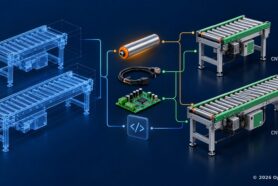
OpenBOM starts where engineering data starts: CAD, BOMs, Excel, files, suppliers, procurement, and ERP handoff. It extracts BOMs from SolidWorks and multi-CAD environments, manages items, revisions, and changes, connects suppliers and procurement, and provides cloud PDM for files. It helps teams move from disconnected Excel handoffs to structured, collaborative product data.
But the more important part is what sits underneath. OpenBOM’s collaborative workspace is the coordination place where people and AI agents work on the same product context. Product memory is the context layer beneath it. It does not just store a list of parts. It keeps relationships, history, decisions, changes, and sources. It knows how product data is connected and why it changed.
Agents can only reason over data they can reach. An AI agent cannot produce reliable outcomes from disconnected fragments, no matter how good the model is. Structured product context is what makes engineering AI possible.
Now imagine a BOM Review Agent working in this environment. It does not open an Excel file and check for empty cells. It starts with the task, for example “review this product before prototype release.” It collects the context: the CAD-derived BOM, items and revisions, drawings and files, supplier and cost information, procurement status, open changes, and human comments. It reasons over that context, flags parts without suppliers, detects inconsistent revisions, compares CAD structure with the BOM, and summarizes risks. Then it produces the outcome, which might be an Excel file, a readiness report, an RFQ package, a PO draft, or a set of review tasks for humans.
The agent is not making a better spreadsheet. It is helping the team complete an engineering workflow using trusted product context. And humans do not disappear from this workflow. Their role gets better. Instead of reconstructing context from files, emails, and spreadsheet versions, people focus on judgment and decisions.
Excel Becomes an Output, Not the Center
Let me repeat: Excel is not bad. It is flexible, familiar, and universal, and it will remain part of engineering and manufacturing workflows for a long time. Suppliers will keep accepting spreadsheets. ERP systems will keep importing them.
But Excel should no longer be the place where product truth is manually reconstructed.
In the old workflow, Excel becomes the temporary system of record. People export data, copy and paste values, correct cells, email versions, and hope everyone knows which file is current. In the new workflow, product truth lives in structured product memory, and Excel becomes a view, a report, a delivery format. The spreadsheet still exists, but it is generated from context, not assembled from memory. Every important number knows where it came from. Every assumption is visible. Every missing field is flagged before the file travels.
This is the real opportunity of AI in engineering workflows. Not faster Excel. Better product decisions.
Where to Start
If you are running SolidWorks, folders, and Excel today, you do not need to throw anything away. Start by asking a few practical questions:
- Which Excel files are used as handoff artifacts, and who carries the context behind them?
- What data is always missing when you prepare a release, an RFQ, or an ERP import?
- Where do mistakes usually happen, and who catches them today?
- Which single workflow would benefit most from an AI-assisted review?
Do not begin by trying to replace Excel. Begin by identifying the workflows where Excel is carrying too much responsibility without enough context. Prototype release, supplier RFQ, engineering change review, and ERP handoff are all good candidates. Each of them can be rethought around context first and output second.
Conclusion: The Future Is Not AI-Generated Spreadsheets
AI will generate spreadsheets, reports, dashboards, and formulas. It will save time. But that is not the transformation that matters.
The bigger transformation is moving from linear spreadsheet handoffs to AI-assisted product workflows. The old workflow exported data and asked humans to carry the context. The new workflow collects context first, validates it, reasons over it, and produces the right outcome. Sometimes that outcome is Excel. Sometimes it is a PO, an RFQ, a release package, documentation, or an ERP transaction.
Excel is not going away. But Excel is becoming an output, not the center of the workflow.
The future is not AI-generated spreadsheets. The future is AI-assisted product workflows built on trusted product context.
In the next articles, I will go deeper into specific workflows: BOM review, supplier RFQ, and ERP handoff, and how OpenBOM agents transform each of them.
Join our newsletter to receive a weekly portion of news, articles, and tips about OpenBOM and our community.