A BOM management system organizes product Items, assembly relationships, quantities, revisions, and supporting information so engineering, manufacturing, and purchasing can work from a consistent product definition.
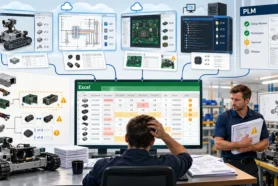
That definition sounds straightforward. The difficulty appears in everyday work. Engineering changes a component in CAD. Purchasing still has last week’s spreadsheet. A supplier receives a drawing without enough context to identify the correct assembly. Each person has information, but bringing it together requires another email, export, or meeting.
This is often why manufacturers start looking for BOM software. They need a dependable way to connect product information and use it to make decisions: what to build, what changed, what it costs, and what needs to be purchased.
At OpenBOM, we believe an evaluation should follow that work. Start with one product and the people who need its information. Then test whether the system helps them complete a useful task with less retyping, fewer disconnected copies, and clearer responsibility.
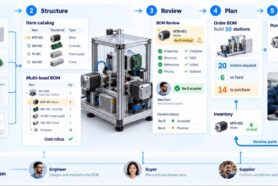
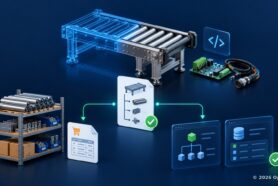
Consider an illustrative example: an automated inspection station with two motors, a machined housing, a controller board, a purchased power supply, and standard fasteners. Mechanical design comes from CAD, electronics information comes from a PCB design system, and some supplier information arrives in Excel or PDF. We will use this example to explore what matters when choosing a BOM management system.
Start with reusable Items and connected product structures
A useful starting question is how the system represents a part that appears in several products.
Suppose the station uses a motor that also appears in two other machines. Its part number and description identify the same component wherever it is used. The quantity, however, belongs to a particular assembly: one machine might use one motor while our inspection station uses two.
OpenBOM organizes this information using Items, catalogs, and BOM relationships. Catalogs hold reusable Item records. BOMs describe how those Items are used together. Properties associated with an Item describe the component; instance properties describe its use in a particular BOM.
This distinction matters when a component is reused. Teams can maintain shared Item information and understand its use across assemblies without rebuilding the same part record in every product spreadsheet.
Evaluate the structure as well as the records. Can you navigate a multi-level assembly, identify where a component is used, and see a flattened quantity summary? Can you add properties relevant to your work, such as material, finish, make-or-buy classification, supplier, or lead time?
Also distinguish a different view of the same structure from a different product structure. Hiding columns for a buyer is different from organizing an engineering BOM and a manufacturing BOM. OpenBOM’s xBOM capabilities support multiple product structures; your evaluation should establish which ones your process needs and how they will be maintained.
Connect the information your product actually needs
The inspection station’s product definition extends beyond its mechanical CAD assembly. The controller board, purchased power supply, drawings, and supplier specifications also matter.
An evaluation should therefore use the actual combination of sources your team works with. Test a CAD import, an existing Excel BOM, and the supporting files needed by a downstream participant. Observe how part numbers, quantities, properties, and file references become usable product information.
OpenBOM provides CAD integrations and data-import capabilities for bringing information into its product model. The workflow varies by source and connector, so use your own application and representative data in the evaluation.
For teams managing local SOLIDWORKS files, CAD File Agent and SmartSync are relevant to the file-management part of this process. Keep the evaluation focused on the result: can engineers manage their design work while making the necessary product information accessible to others?
Define ownership as part of this test. Decide which information remains managed in the design environment, which becomes managed Item or BOM data, and who reviews updates. Begin with the information needed for the first business use case, then expand the connected product context as additional needs emerge.
Make engineering changes understandable
Now replace one of the station’s components. Engineering selects a different motor, updates the mounting arrangement, and prepares a new drawing.
The team needs to understand the difference between the working design and the accepted product definition. Purchasing also needs to know whether the change affects an upcoming build or applies to a later batch.
This is where revision control and change management become practical. A new CAD file version records a design update. A reviewed Item or BOM revision identifies an accepted product definition. An approval process establishes who must review a proposed change and what must happen before it can be used downstream.
Use the example to evaluate revision control and change management. Find the prior definition, review the proposed change, identify other products using the affected component, and verify what a downstream user sees after acceptance.
Also test the timing. If purchasing has already prepared an order, establish how the team will review its impact and decide what to update. Capturing an engineering change and applying it to an existing purchasing record are separate decisions that need clear ownership.
Check BOM quality before the next handoff
A BOM can have a revision number and still contain missing or inconsistent information. Our inspection station might have a motor without a vendor, a machined component without cost information, or an incorrect assembly relationship.
These problems deserve their own evaluation criterion: how does the system help people find and resolve them?
OpenBOM’s BOM Review checks product data for issues such as missing properties, part-number inconsistencies, circular references, and mismatches between PCB quantities and reference designators. Results help reviewers locate the information requiring attention before it travels further into purchasing or manufacturing.
The General BOM Health AI check card adds another form of assistance. It can surface observations such as similar parts, unusual lead times, or missing data patterns. These findings are informational insights for human review. Deterministic checks and AI observations serve different purposes.
For a meaningful test, deliberately include a few known problems in the sample BOM. Check whether the findings are understandable, whether users can locate the affected records, and how they confirm a correction.
AI can also assist with getting information into the system. OpenBOM’s AI-powered PDF drawing import recognizes product information for review before creating structured Items and BOM data. At the time of writing, this importer is in private beta and requires an AI license. Evaluate it where available, while keeping the core selection focused on workflows your team can use today.
Test collaboration from each participant’s perspective
Collaboration becomes useful when people can work with the information needed for their role.
The engineer needs product structure and design references. The buyer needs quantities, sourcing information, and costs. The supplier needs the specifications relevant to its work. Their access and editing responsibilities may differ.
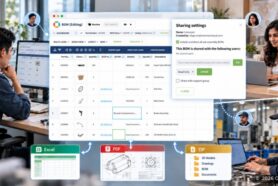
OpenBOM combines a familiar spreadsheet-style interface with shared access and simultaneous editing. Users can share BOMs, catalogs, and Order BOMs through a Share dialog, with read-only, editing, or configured By-View access. The experience is similar to sharing a Google Doc: people access shared information according to the permissions they receive.
User-defined and team views help organize properties, filters, and access for different participants. During an evaluation, configure the actual sharing permissions and test what the recipient can see and change.
Have a buyer and a supplier participant open the information themselves. Can they find the relevant part, drawing, quantity, and revision context? Can they complete the intended task without an engineer explaining every field?
Adoption can happen gradually. Some suppliers will continue to require Excel or PDF packages. Use exports where needed, while introducing shared access where it reduces coordination work. Define how returned files and comments will be reviewed and incorporated.
Follow the BOM into costing and purchasing
For many manufacturers, the value becomes visible when the product structure supports a cost or purchasing decision.
Start with costing. Can the team enter the required inputs, calculate component contributions, and roll up costs through the assembly structure? OpenBOM supports product cost calculations and rollups. Test the calculation with known values, including any unit conversions or make-or-buy assumptions relevant to your process.
Then plan a small batch. Ten inspection stations require twenty motors. With six suitable motors on hand and no other demand or planning adjustments, the expected gap is fourteen. This gives everyone a simple result to check.
OpenBOM’s planning and purchasing workflow connects BOM quantities, vendor assignments, inventory availability, Order BOMs, and purchase orders. Test the path from the product structure to the required quantities and the purchasing documents your team needs.
Revision context matters here, too. OpenBOM supports creating an Order from a selected BOM revision. The revision provides the product data, while Quantity on Hand is calculated from current inventory. This connects a defined engineering state with the availability information needed for planning.
If your company uses ERP, establish which application owns inventory, purchasing, and financial records, then test the required integration. OpenBOM can support its own planning and purchasing workflows or participate in a connected process. The right arrangement depends on the business systems and responsibilities already in place.
Compare approaches against the work you need to complete
Several approaches can be appropriate. Their usefulness depends on the product, participants, and controls required.
| Approach | When it can fit | What to examine |
|---|---|---|
| Spreadsheets and shared drives | A contained task with clear ownership and limited coordination | Reused parts, conflicting copies, revision identification, and manual consolidation |
| CAD-centered PDM | Managing design files and engineering collaboration around supported CAD environments | Access for downstream users and coverage of the full product definition |
| Cloud BOM or product-data platform | Connecting reusable Items, structures, revisions, and cross-company work | Data-model flexibility, collaboration, integrations, and operational workflows |
| Broader PLM platform | Lifecycle processes and governance that justify broader implementation scope | Configuration, adoption effort, administration, and fit with required processes |
| ERP or MRP | Material planning and business operations within the system’s supported scope | Engineering changes, design references, supplier access, and product-data handoffs |
Categories overlap. Some PDM products include BOM functions, some PLM platforms include file management, and ERP systems vary in their engineering support. Use this table to identify what to test, then assess the specific product and configuration.
Run a practical evaluation with measurable results
Choose one representative product, one ordinary engineering change, and one downstream task. Include the people who perform the work and agree on the expected results before the demonstration.
The inspection station example produces a compact acceptance scorecard:
| Evaluation task | Evidence to look for |
|---|---|
| Import the product | Assembly relationships and quantities match the source; exceptions are visible |
| Reuse a component | Shared Item information and assembly-specific quantities are clear |
| Change the motor | Reviewers can identify the affected products and distinguish prior and accepted definitions |
| Review BOM quality | Known test problems are found and can be traced to the affected records |
| Share with a supplier | The recipient can access the intended information with appropriate permissions |
| Calculate product cost | The rollup matches the agreed test calculation |
| Plan ten stations | Twenty motors are required and the expected fourteen-unit gap is explained |
Record the effort as well as the result. How long does it take to import the BOM, review a change, prepare a supplier package, and calculate purchasing requirements? How much retyping remains? How often must another person clarify the information? These observations provide a basis for estimating value using your own work.
Include adoption and ownership in the assessment. Identify who maintains Item properties, reviews imported updates, administers access, and resolves exceptions. Check performance with a realistically sized BOM, relevant security requirements, and the ability to export data for continued use.
Finally, compare the total cost of the intended setup. OpenBOM’s current pricing separates paid editing roles from free read-only access and includes data-record pricing and integration options. Account for the subscription, required integrations, onboarding, and ongoing administration. Confirm that the capabilities you tested are included in the proposed configuration.
Start with one useful workflow, then expand
A successful BOM management evaluation should end with a concrete improvement: engineering can explain the accepted product definition, purchasing can calculate what is needed, and a supplier can access the information required for its task.
OpenBOM brings reusable Items, flexible product structures, CAD-connected information, revisions, collaboration, validation, and planning into these everyday workflows. You can begin with a product and a handoff that already matter, establish the necessary data rules, and expand as the team demonstrates value.
Bring one real assembly, one real change, and the people who receive its information to an OpenBOM product demonstration. Use the evaluation to answer a practical question: can your team move from product information to a dependable decision with less manual coordination?
REGISTER FOR FREE and check how OpenBOM can help you.
Best, Oleg
Join our newsletter to receive a weekly portion of news, articles, and tips about OpenBOM and our community.