Food is the best way to explain PLM and manufacturing
I think “food” is the best way to explain PLM and manufacturing. Everyone understands ingredients, recipes, purchasing, preparation, and serving. A small change to a recipe can affect cost, availability, preparation time, and the guest experience. Those are the same relationships we manage in product development.
Recently, I saw an illustration that used this metaphor made by Michael Valin on LinkedIn. PLM was a shopping cart full of ingredients. The ingredients flowed into three kitchens labeled ERP, PIM, and Service, and each kitchen produced a different dish. The caption said each domain adds and owns its information.

I liked the creativity, and I agree that each domain brings its own expertise. But the separate dishes made me pause. Aren’t we all working on the same product?
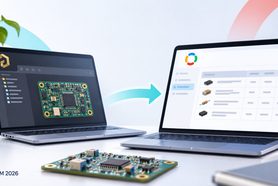
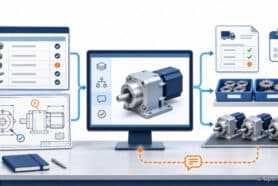
In manufacturing, engineering, purchasing, production, marketing, and service contribute to one product. They need different structures and different information, but their decisions stay connected. That is the perspective behind OpenBOM xBOM: manage multiple product structures and views while connecting the information used across domains and the systems they work in.
The value is in the connections, not in separate dishes
Imagine a team cooking one dish together. The chef develops the recipe. Purchasing picks suppliers and orders ingredients. Someone writes the menu description and photographs the plate. The service team serves guests and collects their feedback.
Each person has a different responsibility, but information moves between them all the time. The chef needs ingredient prices to estimate the cost per serving. Purchasing needs recipe quantities to plan an order. The menu writer needs the ingredient and allergen list. Guest feedback might send the chef back to change the recipe.
Manufacturing works the same way. Engineering needs supplier information. Purchasing needs product quantities. Service needs to know which configuration it is maintaining. Manufacturing constraints influence design decisions. The product is the common context for all of it.

So I redrew the picture. One shared dish sits in the center, with four peer specialists around it: PLM for the recipe and early cost estimate, ERP for purchasing and supply, PIM for the menu and presentation, and Service for serving and feedback. A single ingredient card for tomatoes, with a price and a supplier, connects to both the recipe cost estimate and purchase planning. Same information, different purposes.
Price belongs in PLM because engineers make cost decisions before ERP sees anything
Price is the simplest example I know. An engineer is choosing between two components. Both meet the technical requirements, but their cost and availability differ. The engineer needs that information while evaluating the alternatives, not after release.
I want price in PLM for an early cost rollup estimate. The purpose is not to send it to ERP. Purchasing may maintain the supplier quotes, and ERP may record purchase orders and actual costs. Those responsibilities stay where they are. But the same information also supports decisions made long before anyone places an order.
In the kitchen, the chef needs ingredient costs while developing the recipe. Discovering that the dish is too expensive after everything has been bought creates rework.
There is an important detail here. Connecting price across domains takes more than adding a “Price” column everywhere. An indicative estimate, a supplier quote, a negotiated price for a quantity break, and the price paid on a previous order are different values that answer different questions. Their meaning depends on context:
| Context | Why it matters |
|---|---|
| Supplier and currency | Two quotes for the same part are not comparable without them |
| Quantity and unit of measure | Price per unit changes with volume and packaging |
| Quote date and validity | An old quote can look precise and be wrong |
| Revision or configuration | The price may apply to a part that has since changed |
| Estimated, quoted, or actual | Tells the reader how much confidence the number deserves |
Without that context, making a number visible across systems creates false confidence. The connection should help someone judge whether a value fits the decision they are making.
Shared item definitions are what make multiple BOMs manageable
OpenBOM xBOM is our extended BOM model. It supports multiple BOM types, such as engineering, manufacturing, and service structures, built from the same dataset (OpenBOM data model overview).
The foundation is the reference and instance model. Items are defined once in catalogs, which act as the master record. Each line in a BOM is an instance of a catalog item. Reference properties, such as part number, description, material, or default vendor, stay consistent wherever the item is used. Instance properties, such as quantity, position, or reference designator, belong to a specific use in a specific structure (product structure explained).
Back to the kitchen. “Olive oil” has an identity and shared descriptive information. How much of it you need depends on the recipe: 30 milliliters in one, 100 in another. A manufactured component works the same way. Its part number and description belong to the item, while its quantity and position belong to the assembly where it is used.
This distinction is what lets one item participate in an engineering BOM, a manufacturing BOM, and a service BOM without copying it three times and hoping the copies stay in sync.
A different set of columns is not a different structure
“Multiple views” can mean two things, and both matter.
Sometimes teams need a different selection of information from the same structure. Engineering wants technical properties and CAD references. Purchasing wants suppliers, costs, and lead times. OpenBOM user-defined views handle this: each view is a set of properties to display plus a filter for which items appear. Any user can create one, and team administrators can publish team views and restrict which views each user can access (user-defined views and team views).
Other situations need a different structure. Engineering organizes components by design assembly. Manufacturing might group them into kits or production assemblies that never appear in the CAD model. Service might organize replacement packages for maintenance. Changing which columns appear cannot express those differences. That is what xBOM BOM types are for: separate structures that reference the same catalog items while representing their own hierarchy.
In the kitchen, the recipe, the purchasing list, and the preparation plan describe different aspects of the same dish. Each has its own shape. Their relationships are what keep the team coordinated.
The practical questions follow from that. Which engineering components roll into a manufacturing kit? Which replacement part applies to a particular revision? What happens to the purchasing plan when engineering changes a component? Structures that differ for good reasons make those relationships more valuable, not less.
Information has to reach the systems where decisions happen
These perspectives rarely live in one application. CAD contributes design information. ERP manages purchasing and production transactions. Enterprise PLM may govern release. Other applications handle customer-facing content or service processes.
This is the role I describe as OpenBOM’s Engineering Frontend. CAD add-ins, imports, and APIs capture design information from tools such as SOLIDWORKS, Onshape, AutoCAD Electrical, Altium, and KiCad into Items and BOMs. In an enterprise deployment, OpenBOM exchanges mapped information with PLM and ERP, where enterprise PLM manages its assigned lifecycle items and ERP manages its assigned operational records (Engineering Frontend for PLM and ERP). Each integration defines the records, properties, identifiers, and lifecycle actions involved.
Here is an illustrative workflow:
- Capture the assembly structure and selected properties from CAD.
- Enrich the engineering BOM with sourcing and estimated cost information.
- Organize the manufacturing BOM needed for production.
- Publish agreed item and BOM information to ERP.
- Bring selected purchasing information back into engineering review through a configured integration.
Direction and timing depend on the workflow. A release may trigger publication to ERP, while a sourcing update may feed a new engineering review. The point is to make useful information available where the decision is made.
Who maintains information and who uses it are separate questions
Enterprise data discussions usually start with ownership. Who owns the part number? Who owns the supplier? Who owns the price? Those questions establish accountability. Someone has to maintain the information, control changes, and resolve errors.
Another question deserves equal attention: who needs this information, and for what purpose? Purchasing can maintain supplier pricing while engineering uses it for cost evaluation. Engineering can maintain material specifications while marketing uses them for product descriptions. Service can record field observations that help engineering find a design issue.
None of this means giving everyone permission to change everything. OpenBOM provides configurable objects, properties, relationships, views, and permissions, and integrations follow the agreed model and mappings. Implementation is where a team decides who maintains a quote, who approves a replacement component, and which system controls a released item.
The original kitchen picture also showed information moving one way, from PLM outward. Product development depends just as much on information coming back. A supplier changes a lead time and affects component selection. Manufacturing finds an assembly difficulty and prompts a design review. Service spots a recurring failure and shows engineering how the product behaves in the field. An xBOM discussion that only covers publishing engineering structures downstream leaves out much of the value.
Connected structures become Product Memory when decisions keep their context
Making current information available is the first step. Preserving the context behind decisions is the next one.
Which quote informed the early estimate? Which revision was evaluated? Why did the team pick the more expensive component? Was it availability, reliability, or a manufacturing constraint? Months later, someone sees a cheaper alternative and asks why it was not selected. The answer may be perfectly reasonable, but it is hard to reconstruct once the context is gone.
This is how I connect xBOM to Product Memory: the connected context and decision history behind a product, capturing why designs, changes, and trade-offs were made, along with what was approved or released. Connected structures are part of the foundation. Preserving revisions, assumptions, and rationale makes that foundation more useful over time, for the next engineering review, the next supplier evaluation, and for AI tools expected to answer questions or propose actions based on product data.
The kitchen works the same way. Keeping the final recipe is useful. Keeping the reason an ingredient changed helps the next cook understand the decision.
The cooking metaphor works only if the shared dish stays in the center
Different specialists contribute different information. Each needs a perspective suited to their work, plus access to relevant information contributed by others. The recipe, the purchasing list, the menu, and the serving instructions all look different, and their connections help everyone make better decisions about the same dish.
OpenBOM xBOM brings that approach to product data through reusable catalog items, multiple BOM types, configurable views, and connections to CAD, PLM, and ERP. When we talk about xBOM, we should ask both how product structures differ and how information connects the decisions made across them.
Start with a practical question: what information does your team need from another domain to make a better decision? It might be a supplier price for an early cost estimate, a manufacturing constraint for a design review, or a configuration for a service task. That is a good place to start exploring how OpenBOM connects your product structures and workflows.
Register for free to OpenBOM and try it with your own data.
Best, Oleg
Join our newsletter to receive a weekly portion of news, articles, and tips about OpenBOM and our community.