We live in a digital world and data has become the most valuable business asset. Whether you are designing a new product, planning procurement, or managing supply chain operations, the ability to structure, share, and analyze product information is key.
While PDM and PLM were around for the last few decades, OpenBOM steps in with a unique approach of building a data management platform that not only allows to manage information online for distributed manufacturing companies, but also connect those companies in manufacturing networks sharing information between OEM, suppliers and contractors.
Unlike traditional PLM and PDM systems, which rely on monolithic, file-centric, and single-tenant architectures, OpenBOM offers a multi-tenant, graph-based, flexible data model. This foundation allows companies to manage product information across the entire lifecycle, integrate seamlessly with engineering and business systems (such as CAD, ERP, and procurement platforms), and share data securely with contractors and suppliers in real-time.
In this blog, we’ll take a high-level look at the OpenBOM data model, the key elements that make it unique, and why it matters for modern product development.
Key Elements of the OpenBOM Data Model
The OpenBOM data model is built on the principles of flexibility, openness, and connectivity. At its core, it leverages a graph-based architecture that connects information objects through relationships. This enables a digital thread of information across the extended enterprise.
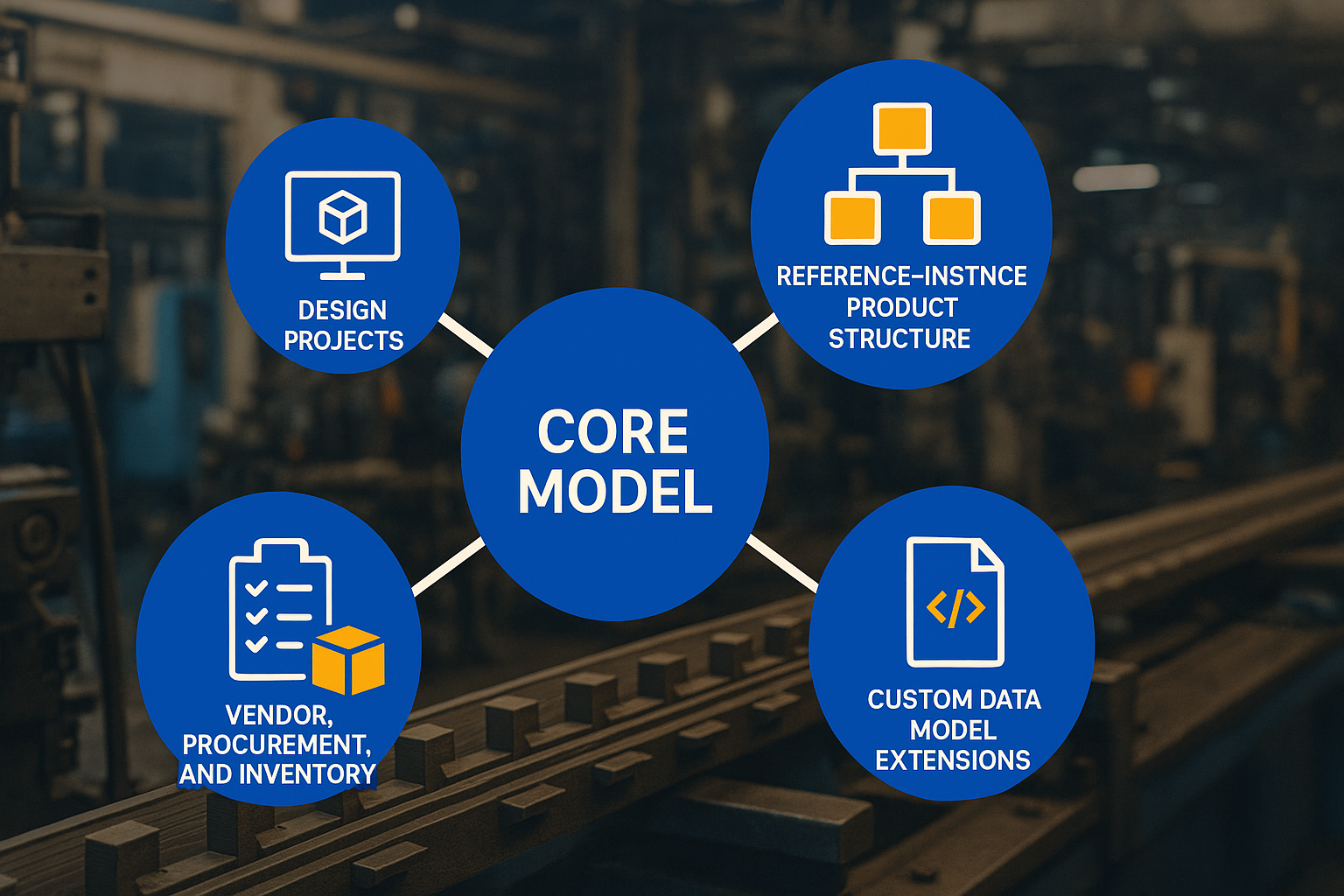
Here are the five major components:
- Core Model
- Reference–Instance Product Structure and xBOM
- Design Projects
- Vendor, Procurement, and Inventory
- Custom Data Model Extensions
Let’s explore each of these in more detail.
1. Core Model
The core model is the foundation of everything in the OpenBOM data model. It defines the fundamental building blocks of objects and properties. Here is what is included:
- Data Objects – These are the basic units of information, such as items, BOMs, catalogs, or design projects.
- Properties – Attributes that describe each object (e.g., part number, description, cost, material, revision, supplier). OpenBOM supports various property types, including text, numeric values, dates, links, object references, and more.
- Views (Lenses) – Multiple perspectives or “lenses” can be applied to the same object. For example, engineering might see CAD references and technical details, while procurement sees suppliers and cost.
The flexibility of the core model means that companies can define their own information structures without waiting for a vendor’s rigid data schema. You can model your data according to your product, processes, and supply chain—rather than forcing your processes into a one-size-fits-all system.
2. Reference–Instance Product Structure and xBOM
A product’s data is more than a list of parts. It includes relationships between items, versions, configurations, and lifecycle changes. OpenBOM addresses this through its Reference–Instance model and the concept of xBOM (extended Bill of Materials).
Key Features:
- Item / Catalog / BOM Model – Items are defined in catalogs (the master record), and Bills of Materials (BOMs) organize items into hierarchical structures.
- Reference vs. Instance Properties – Each item has reference properties (e.g., weight, material, default vendor) and instance properties (e.g., quantity, position in the assembly). This separation enables precision in product structures.
- Core BOM and xBOM – The core BOM captures the engineering structure, while xBOM provides multiple contextual views (EBOM, MBOM, SBOM, Service BOM, etc.) from the same dataset.
- Revisions and Change Objects – OpenBOM supports version control, including BOM and item revisions, as well as change management objects like ECRs (Engineering Change Requests) and ECOs (Engineering Change Orders).
This flexible structure empowers manufacturers to bridge the gap between engineering and manufacturing without duplicating or losing data.

3. Design Projects
While BOMs represent structured data, modern engineering is still heavily file-based. CAD files, drawings, and related documents are essential parts of the product lifecycle. OpenBOM’s Design Projects model provides PDM-like capabilities for managing design data.
- CAD File Management – Upload, organize, and manage CAD files directly in OpenBOM.
- Version Control – Keep track of versions and revisions of CAD files and related documents.
- Link to Items and BOMs – Connect design files to product structures, ensuring the digital thread is maintained from CAD to manufacturing.
By supporting both structured product data and unstructured design files, OpenBOM eliminates the traditional PDM/PLM divide. This ensures design intent is always connected to product lifecycle data.
4. Vendor, Procurement, and Inventory
Products don’t exist in isolation—they require parts, materials, and services from suppliers. OpenBOM integrates procurement and inventory management directly into the data model.
Capabilities include:
- Vendor and Sourcing Model – Manage approved vendors, sourcing information, and supplier-specific details.
- Inventory Management – Track inventory levels, stock availability, and allocations across multiple locations.
- Procurement Processes – Create and manage purchase orders (POs), requests for quotation (RFQs), and vendor quotes.
- Synchronization – Keep procurement records in sync with the inventory, ensuring accurate data for planning and execution.
This model allows engineering, procurement, and operations to work from the same source of truth. Instead of manually exporting BOMs into spreadsheets for procurement, OpenBOM enables real-time integration between design data and supply chain execution.
5. Custom Data Model Extensions
Every company has unique processes and requirements. Recognizing this, OpenBOM provides the ability to extend the core data model with Custom Object Types.
- Custom Objects – Define new record types such as Requirements, Quality Records, Compliance Certificates, or Test Reports.
- Object References (Links) – Connect custom objects with existing items, BOMs, or projects. For example, link a compliance certificate to a part, or connect a requirement to a subsystem.
- Full Lifecycle Integration – Custom objects follow the same lifecycle management principles as core objects, ensuring they are integrated into the digital thread.
This flexibility transforms OpenBOM into more than a BOM or PDM system. It becomes a platform for building your own digital lifecycle model, tailored to your business.
Why the OpenBOM Data Model Matters
The manufacturing landscape in 2025 looks very different from just a few years ago. Companies are global, supply chains are distributed, and products are increasingly complex. In this environment, traditional monolithic PLM systems struggle to keep up.
The OpenBOM data model provides:
- Flexibility – Adapt quickly to changing product and business requirements.
- Connectivity – Link engineering, procurement, and supply chain into a single digital thread.
- Scalability – Multi-tenant architecture supports teams of all sizes, from startups to large enterprises.
- Openness – APIs and integrations ensure data flows across CAD, ERP, and other business systems.
By combining a graph-based foundation with multi-tenant SaaS architecture, OpenBOM creates a modern approach to PLM/PDM that is agile, collaborative, and future-ready.
Conclusion
This blog provided a high-level summary of the OpenBOM data model as of 2025. We covered its core elements:
- Core Model
- Reference–Instance Product Structure and xBOM
- Design Projects
- Vendor, Procurement, and Inventory
- Custom Data Model Extensions
Each of these areas represents a rich set of capabilities that help companies manage product lifecycle data, connect engineering and business functions, and enable digital collaboration across the supply chain.
In upcoming articles, we will dive deeper into each of these components. We’ll explore real-life examples, practical workflows, and how companies are using OpenBOM to transform the way they manage product information.
Stay tuned!
REGISTER FOR FREE to check how OpenBOM can help you.
Best, Oleg
Join our newsletter to receive a weekly portion of news, articles, and tips about OpenBOM and our community.