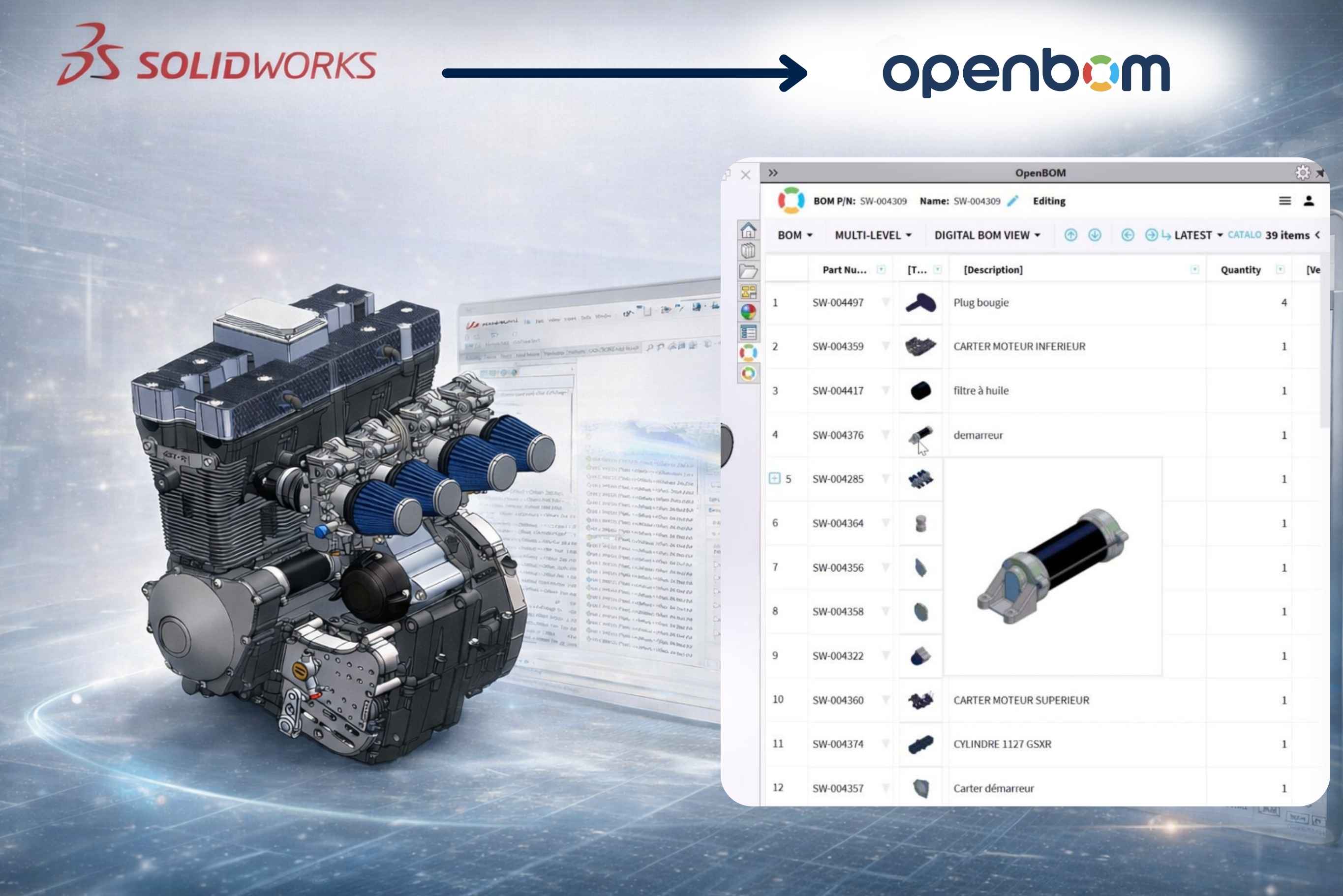
For many SOLIDWORKS teams, the challenge was never the design work itself. It was everything that came after: configuring tools, keeping derivative files organized, managing BOMs across disconnected spreadsheets, and trying to bring manufacturing and procurement teams into the loop without giving everyone an edit seat they did not need. Getting a product data management system up and running felt like a project on top of the actual project.
The new OpenBOM for SOLIDWORKS add-in is built around a different premise. Setup should be fast. The interface should be clear. Users should be able to start seeing value in days, not weeks. And the system should reduce the manual work that piles up around engineering deliverables, not add more steps to manage.
This article walks through what changed, why it matters, and how the new experience supports the way engineering teams actually work.
A Cleaner, More Approachable Interface
The most immediate difference in the new OpenBOM for SOLIDWORKS experience is visual clarity. The interface is cleaner and better organized, with less clutter competing for attention during everyday tasks. Key actions are easier to find. Navigation is more intuitive for first-time users. The overall experience feels less like configuring enterprise software and more like using a tool designed for engineers who need to move quickly.
This matters for adoption. When a new user opens a system and immediately feels uncertain about where to start or what each option means, friction builds. That friction slows rollout, creates dependency on internal champions or external support, and delays the point at which teams start working differently. A cleaner interface is not just about aesthetics. It reduces hesitation and makes the first interaction easier to navigate without hand-holding.
Faster Setup, Less Clutter from the Start
Setup is often the first real test of how a system will feel to use. If the initial configuration dialog presents too many options at once, or if the path from installation to productive use is unclear, many users stall before they ever complete onboarding.
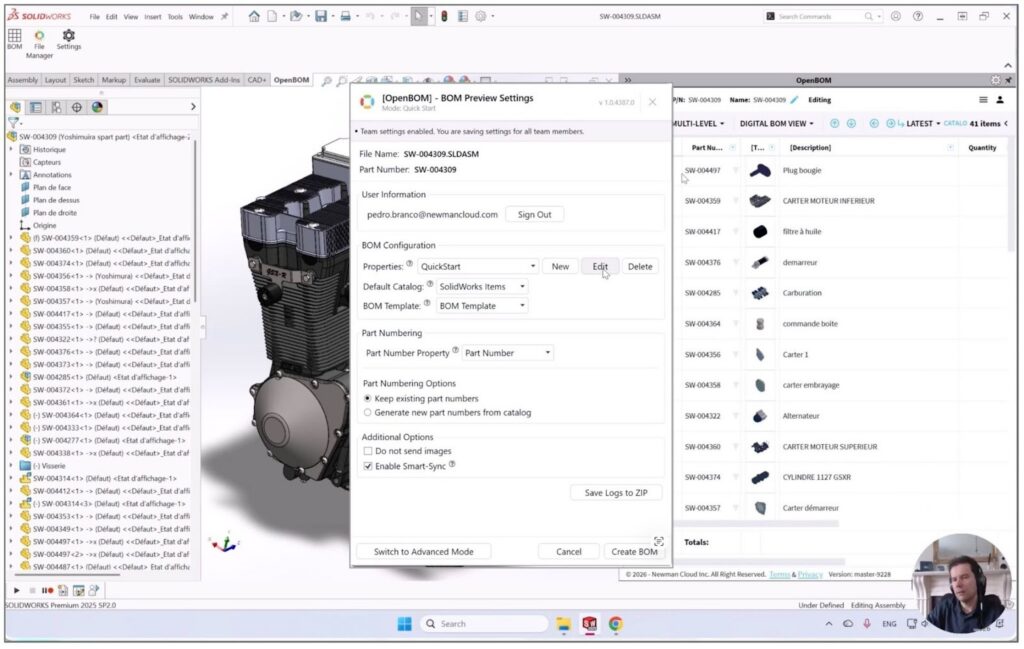
The new setup dialog is designed to eliminate that barrier. Options are better organized, the steps are easier to follow, and the configuration choices that matter most are presented clearly without being buried in layers of settings. Users can move from installation to a working connection with their SOLIDWORKS environment more quickly than before. For teams evaluating OpenBOM or deploying it for the first time, this is the difference between an evaluation that gains momentum and one that stalls before it gets started.
Clearer Progress and Status During Operations
Once users are working with the system day to day, they need to know what is happening. During save operations, BOM updates, file syncs, and data extraction, a clear progress and status display is what separates a system that feels reliable from one that generates uncertainty.
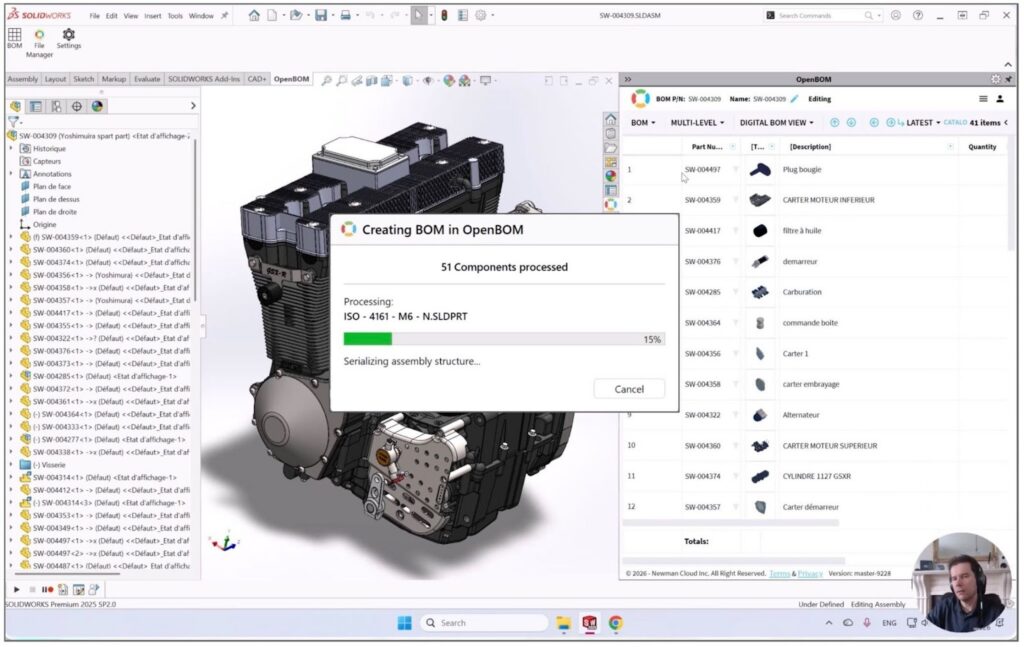
The new progress and status dialog is cleaner and easier to read. It provides better visibility into what the system is doing at each step, so users are not left wondering whether an operation is running, stuck, or complete.
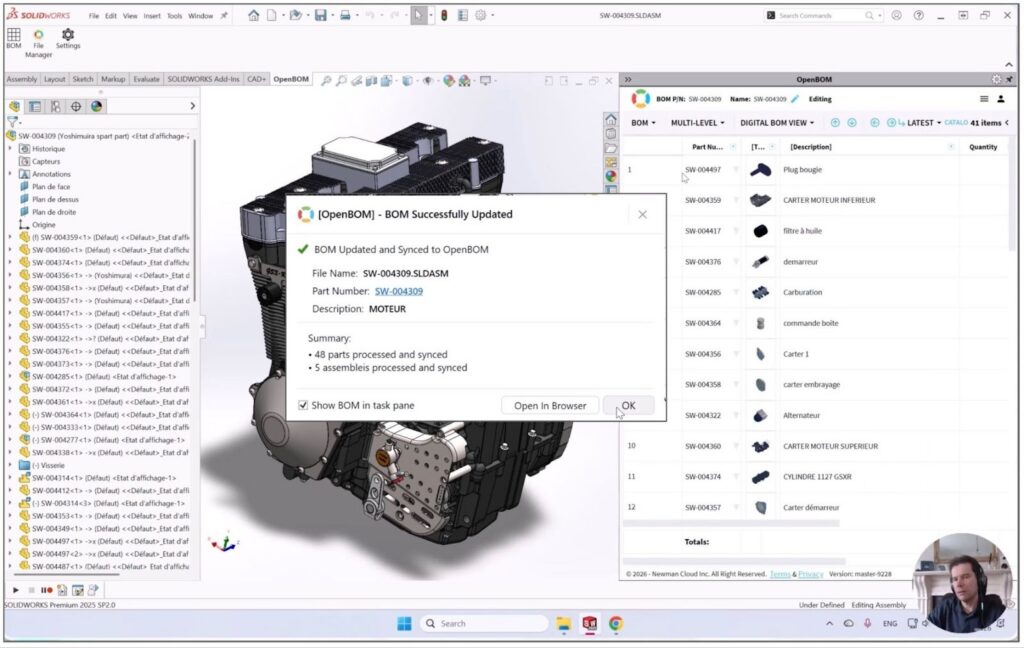
That clarity reduces anxiety in daily use and builds confidence in the system over time. Small improvements to feedback design compound into a noticeably better working experience across hundreds of routine operations.
Start Using OpenBOM with SOLIDWORKS in 3 Minutes
The best way to understand how simple the new experience is to see it in action. The new getting-started video shows the initial workflow from installation through first use in three minutes.
For engineers who want a fast orientation without reading through documentation, this is the starting point. It demonstrates that the connection between SOLIDWORKS and OpenBOM is not a complex integration requiring days of configuration. It is a short, guided process that most users can complete in a single sitting.
Automatic Derivative File Generation from SOLIDWORKS Designs
One of the most operationally valuable improvements in the new add-in is the ability to configure automatic derivative file generation directly from SOLIDWORKS designs.
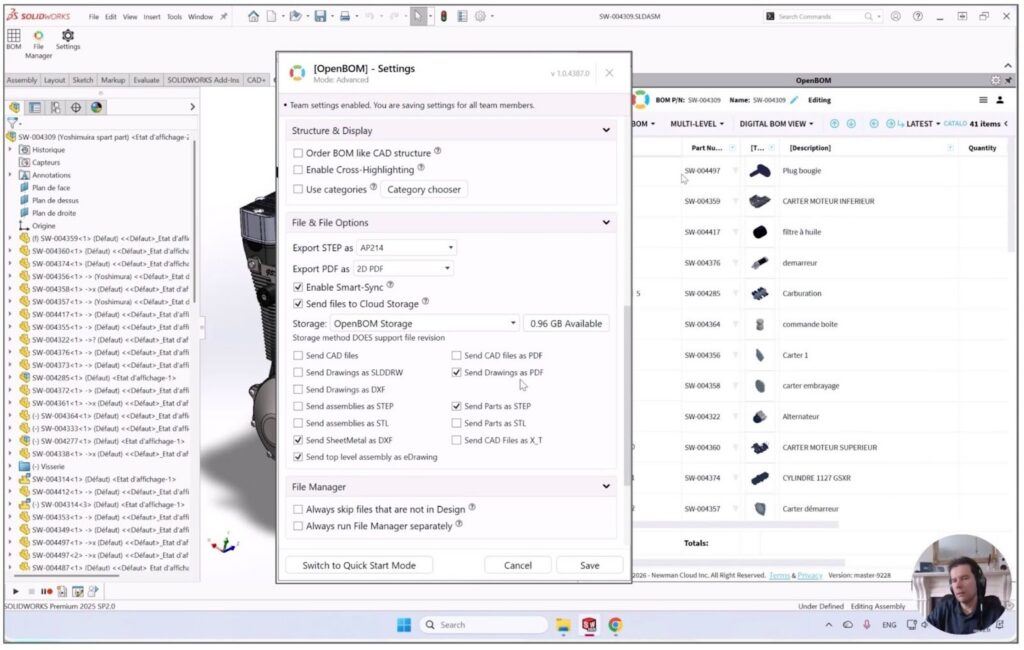
In most engineering teams today, generating derivative files is a manual process. An engineer completes a design, exports a PDF for review, creates a STEP file for manufacturing, produces a DXF for a supplier, and saves each output somewhere the right people can find it. Multiply that by dozens of parts and assemblies, repeat it across every design revision, and the result is a large and often inconsistent collection of files spread across local drives, shared folders, and email threads.
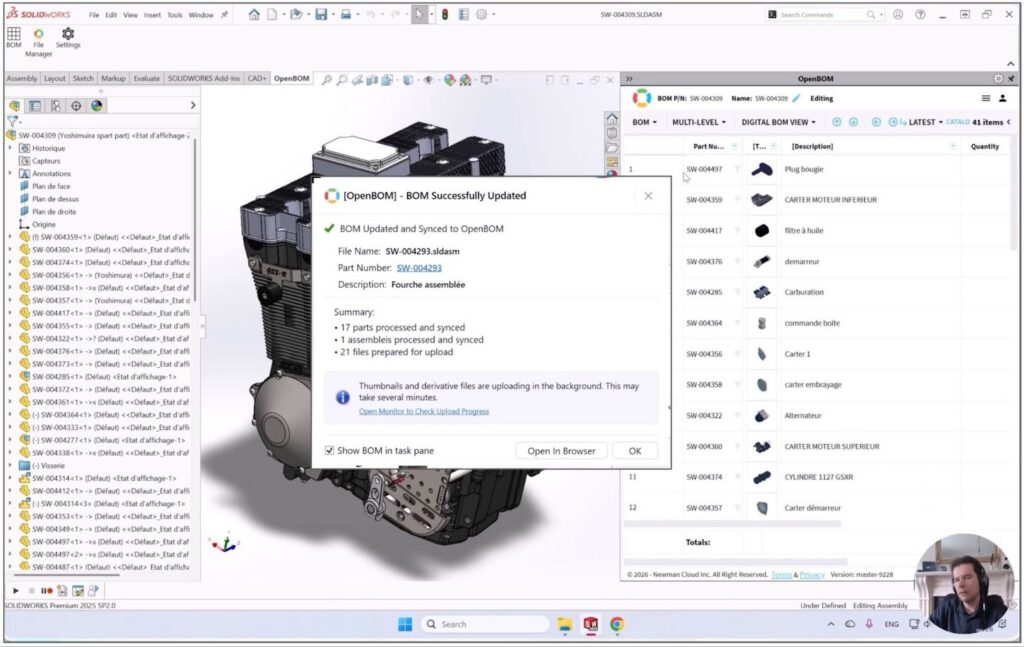
OpenBOM changes this by allowing teams to configure automatic generation of the file formats they need as part of the normal save and update workflow. When a design is updated, the downstream deliverables are produced automatically and made available in an organized, accessible location. Manufacturing teams get the files they need without having to request them. Procurement can access current documentation without chasing down engineers. Suppliers receive consistent, up-to-date formats without manual intervention.
The configuration is straightforward. Teams define which formats they need, where outputs should be stored, and how the process should be triggered. From that point forward, the manual export step is removed from the workflow. The result is fewer missed outputs, more consistent documentation, and less time spent on file management that adds no engineering value.
From Disconnected Spreadsheets to a Connected Workflow
Most SOLIDWORKS teams already know the problem. BOMs live in spreadsheets. Derivative files accumulate in folders with names like “Final,” “Final_v2,” and “Final_use_this_one.” Manufacturing uses a version of the BOM that engineering updated two weeks ago. Procurement is working from a PDF that does not match the current design.
The new OpenBOM experience is designed to make it easier to close that gap. With a simpler setup process, a cleaner interface, and automated derivative file generation, the transition from disconnected tools to a structured, connected workflow becomes something a team can accomplish in days rather than months. Users do not need to overhaul their entire process at once. They can start with the connection between SOLIDWORKS and OpenBOM, begin managing BOMs and derivative files in one place, and expand from there as the process matures.
The shorter learning curve matters here. When a system is approachable from the first interaction, individual engineers are more likely to adopt it without top-down mandates. When adoption spreads naturally across the team, the data in the system becomes more complete, and the value of the connected workflow increases.
Easier to Start, Easier to Share
The new OpenBOM pricing and subscription model is designed to match the simplified onboarding experience. There are no minimum seat requirements. Teams can start with a small group, prove out the workflow, and expand as adoption grows. This lowers the barrier for initial deployment and makes it easier to run a meaningful evaluation without committing to a large rollout before the system has demonstrated its value.
Equally important is the availability of unlimited free read-only seats. Not everyone in the organization needs to create or edit product data, but many people need to see it. Manufacturing leads need current BOMs. Procurement needs up-to-date part information. Sales needs access to product configurations. Management needs visibility without editing access.
With unlimited free read-only seats, engineering data can be shared across the organization without requiring additional licenses for every stakeholder. The design team maintains control of the data. Everyone else gets access to the information they need, in the format they can use, without friction. This makes the decision to adopt OpenBOM easier to justify across the organization, not just within the engineering group.
Conclusion: Start Working Differently
The new OpenBOM for SOLIDWORKS add-in is not a cosmetic update. It is a meaningful improvement to the experience of connecting SOLIDWORKS to a structured product data workflow — from the first configuration step through daily operations.
Cleaner setup. Clearer progress and status visibility. Automatic derivative file generation. A faster path from installation to productive use. No minimum seat commitments. Free read-only access for the rest of the organization.
For SOLIDWORKS teams that are still managing BOMs in spreadsheets and derivative files in disconnected folders, this is a practical place to start changing how that work gets done.
Register for free and start using OpenBOM with SOLIDWORKS today.
Best, Oleg
Join our newsletter to receive a weekly portion of news, articles, and tips about OpenBOM and our community.