Here is the problem most PLM and other product data tools ignore
Most engineering and manufacturing companies already know they need better product data management. Structured BOMs, revision control, connected CAD files, a single source of truth — the benefits are clear.
The problem isn’t understanding the destination. The problem is that getting there requires changing processes that involve procurement teams, suppliers, contract manufacturers, quality departments, and sometimes customers. Many of those processes are Excel-driven, approved, and locked in place by organizational boundaries that one team cannot unilaterally change.
So companies get stuck. The engineering team moves forward. Everyone else stays in spreadsheets. The gap between “better data” and “how work actually gets done” doesn’t close.
This article explains how OpenBOM approaches that gap — and specifically, how new flexible Excel export and file naming capabilities let you manage product data properly while still producing the Excel files and named file packages your organization depends on today.
Why product data management without replacing Excel matters
Managing product data without replacing Excel isn’t a compromise. For most small and mid-sized manufacturers, it’s the only realistic path forward.
Here’s why. Excel-based processes in manufacturing don’t exist because people love spreadsheets. They exist because they work across organizational boundaries. A supplier doesn’t need access to your PLM system. A contract manufacturer doesn’t need to learn your BOM tool. A procurement team that spans two companies doesn’t change its approved template because one engineering department upgraded its software.
These processes are durable precisely because they’re low-friction and widely understood. Replacing them requires coordination across teams, organizations, and sometimes geographies — and that coordination takes time, budget, and organizational will that isn’t always available.
The practical question isn’t “how do we eliminate Excel?” It’s “how do we make our product data trustworthy and structured on the inside, while still producing the Excel outputs and named files that people need on the outside?”
That’s the design principle behind OpenBOM’s export layer.
A concrete example: the RFQ package problem
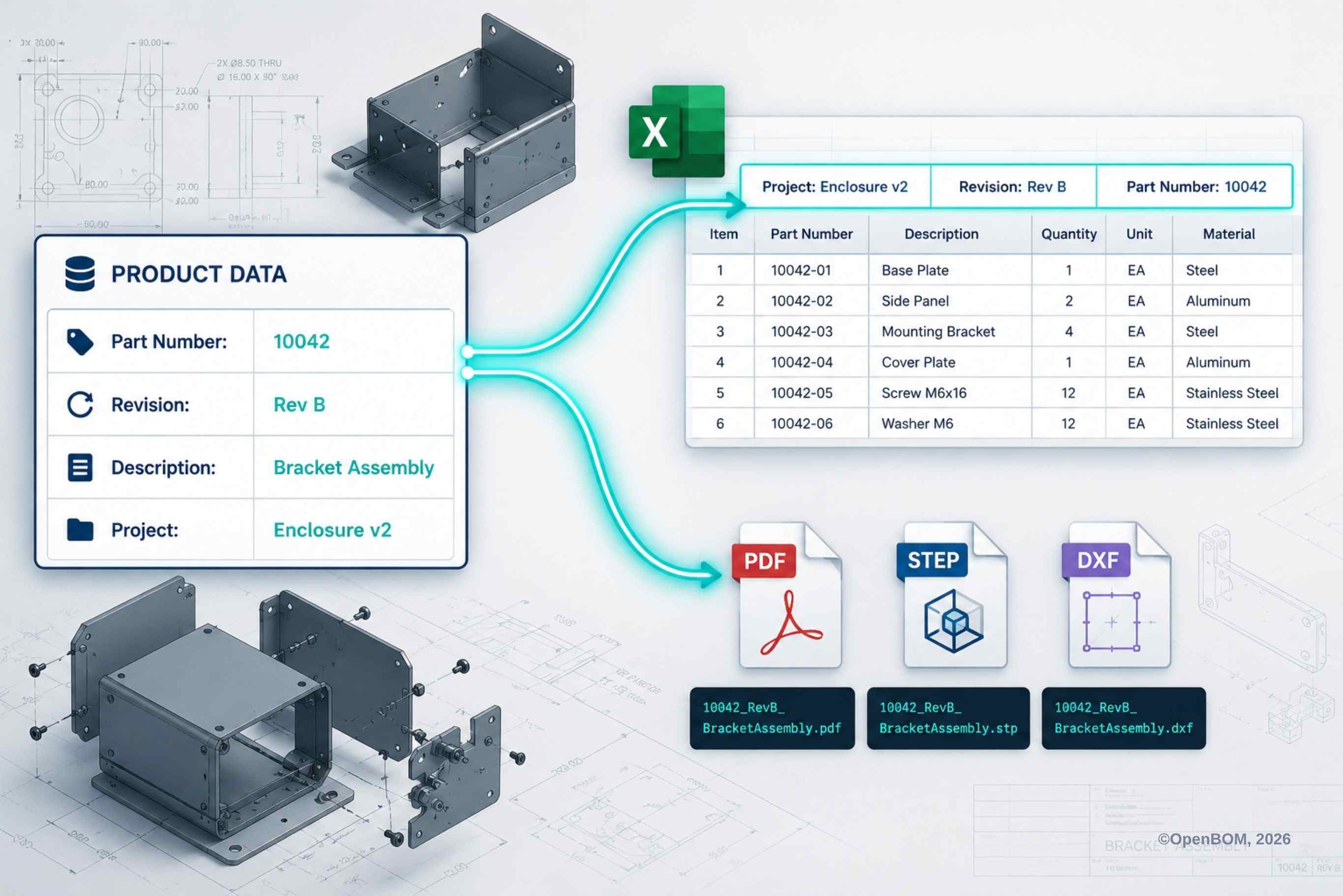
Consider a common scenario. A purchasing engineer needs to send an RFQ package to a supplier. The BOM lives in OpenBOM — current, revision-controlled, accurate. But the supplier package requires three things:
- A BOM spreadsheet with the project name, revision, and quote reference in the header — matching the supplier’s intake template
- PDF drawings for each part
- STEP files named with the part number and revision, so the supplier’s receiving team can file them without manual sorting
Without flexible export, the workflow looks like this: export the BOM, open the spreadsheet, manually type the header fields, export the PDFs, open a file explorer, rename each file one by one, assemble the package, send.
It works. But it’s slow, it’s manual, and it introduces errors — a wrong revision in a header, a file named with last quarter’s rev level, a spreadsheet someone edited after export that no longer matches the actual BOM.
With OpenBOM’s new export capabilities, the header fields populate from OpenBOM properties automatically. The file names are generated from metadata. The package is accurate and ready without any manual editing.
Same output. No rework. No version drift.
What’s new: out of the box Excel export combined with flexible data model and with metadata in headers
OpenBOM now allows customers to include additional properties and metadata in Excel headers when exporting BOM data.
This can include BOM name, revision, project, lifecycle status, customer reference, dates, or any other property defined in OpenBOM. The result is a spreadsheet that carries its own context — so anyone who receives it, whether they’re in the next room or at a supplier on the other side of the world, can immediately see what it represents and where it fits.
This matters because exported files travel. Once a spreadsheet leaves OpenBOM, it gets emailed, uploaded, printed, attached to purchase orders, forwarded between teams. The connection to the original source data disappears. Metadata in the header keeps that context visible and reduces the back-and-forth that happens when recipients can’t tell which version they’re looking at.
For companies with approved Excel templates that can’t be changed, this also means OpenBOM can produce output that conforms to existing formats — rather than requiring teams to reformat every export manually.
What’s new: metadata-driven file naming for CAD and derivative files
The second capability is the ability to use OpenBOM properties to define file names for exported CAD and derivative files — PDFs, STEP files, DXFs, eDrawings, or any other format your workflow produces.
Instead of exporting files with generic names and renaming them afterward, you can configure a naming pattern in OpenBOM using fields like part number, revision, description, or project name. The exported files arrive already named correctly — ready to share with suppliers, manufacturing partners, or internal teams without any additional handling.
In manufacturing environments, file names carry operational meaning. A folder of STEP files that arrives at a supplier with clear, revision-aware names gets processed faster and with fewer errors than a folder of files that need to be sorted and renamed manually. Getting this detail right removes a category of quiet, invisible work that teams absorb every week.
How this fits a step-by-step product data strategy
A common question we hear is: if we adopt OpenBOM, do we have to change all our processes at once?
The answer is no — and that’s intentional.
OpenBOM is built as a flexible product data layer. It can hold your item catalog, manage your BOMs, connect your CAD files, track revisions, and support lifecycle processes. But it’s also designed to produce outputs that fit the processes around it — including the Excel-based processes that aren’t going away yet.
The adoption path most companies follow looks something like this:
- Phase 1: Organize product data in OpenBOM such as items, properties, BOMs, files
- Phase 2: Use flexible export to feed existing Excel workflows from clean, structured data
- Phase 3: Gradually reduce manual Excel work as teams gain confidence in the structured data
- Phase 4: Connect downstream systems – ERP, procurement, suppliers – directly to OpenBOM data
At every phase, the work done in OpenBOM is real and cumulative. You’re not running two parallel systems indefinitely. You’re building a data foundation that progressively replaces the manual translation work between systems — at a pace your organization can absorb.
See it in action: two video walkthroughs
Rather than describe every configuration option, here are two short walkthroughs showing exactly how these features work.
Video 1: Flexible Excel Export with Metadata in Headers
This walkthrough shows how to configure a BOM export in OpenBOM to include metadata in the spreadsheet header — what properties are available, how to map them to header fields, and what the finished export looks like.
Video 2: Metadata-Driven File Naming for CAD and Derivative Files
This walkthrough covers how to build a file naming pattern in OpenBOM using item properties, and how that pattern is applied when exporting CAD and derivative files. You’ll see the configuration and the resulting file package — correctly named, ready to share.
Frequently asked questions
Can I export a BOM from OpenBOM to Excel with custom metadata in the header? Yes. OpenBOM’s flexible Excel export allows you to include any item or BOM property — revision, project name, lifecycle status, customer reference, and others — in the spreadsheet header. This keeps context attached to the file after it leaves the system.
How do I apply revision numbers and part numbers to exported CAD file names in OpenBOM? OpenBOM allows you to define a file naming pattern using metadata fields from your item catalog. When you export CAD or derivative files, the names are generated automatically from those fields — no manual renaming required.
Can OpenBOM work alongside existing Excel-based processes in my organization? Yes. OpenBOM is designed as a flexible product data layer that can produce Excel outputs and named file packages that conform to existing templates and naming conventions. Teams can adopt structured data management in OpenBOM while continuing to share information in the formats their suppliers, procurement teams, and other departments already use.
How do engineering teams manage product data across multiple organizations without forcing everyone onto the same system? The practical answer is a structured data layer that handles internal organization while producing interoperable outputs — Excel files, named PDFs, STEP files — for external stakeholders. OpenBOM’s export capabilities are built specifically for this use case: clean data on the inside, familiar formats on the outside.
Is this approach suitable for small and mid-sized manufacturers? Yes. The step-by-step adoption model is particularly well suited to smaller companies that don’t have the resources for a large-scale PLM rollout. OpenBOM allows teams to start with the data organization that matters most, use flexible export to bridge existing workflows, and expand from there.
The bottom line
Managing product data well doesn’t require replacing every process your organization has built. It requires building a data foundation that’s structured and reliable — and connecting it to the world as it actually exists, including the Excel files, file packages, and naming conventions that real workflows depend on.
That’s what OpenBOM’s flexible export capabilities are designed to do.
Get started with OpenBOM for free
Best, Oleg
Join our newsletter to receive a weekly portion of news, articles, and tips about OpenBOM and our community.