A continuation of the April 20, 2026 OpenBOM article: AI Agents and PLM Adoption: Why Understanding Your Work Comes First
AI Co-Working in Engineering Starts with Strategy
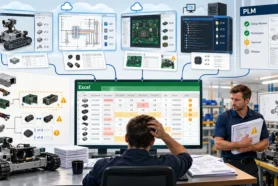
Yesterday, I wrote that AI agents will struggle in PLM and engineering environments if organizations cannot explain how their work actually happens. That article was about a very fundamental problem. Everyone is excited about AI. Everyone wants agents. But when the moment comes to define what the agent should actually do, many companies discover that the most important knowledge is still trapped in habits, exceptions, tribal memory, and undocumented decisions.
Today, I want to take the next step in that conversation.
I recently read Ilan Madjar’s article on The Future of AI Co-Working is Here, but Enterprise PLM Needs a Strategy. His core point resonated with me: the future of AI in engineering is not just about automation. It is about co-working. It is about software participating in the day-to-day flow of engineering activity in a way that is useful, contextual, and connected to how teams actually operate. But the part that matters most is not the framing. It is the strategy behind it — the governance, the access model, the shared conventions, and the consistent logic that makes an AI coworker actually reliable.
This is where many companies need to pause and ask a genuinely practical question: if we want an AI coworker operating around CAD files, what exactly do we expect that environment to support?
That is the real planning problem. And it does not begin with choosing a tool. It begins with describing the work.
Why CAD Files Are the Right Starting Point for AI Co-Working
For many years, engineering software has been built around storage, control, check-in/check-out, and process enforcement. Those things are still important. But they are not enough to describe what really happens in design work. Engineers spend their days finding files, opening assemblies, checking references, creating drawings, generating PDFs and STEP files, comparing revisions, fixing broken references, answering questions from manufacturing, and preparing information for handoff to downstream teams. This is not a side activity. This is the actual work.
So when I think about CAD File Agent and the concept of a CAD file co-working environment, I do not start from AI as a technology. I start from the work itself.
A design is never just a file. It is a collection of relationships. A part belongs to an assembly. A drawing documents a version of a model. A PDF or STEP file becomes the artifact that someone downstream will actually use. A revision is not just a formal record — it is the moment where a team says: this is what we mean now, this is what we are ready to share, and this is what others can trust.
When you look at engineering work through that lens, a co-working environment starts to take a very different shape. It becomes less about a smart interface and more about a system that understands context, continuity, and task flow.
If an AI agent can become useful inside CAD file management, it has a genuine chance to become useful across the rest of the workflow too. That is why this is the right place to start.
What a CAD File Co-Working Environment Should Actually Do
The first planning mistake most companies make is starting with the question: what prompts can I type? The right question is: what jobs around CAD files take time, create friction, or depend on too much manual effort right now?
The early opportunities are not abstract. They are very concrete. Find the right file. Understand which drawing belongs to which model. Check whether derivatives exist and are current. Generate missing PDFs or STEP files. Recognize what changed between revisions. Help prepare a release package. Organize information for BOM handoff. Surface missing metadata. Explain the assembly structure to someone who did not build it.
These are not futuristic scenarios. These are daily engineering activities that happen in almost every SOLIDWORKS team, regardless of company size or industry.
The first step in planning a CAD file co-working environment is to identify which of these tasks you want the agent to help with first. Not in theory, and not a comprehensive wishlist. This month. Which operations are repetitive? Which ones depend on tribal knowledge? Which ones cause delays when someone is out of the office?
Start there. That is the scope of the first meaningful version of your CAD file co-working environment.
Lessons from OpenBOM Workflows: Design Tasks, Derivatives, and Revisions
Over the years of building and supporting OpenBOM, we learned something important: customers do not struggle because they lack another database or another screen to manage files. They struggle because engineering work is dynamic, collaborative, and often fragmented across tools, folders, email threads, and people.
One of the most consistent lessons was this: data is important, but outputs are what move work forward.
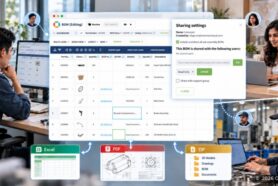
Drawings are outputs. PDFs are outputs. DXFs are outputs. STEP files are outputs. BOMs are outputs. Revision snapshots are outputs. Procurement and manufacturing rarely consume the native CAD model directly. They consume something prepared from it, combined with structure and context. This is why derivative generation is such a central part of the story. It is not an edge case. It is one of the most common forms of daily engineering work.
In many organizations, the process of managing derivatives is still informal. Someone remembers what to export. Someone knows which format a supplier needs. Someone checks whether the PDF is up to date before sending it. Someone manually renames files before attaching them to an email. None of this looks like a strategic problem until something breaks. Then everybody realizes how much quiet work depends on these small actions being done consistently, correctly, and by someone who knows the context.
A CAD file co-working environment should make that work visible and repeatable. That is the second planning step: define the outputs that matter, who consumes them, when they are needed, and what logic should govern their generation. Mapping that today will define what the agent should actually automate tomorrow.
The third step is to think carefully about revisions — and what they really represent.
Revisions are not just version records. They are moments of coordination. A revision captures a decision. It tells the team and its downstream partners that something has reached a point of stability, readiness, or communication intent. But the knowledge around a revision is often incomplete inside the system. Why was it revised? What changed — geometry, documentation, supplier substitution, or a manufacturing correction? Were the derivatives regenerated? Was the BOM updated at the same time? Did someone review the release package before it went out?
These questions are frequently answered somewhere outside the formal system, if they are answered at all. A co-working environment should help close that gap — not by replacing engineering judgment, but by helping collect, organize, and preserve the context that normally gets lost in folders, chat messages, and human memory.
How to Plan Your CAD File Management Environment for AI
OpenBOM has always been about more than storing data. The most meaningful part of structured engineering information is not the record itself. It is how the record participates in a workflow. Design tasks lead to structured items. Items become BOMs. BOMs connect to revisions, procurement, production, and service. Design projects involve file organization, collaboration with colleagues, and downstream handoff to teams who depend on what engineers prepare.
What we learned from our customers is that people need practical support at the moments of transition — when engineering work becomes something another person or another team will consume. That is where friction lives, and that is where a well-designed CAD file management environment can have the most immediate impact.
If I were advising a team how to plan its setup, I would suggest starting with five questions:
What design tasks do you want help with this month? Not in theory — but the ones your team actually performs every week that take too long or break too often.
Which outputs must be generated regularly, and who receives them? Knowing the destination changes what the agent needs to do.
How do you currently decide when a revision is ready? If the answer is ‘it depends on who you ask,’ that is exactly the kind of tribal knowledge a co-working environment should help formalize.
What context is repeatedly missing when someone reviews a design handoff? That missing context is what the environment should capture going forward.
What information do people ask for that is not captured in the file itself? Those are the gaps where memory fails and the agent can help.
These questions are not difficult to answer inside a team. But they are rarely written down. Writing them down is the planning act. It turns abstract AI ambition into a concrete scope.
In the beginning, the best CAD file co-working environment will not try to do everything. It will focus on a narrow but meaningful set of tasks — file understanding, derivative generation, revision support, and preparation of downstream information. In many companies, improving just those areas would save real time every week and prevent the kind of quiet errors that only show up during a customer escalation or a production delay.
The Future of BOM Review in an AI Co-Working Environment
Once a CAD file co-working environment is functioning, the next area becomes genuinely interesting: BOM review.
Today, BOM review is still treated too often as a static inspection process. Someone opens a table, scans rows, checks quantities, maybe compares revisions, looks for missing information, and tries to decide whether the structure is complete enough to move forward. Anyone who has been through real engineering releases knows that BOM review is never just about rows and columns. It is about context.
Why is this item here? What changed from the previous version? Which file or drawing supports it? Is the manufacturing representation complete? Are the right derivatives attached? Has anything been revised without a corresponding BOM update? Is this structure ready for purchasing, or only ready for internal design review?
These are not questions a table can answer by itself. They require a system that understands relationships — between files, revisions, items, and downstream consumers.
This is where the future becomes especially promising. BOM review can evolve from static verification into a contextual co-working process. Instead of only presenting a table, the system can help explain what changed, surface anomalies, identify missing outputs, connect revisions to file changes, and support a more conversational way to evaluate readiness. Not by replacing the engineer’s judgment — but by making the review faster, more complete, and closer to how people actually reason about product data when they are doing the job well.
That future does not begin with a large transformation project. It begins with understanding the work around CAD files — which is exactly where we started this conversation.
Test CAD File Agent for SOLIDWORKS
AI co-working in engineering will not succeed because a vendor describes it as intelligent. It will succeed when the environment is grounded in the real tasks engineers perform every day — the outputs they generate, the revisions they coordinate, the context they carry in their heads, and the downstream teams they need to support.
That is the path we are following with CAD File Agent for SOLIDWORKS. We are starting from the practical side of engineering work: files, structure, derivatives, revisions, and the information flow that connects design activity to BOMs and downstream processes. In my view, this is the right place to start if we want AI to become genuinely useful in engineering — not just impressive in demos.
If your team works with SOLIDWORKS and you are thinking about how AI co-working can help organize CAD files, support derivative generation, improve revision workflows, and prepare the foundation for better BOM review, I would invite you to test CAD File Agent for SOLIDWORKS and share your feedback with us.
Because in the end, the question is not whether AI can participate in engineering work.
The real question is whether we are prepared to teach it what that work actually is.
Best, Oleg
REGISTER FOR FREE to check how OpenBOM can help.
CONTACT US to talk about CAD File Agent.
Join our newsletter to receive a weekly portion of news, articles, and tips about OpenBOM and our community.