The demand for API usage has been growing dramatically in the last year. There are two observations here – an increased demand for integrations (eg. ERP) and ease of AI coding using platforms such as Claud Code or Codex.
In the past, OpenBOM has been providing API key by request – “contact support to get your API key.” But with the changes of OpenBOM subscription model, you can now start using OpenBOM by subscribing to monthly with one seat and integration with low price.
Which creates an interesting opportunity for everyone who is looking how to organize a programmatic data exchange with BOMs and files downstream to production, shopflow or supply chain.
With the August 2026 update, you don’t need to contact OpenBOM anymore for API access. You just need to register for OpenBOM, purchase it monthly and that’s it. Team administrators can now create and manage the team’s OpenBOM API keys directly from the Administration Dashboard, without contacting OpenBOM support.
API Access Is Now an Admin Function, Not a Support Request
The new API Keys section in the Administration Dashboard gives admins a self-service dashboard and the ability to create API key and secret pairs for team members. Each key and secret pair authenticates as a specific user and inherits that user’s workspace permissions, so API access follows the same access model your team already manages. The integration authenticates with the access key ID and secret key in the Authorization header.
This makes it easier to set up integrations, automation scripts, and other workflows for Public APIs, exactly when your developers need them, not when a support queue clears.
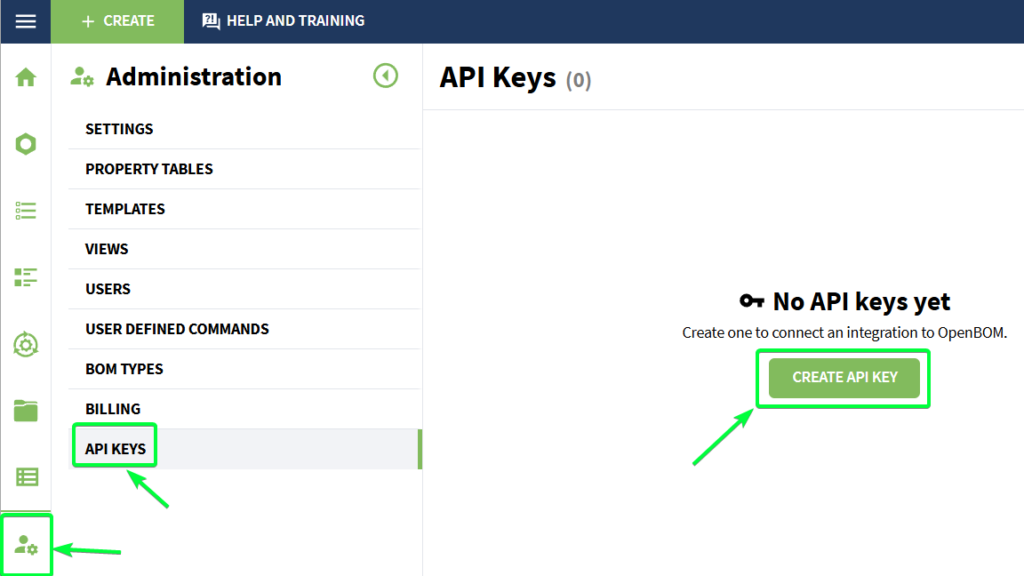
API Keys section in the Administration Dashboard with Create API Key

Create API key dialog with user email and description
Security Is Built Into the Key Lifecycle
For security, the secret is shown only once during key creation. After the dialog is closed, only the access key ID remains available, so the secret should be copied and stored securely at the moment it is created. This matches the pattern developers expect from modern SaaS platforms.
Admins can also manage existing keys from the same page, including activating, deactivating, revoking, and deleting keys when access needs to change. Deleted keys are no longer available and cannot be used. When a team member leaves, when a script is retired, or when a key may have been exposed, the admin resolves it in seconds from the same dashboard.
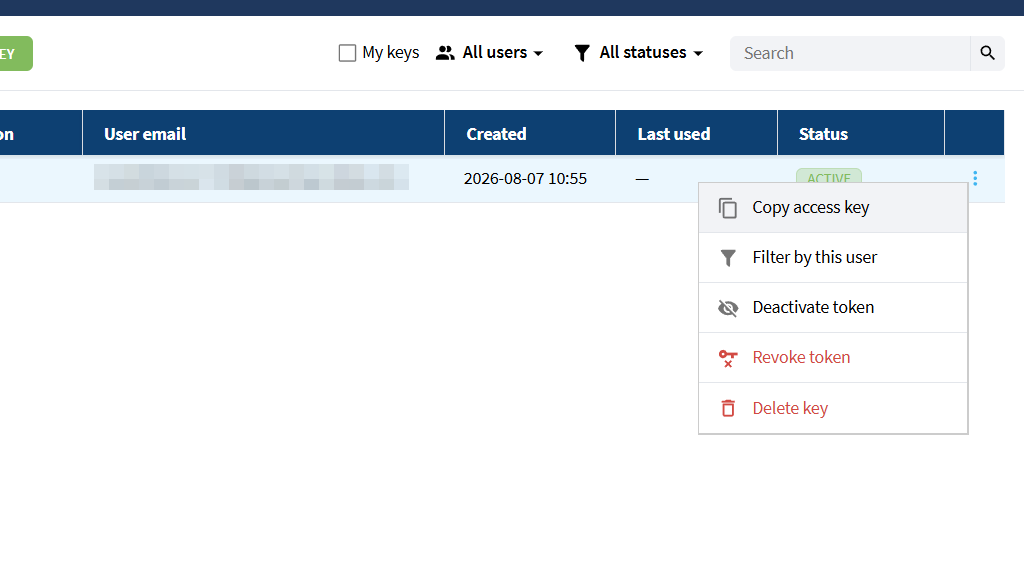
Key management actions: copy access key, deactivate, revoke, delete
Why We Did It
We are making OpenBOM more affordable and accessible to start. A new business model which relies on usage rather than expensive seats is available now. Minimum seat requirements are gone. You can start small and expand. API key was a remaining function to unlock customer creativity and work.
The Public API is how OpenBOM connects to the rest of your business: ERP synchronization, automation scripts, custom reports, and the growing set of integration workflows our customers build. But an API is only as accessible as its slowest step, and for too long that step was a manual key request through support.
Self-service key management does two things. It removes the friction between “we want to integrate” and “we are integrating,” which for a developer can be the difference between building today and deferring the project. And it puts key governance where it belongs: in the hands of your team admin, with full visibility into who has keys, when they were created, when they were last used, and the power to revoke access instantly. Faster for developers, safer for the company.
Alongside key management, this release also improves Public API behavior itself. Empty BOM rows can now be removed when deleting rows with an empty Part Number, and BOM property updates inherited from Catalog properties handle unsupported updates more clearly rather than returning a successful response without changing the BOM.
How It Works
- Open the Administration Dashboard.
- Go to the API Keys section.
- Create a new API key for a team member.
- Copy and securely store the secret when it is shown.
- Review existing keys in the API Keys list.
- Activate, deactivate, revoke, or delete keys when needed.
- Use the OpenBOM Public API documentation to review available API methods and authentication details.
Public API documentation is available in the OpenBOM Swagger documentation at https://developer-api.openbom.com/openapi.
FAQ
How do I get an OpenBOM API key? A team administrator creates it in the Administration Dashboard under the API Keys section. There is no need to contact OpenBOM support. The admin selects a team member, generates a key and secret pair, and the integration authenticates with the access key ID and secret key in the Authorization header.
What permissions does an OpenBOM API key have? Each key and secret pair authenticates as a specific user and inherits that user’s workspace permissions, so API access follows the same access model the team already manages in OpenBOM.
Can I see the API secret again after creating the key? No. For security, the secret is shown only once during key creation. After the dialog is closed, only the access key ID remains available, so the secret should be copied and stored securely when it is created.
How do I revoke or disable an OpenBOM API key? Admins manage existing keys from the API Keys page, including activating, deactivating, revoking, and deleting keys. Deleted keys are no longer available and cannot be used.
Where is the OpenBOM Public API documented? Public API documentation is available in the OpenBOM Swagger documentation at https://developer-api.openbom.com/openapi.
Conclusion
Self-service API key management gives your team instant, governed access to the OpenBOM Public API. Developers get keys in seconds instead of support tickets, and admins get full lifecycle control over every key the team uses. If your roadmap includes integrations, automation, or connecting OpenBOM to the rest of your toolchain, the door is now open the moment you decide to walk through it.
REGISTER FOR FREE and purchase OpenBOM monthly for one seat to experiment with API.
Best, Oleg
Join our newsletter to receive a weekly portion of news, articles, and tips about OpenBOM and our community.