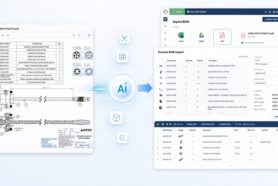
As we move into the summer, we’re excited to share several new updates and improvements in the May 2025 OpenBOM release. This update focuses on user experience enhancements, smarter CAD and ERP integrations, AI support workflows, and new features for better collaboration and automation. Let’s dive into what’s new.
General Improvements
Support for More Import Level Formats
One of our most requested import features is here! OpenBOM now supports Numeric Level Depth indicators (e.g., 1, 2, 3) in addition to the existing Decimal Level format. This improvement gives you greater flexibility when importing multi-level BOMs from spreadsheets. A reference chart in the UI guides users during conversion, simplifying your onboarding and integration workflows.
A reference chart is now available in the user interface to help you understand how the conversion works and what your imported structure will look like. Whether your BOM looks like this:
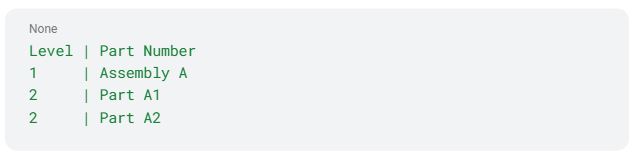
Or like this:

OpenBOM will interpret and build the correct multi-level structure in your BOM automatically.
Change Request Dialog – Now Clearly Shows “Revision”
We’ve updated the Create Change Request dialog to clearly display the Revision property being created. No more guessing — you’ll now see exactly what revision is being proposed, improving clarity in your change management process.

Ask to Share When Submitting a Ticket
When submitting a support ticket via the online Support button, OpenBOM now includes a simple prompt asking if you’d like to share the related BOM or document. This small addition significantly reduces back-and-forth and helps us resolve your issues faster by giving our team immediate access to the right data.

AI and Automation
We’re continuing to lay the groundwork for OpenBOM’s upcoming AI Agent capabilities. Enhanced import handling, smarter context recognition, and support workflows are now more efficient and ready for automation — setting the stage for what’s next.
- Invisible, Context-Aware Support
The Agent works quietly in the background loading files, generating BOMs, estimating costs—without needing explicit commands or setup. OpenBOM AI adapts to your workflow, not the other way around. - Understands Engineering Files
Engineering still runs on files. The Agent is built to read and understand spreadsheets, PDFs, ZIPs, and CAD data, turning legacy documents into structured knowledge without manual effort. - Engineer-Centric Automation
Traditional workflows are rigid. OpenBOM AI Agent introduces lightweight, flexible processes that can be triggered by data, files, actions, and events. It connects to your tools using modern APIs and OpenBOM’s BOM MCP protocol. - Conversational Product Intelligence
Ask questions like “Why was this part deprecated?” or “What designs use this component?” and get meaningful answers. Powered by OpenBOM’s graph-based digital thread, the Agent speaks your product language.
To read more about what OpenBOM does check the following articles and OpenBOM AI Agent announcements.
- BOM AI Agent – A New Approach to Intelligent, Invisible Engineering Workflows
- Turning OpenBOM Into an Invisible AI Agent
- BOM AI Agent That Speaks Files
- Rethinking Engineering Workflows: A BOM Agent That “Speaks” Files and Works for You
- Product Memory and Conversational Intelligence For BOM Change, RFQ, Cost, And Procurement
We are interested in working with customers on the ongoing development of OpenBOM AI Agent. Please contact us directly via support.
CAD Integrations
Autodesk Fusion – Electronics/PCB Initial Release
We’re excited to announce the initial support for Autodesk Fusion Electronics and PCB workflows. Now you can streamline the entire procurement and inventory process, starting from PCB design.
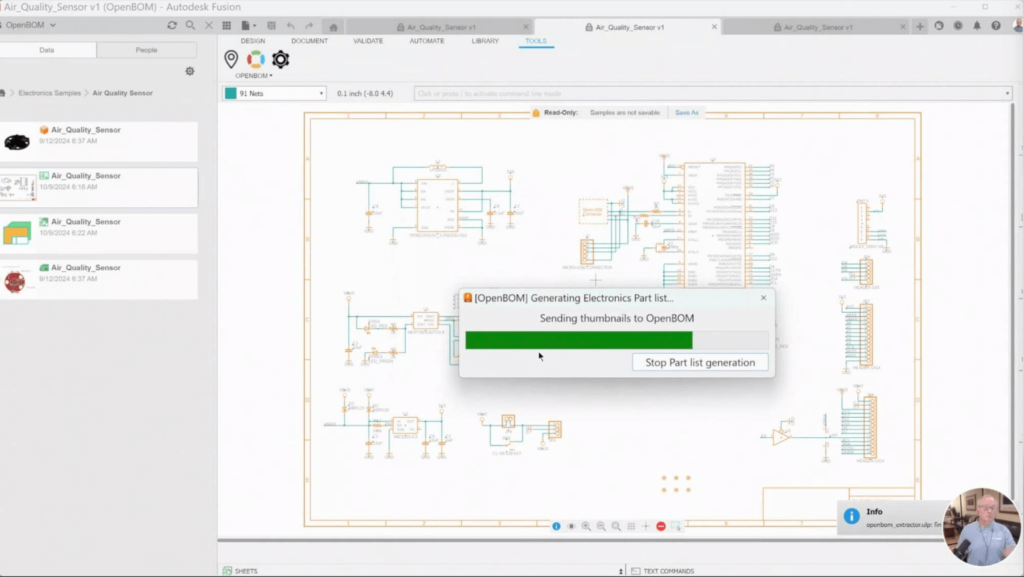
Read the Blog for more information about what we did and watch the video with the demo.
Autodesk Fusion – Flatten BOM on Drawing
A powerful enhancement — you can now add a Flattened BOM to Fusion drawings, making it easy to generate documentation directly from design.

Read the Blog for more information about what we did and watch the video with the demo.
Siemens NX Add-In – Suppressed Items Support
Our most recent CAD integration release continues to receive important updates.
We’ve improved our Siemens NX integration by ignoring suppressed components during BOM generation. This ensures only relevant parts make it into your OpenBOM product structure.

PTC Onshape – Smarter Part Number Generation
We continue to improve OpenBOM integrated applications for PTC Onshape.
Part Number generation in Onshape just got smarter.
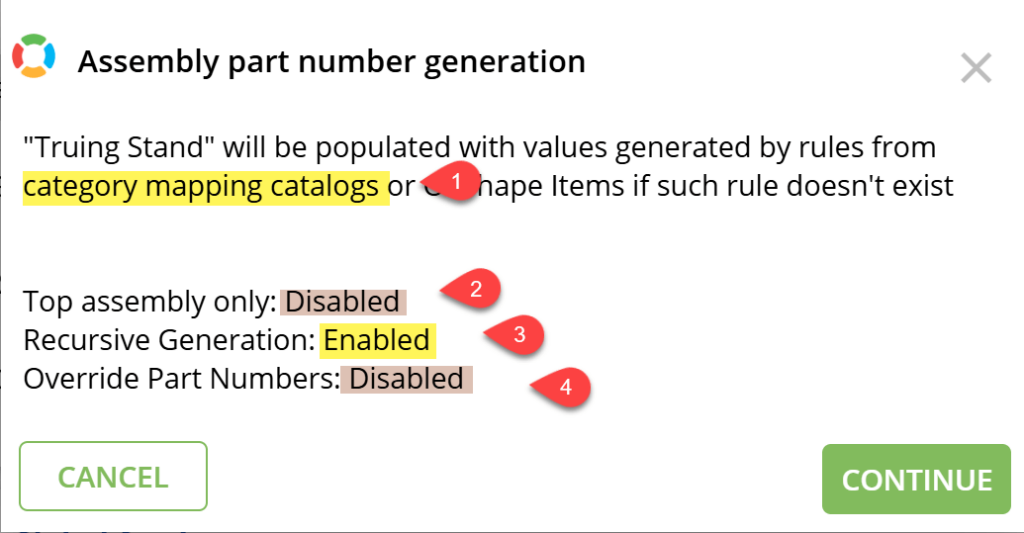
In the pre-action dialog below, you can see that OpenBOM will:
- Respects Category Mapping
- Supports recursion through the full assembly
- Leaves existing part numbers untouched
We’ve also enhanced the Quick Start Pre-Action Dialog to better explain what will happen during import — including part numbering logic, BOM templates, and catalog creation.

All CAD Integrations – Smarter Workflows
- No BOMs are created for empty assemblies, allowing you to master BOMs in another system (e.g., a PCB in SolidWorks suppressed but mastered in Altium).
- Improved Locate operation for easier BOM search and retrieval.
- Enhanced Product Structure validation catches issues like duplicate part numbers and incorrect configurations before BOM generation.
OpenBOM – ERP Integrations
NetSuite – Automatic ZIP for Large Files
To better handle large datasets, OpenBOM’s NetSuite integration now automatically zips large files, ensuring smoother uploads and reduced errors in processing.
Fixes and Miscellaneous Improvements
- Fixed a rare case where an extra line appeared after a CAD operation
- Resolved a crash with older Altium builds
- Fixed an Onshape bug where drawings weren’t found
- Improved UI — fixed the Graph flyout panel blocking the horizontal scrollbar
- Improved MFA login error handling across CAD integrations
Conclusion
We hope you enjoy these improvements and look forward to your feedback. As always, thank you for being a part of the OpenBOM community — and stay tuned for even more AI-powered capabilities coming soon!
Best, Oleg
Join our newsletter to receive a weekly portion of news, articles, and tips about OpenBOM and our community.