
Accessing the right information at the right time is a paramount requirement for all engineering and manufacturing teams. I’m super excited about the new user experience improvement in the coming update of OpenBOM. When accessing a Bill of Materials (BOM), the default mode was to access a BOM “latest state for edit”. We’ve heard from many customers and users to control access to it in the last revision. In many use cases, it prevents an extra click or two.
We heard you. And we’re making it better.

Open the Most Recent BOM Revision by Default
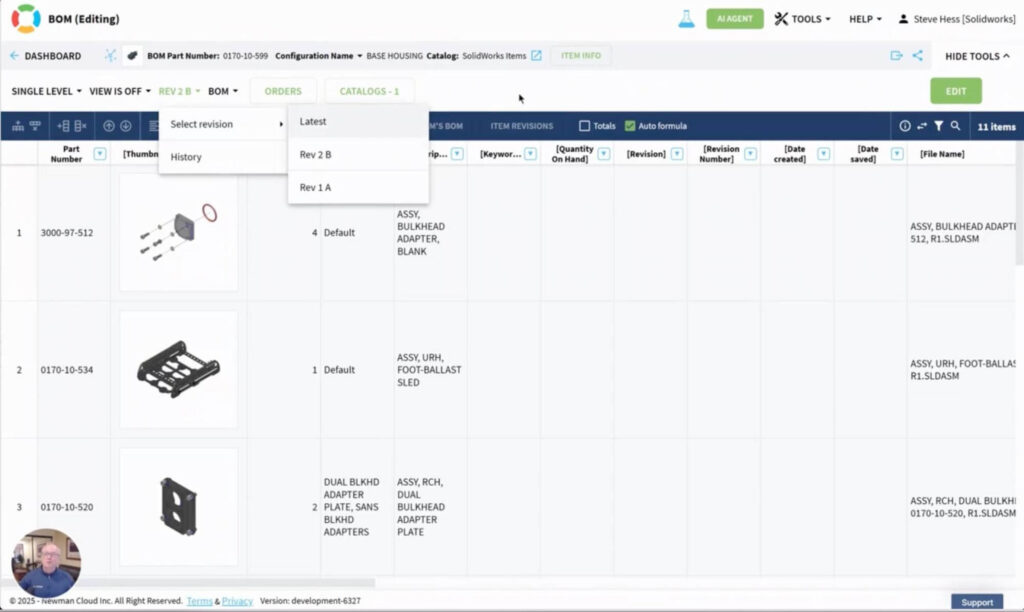
Starting with the coming April release, OpenBOM introduces a simple new setting: Open BOM in the Most Recent Revision by Default.
No more clicking through editable “latest” state and by mistake editing the Bill of Materials. Once enabled by your team administrator, this setting ensures that every BOM with multiple revisions automatically opens in its latest revision — instantly and consistently.
✅ If your latest revision is Rev B, that’s what you’ll see — not Rev A, not Rev 0. Just the right one, right away. And when you need to edit a BOM, you can click on the “Edit” button to switch into the “latest” state.
How It Works
This feature is controlled at the team level by your administrator. To enable it:
- Open Team Administrator Settings.
- Find the toggle labeled Open BOM in the Most Recent Revision by Default.
- Turn it on.
That’s it. From then on, all team members will land on the most current revision when opening a BOM. Watch the video to see a demo of how it works.
Why It Matters
Here’s how this small change can make a big difference:
- Always Read Only: Eliminate the risks of editing a BOM when viewing
- Save Time: Skip the extra clicks. OpenBOM brings you straight to the latest rev.
- Team Alignment: Ensure every team member is viewing the same, most updated released information (more people are consuming data, actually)
- Secured Editing: Tap “Edit” and start working — right in the latest revision.
This improvement is part of our ongoing effort to reduce friction and simplify data access.
NOTE: In the future, we will allow a new role at OpenBOM for users that are only supposed to see released information (and not the latest edits).
📅 When Is It Available?
The feature will be live in the April release, rolling out next week. Be sure to ask your team administrator to enable the setting to get the benefits immediately.
Conclusion and Final Thoughts
The new Open BOM in the Most Recent Revision by Default option might seem small, but it packs a big punch for everyday efficiency. It’s another step toward making OpenBOM smarter, more intuitive, and more aligned with the way teams work.
Keep an eye on our release notes and blog for more updates coming soon. As always — thanks for being part of the OpenBOM journey!
REGISTER FOR FREE and check how OpenBOM can help you.
Best, Oleg
Join our newsletter to receive a weekly portion of news, articles, and tips about OpenBOM and our community.