
What is product data management, once you leave the acronym behind? For us, it starts as three records that must stay distinct: the Item’s identity, the quantity of that Item on one BOM, and the revision that applies to a specific build. Mix those three and purchasing orders the wrong part, or the right part at the wrong state. This article is about the data model that supports it. It is not a definition of PDM software, and it is not a comparison of PDM and PLM.
We use one illustrative product throughout: a roller conveyor, CNV-1000, built for a small packaging line. Nothing here is a customer result. The numbers are a teaching example with the assumptions stated.
What Is Product Data Management at the Record Level?
What is product data management in daily engineering work? It is the practice of keeping each fact about a product on the record that owns it. In our model, three facts get their own records. Each one answers a different question.
Identity answers which thing this is. Quantity answers how many of that thing this structure uses. Revision answers which approved state of that thing applies to this build.
A spreadsheet usually bundle all three in one row – simple and dirty. The part number, the count, and a note like “A” sit side by side. That row looks complete. It is not. The part number is a catalog artifact. The count is a use of that part on one assembly. The revision is a point in the part’s history. These properties can appear in the BOM, while remaining connected to the catalog Item. The distinction concerns data structure and model, not visibility.
| Record | Question it answers | Where it lives | What must not live here |
|---|---|---|---|
| Item identity | Which reusable thing is this? | Catalog Item, with its own identifiers | How many this BOM uses, or which build it belongs to |
| Usage quantity | How many of that Item does this BOM use? | The Item’s row on a specific BOM | The Item’s name, cost, or approved state |
| Revision | Which state applies to this build? | A saved Item or BOM revision | Not a promise that the newest save is approved |
Our core product model separates the Item, the Item’s use in a structure, and the revision for the same reason. This article stays on the practical consequence: which record you edit, and which you leave alone.
Why Should Item Identity Stay Off the BOM Row?
An Item is a reusable engineering identity. It is not a CAD file, and it is not a row in a BOM. One file can feed several Items. One Item can have several representations. Some Items, such as a purchased fastener or a firmware build, have no CAD file at all.
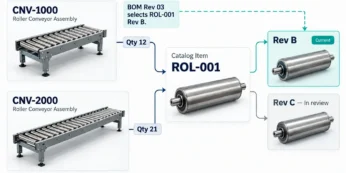
On CNV-1000 the drive roller is Item ROL-001. The catalog holds what is true about that roller no matter where it is used: description, unit of measure, manufacturer, and our internal part number. The next conveyor, CNV-2000, uses the same roller. It does not get a second Item. It gets another use of ROL-001.
Identifiers are not interchangeable. We keep four of them distinct and map them:
- Internal part number: ROL-001, the identity our team owns.
- Manufacturer part number: the number printed on the roller maker’s drawing.
- Supplier part number: the number our distributor uses to sell that roller.
- ERP item number: the number the receiving system uses after we publish mapped data.
If a buyer pastes the supplier number into the internal field, where-used breaks. The roller still exists. The graph can no longer find every place it is used. We check for duplicate internal numbers at the company catalog, and each catalog can use its own numbering template. The part-number setup is a catalog concern, not a BOM-row concern.
Identity also survives a drawing change. If the roller OD changes and we issue a new revision of ROL-001, the part number stays. A new part number is a new Item, and we only create one when the roller is no longer interchangeable.
Where Does Quantity Belong on a BOM?
Quantity belongs to the Item’s use in a specific BOM. It does not belong to the Item. ROL-001 does not “have a quantity” in the catalog. CNV-1000 uses 16 of them. CNV-2000, a longer frame, uses 24. Both sentences can be true on the same day.
That split is what a single spreadsheet row hides. Someone updates the roller count on CNV-1000 and, because the count lived next to the part number, the shared row now says 24 for every conveyor. Purchasing then buys eight extra rollers for a machine that does not need them.
Here is the small calculation we use when we teach this. Assumptions: one CNV-1000 uses 16 rollers; we are building 3 machines; quantity on hand is 20; we are not ignoring on-hand stock.
- Usage on one BOM: 16 rollers, stored on the CNV-1000 row, not on ROL-001.
- Demand for this order: 3 machines times 16 rollers = 48.
- Gap against quantity on hand: 48 minus 20 = 28 to buy.
Quantity on hand is a simple inventory field on the catalog Item. It is not an allocation. We do not reserve those 20 rollers for this job. If they are already committed elsewhere, the buyer turns on Ignore QOH and the gap becomes 48. That toggle is a workaround, not a reservation engine.
A filtered view is not a new structure either. Hiding the cost column, or hiding fasteners, does not create a manufacturing BOM. If manufacturing needs a different structure, that is a different BOM, with its own quantities. EBOM-to-MBOM conversion is not automatic. Our guide to how many BOMs you need covers when a second structure is justified. This article only insists that each structure carries its own quantities.
How Is a Revision Different From a Save or an Approval?
A file version, a revision, and an approval are three different events. Saving the roller model creates a file version. Creating a revision records a state of the Item or the BOM. Approval is a decision that this state may be used. None of those steps is the other.
We do not tell purchasing to “use the latest.” Latest is whatever someone saved last. We name the revision that applies to this build. For the three CNV-1000 machines in the example, that is ROL-001 revision B, the state released after the fit review. Revision C may already exist because engineering lengthened the shaft for a prototype. Those three machines do not get revision C.
Basic revision history is simple, and it is not by itself a controlled process. When change management is turned on, a change request replaces a casual “save revision,” and sign-off sits on a dashboard with role-based approval. That controlled path is a Company-plan capability. Teams that have not enabled it still have revision history. They do not yet have a governed release.
Our item revision write-up covers how Item revisions sit beside BOM revisions. The rule to remember here is narrower: the revision you name is the one this build is allowed to use, not the newest row in the history.
What Goes Wrong When One Spreadsheet Row Holds All Three?
Put the three facts back into one row and each failure has a different owner. We see the same four in spreadsheet BOMs that grew up next to the CAD model.
- Identity overwritten. A buyer types the distributor’s number over ROL-001. The roller is now invisible to where-used, and a second Item gets created for the same physical part.
- Quantity copied to the wrong structure. CNV-2000’s 24 rollers land on CNV-1000 because both assemblies shared a row. The gap calculation becomes 3 times 24 = 72, minus 20 on hand, so someone orders 52.
- Latest treated as released. Revision C of the shaft is in the model. The released machines still call for revision B. “Use latest” ships the prototype shaft.
- Export treated as live data. An Excel file mailed on Monday is a snapshot. Tuesday’s quantity change is not in it. The supplier builds Monday’s numbers.
None of these is fixed by a better color code in the sheet. Each one is fixed by putting the fact on the record that owns it, then pointing purchasing at a released revision rather than at a file.
How Do We Keep the Three Records Apart in One Workflow?
Here is the same conveyor, walked once from design to a purchase, with each action on its own record. The example is illustrative.
1. Create the identity once. Engineering adds ROL-001 to the roller catalog: description, unit each, manufacturer, and our part number. No quantity. No build. If the CAD model exists, it is a representation attached to the Item, not the Item itself.
2. Use the Item on a BOM. CNV-1000 gets a row that references ROL-001 with quantity 16. CNV-2000 gets its own row with quantity 24. Editing 16 does not edit 24, and neither edit changes the catalog.
3. Manage the revision for this build. After the fit review, we save ROL-001 revision B and the CNV-1000 BOM revision that contains it. We do not call it latest. We call it the revision applicable to the three-machine order.
4. Approve before anyone buys. If change management is enabled, a change request and sign-off replace a bare save. If it is not enabled, the team still has to say, in writing, which revision this order uses. A save is not that sentence.
5. Buy from the released revision. We create an Order BOM from the released revision of CNV-1000, for a build quantity of 3. The Order BOM rolls the structure up: 3 times 16 = 48 rollers. Quantity on hand is 20, so the gap is 28. The purchase order is generated for that gap, for the preferred vendor on ROL-001.
Two checks close the loop. First, where-used on ROL-001 still lists both conveyors, which proves the identity was not forked. Second, the Order BOM names revision B, which proves purchasing did not pick up revision C. Publishing mapped item data to an ERP is a separate step, and we verify what the receiving system stored. A successful publish is not the same as a match.
The commercial overview of this workspace is on our BOM management page. The same-section background on structures is in BOM types, formats, and examples. Both sit in BOM and PLM Fundamentals, which is the section this article belongs to, alongside the PLM and BOM Management hub.
See How Revision Control Works
Frequently Asked Questions
Is the Item the same thing as its CAD file?
No. The Item is the reusable identity. The CAD file is one representation of that identity. A purchased roller can be an Item with no file. One assembly file can also feed more than one Item if the product breaks into separate identities.
Can one Item have two quantities at once?
Yes. Quantity is not a property of the Item. CNV-1000 can use 16 of ROL-001 while CNV-2000 uses 24. Each quantity lives on that BOM’s row. The catalog Item has neither number.
Does “latest revision” mean the one we should buy?
No. Latest usually means the newest save. Purchasing needs the revision applicable to this build, which may be older than the one engineering has open for a prototype. Approval is a further step. A revision can exist before anyone has approved it.
Does a filtered BOM create a manufacturing structure?
No. Hiding columns or hiding rows does not make an MBOM. A manufacturing structure is a different BOM with its own uses and its own quantities. We do not treat a filter as that transformation.
Can we order from a released revision instead of the live BOM?
Yes. We support an Order BOM created from a released revision, so the purchase stays tied to the approved definition. The Order BOM aggregates required quantities from the build quantity and the multi-level structure. It does not allocate inventory, and it is not a production schedule.
Put Each Fact on the Record That Owns It
Product data stays trustworthy when identity, quantity, and revision are three records. The catalog owns who the part is. The BOM row owns how many this structure uses. The named revision owns which state this build may use. Get those three right on something as ordinary as a conveyor roller, and the purchase order has a chance of matching the machine you meant to build.
Join our newsletter to receive a weekly portion of news, articles, and tips about OpenBOM and our community.