Modern products are no longer just mechanical. A smart appliance, an industrial machine, or an electric vehicle all combine mechanical parts, electronics, and software. That mix creates a practical problem for engineering teams: how do you manage everything together in one reliable Bill of Materials (BOM)?
In the OpenBOM webinar, “When Software Meets the BOM: Managing Mechanical, Electronics & Code Together,” we looked at why traditional BOM methods no longer work well and showed how OpenBOM connects mechanical, electronic, and software components in a single digital BOM.
The Traditional BOM Challenge
For years, product development relied on a simple hierarchy. A BOM looked like a tree:
- A product contains assemblies
- Assemblies contain subassemblies
- Subassemblies contain components
This structure works for straightforward physical products. But once multiple engineering disciplines get involved, things start to break down.
Each team usually works in its own tools:
- Mechanical engineers use MCAD systems
- Electrical engineers work in ECAD tools
- Software teams rely on source control and development platforms
The result is scattered product data. Information lives in CAD systems, spreadsheets, PLM tools, and software repositories. Teams end up syncing data by hand, which leads to mistakes, delays, and mismatched information.
What Happens When Software Enters the BOM
Things get more complicated once software becomes part of the product.
Modern products include three major layers:
- Mechanical structures such as housings and assemblies
- Electronic components like PCBs, chips, connectors, and wiring
- Software systems including firmware, operating systems, drivers, and applications
Software is usually managed in specialized development and lifecycle tools. Information about it often comes from systems like Jira, GitHub, GitLab, or other ALM platforms.
OpenBOM can bring that data into the digital BOM in several ways. Software information can be synced from development systems, captured from workflows, or connected through the OpenBOM API. That allows automated links between software repositories and the product structure.
Software also introduces challenges that traditional BOMs were never designed to handle:
- Versioning and dependencies
- Continuous updates and releases
- Multiple configurations and environments
A static hierarchical BOM struggles to represent these relationships. Software doesn’t behave like a physical part. It changes constantly and often depends on external libraries and packages.
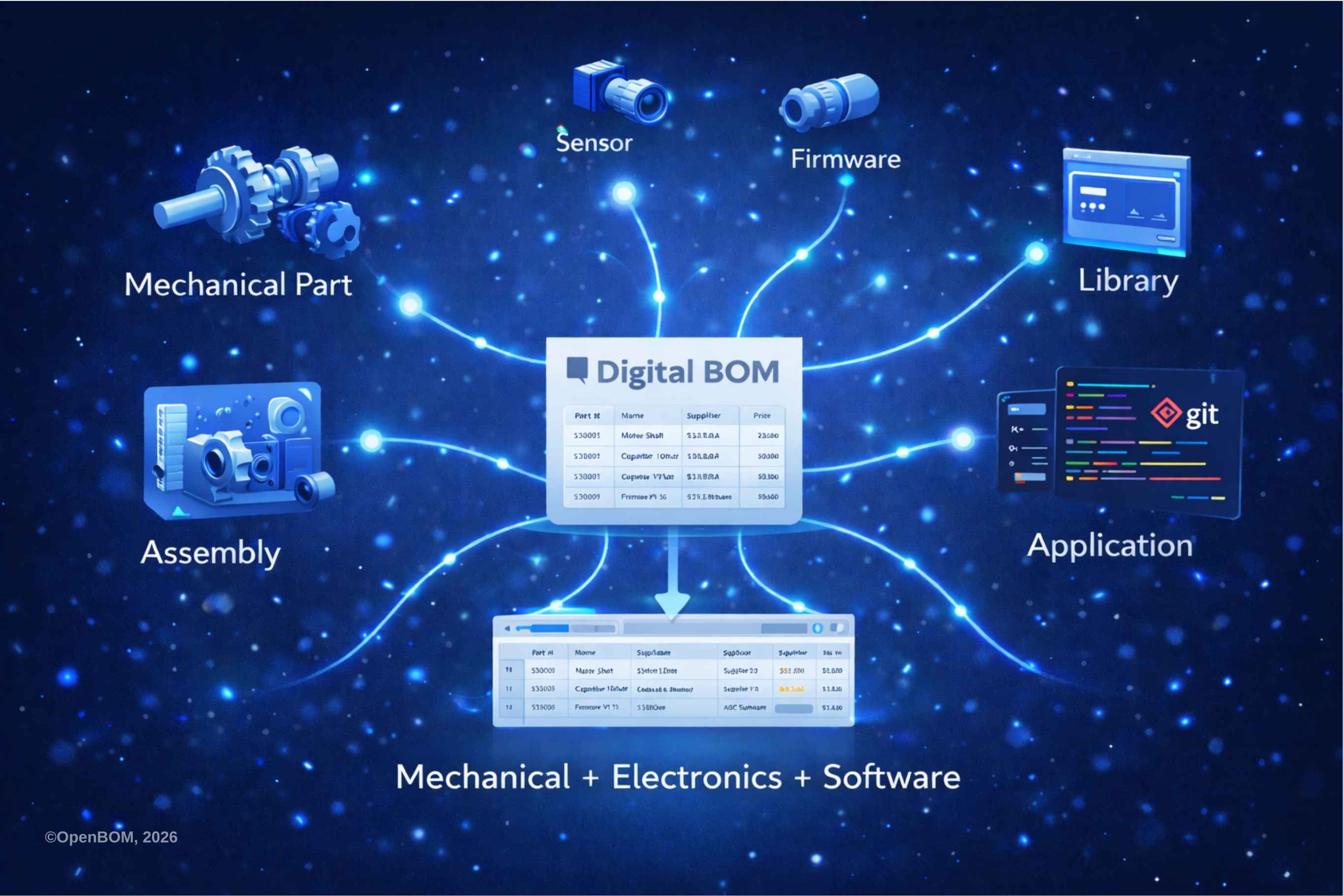
Because of that, companies increasingly need a digital BOM that connects mechanical, electronic, and software data while letting each team continue using its own tools.
Moving Beyond Hierarchies: Product Memory
OpenBOM approaches this problem differently. Instead of relying only on hierarchies, it uses a graph-based model called product memory.
In this model, every component becomes an item in the system—whether it’s a mechanical part, an electronic component, or a software module.
Items are connected through relationships that describe how they interact. For example:
- A component is used in an assembly
- A circuit board is installed in a housing
- Firmware runs on a processor
- A software package depends on another library
This model makes it easier to represent complex cross-discipline dependencies and build a more accurate product structure.
OpenBOM also records the history of product data automatically. It tracks changes, updates, and user actions over time. The system stores revision snapshots and baselines so teams can see how a product evolves.
Together, these relationships, history records, and revision snapshots create what OpenBOM calls product memory—a complete record of the product and how it has changed.
OpenBOM Demo: Managing Mechanical, Electronics, and Software Together
During the webinar demo, we showed how teams can manage a unified digital BOM that includes all three domains.
Master Baseline and Collaborative Workspace
OpenBOM provides a master baseline where product data from multiple sources can come together. Mechanical BOMs and electronic BOMs can be managed in the same workspace.
Once everything is visible in one place, teams across disciplines start working from the same product definition.
Extending the BOM to Software
The same environment can include software BOMs as well.
Software components can appear as items in the BOM and link to:
- Hardware platforms
- Firmware modules
- Libraries and packages
- Documentation and repositories
This treats software as a real product component instead of something tracked separately.
Managing Versions and Updates
Software changes frequently, so version control matters.
OpenBOM helps track:
- Software releases and versions
- Dependencies between components
- Revision history
- Changes across mechanical, electronic, and software items
When something changes, the system keeps a full history. Teams can trace the change and understand what else it affects.
Understanding Product Relationships
One of the most useful aspects of OpenBOM is visibility into product relationships.
With a unified digital BOM, teams can quickly see:
- Where a component is used across products and assemblies
- Related documents and design files
- Revision history
- Inventory and supply chain data
Instead of isolated pieces of information, the product becomes a connected system. That is the foundation of product memory.
Webinar Recording
Watch the full webinar recording:
Conclusion: The Future of Digital BOM Management
The main takeaway from the webinar is simple: the traditional BOM no longer fits modern products.
Today’s products combine mechanical systems, electronics, and software. Each discipline uses different tools and workflows. Managing that complexity requires a digital BOM that connects all parts of the product.
OpenBOM’s product memory approach helps companies:
- Treat hardware and software as part of the same product structure
- Maintain traceable relationships between components
- Support collaboration across mechanical, electrical, and software teams
- Manage product data as it evolves
- Preserve change history through revisions and baselines
Modern BOM management also needs to connect engineering tools. Mechanical teams use MCAD systems. Electronics engineers rely on ECAD and PCB tools. Product and software data often lives in PDM and ALM environments.
OpenBOM acts as the layer that links these systems together. It integrates data from MCAD, ECAD, PCB, PDM, and ALM platforms without forcing teams to abandon the tools they already use.
As products become smarter and more software-driven, managing mechanical, electronic, and software components in one digital BOM will become essential. OpenBOM’s product memory provides a practical way to connect product data, relationships, and history in one place.
REGISTER FOR FREE to check how OpenBOM can help.
Best, Oleg
Join our newsletter to receive a weekly portion of news, articles, and tips about OpenBOM and our community.