Welcome to the final OpenBOM release of 2025!
This December update reflects many of the patterns we consistently see when talking to customers: the BOM is rarely the problem at creation time, but coordination, review, file sharing, and integration almost always become painful later, especially when multiple people, tools, and organizations get involved. The features in this release focus on reducing that friction by keeping context, decisions, and execution closer to the data itself. That observation combined with our strategy to develop OpenBOM as an environment where teams can collaborate and work together brought OpenBOM Reviews.
Below is a walkthrough of what’s new, with a strong emphasis on how these changes support real engineering, manufacturing, and procurement workflows.
OpenBOM Review — Comments & Tasks
With this release, we are introducing Comments & Tasks as part of OpenBOM Review, a collaboration layer designed to bring conversations, questions, and action items back into the BOM instead of letting them leak into emails, chat threads, and spreadsheets that quickly lose context.
In many organizations, the hardest part of working with a BOM is not building the first structure, but aligning people before release or during a change. Questions about suppliers, costs, missing files, or unclear part choices often show up late, and the discussion around them becomes fragmented. Comments & Tasks are meant to address that moment by allowing teams to discuss and resolve issues directly where the data lives.

By tying comments and tasks to individual cells in Items, BOMs, and Orders, OpenBOM preserves the exact context of a discussion, which is often lost when people refer to “row 27” or attach screenshots or documents in emails. This makes reviews more precise and reduces back-and-forth clarification. Over time, it also creates a lightweight history of decisions that explains why something was accepted, changed, or delayed—something traditional PLM change records often fail to capture in a usable way.

The centralized Tasks Dashboard helps teams move away from personal to-do lists and scattered reminders toward a shared view of readiness. Instead of asking whether a BOM is “done,” teams can see what is still open, who owns it, and what is blocking release.

This is particularly valuable for cross-functional coordination between engineering, sourcing, and manufacturing planning, where visibility gaps are common.
Key Features
- Cell-based comments and tasks
- Review Panel in the spreadsheet view
- Centralized Tasks Dashboard
- Smart mentions with visual cues
- Unified filtering by assignment, mentions, status, and due dates
- Keyboard shortcuts and usability improvements
Export Linked Files for Selected Items
We’ve added a new Export Linked Files to ZIP option that allows users to package all files linked to selected items into a single archive, making it much easier to share exactly what is needed with suppliers, contract manufacturers, or the shop floor.
File sharing often becomes inefficient when teams either send too much—entire folders or full project exports—or too little, requiring follow-up requests and manual searching. This feature supports more intentional, item-level sharing without forcing teams to reorganize how files are stored.
In practice, many manufacturing delays come not from missing data, but from missing the right files at the right moment. This capability helps reduce that gap by allowing engineers or planners to quickly assemble a precise package of files associated with specific items, without exporting entire BOMs or manually collecting documents.
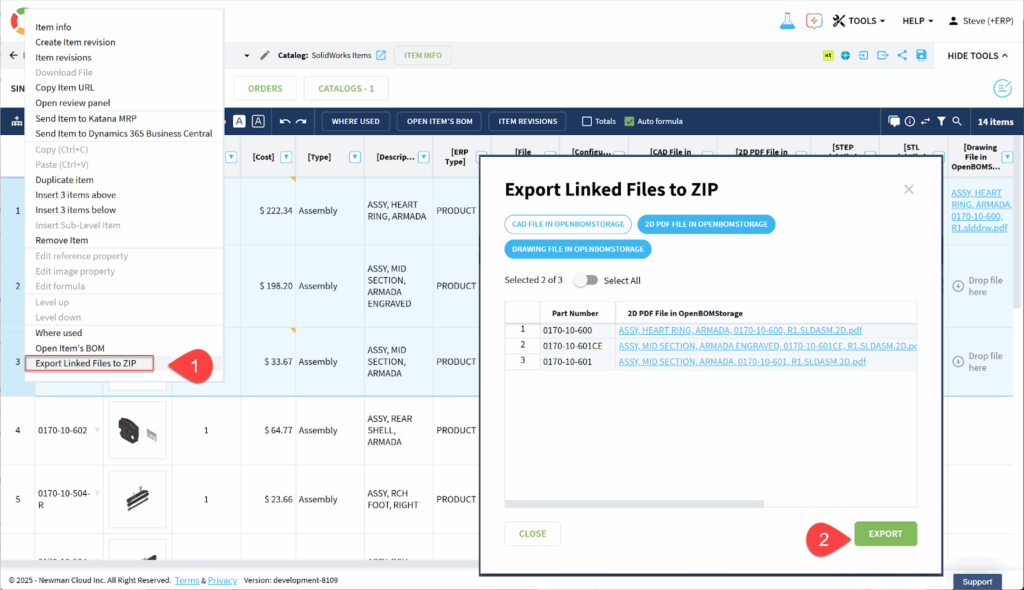
Because the export is driven by existing links in OpenBOM, it reinforces good data hygiene while still accommodating real-world workflows where files need to be shared outside the system. It also reduces the temptation to duplicate or re-store files elsewhere “just in case,” which often leads to version confusion later.
Key Features
- Context menu access from item lists
- Automatic detection of reference columns with files
- Filtering options before export
- One-click ZIP generation
Learn more about it in the following OpenBOM Article – “Can You Send Me the Files?” — We Just Made This Easier.
A video with a sample demo is here – Can you send me the files?
New Account CAD Installer Page
We introduced a new CAD Installer page as part of the OpenBOM account creation flow to simplify the first steps after registration and reduce friction for new users.
As a new account is being set up, users can immediately install the CAD integration they selected during registration, without navigating separate documentation or download pages.

The first hour with a new system often determines whether it feels approachable or frustrating. By embedding CAD installation directly into onboarding, OpenBOM helps teams move more quickly from evaluation to real data, which is especially important for engineers who want to see their BOMs synced before committing further time. This also reduces internal setup support for admins and IT, since the path from account creation to usable integration is clearer and more predictable.
BOM Compare — Refresh & Open in New Tab
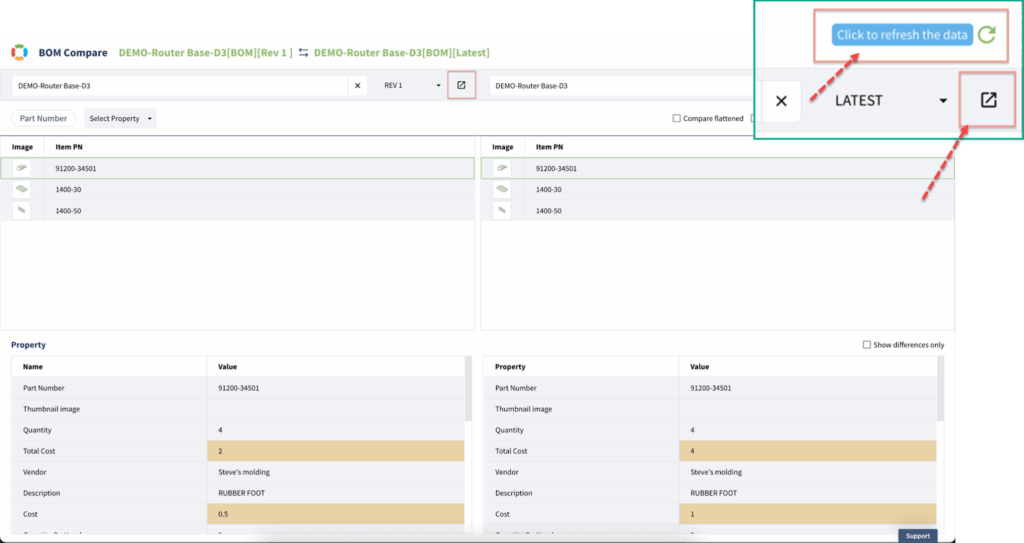
We added two small but meaningful enhancements to BOM Compare: a Refresh button and an Open in New Tab option.
Customers frequently work with BOM Compare alongside editing and review tasks, often across multiple browser tabs. Previously, refreshing comparisons meant re-selecting data or losing context. These updates make BOM Compare behave more like a working tool rather than a static report, which better matches how teams analyze changes while work is still in progress.
Key Features
- One-click refresh of comparisons
- Preservation of current comparison setup
- Open selected BOMs or revisions in a separate tab
OpenBOM Public API with Swagger (OpenAPI)
We released the OpenBOM Public API with full Swagger (OpenAPI) documentation, making it easier for developers and integration teams to explore, test, and build against OpenBOM in a structured way.
Many customers use OpenBOM as part of a broader ecosystem that includes CAD, ERP, purchasing systems, and internal tools. Clear API documentation lowers the barrier to automation and reduces reliance on custom scripts built through trial and error. By making the API contract explicit and testable, OpenBOM helps teams build integrations that are easier to maintain over time, which becomes increasingly important as data volumes and system interdependencies grow.

Key Capabilities
- Interactive endpoint exploration
- Clear request and response definitions
- Support for code generation across languages
- Reduced ambiguity during integration work
📹 Video walkthrough:
ERP Integration — Katana MRP
For the last six months we continued to enhance the number of out of the box ERP integrations. All these integrations are using a common integration framework that will become a foundation of OpenBOM ERP Integration AI Agent later in 2026.
The new integration coming this month is OpenBOM – Katana MRP, enabling structured BOM and item data to flow into manufacturing operations.
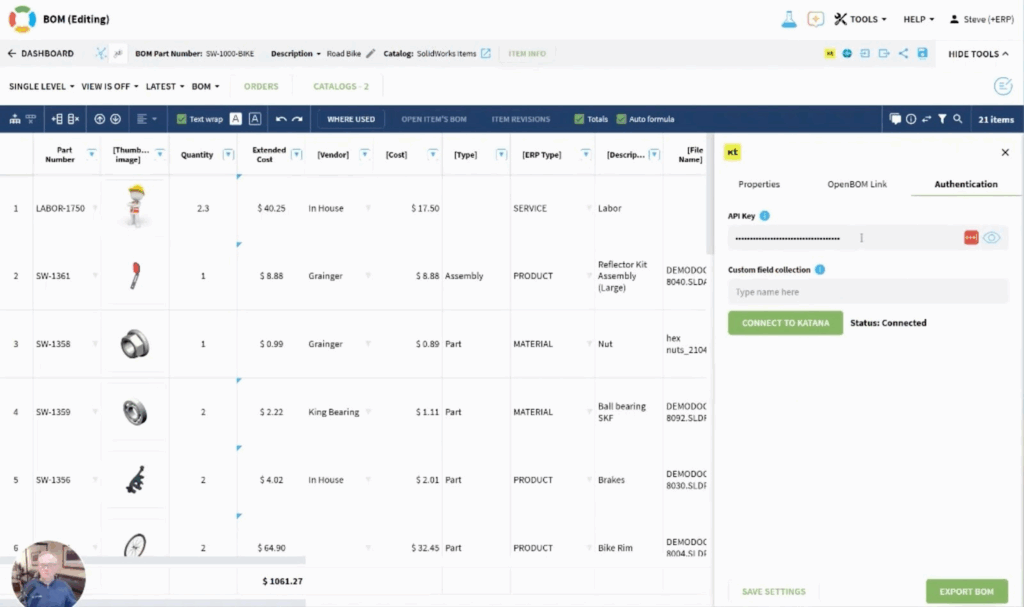
For many small and mid-size manufacturers, the challenge is not choosing between engineering and manufacturing systems, but keeping them aligned without duplicating effort. This integration reinforces OpenBOM’s role as a system of record for product structure, while allowing Katana to focus on execution and planning.
Read more about OpenBOM – Katana MRP integration in this article – OpenBOM For Katana MRP. 📹 Watch a quick demo in the following video.
CAD Integration Improvements
Onshape — Move Item to New Document
OpenBOM now correctly detects Onshape’s Move to New Document behavior and either updates items or warns about duplicates.
Users moving Onshape assemblies between Onshape Documents will appreciate this improvement. OpenBOM now, correctly, identifies parts and assemblies that have been moved using the Onshape “Move to new document” command. In this operation, Onshape actually copies and deletes the selected item from the local document and pastes it into a target document. OpenBOM now recognizes this condition and either performs an update as expected or notifies you if you are about to create a duplicate. In either case, you are informed and can take appropriate action if needed.

Cross-CAD Duplicate Awareness
This release enhances all CAD integrations’ awareness of BOMs & Items created by other CADs and Excel. For example, if you have a PCB BOM from Altium and a mechanical BOM from Onshape with the same part numbers, you will see a more informative message. In the example below, an Onshape user has used a part number for an item created in another system.

Public API — Purchase Order Retrieval
A new endpoint allows retrieval of a specific Purchase Order by ID.
Endpoint:
/purchaseorder/{poId}
This supports tighter integration between procurement workflows and external systems without requiring full data exports. Here is a link to the OpenBOM API.

Other Improvements and Bug Fixes
This release also includes numerous refinements that improve stability and predictability across everyday workflows, including QuickStart control improvements, better performance and messaging for Onshape users, spreadsheet importer corrections, and fixes across sourcing, APIs, UI behavior, and currency handling.
While individually small, these changes reflect ongoing attention to how OpenBOM behaves under real usage, especially when systems, data, and people intersect.
Conclusion and Closing Thoughts
The major enhancements of OpenBOM introduced in December 2025, was clearly the introduction of OpenBOM Review first Beta release. It introduces new collaborative capabilities in OpenBOM Collaborative Workspace technologies – switching from the pure data management and collaborative editing with revision control to comments and actionable tasks. Together with Tasks and activities dashboard it gives your team the way to manage engineering and other activities not only via release management, but through the actionable discussion threads.
Looking across the December/2025 features, the common thread is keeping our focus on improvement of communication and user experience on one side and enhancements of OpenBOM capabilities to integrate with other applications and providing improvements in API layer. All together it allows users to move their work forward in management of data (items, catalogs, BOM, files) and also manage conversations and tasks. The outcome of this is establishment of the context (produced from product memory), which serves as an important element of process improvement.
As teams grow and workflows span more tools and organizations, the cost of lost context rises quickly. These updates are another step toward making OpenBOM a place where product data, decisions, and execution stay connected, not scattered.
Our Team is excited about the OpenBOM December 2025 Update and wish all of your Merry Christmas and Happy Holidays!
I hope all of you will be able to relax and recharge during the holiday season, but if you feel like exploring something new, I’d encourage you to REGISTER FOR FREE and check OpenBOM for 14 days. No commitments – it is just a free offer.
Best, Oleg
Join our newsletter to receive a weekly portion of news, articles, and tips about OpenBOM and our community.