OpenBOM Expands Integrations with Financial, MRP, and ERP Systems. And today, we would like to speak about Katana MRP.
Manufacturing companies are working with more systems than ever before. Design data lives in CAD tools and PDM systems. Engineering details live in OpenBOM. Inventory, purchasing, and production are handled elsewhere. As organizations grow, they begin to rely on MRP and ERP platforms, financial software, supply chain tools, and a long list of spreadsheets and cloud documents. This creates a challenge because engineering information must move cleanly into the systems that run production.
OpenBOM continues to invest in integrations that help companies close the gap between engineering and operations. The goal is not to replace every system but to help them work together so that items, product structures, attributes, and supporting files stay aligned. Many manufacturers are small and medium sized organizations that do not have dedicated IT departments or integration specialists. They need modern, simple connections that work and can be configured without significant effort.
Over the past year, OpenBOM introduced and expanded integrations with financial and ERP tools. The next step in this journey is integrating with modern MRP systems that focus on production planning and inventory. The new integration with Katana MRP fits naturally into this strategy because Katana is widely adopted by manufacturers who need a clean, easy way to manage production while engineering work continues in parallel.
This article introduces the OpenBOM for Katana MRP integration, explains how it works, and outlines the main functionality that helps engineering and production stay connected.
Katana MRP Joins the OpenBOM Integration Ecosystem
Katana MRP is a cloud native manufacturing resource planning tool that serves small and mid sized manufacturers. Many of these companies build physical products that combine custom components, standard parts, electronic assemblies, mechanical structures, and packaging. They manage inventory, purchasing, and shop floor planning in Katana. At the same time, engineering teams use CAD tools and OpenBOM to manage design data.
Katana’s strengths include a simple user experience, strong production planning tools, and an API that allows integrations to work reliably. Many teams use Katana to run their daily operations and depend on engineering to deliver accurate items and bills of materials in a format that matches Katana’s needs. The lack of a direct connection often forces engineers to retype data or manually upload spreadsheets. This creates errors and consumes time that can be spent on design work or process improvements.
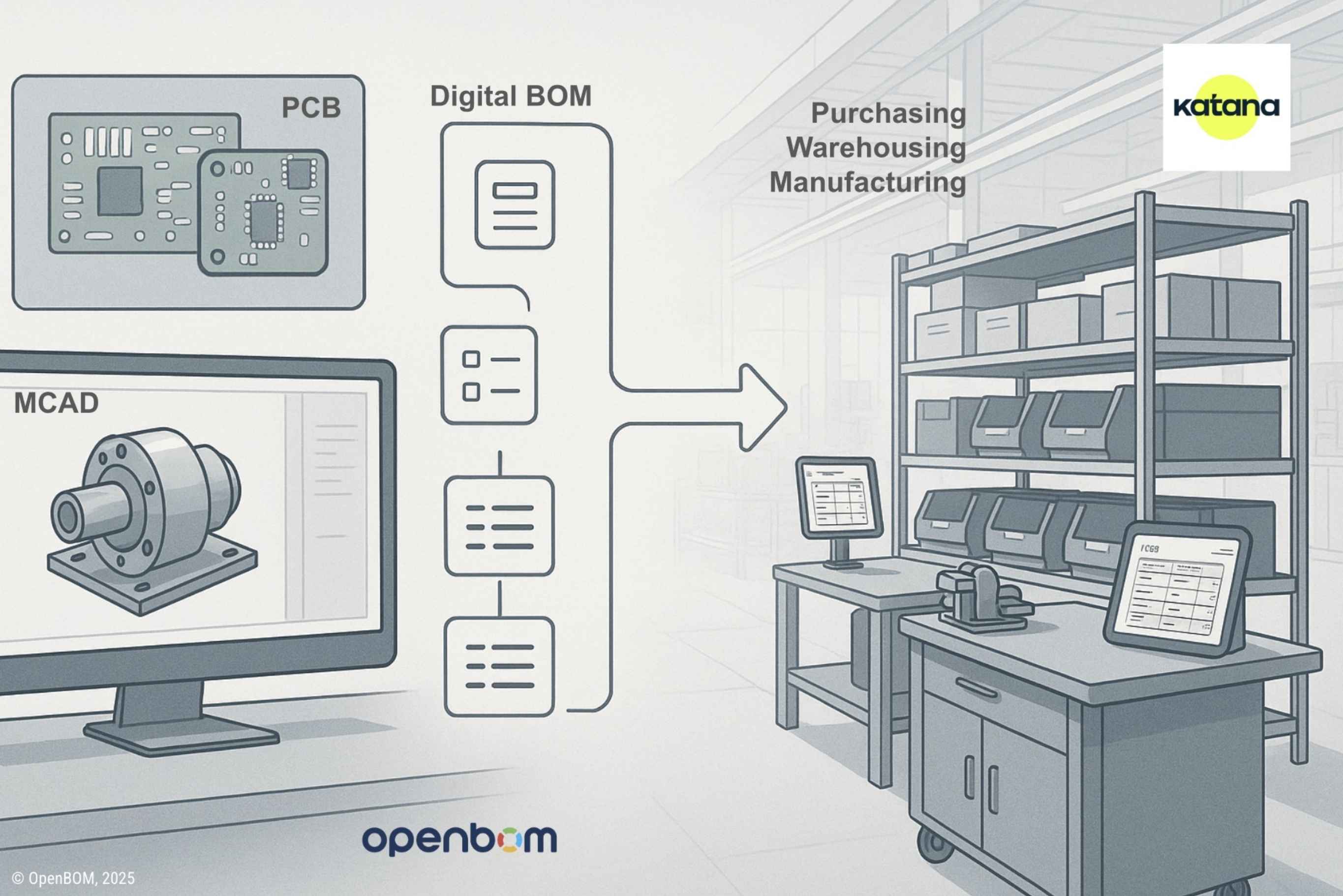
The new OpenBOM integration addresses these challenges by creating a straightforward path for item and BOM data to flow from engineering to production. Engineering work stays within OpenBOM. Katana receives the structured information needed for planning, purchasing, and execution.
A Seamless Integration Between Engineering and Production
The vision behind the OpenBOM for Katana integration is simple. Engineering manages item data, attributes, files, and structured bills of materials inside OpenBOM. Production teams rely on Katana to run operations. The integration keeps both sides connected while minimizing overhead.
Rather than exporting spreadsheets or synchronizing files manually, the integration creates a clean, online connection between the two systems. Items and BOMs flow directly. Attributes are mapped in a transparent way. Updates move from engineering to production without rework. Katana users can also reference the source information in OpenBOM through links that maintain traceability.
The integration is built around core functions that manufacturers rely on daily. These include establishing the online connection, mapping attributes, synchronizing items and BOMs, and linking back to OpenBOM. Attachments and file references also move through the integration so that Katana users have access to drawings, specifications, and related documentation.
The next chapters explain each function and show how the integration supports a consistent engineering to production workflow.
Main Functionality Overview
The OpenBOM for Katana integration includes a focused set of capabilities that support real engineering and MRP workflows:
- Online connection to Katana
- BOM integrated user experience
- Attribute mapping
- Items and BOM synchronization
- Links back to OpenBOM
- Attachments and file references
These functions create a predictable flow of information across both systems, reduce manual effort, and maintain alignment as product data changes.
Connecting OpenBOM to Katana MRP
The first step in the integration is establishing the connection between OpenBOM and Katana. Katana provides secure access through API tokens or OAuth depending on the account configuration. OpenBOM guides the user through a simple setup process that verifies the connection and prepares the account for data synchronization.
Once authenticated, the integration remains available inside OpenBOM so engineers can choose which items and BOMs to send to Katana. The connection is online, which means users do not need to manage files, upload documents, or run external tools. The integration works entirely within the OpenBOM environment.

Attribute Mapping for a Clean Data Flow
OpenBOM and Katana each provide a flexible data model. Different companies use different naming conventions and different attribute structures depending on their products and processes. For example, one company may use “Manufacturer Part Number” while another uses “MPN.” One may track “Unit Cost” or “Lead Time” in OpenBOM while Katana may use a slightly different terminology or data type.
For this reason, attribute mapping is a key part of the integration. OpenBOM allows users to configure how engineering attributes flow into Katana’s item fields. Users select the attributes they want to sync, define how they correspond to Katana’s structure, and store these mappings for reuse.
This ensures that the data moves cleanly and that engineering terminology aligns with production terminology. Mapping keeps both sides consistent, reduces confusion, and avoids duplication.

Items and BOM Synchronization
Once the connection and attribute mapping are configured, users can begin synchronizing items and BOMs. The process is straightforward. Engineers work in OpenBOM as they normally do. They create items, define attributes, add components to BOMs, and manage product structure. When the time comes to send this information to Katana, the integration transfers the necessary data.
The synchronization process includes the following steps:
- Items are created or updated in Katana based on the information in OpenBOM
- Quantities and structure from the BOM are transferred
- Attributes mapped earlier are included
- Updates can be pushed again when engineering changes occur
The goal is to give Katana a clean, production ready bill of materials that matches engineering intent. Katana users can then rely on this structure for inventory planning, production scheduling, and purchase order creation.
The process does not force engineers to retype data. It does not require spreadsheet exports unless a company prefers to do so for historical reasons. The integration keeps engineering and MRP data aligned without additional manual work.
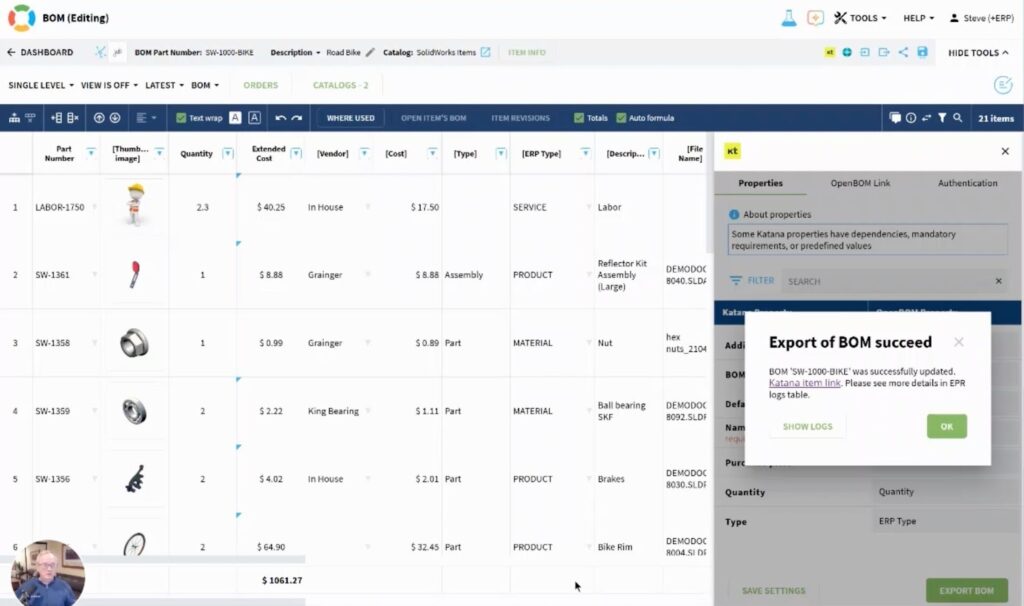
Links Back to OpenBOM for Traceability
One of the challenges in shared engineering and operations environments is maintaining visibility into the source of information. When production teams look at an item or BOM inside Katana, they often need to understand where the data originated, what engineering decisions were made, and which files or specifications are associated with each component.
To support this workflow, the integration adds links from Katana items back to the corresponding items or BOMs in OpenBOM. This gives Katana users immediate access to engineering context without searching for files or asking the engineering team to resend documents.

Traceability is especially important when dealing with changes. When engineering updates a design and pushes an update to Katana, operations can quickly navigate back to the original item in OpenBOM to understand the change, review files, or check updated values. This closes the loop between engineering and production and reduces communication gaps.
Check the results in Kata – data, attributes, links
Engineering data includes more than attributes and BOM structure. Many companies rely on CAD exports, PDF drawings, images, test results, specifications, and datasheets. OpenBOM supports attaching these files to items, BOMs, and catalogs. Manufacturers expect these documents to be visible to production teams as well.
This supports a complete workflow where engineering delivers everything needed for production and operations can perform their tasks without requesting files repeatedly. The result is a more efficient collaboration pattern between teams.
Link back to Katana MRP allows to get a live access to all information stored in OpenBOM – CAD files, derivatives, images.

Video Walkthrough
A short walkthrough video is available for users who prefer to see the integration in action. The video shows how to connect the systems, set up attribute mapping, synchronize items and BOMs, and open links back to OpenBOM from within Katana. The demonstration gives a practical overview of how companies can adopt the integration quickly.
More Information
The OpenBOM for Katana MRP integration page includes documentation, examples, configuration guidance, future updates, and support information. It is a helpful resource for understanding details about the setup, data flow, and best practices. Users can refer to this page as they adopt the integration and as the integration grows with new features.
Pricing and Availability
Pricing for the integration depends on the OpenBOM subscription tier, the size of the organization, and the specific configuration required. The integration is available for customers who rely on Katana for production and want to synchronize engineering data directly from OpenBOM.
Readers can contact the OpenBOM sales team to discuss pricing, configuration support, and planning for deployment. The team can also help evaluate whether the integration fits a specific manufacturing workflow.
Conclusion. Start Using OpenBOM for Katana MRP Today
OpenBOM offers a free registration option so users can begin exploring how item structures, engineering metadata, and files are captured in OpenBOM. From there, users can test the Katana MRP integration and see how the connection can simplify their engineering to production workflow.
Learn more and get Katana at your BOM here.
REGISTER FOR FREE and explore how OpenBOM can help your team work more efficiently with Katana MRP.
Best, Oleg
Join our newsletter to receive a weekly portion of news, articles, and tips about OpenBOM and our community.