Working many years in the engineering and manufacturing environment, I know one thing that is always critical and important for everyone who is touching CAD and the engineering environment – simplicity and integrations matter.
Everyone wants to be fast and agile. Therefore, the ability to integrate design, data management, and procurement processes into a seamless workflow gives companies an indisputable competitive advantage. There are two important functions in this integrated process:
- Engineering change risk assessment tools via integrated BOM functionality
- Organizing procurement bill of process for contract manufacturing and purchasing
Let’s unpack how OpenBOM delivers these two functions
Engineers and designers working in SOLIDWORKS need a solution that allows them to manage files efficiently, capture and update Bill of Materials (BOMs) in real time, and streamline the purchasing process without jumping between different systems.
OpenBOM for SOLIDWORKS provides exactly that—a unified platform that connects design to procurement, eliminating inefficiencies and ensuring a smooth transition from CAD to purchase orders.

Main Functions of OpenBOM in SOLIDWORKS
Integrated Cloud File Management
Managing CAD files efficiently in a user cloud environment has long been a challenge for SOLIDWORKS users. Version control issues, scattered files, and disconnected workflows often lead to delays and errors. OpenBOM’s Integrated Workspace Manager (WM), now embedded in SOLIDWORKS addresses these challenges by bringing structured file management directly into the CAD environment. Engineers no longer need to worry about missing files or outdated versions.
Every design iteration is tracked and stored within OpenBOM’s cloud-native environment, ensuring that teams always work with the latest data. OpenBOM simplifies how files are handled and makes collaboration effortless.
If you already have a PDM system (eg. SOLIDWORKS PDM), OpenBOM integrates directly with SOLIDWORKS without impacting your current workflow to control files.
Integrated Capturing Bill of Materials
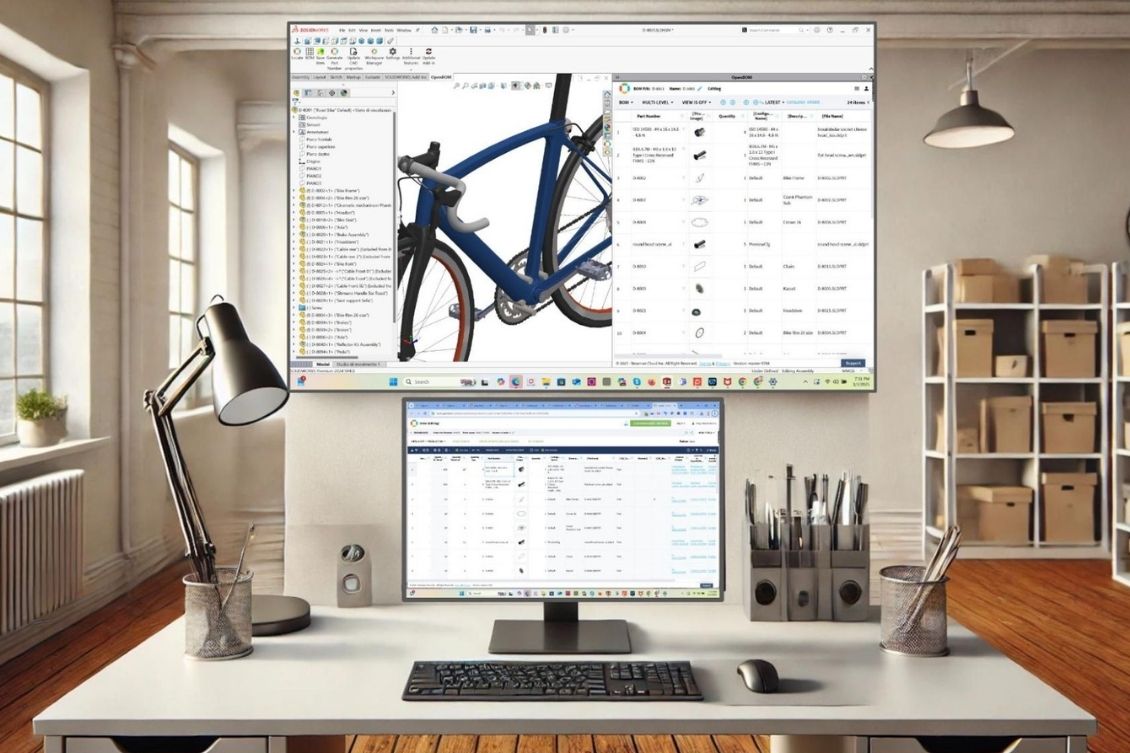
Accurate and up-to-date BOMs are critical for any manufacturing process. OpenBOM enables users to automatically extract BOM data from SOLIDWORKS without the need for manual data entry.
Any updates made to the design are instantly reflected in OpenBOM, ensuring that the BOM remains consistent with the latest CAD model. Multi-level BOM management allows for a detailed breakdown of assemblies and subassemblies, giving engineering and procurement teams the ability to manage complex product structures with ease.
This real-time integration eliminates errors, reduces time spent on administrative tasks, and ensures that manufacturing always has the correct data to work with.
Integrated Purchasing Process (CAD to Order)
One of the biggest challenges in traditional engineering workflows is the disconnect between design and procurement. Engineers design parts and assemblies, but translating that into actual purchase orders for vendors is often a manual and error-prone process. OpenBOM bridges this gap by allowing users to generate purchase orders directly from their SOLIDWORKS BOM.
Vendor and supplier information is linked within OpenBOM, enabling seamless procurement without the need to export data into spreadsheets or third-party systems.
The ability to connect engineering data to purchasing ensures that teams can move faster and reduces the risk of costly mistakes in ordering materials.
How OpenBOM Enables a Seamless Workflow
The power of OpenBOM lies in its ability to bring integration and simplicity to the engineering process. By embedding itself directly within SOLIDWORKS, OpenBOM removes the barriers that often slow down product development. The transition from design to procurement becomes seamless, eliminating the need for redundant data entry and disconnected processes. Updates made in CAD are immediately reflected in BOMs and purchase orders, ensuring that all teams have access to real-time, accurate data. This cloud-native approach also fosters collaboration across engineering, procurement, and manufacturing teams, allowing for a more agile and efficient workflow.
Conclusion: Why Integration and User Experience Matter
Having an integrated system that connects CAD, BOM management, and procurement is essential and is a dealbreaker and competitive factor to win in a complex and competitive manufacturing environment.
There are two important things to know about OpenBOM for SOLIDWORKS – integration and user experience. We are obsessed with providing the best user experience for engineering and companies using SOLIDWORKS to make the best alignment with processes these companies run.
OpenBOM for SOLIDWORKS provides a seamless workflow that ensures engineers, procurement teams, and manufacturers are always on the same page. By eliminating data silos and automating critical processes, OpenBOM accelerates product development, reduces errors, and creates a truly connected digital thread.
For SOLIDWORKS users looking to streamline their design-to-purchase process, OpenBOM offers the perfect solution—an integrated CAD to purchase order environment that enhances efficiency and collaboration at every step of the journey.
REGISTER FOR FREE and see how it can help you.
Best, Oleg
Join our newsletter to receive a weekly portion of news, articles, and tips about OpenBOM and our community.