Earlier this week, I previewed CAD File Agent for SOLIDWORKS. If you missed that, check these two articles:
Why did we start from the development of PDM assistant?
Demo: Rethinking PDM Workflow with CAD File Agent
Today, I want to provide a broader architectural perspective for teams and companies thinking about how to change their PDM/PLM adoption journey and rethink information flow in the era of AI.
PLM architecture is often discussed in terms of databases, integrations, workflows, and systems of record. But for most companies, the success or failure of PLM is experienced much more simply: can people get the product information they need, when they need it, without breaking the way they work?
Engineers need to work in CAD. Purchasing teams need reliable product information in ERP. Manufacturing teams need accurate BOMs. Quality teams need traceability. Management needs confidence that product data is not trapped in files, spreadsheets, emails, or disconnected systems.
For many years, companies followed the same basic pattern when they wanted to organize engineering data. First, they collected CAD files in a central location. Then they tried to extract useful information from those files using scripts, spreadsheets, manual exports, or connections to an on-premise PDM system. Later, someone would attempt to push that information downstream into ERP, procurement, manufacturing, or service systems.
This approach worked well enough when product data moved slowly, engineering teams were centralized, and most processes were controlled inside one company. But this is not how modern engineering and manufacturing work anymore.
Today, engineering data is created continuously. CAD files change every day. Suppliers, contractors, manufacturing teams, purchasing departments, and service organizations all need access to reliable product information. The problem is not only where files are stored. The bigger problem is how companies capture product knowledge from CAD work and make it available to everyone who needs it.
A significant shift is happening across enterprise software. Major platforms are becoming headless. Salesforce recently asked the question out loud: why should users always need to log into Salesforce to get value from Salesforce data? Their answer — Headless 360 CRM — was to expose the entire platform through APIs, agents, and embedded experiences so that product context follows people and systems rather than requiring everyone to go to a single interface.
The same question now applies to engineering and PLM. Why should engineers, buyers, manufacturing planners, or AI agents always need to log into a traditional PLM system to use product data? CAD File Agent is the starting point for answering that question in engineering.
Instead of forcing companies to start with a traditional PLM or PDM implementation, CAD File Agent starts where engineering work already happens. The agent works alongside engineers, understands CAD files, captures design context, organizes product data, and makes this information available through OpenBOM’s collaborative workspace, APIs, integrations, and embedded user experiences inside other enterprise systems.
The goal is not to replace the way engineers work with another heavy system. The goal is to improve the daily experience of everyone who depends on product information — engineering, manufacturing, procurement, quality, service, and management — by moving from file chaos and disconnected spreadsheets to connected product memory.
1. From Shared Drives and PDM Vaults to Intelligent CAD File Management
The traditional PLM or PDM journey usually begins with a simple question: where should we put the files?
Companies create shared folders, network drives, cloud storage locations, or PDM vaults. Then they ask engineers to upload CAD files, follow naming conventions, check files in and out, and make sure the right versions are stored in the right place. In theory, this creates control. In practice, it often creates friction.
Engineers still work locally. They still create temporary files. They still copy assemblies. They still use Pack and Go. Drawings, PDFs, STEP files, DXF files, and BOM exports are often stored in different places. Over time, the company ends up with many file locations, multiple versions, and no clear understanding of which design is the real source of truth.
The traditional answer is to centralize more. Put files into a PDM vault. Add more rules. Add more scripts. Add more manual steps. But this often makes adoption harder because engineers experience the system as something outside their natural workflow.
CAD File Agent changes this pattern.
Instead of starting with the storage location, it starts with the CAD context. The agent operates close to the engineering activity. In environments such as SOLIDWORKS and other CAD systems, it can understand assemblies, parts, drawings, file references, versions, and relationships. It helps capture not only the files, but also the structure and meaning behind them.
The system is no longer just a place where files are deposited after the work is done. It becomes an active participant in the engineering workflow. It observes the product structure, captures dependencies, understands changes, and helps organize design information as part of the natural CAD process.
The user experience changes from “go to the system and manage data” to “continue engineering work while the system captures and organizes product context in the background.” This is a much more natural starting point for PLM adoption.
For engineers, the value is simple. They do not need to become data administrators. They can continue designing products while the agent helps organize the information around their work. For the company, the benefit is even larger: the design context is captured earlier, more accurately, and closer to the source.
2. From BOM Spreadsheets to Connected Product Data: How CAD File Agent Replaces Excel
The second traditional pattern is spreadsheet extraction.
Almost every company does it. CAD files contain valuable information, but downstream teams cannot easily use native CAD data. So companies export BOMs to Excel. They run scripts. They build custom macros. They copy and paste item numbers, descriptions, quantities, suppliers, materials, costs, and revision information into spreadsheets.
At first, this feels flexible. Everyone understands Excel. Everyone can edit it. Everyone can email it.
But over time, the spreadsheet becomes a dangerous middle layer between engineering and the rest of the company. Nobody knows whether the spreadsheet reflects the latest CAD model. Nobody knows who changed the supplier, cost, or quantity. Nobody knows whether the ERP data matches the engineering structure. The product definition becomes fragmented.
In the traditional architecture, CAD is one world, PDM is another world, Excel becomes the translation layer, and ERP becomes yet another disconnected destination.
CAD File Agent enables a different model.
The agent helps turn CAD files into connected product data. It can capture file structure, metadata, relationships, and design context, and make this information available in OpenBOM. Once the data is in OpenBOM, it is no longer trapped inside CAD files or scattered spreadsheets. It becomes part of a collaborative product knowledge environment.
From there, the data can be accessed through the OpenBOM API, shared with other users, embedded into business workflows, connected to BOMs, linked to items, synchronized with downstream systems, and used as part of broader digital thread processes.
Instead of treating CAD files as isolated documents that need to be periodically exported, the company can treat CAD work as a continuous source of product knowledge. The architecture becomes connected, collaborative, and much more adaptable.
The value is especially important for companies that are not ready for a full enterprise PLM implementation. They may already have ERP, procurement workflows, shared drives, cloud storage, or a PDM system. CAD File Agent does not require them to throw everything away. It gives them a new way to capture engineering data and make it available where it is needed.
This is the second architectural shift: from Excel as the integration layer to APIs and collaborative product data as the integration layer.
The user experience changes from manually preparing and reconciling spreadsheet exports to working with connected product data that can be shared, reviewed, and reused across the company.
3. Why PLM Must Become Headless — And How CAD File Agent Makes It Possible
The third change is the most strategic.
Traditional PLM architecture is system-centric. The assumption is that the company needs to select one system, move data into it, configure processes, train users, and then enforce adoption. This approach can work, but it often requires a long implementation cycle. It also assumes that users will come to the system to do their work.
Modern engineering and manufacturing do not always fit this model.
Product development is distributed. Some users work in CAD. Some work in ERP. Some work in Excel. Some work with suppliers. Some only need read-only access. Some only need to review a BOM, approve a change, check whether a file is current, or understand the impact of an engineering decision. Forcing everyone into one central system creates resistance.
CAD File Agent points to a different architecture: headless, agentic product memory.
In the traditional model, PLM value is mostly experienced through the PLM interface. To see product structure, check a revision, or understand a change, users go to the PLM system. The interface is the destination.
Agentic workflows change this assumption. Product data needs to be available to CAD users, ERP users, procurement teams, manufacturing planners, quality teams, suppliers, and AI agents. Some will use a browser interface. Some will use an embedded view inside another system. Some will consume data through APIs. Some will interact through a conversational agent. Some may never log into PLM at all.
CAD File Agent becomes the headless starting point for engineering data. It captures CAD file structure, metadata, dependencies, BOM context, and design relationships from inside the engineering environment. But the value of that data is not locked inside the CAD add-in or a single PLM screen. Once captured in OpenBOM, the data becomes available through APIs, embedded user experiences, integrations, and future agents.
In this model, OpenBOM becomes the connected layer where files, BOMs, items, revisions, changes, and downstream workflows can be organized. Other systems can consume this data through APIs, integrations, and embedded collaborative user experiences.
Connectivity is not only about moving data from one database to another. In many companies, data integration exists, but the user experience is still fragmented. Engineers work in CAD or PDM. Buyers work in ERP. Manufacturing planners work in another system. Quality teams review spreadsheets or exported reports. Everyone may technically have access to some version of the data, but they do not share the same product context.
CAD File Agent and OpenBOM create a different option. Product knowledge captured from CAD can be exposed not only as structured data through the OpenBOM API, but also as an embedded OpenBOM experience inside ERP, PLM, procurement, or other enterprise systems. This allows users to see the product structure, related files, item information, revisions, suppliers, alternates, BOM context, and change history directly inside the system where they already work.
For example, a purchasing manager working in ERP can open an item or procurement record and see the related engineering BOM, CAD-derived product structure, approved manufacturer and vendor information, and file context without leaving the ERP environment. A manufacturing planner can review the latest product structure and understand what changed before creating a production plan. A quality or compliance user can inspect relevant product information without asking engineering for another Excel export.
The company does not need to force every user into a single PLM interface. Instead, OpenBOM becomes a connected product memory layer available through APIs, embedded experiences, and agents. Engineers work in CAD. Business users work in ERP or other enterprise systems. AI agents can access structured product context when they need to validate, summarize, compare, or trigger workflows. OpenBOM provides the shared product context across all of them.
For example, an engineer changes a SOLIDWORKS assembly. CAD File Agent understands the file structure and captures the updated design context. OpenBOM connects this information to the BOM, item records, revisions, and related product data. A purchasing person can see what changed inside the ERP experience. A manufacturing person can review the impact from a connected OpenBOM view embedded in their workflow. An ERP integration can receive structured data. A future BOM Review Agent can validate completeness, identify missing suppliers, check cost targets, or create tasks for people to fix problems.
This is not traditional PDM with a chatbot added on top. It is a different architectural model.
The agent starts where the work happens. The data becomes available through a connected platform. The experience follows users into the systems they already use. APIs expose the same product knowledge to other applications. Future agents operate on structured engineering context rather than disconnected files and spreadsheets. The company gradually builds product memory across files, BOMs, decisions, revisions, and workflows without demanding a massive system replacement.
The user experience changes because product context follows people into the systems they already use. Engineers can work in CAD. Purchasing can work in ERP. Manufacturing and quality teams can access the same product context without waiting for manual exports or switching into an unfamiliar PLM interface. And agents can begin to act on engineering data because the data is no longer trapped inside files, vaults, or spreadsheets.
How to Start: A Practical PLM Adoption Path for Engineering Teams
The most important value of CAD File Agent is not only technical. It is practical adoption.
Many companies know they have a product data problem, but they are not ready to launch a large PLM program. They cannot stop engineering work for months. They cannot ask every team to change tools immediately. They cannot afford another complex implementation that becomes a consulting project before users see value.
CAD File Agent supports a more natural adoption path.
Define the information flow first.
Before any tool can succeed, people inside the company need to agree on how information should naturally flow. This sounds obvious, but it is often where PLM programs stall. IT teams push for a single system of record, a simplified landscape, one authoritative source for everything. The instinct is right, but the sequencing is often wrong. When the tool is selected before the information flow is agreed upon, the tool becomes the argument rather than the solution. Teams spend months configuring a system to enforce a workflow that nobody has fully committed to.
CAD File Agent offers a different starting point. Because it begins inside the CAD environment where engineers already work, the first conversations are grounded in something concrete: how does design information actually move today, and where does it break down? That question is much easier to answer than “what should our PLM architecture look like?” Once a team can see their actual information flow — files, BOMs, revisions, handoffs to procurement and manufacturing — the gaps become visible and the agreement on how to fix them becomes more natural. The tool supports the conversation rather than replacing it.
Then start where the pain is visible.
A company can start with CAD file organization and design data capture. This solves an immediate problem for engineers: files, references, versions, drawings, and design history become easier to manage. Then the company can connect this data to BOMs and item records. After that, it can expand into procurement, ERP, supplier collaboration, change management, and BOM review workflows.
They do not transform all at once. They improve one workflow, prove value, expand adoption, and connect more processes over time.
The traditional PLM adoption model often starts with the system. CAD File Agent starts with the user.
This is the core adoption pattern. The company does not need to buy a large architecture vision first and wait years for value. It can start by improving the daily experience of engineers working with CAD files, then extend the same product context to BOM management, procurement, ERP, suppliers, change workflows, and future AI agents.
A Simple Example
Imagine a company building industrial equipment using SOLIDWORKS.
In the traditional approach, engineers store files in shared folders or a PDM vault. Someone exports BOM data to Excel. Another person cleans it up. Purchasing imports or re-enters data into ERP. Manufacturing receives a PDF or spreadsheet. When a supplier asks a question, someone has to trace back through emails, folders, and old exports to understand what changed.
The company technically has data, but the data is not connected.
With CAD File Agent, the design activity becomes the starting point. The agent works in the CAD environment, captures file structure and design context, and connects it to OpenBOM. The BOM, item data, files, revisions, and related information become available in a collaborative workspace. Downstream systems can access the data through APIs or integrations. Teams can review, validate, and act on product information without depending on disconnected Excel exports.
Here is a diagram that explains in detail how it can be different.
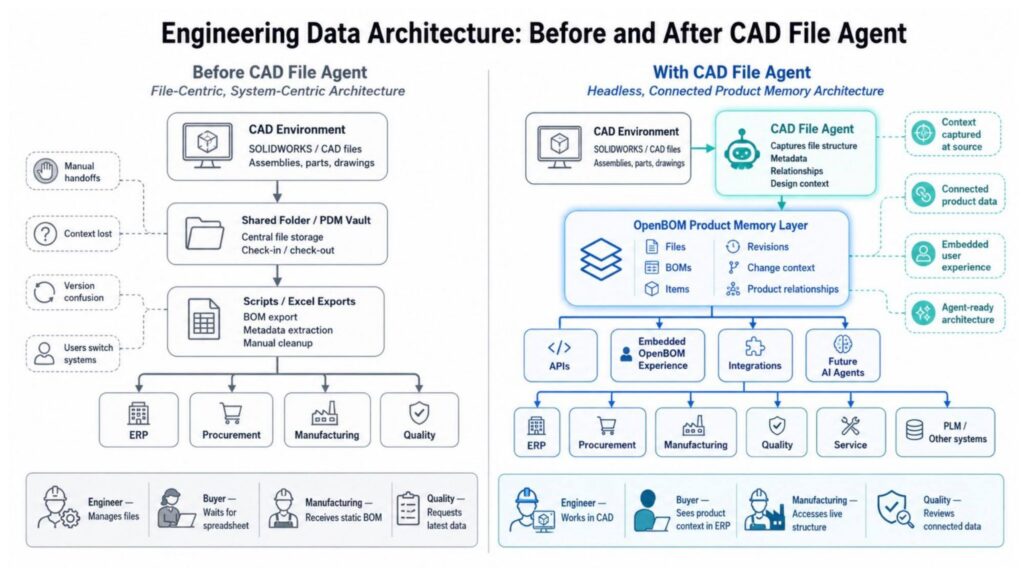
The same information can also be made available inside the systems people already use. A buyer can see OpenBOM product context inside ERP. A manufacturing planner can review an engineering structure from a connected embedded view. A quality person can inspect BOM completeness and related files without asking engineering for another report.
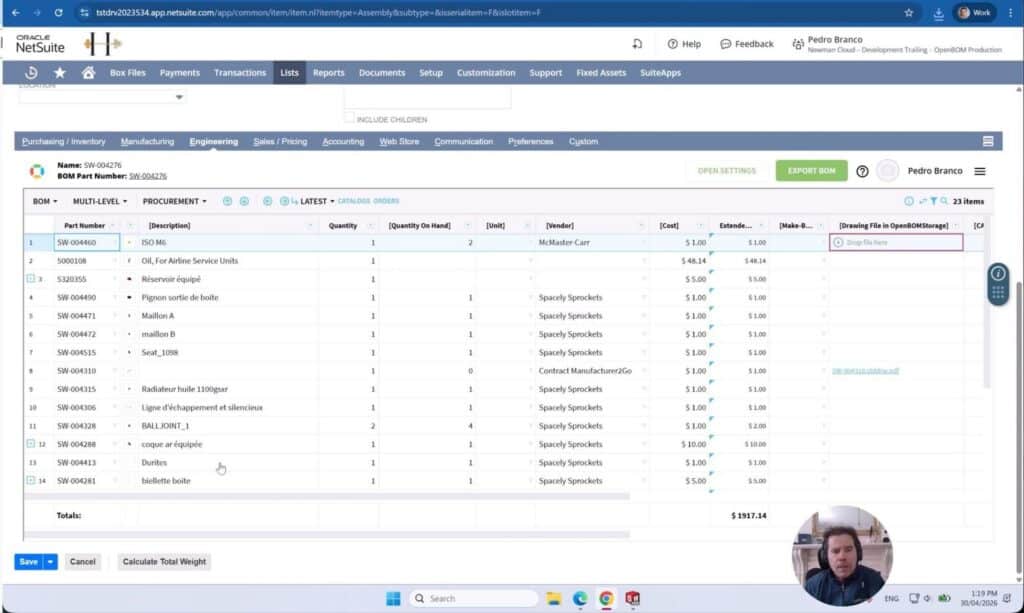
Here is an example of how this architecture can be applied in practice. A seamless and embedded “engineering” view into CAD data from NetSuite ERP available via OpenBOM. Check more about it in the following article – SolidWorks BOM to ERP Integration Options: Push, Embedded, and MBOM Options with Odoo, NetSuite, and Other ERP Systems
The result is not just better file management. The result is a new architecture for product knowledge.
CAD File Agent as a New PLM Entry Point for SOLIDWORKS and Engineering Teams
CAD File Agent changes the way companies can think about PLM architecture.
It moves the starting point from central systems to engineering work. It moves the integration layer from spreadsheets to connected product data. It expands connectivity through APIs and embedded OpenBOM experiences inside ERP, PLM, procurement, and other enterprise systems. And it moves the long-term architecture from system-centric PLM to headless, agentic product memory.
This is important because most companies do not suffer from a lack of tools. They suffer from disconnected product knowledge and fragmented user experiences. CAD files are in one place. BOMs are in another. ERP data is somewhere else. Decisions are hidden in emails, meetings, spreadsheets, and tribal memory. Even when systems are technically integrated, users are often forced to jump between screens, compare exports, or ask someone else for the latest context.
CAD File Agent helps companies begin solving this problem from the place where product knowledge is created: the CAD environment.
The broader shift is toward headless engineering systems. The browser interface remains useful, but it is no longer the only way product knowledge is consumed. CAD File Agent is OpenBOM’s headless entry point into engineering data — capturing product context at the source and making it available to people, systems, and agents wherever they need to work.
From there, OpenBOM makes this knowledge available wherever people need to work — through collaborative workspaces, APIs, integrations, and embedded user experiences inside existing enterprise systems. This means companies can preserve investments in ERP, PLM, procurement, and other business platforms while creating a new layer of connected product memory across them.
The real value is visible in the daily user experience. Engineers spend less time managing files and exports. Purchasing teams see engineering context without chasing spreadsheets. Manufacturing and quality teams can review product information in the systems they already use. This is how CAD File Agent helps companies move from file chaos to connected product memory, one workflow at a time.
Want to try CAD File Agent? Contact us directly to discuss.
Register for free and check how OpenBOM can help.
Best, Oleg
Join our newsletter to receive a weekly portion of news, articles, and tips about OpenBOM and our community.