Last week I wrote about whether AI will kill the Part Number. The short answer was no. AI kills the smart Part Number, and what survives is a stable identifier with the meaning living in the connected data around it. That conclusion is easy to state and harder to act on, because it raises a question the moment you accept it. If the meaning does not live in the number, where exactly does it live?
When I shared on LinkedIn, I got this comment from Prof. Martin Eigner – “Oh no, not that part number again🤣”. Some others confirmed that they witnessed enough numbering wars.
Here is the thing… That is not a philosophical question. It is the question every OpenBOM onboarding meeting answers in its first hour.
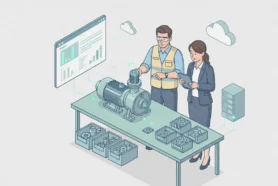
The session usually starts with a practical goal. Connect the CAD data, build a BOM, organize the items, and get ready for purchasing, inventory, and whatever comes downstream. But within a few minutes the conversation bends toward part numbers, and it stays there. Some customers have never thought hard about the problem and have been using file names, drawing numbers, or whatever was convenient. A few arrive with a clean, well-governed system and move fast. Most are in the middle. They have a partial scheme, a few rules, a handful of exceptions, and a quiet sense that what worked so far will not scale.
What the room is really deciding is not the schema. It is where each piece of meaning is going to live, and which of those pieces the number should be allowed to carry. Once you watch a few of these sessions, the abstract principle from last week stops being abstract. You can see exactly where the meaning goes, because you are putting it there.
A part number should live as a stable, generated identifier, while the meaning it used to carry, the category, configuration, revision, and supplier data, should live in the connected product data around it. The number identifies the item. Everything else belongs in the relationships and properties, where it can change without breaking the identity.
A Configuration Is Not Always a Product
The first place the principle gets real is configurations, and it is also the place most numbering schemes quietly break.
Almost every engineering team uses configurations, and configurations carry a trap. Some of them are real product variants. A two-carburetor build and a four-carburetor build are different products. They ship differently, they are ordered differently, and they need their own identity. In that case the part number has to live at the configuration level, not at the file level, because the file is now representing more than one thing that the rest of the company needs to tell apart.
But many configurations are not products at all. Engineers create exploded views, simplified states, doors-open and doors-closed representations, and other arrangements that exist purely for design convenience. These should never reach the BOM. The number does not know the difference. The engineer does, and the system has to be taught to.
There is a simple onboarding trick for this. Give every non-product configuration a temporary part number like “Delete Me.” If “Delete Me” ever shows up in the BOM, something routed a design state into the product structure, and you have caught it before it caused damage. It is a crude check, and it works precisely because the number itself cannot tell you whether a configuration deserves an identity. Context tells you. The number only records the answer.
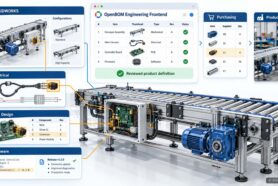
SolidWorks introduced Design States to draw exactly this line between product variation and representation. In practice many engineers keep using configurations the way they always have, so a real implementation has to deal with how people work, not how the tooling intended them to work. This is the heart of the variant problem from the last article, seen up close. The logic of which configuration is a product belongs in the model and the rules, not in a string you decode by eye.
The System Should Hand You the Number
Once you accept that the number is just an identifier, the next decision is who creates it, and the answer should not be a human typing carefully.
A common setup splits items by type. Mechanical parts draw from one catalog with a 1000 range. Electronics draw from a separate catalog with an E-1000 range. A category property on the CAD side routes each item to the right catalog automatically. A part marked “Mechanical” lands in the mechanical catalog and takes a mechanical number. A part marked “Electronics” lands in the electronics catalog and takes an E-number. Numbers get assigned when the assembly is saved, and a recursive command can walk the entire assembly and generate identity for everything that still needs it.
Notice what that arrangement does. The category, which is real and useful information, lives where it belongs, as a property and as catalog membership. It is not smuggled into the digits of the identifier. This is what engineers mean by a non-significant number. It identifies the item without trying to describe it. You still get a number that looks organized, because mechanical and electronic items fall in different ranges, but the range is a side effect of routing, not a meaning you are obligated to keep true forever. If a part gets reclassified later, you reclassify the property. You do not rename the part and break its history. That is the difference between a category you can change and a category you carved into the one field that is supposed to never move.
Keep the CAD Record Thin
The instinct in the room is almost always to put more into CAD, and the better instinct is to put less.
The practice that holds up is to keep the CAD properties deliberately short. Part number, description, and maybe revision. That is usually enough. Cost, vendor, supplier, procurement terms, and every other commercial attribute moves into OpenBOM, where it can be managed as connected data with its own lifecycle. The reason is the supplier problem from the last article, and it shows up the same way every time. Commercial data changes faster than engineering identity. A preferred supplier gets replaced, a second source gets approved, a vendor changes its own part number, and none of that should touch the identity of the engineering item or the CAD file that defines it.
When that data lives in the BOM and the item record instead of in the file, a sourcing change is a sourcing change. When it lives in the file or the number, a sourcing change becomes a renaming exercise, and renaming is where history goes to die. A thin CAD record is not a limitation. It is the cleanest expression of the rule that identity stays still while meaning moves.
A Revision Is a State, Not a New Identity
Revision deserves its own moment, because it is the place where identity and lifecycle get confused most often.
The questions come in a cluster. Should revision sit inside the part number? Should it be a separate property? Should it live in CAD, in PLM, or flow to ERP? Should a changed part get a new revision or a new number? These feel like numbering questions, but they are configuration management questions wearing numbering clothes. The deciding factor is interchangeability. If the new version can replace the old one without anyone downstream needing to know, it is a revision. If it cannot, if the change affects fit, function, purchasing, inventory, or a part already in the field, then it may need a new identity entirely.
This is exactly why pushing revision into the part number causes trouble. It makes the identifier move every time the item changes, and an identifier that moves is no longer doing its one job. A part number should answer “which item is this.”A revision should answer “which state of that item is this.” They travel together, but they are not the same question, and the number should only ever answer the first one.
The File Name Was Never the Part Number
There is one more habit worth naming, because it feels natural and ages badly.
Many companies start by assuming the CAD file name and the part number should be identical. A file has a name, a part has a number, so why maintain two things. It can work for a while in a simple process. Then it gets brittle. File names answer to the CAD system, to folder structures, to PDM rules, and to file references that break when a name changes. Part numbers answer to BOMs, catalogs, revisions, suppliers, purchasing, and ERP. They are managed by different systems for different reasons, and chaining them together means a CAD-side rename can ripple into purchasing, and a purchased component gets forced into a naming convention that was designed for native CAD files.
This is why onboarding usually moves the part number into a dedicated property rather than leaning on the file name. The file name stays useful for the people and tools that care about files. The part number becomes a managed identity that the rest of the company can rely on without ever opening the CAD system to read it.
Bring the Spreadsheet
Purchased parts close the loop, and they make the point almost too cleanly.
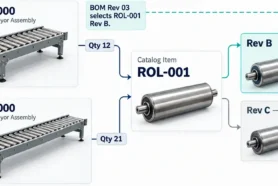
Instead of inventing numbers one at a time for commercial off-the-shelf items during a session, customers are usually asked to bring a spreadsheet of their COTS parts to the next one. Resistors, fasteners, connectors, bearings, the long tail of bought components. Loaded together, they get organized as connected data from the start, with internal identity on one side and manufacturer part numbers, supplier references, and approved sources on the other. Even for a purchased part, where a manufacturer part number already exists and already carries meaning, the move is the same. Keep a stable internal identity, and connect the meaningful, changeable, supplier-owned information to it rather than collapsing the two together.
The Meaning Was Never Gone
Step back from the room and a pattern is sitting in plain view.
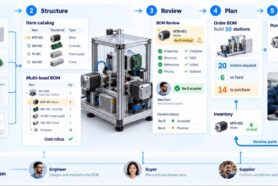
At no point in onboarding does the meaning disappear. The category is still there. The configuration logic is still there. The revision history, the supplier data, the cost, the where-used, the distinction between a product variant and a design state, all of it is still there. What changes is only the address. None of it lives in the digits of the identifier anymore. It lives in catalogs, properties, BOM relationships, item records, and the connections between them. The number gets simpler precisely because everything around it got organized. A simple part number does not mean simple data. It means the data finally has somewhere better to be.
That is the answer to the question this article opened with. The part number should live as a stable, generated identity, and the meaning should live in the connected product data around it. Onboarding is just the moment a company is forced to decide on purpose, item by item, instead of letting the number absorb everything by default.
Which leads to the question this series is really walking toward. If connected product data is the right home for everything the number used to carry, then what happens when that home gets good enough to hold not only the data, but the decisions and the reasoning behind it? The two-carburetor variant is a fact. The choice to treat it as a separate product, and the reason behind that choice, is something more. Today most of that reasoning lives in someone’s head, in a thread, or in a comment that scrolls away. Giving it a durable home, as product context rather than a clever string or a buried note, is the larger idea this series has been circling. That home has a name, and it is where the next article goes.
For now, the practical conclusion is enough. Stop asking what the part number should mean. Start asking where each kind of meaning should live. Once you answer that honestly, the number gets quiet, the data gets intelligent, and the part number argument that opens every implementation finally has somewhere to land.
Best, Oleg
REGISTER FOR FREE to experiment with OpenBOM, Part Numbers and check how it can help your company to better organize data and manage processes.
Frequently Asked Questions
Should part numbers be smart or non-significant? Non-significant, automatically generated numbers are more durable. A smart number that encodes category, project, or supplier becomes wrong the moment the part is reused, reclassified, or re-sourced. The meaning belongs in connected data, not in the identifier.
Should the part number be the same as the CAD file name? No. File names answer to the CAD system and its references, while part numbers serve BOMs, purchasing, and ERP. Tying them together means a file rename can ripple into downstream processes. A dedicated part number property keeps identity stable.
Should the revision be part of the part number? No. Revision is a lifecycle state, not an identity. Putting it in the number makes the identifier move every time the part changes. Use interchangeability to decide between a new revision and a new part number.
Should every CAD configuration get its own part number? Only the ones that represent real product variants, such as a two-carburetor versus a four-carburetor build. Representational configurations like exploded or simplified views should never reach the BOM and should not receive product identity.
Where should part numbers and product data be stored? The identifier stays in a managed part number property. Cost, vendor, supplier, and procurement data move into a connected system like OpenBOM, where they can change without altering engineering identity.
Further Reading
Will AI Kill the Part Number? — OpenBOM
Part Numbers: Best Practices and Future Improvements — OpenBOM
File Name and Part Number: Are They The Same or Different? — OpenBOM
4 Reasons Why Companies Are Still Using Intelligent Part Number Schemas — Beyond PLM
Digital Thread 101: Why Are Part Numbers Hard? — Beyond PLM
Interchangeability, Revisions, and New Part Number — Beyond PLM
Join our newsletter to receive a weekly portion of news, articles, and tips about OpenBOM and our community.