The core function of production planning is to calculate how many parts need to be ordered to make a production batch. OpenBOM does by creating order BOM and calculating quantity gaps for each part.
When you create order BOM, OpenBOM takes Quantity needed from flattened BOM and calculate x number of units. That is your required quantity. Also, OpenBOM calculates quantity gaps, based on Quantity on Hand in catalogs.
Do you ask what happens if you update BOM or Quantity on Hand? Update Order BOM is a function you can use to sync states of Order BOM. Quantity gaps and required Quantity will be recalculated.
At any moment, you can create or update purchase orders. Information will be taken from order BOM and based on vendor assignments. vendors are coming from Vendor lists.
After you are done with Order BOM and purchases orders, you can release Order BOM to production. At that moment, Quantity on Hand in Catalogs are recalculated and Order BOM becomes Read-only.
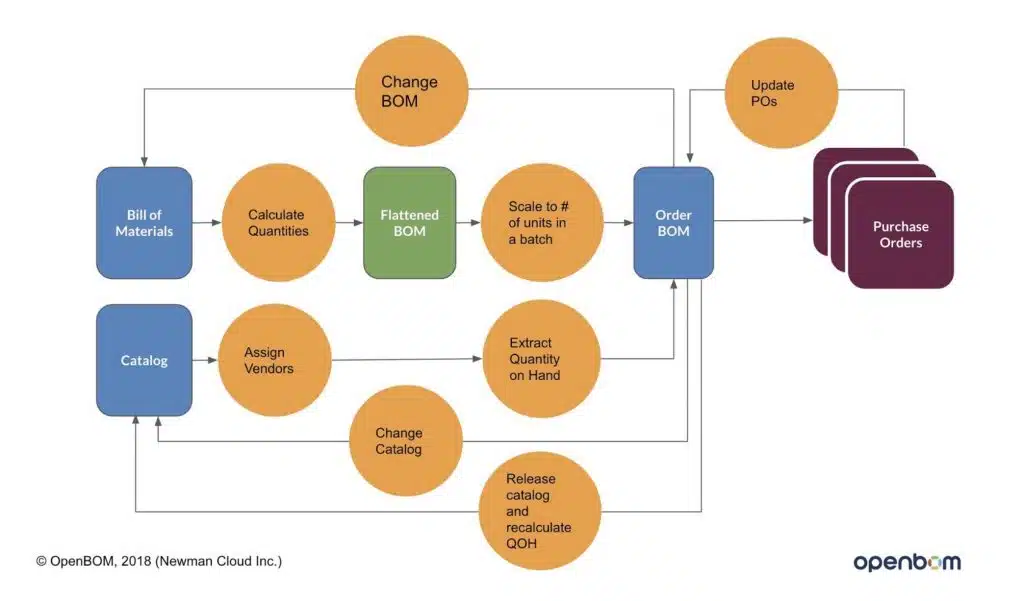
As you can see from the diagram the process of Order BOM creates/updates can go in a cycle. Usually, companies are creating an order BOM to perform orders of long lead items. Them BOM becomes more mature and Order BOM is updated.
Another process is related to stock replenishments. Currently, it is a manual function in OpenBOM. You can open Catalog and update Quantity on Hand.
The following video shows you both processes – Order BOM update and Quantity Gap Recalculation based on updated numbers.
Conclusion
OpenBOM simple production planning process allows you to maintain quantity on hand in the catalog and perform production planning by organizing Order BOM with calculated Quantity Required and Quantity Gaps. It is simple but at the same time robust and powerful function.
Check OpenBOM production planning today. You can register for OpenBOM free user account here. OpenBOM production planning is part of professional user subscription. You can subscribe here.
PS. Let’s get to know each other better. If you live in the Greater Boston area, I invite you for a coffee together (coffee is on me). If not nearby, let’s have a virtual coffee session — I will figure out how to send you a real coffee.
Want to learn more about PLM? Check out my Beyond PLM blog and PLM Book website
Join our newsletter to receive a weekly portion of news, articles, and tips about OpenBOM and our community.