

The end goal of every design and manufacturing process is to assemble a product and ship it a customer. This is in a nutshell what is manufacturing business about. Since on average 70% of the product is usually outsourced assemblies and purchased parts with depended on dozens and sometimes on hundreds of partners, to plan this ordering and purchasing process is very important to get the product out on time and within budget lines.
To support this process, OpenBOM has production planning process. Check bellow to see a big picture of the flow.
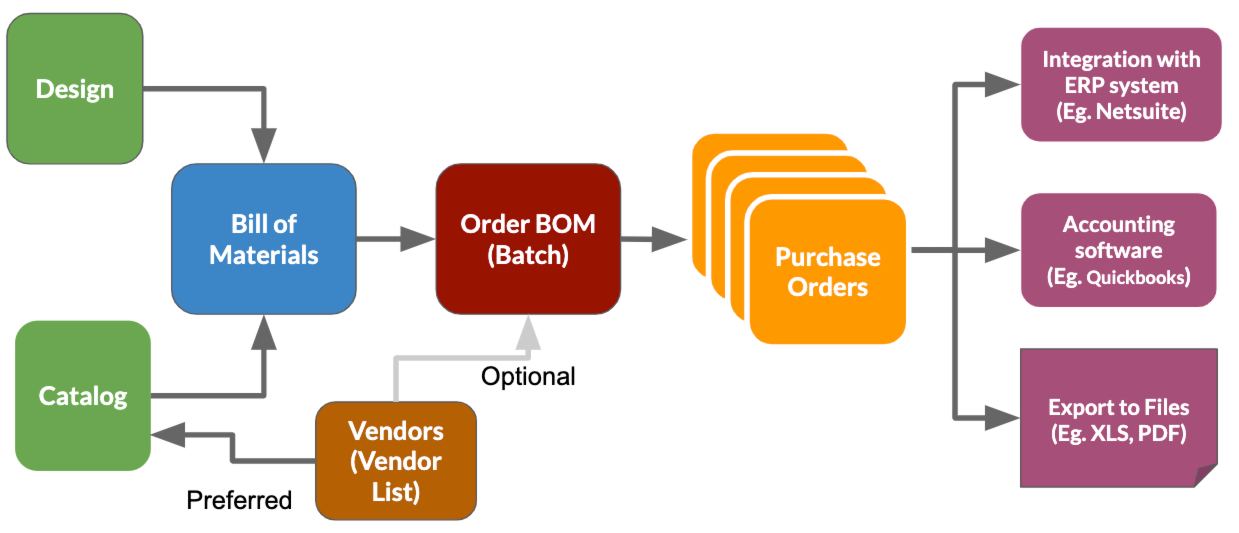
The core elements of this process are Order BOM and Purchase Orders. To make things happen you need to plan a catalog with parts and use them to build a BOM. After it is done, you can create a batch (Order BOM)- a regular BOM, flattened and scaled a number of units.
After you assigned all Vendors ( you can do it in the catalog as well), you generate a purchase order(s) for every vendor. This is a nutshell the process. I hope you find it simple.
The video below gives you the simplest set of steps to get from BOM and Catalogs to Order BOMs and Purchase Orders. Check more on our documentation page
Conclusion.
OpenBOM gives you a flexible way to go from design to purchase in the easiest and flexible path. It can help your production team to be more aligned with design and engineering. And it will help engineers using CAD systems and OpenBOM to communicate more openly with procurement and purchasing.
Best, Oleg
PS. Let’s get to know each other better. If you live in the Greater Boston area, I invite you for a coffee together (coffee is on me). If not nearby, let’s have a virtual coffee session — I will figure out how to send you a real coffee.
Want to learn more about PLM? Check out my Beyond PLM blog and PLM Book website
Join our newsletter to receive a weekly portion of news, articles, and tips about OpenBOM and our community.








