Digital transformation is leading the minds and actions of people in manufacturing industries. In the past “over the wall” manufacturing methods were a key element to move processes and automate activities between engineering and manufacturing. Companies were closing their designs, throwing them to the side of manufacturing, and were able to move on forward to their next design work. Nowadays, such methods as throwing the design to manufacturing and forgetting about it, won’t work. Customers are looking at how to optimize the work and help engineers and everyone in the process to build products faster, cheaper, and more efficient.
Challenges of Digital Transformation, Existing workflow, and Collaboration
These days, in the manufacturing industry, having an efficient digital workflow is key to success. Designers need to be able to quickly create designs and submit them for approval. Purchasing needs to be able to quickly order materials and track inventory. And maintenance needs to be able to quickly identify and fix any problem. A streamlined digital workflow can help make all of this possible. In this blog post, we’ll discuss some of the benefits of having a digital workflow and how it can improve your manufacturing process.
An inefficient workflow process creates a lot of showstoppers during the business flow, which creates inefficiency, miscommunication, increased cost, and many other hiccups. The root cause of these events is in three important things – manual processes, human error, and existing paper-based processes. When I say this, I don’t want to say that engineers are working with the paper, but actually that even moving electronic documents is a new norm, these workflows are technically mimicking the paper form and flows.
Connected Workflows
The recent announcement of OpenBOM Drive as well as substantial enhancements of other OpenBOM tools filled many gaps in the processes and created a connected flow in which engineers, project planners, procurement engineers, manufacturing operations, and release managers can work together seamlessly, sharing data between members of the team as well as other organizations – contractors, suppliers, customers.
In the picture below, I drew an overall diagram of how data and specific operations are connected and can feed each other activities.
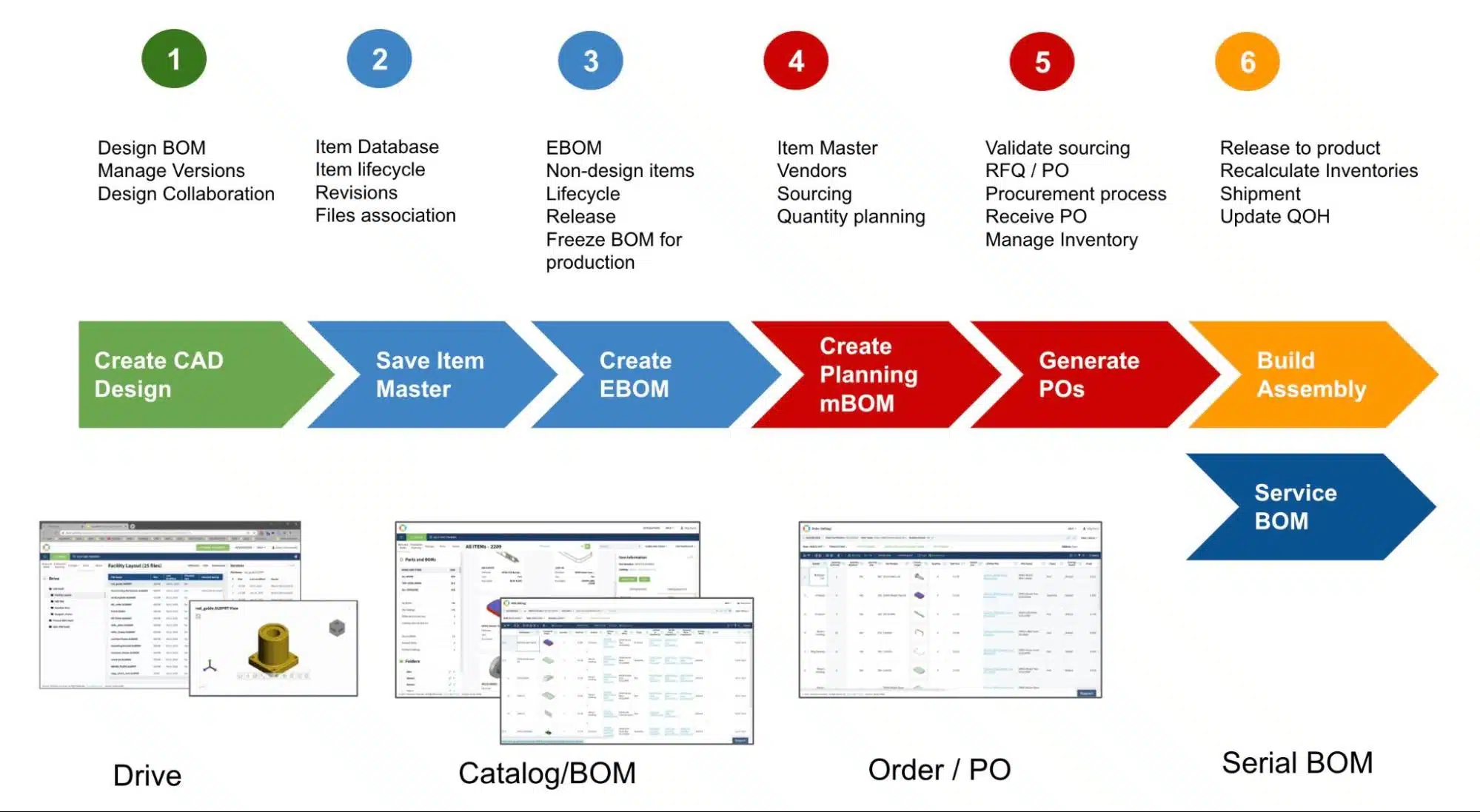
I’m sure the information is visual and doesn’t require much explanation. However, I will give you some basics to outline the main data elements and connections.
Elements of the Workflow
The following 7 steps of the process outlines the overall data flow and activities
Create CAD Design
At this stage, the design (files) are created. If a customer is using a desktop CAD system( true in 80% of use cases) even today, the design can be saved using OpenBOM Drive, the design structure is captured and presented in the virtual drive and allows vaulting operations, check-out/in as well as 3D viewing capabilities.
Save Item Master
Initial data capture of information from design starts by capturing item information from parts and assembly. The process can be kicked by CAD system add-in (Save command), but very quickly turns into a process of bringing multiple elements of business information (eg. vendors, costs, materials, and many others). After all, Item Master saved in the OpenBOM catalog represents the best piece of information about anything that needs to be designed and manufactured.
Create EBOM
A process of creating an initial BOM from CAD design following the process of adding non-model items and additional information. The final state of Engineering BOM (EBOM) represents how engineers see the future product.
Create planning MBOM
At this stage, OpenBOM allows generating planning (Order BOM), which represents EBOM scaled to the level of a number of units that need to be manufactured. This is also the time when the final design about suppliers, sourcing, materials, and components is taking place.
Generate RFQ / PO
Generating of RFQ and PO is process automation when the procurement team is creating documents that need to be sent to contractors and suppliers. They might be shared with multiple contractors, suppliers, and vendors, in parallel. The final decision can be taken based on material availability and processes. These days, the backup sourcing process can often happen at this stage when supply chain shortages and material availability is limited.
Build Assembly
At this stage, the final assembly(ies) will be manufactured and OpenBOM data will be reset (release to production) to reflect consumption of parts in the catalogs (QOH) and incrementing of QOH for built assemblies.
Maintenance
The optional stage happens when products need to be tracked after the shipments. Today is happening more often than usual. Connected products and shift from selling products to services make companies more interested to perform after-sales monitoring and maintenance.
Conclusion
Over the last few years, OpenBOM grew up to provide a holistic set of services for SME (small and medium enterprises), contractors, suppliers, and individual engineers allowing them to work efficiently, collaborate, and connect people working on different tasks and disciplines using various data objects and data-driven objects.
REGISTER to OpenBOM and check how it works by starting a 14-days trial period.
Best, Oleg
Join our newsletter to receive a weekly portion of news, articles, and tips about OpenBOM and our community.