
At OpenBOM, design integrations are not treated as optional add-ons or isolated utilities. They are a core part of how engineering data flows from design into purchasing, manufacturing, and collaboration. Every integration we add follows the same guiding principle: if data already exists in a design system, engineers should not have to manually extract, reformat, or recreate it elsewhere.
Today, we are introducing OpenBOM for AutoCAD Electrical, a new integration that expands OpenBOM’s design ecosystem and brings automated BOM capture to electrical design projects built in AutoCAD Electrical.
This release continues OpenBOM’s steady investment in practical, production-ready integrations that work out of the box and scale across real engineering environments.
Expanding OpenBOM Design Integrations with AutoCAD Electrical
OpenBOM’s approach to design integrations is closely tied to its partnership with Autodesk and a long-term commitment to supporting Autodesk’s design ecosystem. Rather than treating each tool as an isolated case, OpenBOM focuses on building consistent, production-ready integrations that work across mechanical, electrical, and data-driven design environments.
Before introducing AutoCAD Electrical, OpenBOM already supported multiple Autodesk platforms, including Autodesk Fusion for mechanical design and PCB, Autodesk Inventor for mechanical engineering workflows, Autodesk Revit for building and systems design, and Autodesk Platform Services for cloud-based data and application integration. These integrations are widely used by customers who operate in mixed Autodesk environments and rely on OpenBOM as a common data layer connecting design, BOM management, and downstream processes.
The introduction of OpenBOM for AutoCAD Electrical extends this portfolio and brings electrical design data into the same integration framework. Electrical projects created in AutoCAD Electrical can now contribute structured BOM data alongside mechanical and other design sources, without changing how designers work inside their native tools.
By continuing to expand integrations within the Autodesk ecosystem, OpenBOM reinforces a consistent experience across design tools while giving engineering teams a single, connected environment for managing product data, BOMs, and collaboration.
Automating BOM Capture for Electrical Designers
The most immediate value of the AutoCAD Electrical integration is automation. Electrical designers no longer need to spend time exporting reports, cleaning up data, or manually rebuilding BOMs outside the design environment.
Instead, the integration enables direct capture of electrical component data from AutoCAD Electrical projects into OpenBOM. This automated process helps teams:
- Eliminate repetitive manual BOM creation
- Reduce errors caused by data re-entry
- Keep BOMs synchronized with design changes
- Share accurate, up-to-date data with purchasing and manufacturing
For electrical engineers, this means the BOM becomes a natural extension of the design process rather than a separate administrative task.
Built on the Standard OpenBOM Integration Framework
Like all OpenBOM design integrations, the AutoCAD Electrical integration follows a consistent and proven framework. This consistency is important because it reduces learning curves and ensures predictable behavior across different design tools.
The integration includes:
- A native plug-in installed alongside AutoCAD Electrical
- A secure connection to an OpenBOM account and company workspace
- Configurable settings that control what data is captured and how it is structured
- Seamless output directly into OpenBOM BOMs
Designers continue working inside AutoCAD Electrical, while OpenBOM handles structured data capture and downstream use.
Working in Mixed CAD and Multi-Disciplinary Environments
Modern products rarely live in a single design system. Mechanical, electrical, and electronic data often come from different tools and must ultimately converge into a shared product structure.
Because the AutoCAD Electrical integration uses the same OpenBOM framework as other CAD integrations, electrical data can be combined with BOMs created from mechanical CAD systems and other sources. This is especially valuable for companies working in mixed environments where multiple disciplines contribute to a single product.
OpenBOM acts as the common data layer where these different design perspectives come together, enabling consistent BOM management across the entire product.
Configuration Options and BOM Output Capabilities
Flexibility is a key requirement for BOM automation. Different companies have different standards, naming conventions, and data requirements, and the integration is designed to accommodate these differences.
The AutoCAD Electrical integration allows teams to configure:
- Which component properties are captured
- How items are grouped or structured in the BOM
- How captured data aligns with existing OpenBOM item catalogs
- How BOMs are organized for downstream processes
Once captured, the BOM data is available inside OpenBOM for further refinement, comparison, and collaboration. Teams can enrich BOMs with additional attributes, manage revisions, and prepare data for ordering or supplier communication.
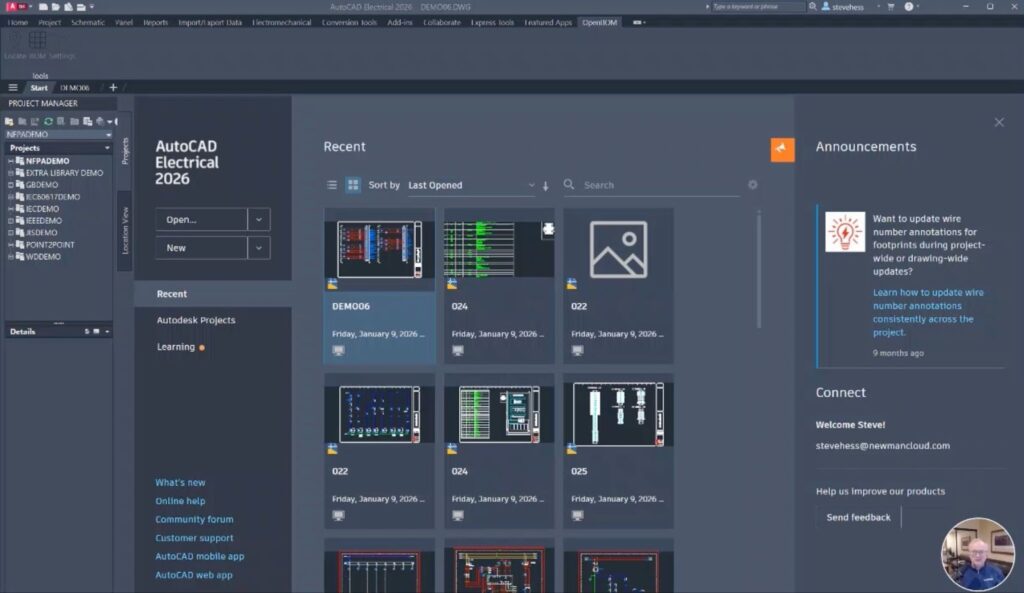
Below you can see some examples of OpenBOM for AutoCAD Electrical usage.
The add-in inside AutoCAD Electrical – simple access.
Flexible setting of parameters:

The output is a standard BOM structured in OpenBOM that can be used in your projects for planning and procurement.

First Demo Video Preview: See the Integration in Action
We’ve prepared a first demo video that shows the AutoCAD Electrical integration in action.
👉
The video demonstrates the end-to-end flow, from connecting AutoCAD Electrical to OpenBOM through generating and reviewing a BOM based on project data.
Conclusion: Continuing the Commitment to Out-of-the-Box Integrations
The release of OpenBOM for AutoCAD Electrical reinforces a simple but important promise: design integrations should be reliable, easy to use, and ready to deliver value without extensive customization.
By extending automated BOM capture to AutoCAD Electrical, OpenBOM helps electrical engineering teams reduce manual work, improve data accuracy, and stay connected with purchasing and manufacturing from the earliest stages of design.
As with all OpenBOM integrations, this capability is designed to work alongside other tools and scale with real-world, multi-disciplinary product development environments. OpenBOM will continue expanding and refining these integrations to ensure that engineering data flows cleanly, consistently, and transparently across the product lifecycle.
REGISTER FOR FREE to check how OpenBOM can help you.
Best, Oleg
Join our newsletter to receive a weekly portion of news, articles, and tips about OpenBOM and our community.