Ask an engineering team when the BOM is finished and they will point to the release. Ask a purchasing team the same question and they will laugh. For them, the released BOM is not the end of the work. It is the raw material for a second job: rebuilding the same product structure in a spreadsheet so they can send RFQs, cut purchase orders, and feed the ERP system.
That second job is where most of the cost of disconnected product data hides. BOM-driven procurement means creating RFQs, purchase orders, and inventory plans directly from the engineering bill of materials, so purchasing always works from current product data instead of exported copies. This post is about what breaks when that connection is missing, and how OpenBOM closes the loop from CAD to BOM to procurement to ERP.
Engineering BOMs Stop Too Early
In most companies, the bill of materials is treated as an engineering deliverable placed on drawings.a It is created to describe the design, reviewed to approve the design, and released to freeze the design. Then it is exported. From that moment, the BOM stops being a living structure and becomes a file attachment.
But the people who spend money against the BOM, purchasing, planning, and operations, only start their work after the release. In the first post of this series, I wrote that nobody has a BOM problem; they have a product data flow problem. The handoff from engineering to procurement is where that problem sends its first invoice.
Purchasing Works From a Disconnected Copy, Not the Source
Here is what the handoff usually looks like. Engineering exports the BOM to Excel. Purchasing adds columns: preferred vendor, unit cost, lead time, order quantity, stock on hand. Within a day, the spreadsheet contains information that exists nowhere else in the company. Within a week, engineering releases a new revision, and the spreadsheet quietly becomes wrong.
The purchasing spreadsheet is not lazy work. It is a rational response to a missing capability. Buyers need supplier data, cost data, and quantity rollups next to the product structure, and if the BOM tool cannot hold that context, Excel will. The cost is that every copy ages, and money gets spent against stale data: wrong quantities, obsolete part numbers, superseded revisions.
RFQs, Purchase Orders, and Inventory Need BOM Context
Procurement is not a list of part numbers. Every RFQ, every purchase order, and every inventory decision depends on product context: which assembly the item belongs to, how many are needed across all open orders, which vendors are approved, what the last quoted cost was. In OpenBOM, that context lives with the item. Vendors, costs, lead times, and inventory records are properties of the same connected digital BOM that engineering created, not columns in a disconnected file.
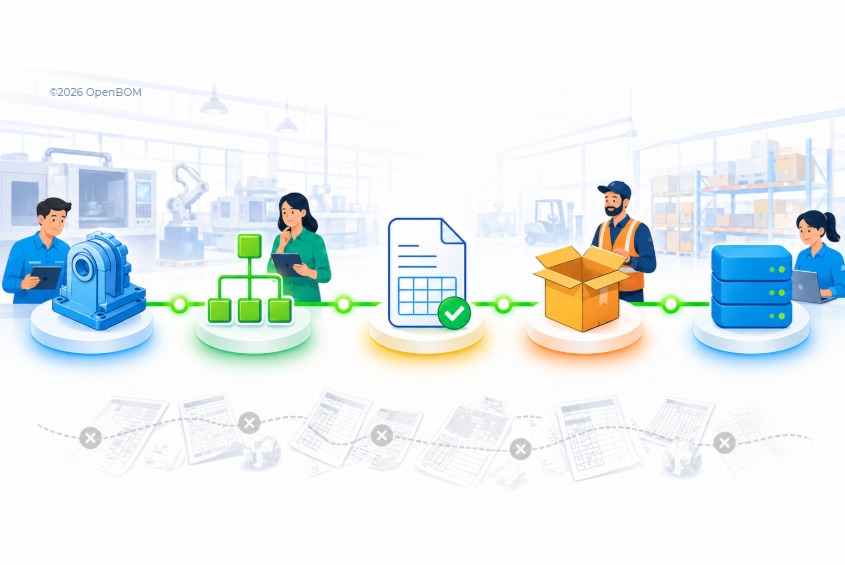
From that structure, OpenBOM produces the documents purchasing actually needs. Quantity rollups across multi-level BOMs turn into order plans. Order plans turn into RFQs sent to vendors. Quotes turn into purchase orders. Received items update inventory. Nothing is retyped, because everything is derived from the same source.
This is exactly the problem Repower Electric Corp solved. Building EV conversion kits for shuttle buses, they needed engineering data to reach production without turning engineers into ERP specialists. In their words: “We didn’t want engineers to have to go into an SAP or an Oracle, or ERP system X. We needed something simple and easy for them to use.” With OpenBOM as the layer between design and ERP, one of their engineers created a work order for diagnostic harnesses on his own, in minutes, with no ERP training.
“We didn’t want engineers to have to go into an SAP or an Oracle, or ERP system X. We needed something simple and easy for them to use.” With OpenBOM as the layer between design and ERP, one of their engineers created a work order for diagnostic harnesses on his own, in minutes, with no ERP training.
ERP Needs Clean Product Data, Not Messy Exports
ERP systems are very good at transactions and very bad at cleaning up product data. When the item master is fed from ad hoc BOM exports, ERP inherits every duplicate part number, every inconsistent unit of measure, and every revision mismatch that the spreadsheet era created. Then the company spends months blaming the ERP implementation for a data problem that started upstream.
The fix is not a bigger export. It is a clean, continuously maintained product data backbone in front of ERP. OpenBOM plays that role: items, BOM structures, revisions, vendors, and costs are managed in one place, and ERP integration synchronizes clean, released data into the systems that run finance, MRP, and production. BOM to ERP integration stops being a quarterly cleanup project and becomes a routine sync.
As John, co-owner of Gates Underwater Products, puts it: “Someone in purchasing can open the BOM in OpenBOM and see the exact product and know what to buy.”
Closing the Loop: From CAD to BOM to Procurement to ERP
Put the pieces of this week together. CAD data is captured automatically into the cloud, with files, revisions, and structures managed together, as covered in yesterday’s post on cloud PDM. The digital BOM becomes the single connected structure for engineering and everyone downstream. And from there, the same data flows into RFQs, purchase orders, inventory, and ERP without a single export.
When that loop is closed, something interesting happens. The company stops re-creating product knowledge at every handoff and starts accumulating it: what was designed, what was ordered, from whom, at what cost, against which revision. That accumulated, connected history is something bigger than a BOM, and tomorrow, in the final post of this series, I will give it a name.
Conclusion: Try How OpenBOM Works
You can build a BOM from your CAD data and generate your first RFQ and purchase order in an afternoon. Register for a free OpenBOM account and start with your own product data.
FAQ
How do you connect a BOM to an ERP system?
A BOM connects to ERP through a managed integration rather than manual exports. OpenBOM maintains items, BOM structures, revisions, vendors, and costs as connected product data, then synchronizes released data into ERP so the item master and BOMs in ERP stay clean and current.
What is BOM-driven procurement?
BOM-driven procurement is the process of creating RFQs, purchase orders, and inventory plans directly from the engineering bill of materials. Because purchasing works from the same connected BOM as engineering, quantities, revisions, and vendor data are always current instead of copied into spreadsheets.
Can OpenBOM create RFQs and purchase orders from a BOM?
Yes. OpenBOM calculates quantity rollups across multi-level BOMs, turns them into order plans, sends RFQs to vendors, and converts quotes into purchase orders. Received items update inventory records connected to the same product data.
Why does ERP need clean product data?
ERP systems inherit the quality of the product data they receive. When ERP is fed from ad hoc BOM exports, duplicates, inconsistent units, and revision mismatches follow. A managed product data backbone in front of ERP keeps the item master accurate and makes BOM to ERP integration a routine sync instead of a cleanup project.
REGISTER FOR FREE and check how OpenBOM can help.
Best, Oleg
Join our newsletter to receive a weekly portion of news, articles, and tips about OpenBOM and our community.