
Apologies for the delayed publication of the OpenBOM update, which was caused by the impact of the Los Angeles wildfire on our team.
As we wrap up an amazing year, the December 2024 release of OpenBOM brings a series of refinements designed to address the details that matter most to our customers. This release focuses on enhancing usability, boosting performance, and introducing key improvements to streamline your experience. We’ve also tackled some annoying bugs to ensure a smoother, more reliable workflow.
Highlights of this release include better messaging in the Workspace Manager, faster file transfer performance, and a more intuitive Item Information Panel, now with persistent filtering for enhanced browsing. Additionally, the PTC Onshape Get Part Number operation delivers an improved user experience with clearer feedback, while Dassault Systems SolidWorks receives its first Part Number validation feature, paving the way for better control and prevention of duplicates or malformed entries.
The holiday season was also a time for reflection and analysis, focusing on the transformation OpenBOM is driving for engineering teams and manufacturing companies. Learn more about the OpenBOM Collaborative Workspace and how it helps manage engineering data and streamline change processes.
Continue to read more about the updates including examples and videos. Learn how they can make your OpenBOM experience even better!
OpenBOM Design Projects
Design Projects continues to be in the focus on improvements helping to create a seamless files synchronization workflow between CAD files in the desktop and cloud storage. It gives you an easy and simple way to maintain cloud file version history and to prevent users from overriding each one’s changes. OpenBOM Smart Sync technologies provides an easy mechanism to manage CAD and other files for continuous design and team collaboration.
OpenBOM Design Workspace Manager received several important updates with this release.
- A new progress panel to reduce the number of messages and making it more clear
- Improved Smart Sync Report Filtering
- Performance and additional sync condition handling improvements
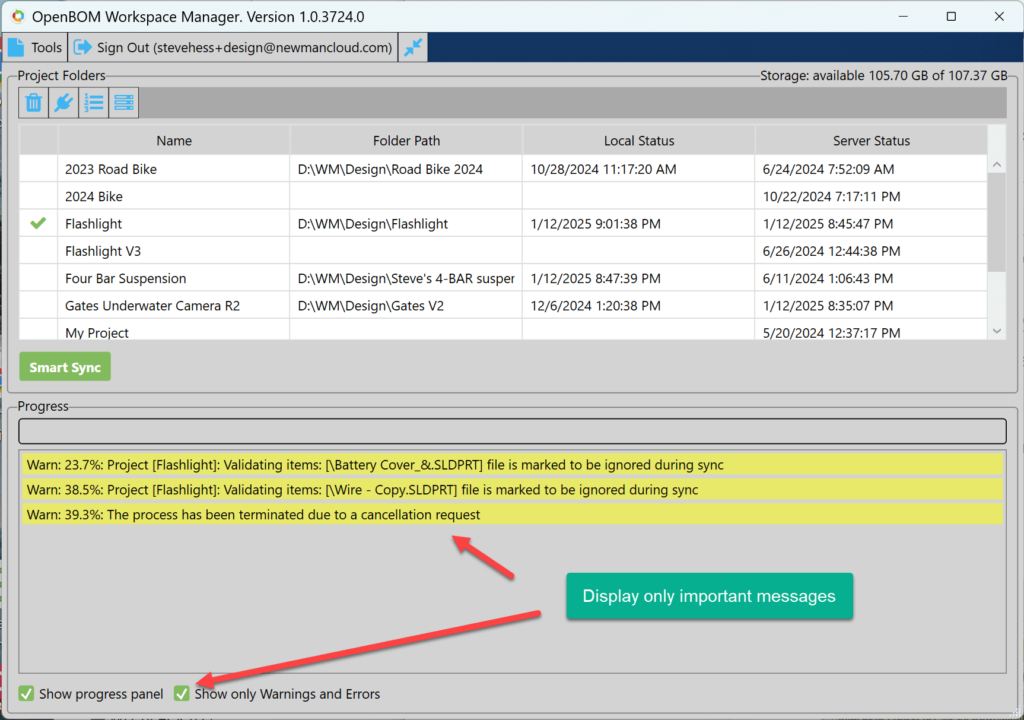
Improved Workspace Manager Smart Sync Report Filtering
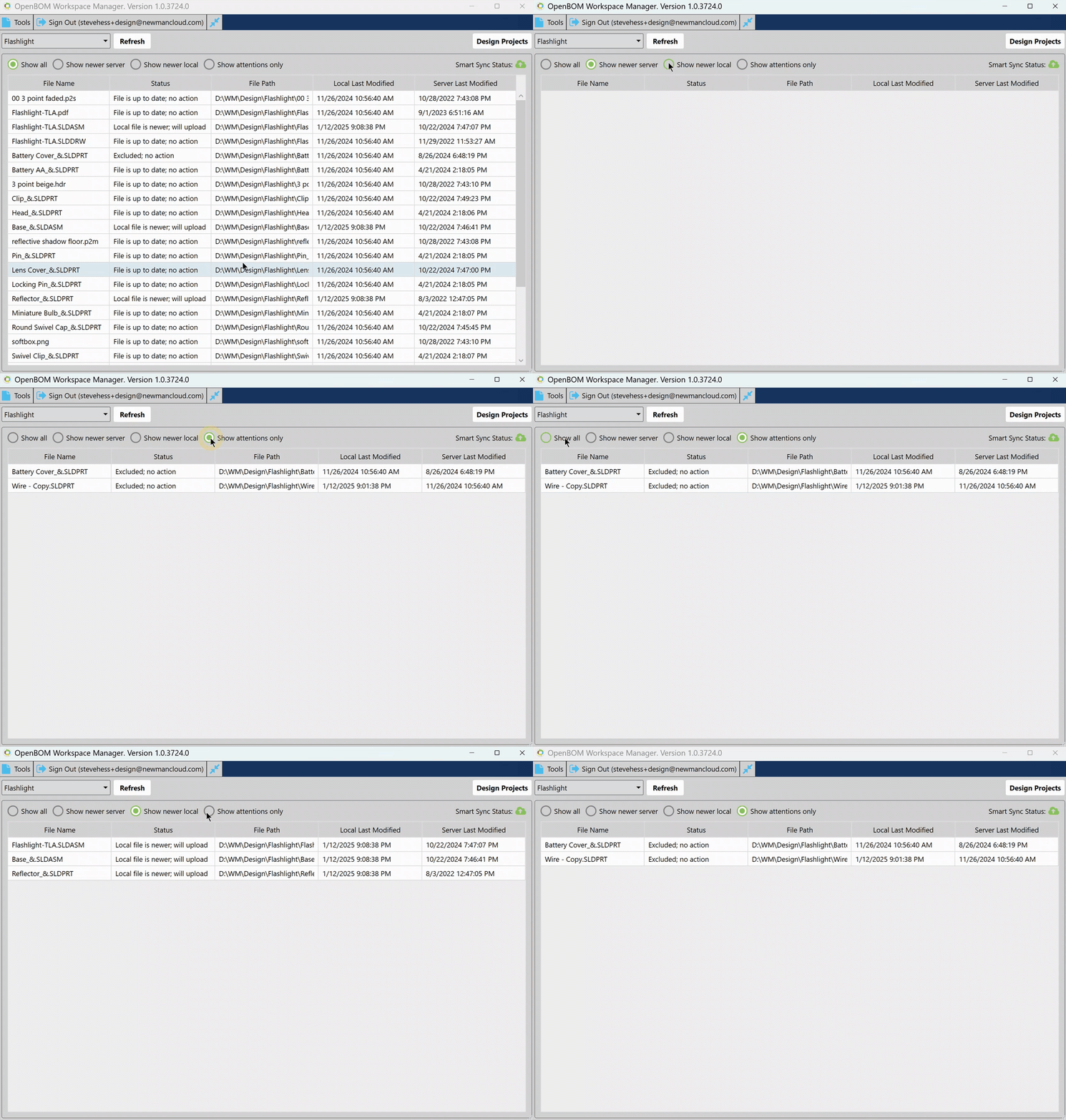
To provide better information about the status of synchronization, we’ve developed a new report filtering mechanism. It now gives you option to show ‘all’, ‘local’, ‘server’ and attention only messages.
Please check the animation below.
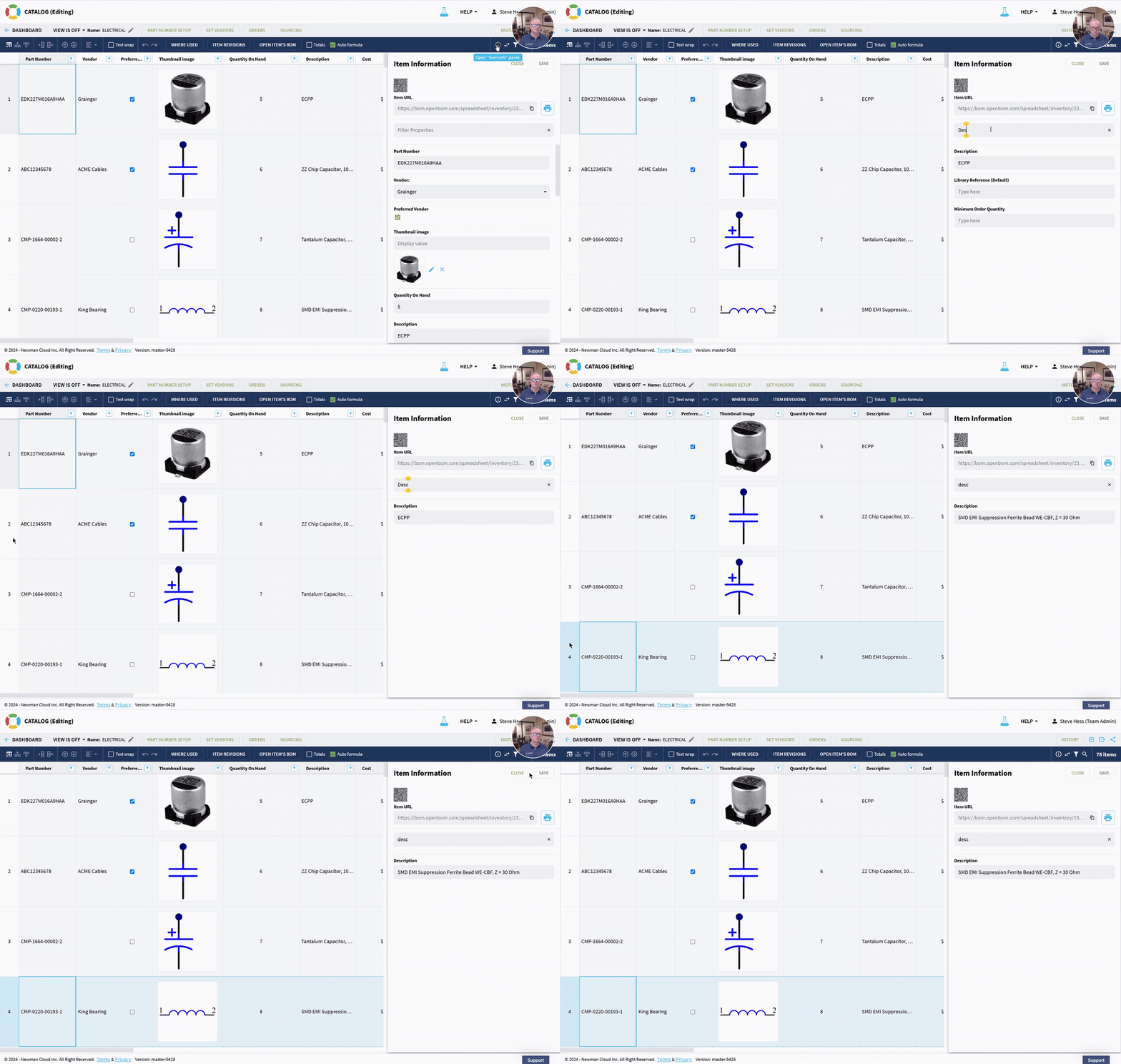
Property Filter Improvements
A seamless property filter improvements that will keep the filter while switching items in the user interface. The setting will remain as you select other Items. See the animation below.
OpenBOM for PTC Onshape
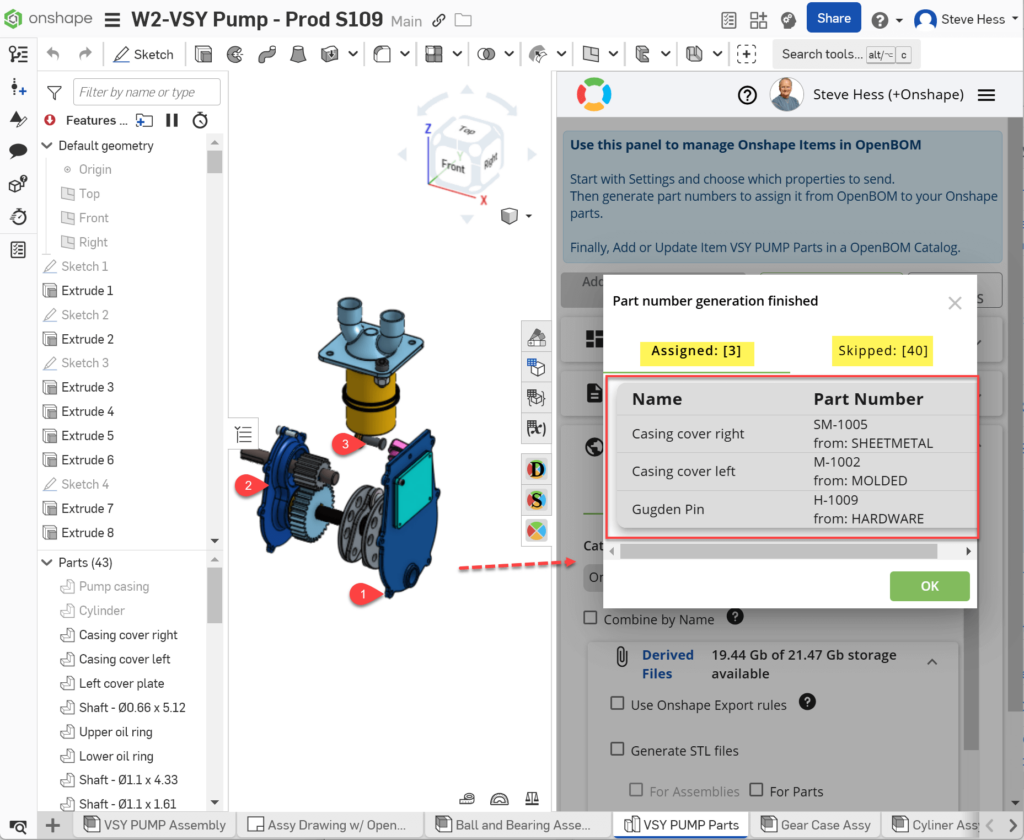
Onshape Get Parts User Experience Improvement
The Get Part Number operation got an improvement. It provides better messaging and better results confirmation. You will know exactly which item got a new Part Number, and where it came from. You will also see items that were skipped during the new part number generation process and why?
Keep in mind that the default is to skip items with existing part numbers although you may optionally overwrite existing part number values in case you’re making a new part from an existing one. The Get Part Number operation provides a lot of flexibility.
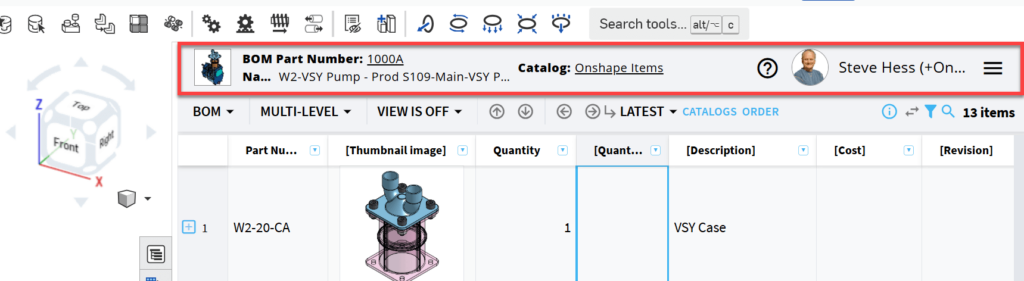
BOM Flyout Header Improvements
The BOM Flyout gets a much easier-to-read and more informative header. Better user identification, BOM Part Number, and other information is easier to locate. Small touch – a nice link to the online help is provided.
OpenBOM for Dassault Systems SolidWorks
SolidWorks customers are a significant part of OpenBOM business and we again provide a number of improvements to delight SolidWorks customers.
Part Number Uniqueness Validation
We’ve been learning and experimenting with how to eliminate the mistakes in CAD data that can lead to creation of duplicated Part Numbers and, as a result, duplicated BOMs. The first experiments are released in OpenBOM for SolidWorks
With this release, OpenBOM Add-in will validate part numbers and provide important messaging “before” (!!!) you send the data to OpenBOM to cause duplicated Part Numbers and BOMs. This feature will reduce/eliminate duplicate part numbers and Circular References (e.g. a part number referencing itself).
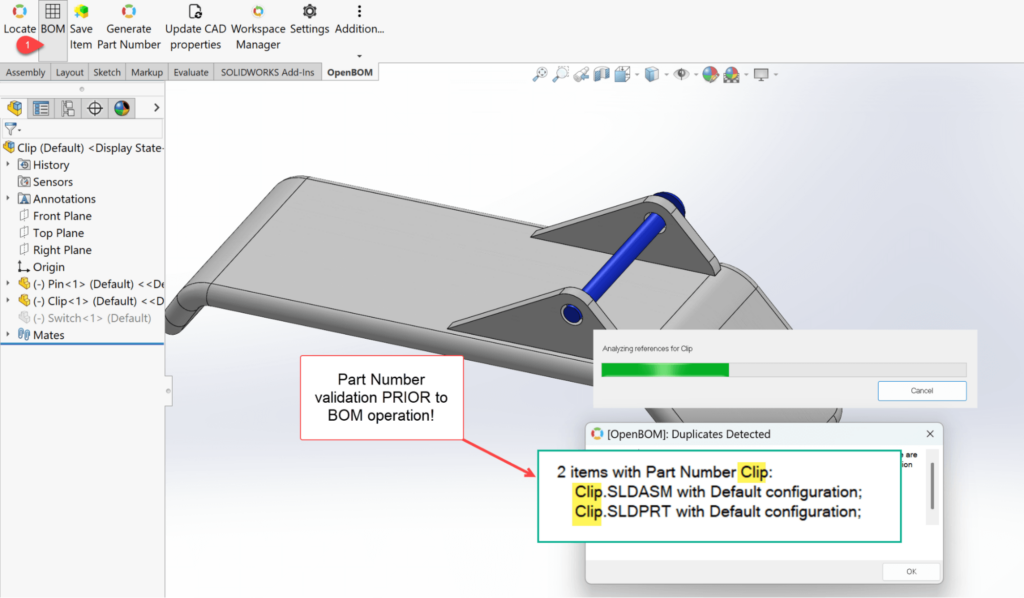
Watch the video how it works and how to fix the problem by assigning a new Part Number.
Other Bug Fixes and Improvement
A few additional improvements and bug fixing.
- Added a new API to export catalogs. See OpenBOM API documentation.
- The View Config API now returns the correct string values.
- Added specific details about custom object references to the related APIs.
- Fixed issues where LastPass and other password managers displayed unexpected queues in OpenBOM fields.
- Resolved a rare case where the active BOM did not appear in the “Where Used” section of a specific part.
- Improved handling and processing of unusual language characters in filenames.
- Finally resolved an issue where the last item in a catalog could not be removed. Apologies for the delay!
- Drag-and-drop uploads to catalog items now always work as expected.
Conclusion
We would like to thank all our customers and everyone who contributed to shaping and improving OpenBOM in 2024. It has been an incredible year, filled with many enhancements and new features that have elevated OpenBOM to new heights.
Your feedback and engagement have pushed us to think both strategically and tactically about how to address the pressing challenges faced by engineering teams and manufacturing companies, and how to make the OpenBOM service even more valuable.
Here’s a quick summary of the key lessons we learned from working with our customers in 2024:
- Focus on the core product loop.
- Simplify the experience—don’t make customers think about how a feature works.
- Increase emphasis on seamless integration.
- Balance flexibility with necessary administrative controls.
We’re excited for what’s ahead in 2025! Stay tuned for updates about the OpenBOM 2025 Roadmap.
Meantime, check for our vision and implementation of how OpenBOM Transforms Engineering Data and Change Management Using Collaborative Workspace. Best regards,
Oleg
Join our newsletter to receive a weekly portion of news, articles, and tips about OpenBOM and our community.