Welcome to OpenBOM What’s New for April 2023! It is this time of the month again and we want to share with you what the OpenBOM team was working on.
This time I’m super excited to share some details about OpenBOM technology development as well as improvement in OpenBOM infrastructure and new features and fixes, of course.
Before jumping forward, I want to remind you that OpenBOM Community is a place where you can get in touch with the OpenBOM team, read more about OpenBOM and ask more questions. If you didn’t register for the OpenBOM community yet, please do it right now.
Here is the list of enhancements and improvements in OpenBOM I’d like to share. Our team worked on them for the last month. Some of the features and improvements were in development for a longer time and just came out.
- OpenBOM AWS Infrastructure and DevOps
- Security and certification (work in progress)
- Support process improvements and CAD Log Files sharing
- CAD Best Practices for revision management
- Check-in/check-out message improvements
- STEP files for Parts and Assemblies in Save Item command
- Altium Improvements
At OpenBOM, we are excited about AI and everything that is related to that topic. Check out more at OpenBOM Copilot Research.
In this month’s update, OpenBOM has introduced several new features and improvements that will make managing your BOMs even more efficient and streamlined. From new integrations to enhanced collaboration capabilities, there’s something for everyone in this release. So let’s dive in and explore what’s new in OpenBOM for April 2023.

OpenBOM AWS Infrastructure, DevOps, and Certifications
As you probably already noticed, OpenBOM was taking off for maintenance and infrastructure improvements last week. We don’t do it very often and we are working towards providing OpenBOM unstoppable platform. The main reason for the stop was to change OpenBOM’s AWS deployment architecture and infrastructure, which was done without any problems. There are several reasons why I’m super excited about this improvement and our engineering team was working on it really hard. Here are some points:
- New OpenBOM AWS Infrastructure allows more scalability in the future deployment
- Speed up our DevOps processes and shorten (to a few minutes) the time we need to deploy new features and updates (hint: better support and ability to bring new features)
- Open the door for future country-based deployments, auto-scaling
- SOC2 Type2 certification is ongoing and we will soon send more updates
Besides the things that I mentioned above, OpenBOM AWS architecture is a foundation for the future OpenBOM Enterprise Portfolio and Security Enhancements we are working on to provide OpenBOM service to enterprise and defense customers.
Managing CAD Revision and Item Revisions just got easier
Deciding where to master the value of a design revision can be a challenging business decision. Does Revision belong in CAD? Does it belong on the OpenBOM Item? The answer for many manufacturing companies is BOTH.
We have just introduced an easy way to de-conflict CAD Revision and OpenBOM Revision with an easy CAD integration option called “CAD Revision”.

Here’s a video on the idea of managing CAD and Item Revisions separately:
An Easier Way to Get Logs Files For A Support Ticket
If the time should come to submit a request for help to OpenBOM support the friendly support person may ask for your CAD and/or other transactions logs. We just unified the entire process into a single button in the CAD settings. The example below is for Solidworks but will be similar for all Desktop CADs.
CAD Checkin/Out in-working Message
Since all engineers are impatient, OpenBOM will display a message if the Drive is busy with your previous request. Most operations are complete in a few seconds so you may likely never see this.
The message below will be displayed if you request a Drive operation (CheckIn/Check-Out) while a prior Drive vault operation is still underway. Similar messages for other operations.

Individually Control STEP File Creation for Parts and Assemblies
STEP files may be large, and often you only want part STEPS, So we have given you more control over which STEP files are created in OpenBOM.
Altium Menu Update Option
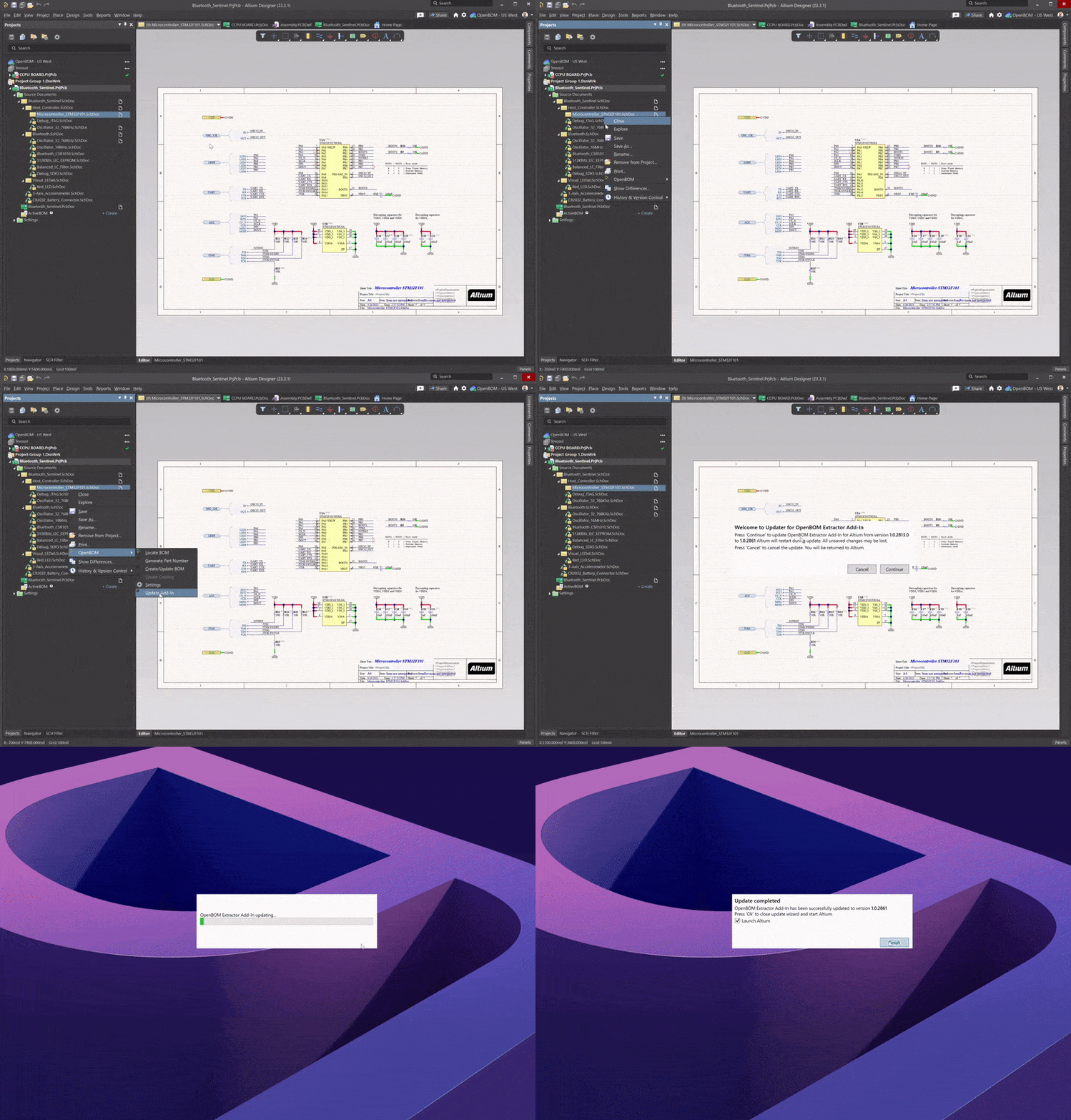
As we continue to reduce our cycle time, we decided to bring an Integration Update feature to the Altium OpenBOM Menu. Now, once you have installed OpenBOM from the Altium extensions appstore, you may update the OpenBOM extension directly from the OpenBOM Menu in Altium as shown below.
It’s an easy way to stay up to date!
As always, we squashed a few bugs along the way
- CAD – Inner Browser now updates properly, all the time
- CAD – Save Item now respects the Part Number setting value
- CAD – Fixed a case when special characters in the filename kept STEPs from being created
- Altium – fixed case when Create BOM failed
Conclusion
We are developing the future of OpenBOM with the opportunity to deliver OpenBOM PLM digital thread support to enterprise organizations. DevOps, security, certification, and scalability – those are invisible capabilities of OpenBOM that will soon be used to deliver the future scale of OpenBOM in data management, visualizations, and analytics.
REGISTER FOR FREE and check out all the new features and functionality online.
THANK YOU!
Oleg Shilovitsky, co-founder and CEO
Join our newsletter to receive a weekly portion of news, articles, and tips about OpenBOM and our community.