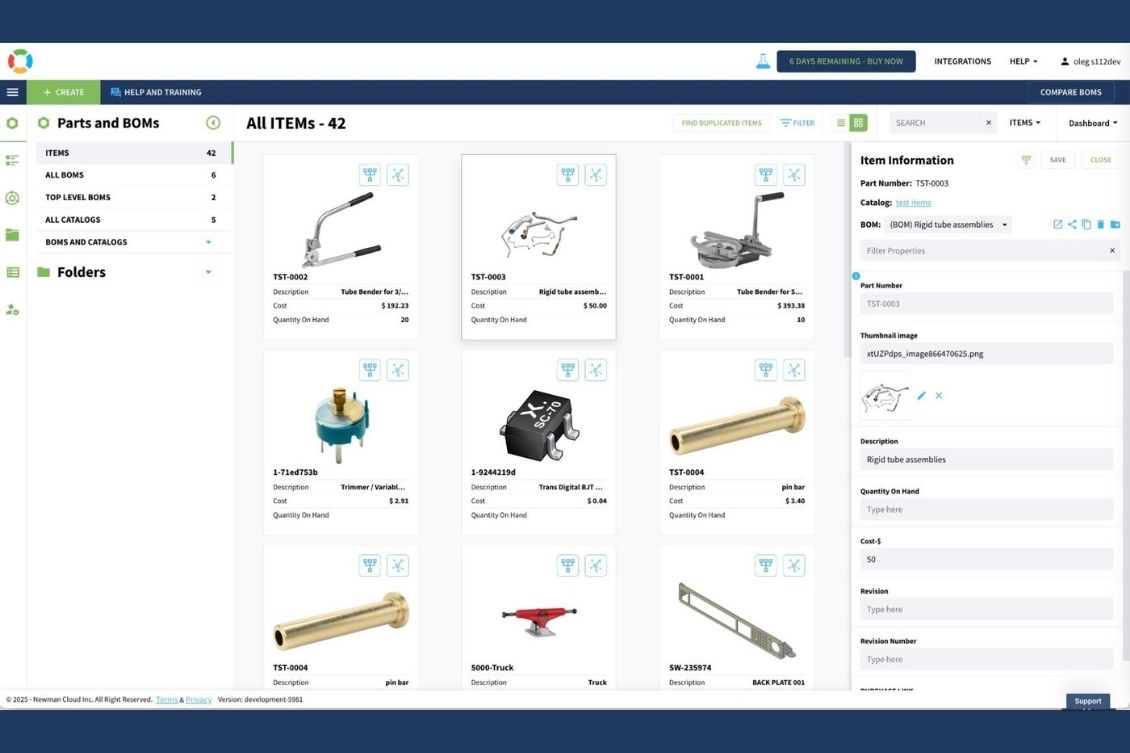
Managing product information effectively is one of the biggest challenges for engineering and manufacturing teams. The OpenBOM ITEMS Dashboard serves as the central hub for editing and navigating product data, allowing users to work seamlessly with multiple item types, attributes, dependencies, and linked elements.
With the latest improvements, OpenBOM takes a significant step forward in making the ITEMS Dashboard even more intuitive, efficient, and powerful. The focus of these enhancements is to provide better search usability, improved navigation, in-place item editing, and smarter duplicate management. These updates simplify the user experience, making OpenBOM an even more universal and flexible tool for managing product data.
Making Search More Intuitive
When working with large datasets, quickly finding the right information is crucial. The improved search capabilities in the ITEMS Dashboard make it easier to locate specific items, even when dealing with thousands of records. The new enhancements ensure that searches are faster and more accurate, reducing the time spent scrolling through long lists.
Users can now experience an improved filtering system that refines search results dynamically, helping them pinpoint the exact information they need. Whether you are looking for a specific part number, a set of items with shared attributes, or dependencies between components, the search functionality now delivers results in a more structured and user-friendly way.
Streamlined Navigation for Better Workflow
One of the biggest frustrations when managing product data is the need to jump between different sections to find related information. The latest improvements to the ITEMS Dashboard introduce integrated navigation commands that allow users to move seamlessly between items, BOMs, and dependencies without breaking their workflow.
Now, users can instantly check where an item is used across multiple BOMs with a single click. This feature makes it easier to understand the context of a part within an assembly and quickly trace its relationships. Additionally, new BOM navigation commands enable users to move directly to a related Bill of Materials without having to search manually. These small but powerful improvements eliminate unnecessary steps, making navigation much faster and more efficient.

In-Place Editing for a More Efficient Experience
Editing item attributes should be quick and seamless, without requiring multiple clicks or unnecessary screen changes. The new in-place editing functionality allows users to modify item properties directly within the ITEMS Dashboard.
This improvement eliminates the need to open additional forms or windows, significantly speeding up the editing process. Whether you need to update pricing, part numbers, descriptions, or custom attributes, all modifications can now be done instantly. This makes working with product data much more fluid and reduces the chances of errors caused by switching between different views.
Managing Duplicate Items with Ease
Duplicate records can create confusion and lead to errors in product data management. The updated ITEMS Dashboard introduces smarter duplicate detection and management tools to help users identify and resolve redundant entries.
Now, when a potential duplicate is detected, OpenBOM provides clear visibility into the issue, allowing users to review the data and take appropriate action. This feature ensures that the product database remains clean, organized, and free of unnecessary duplications, ultimately improving data integrity and accuracy.
Watch the Video: See the Improvements in Action!
To fully understand the power of these improvements, we encourage you to watch our latest video demonstration. This video walks through the new search capabilities, navigation shortcuts, in-place editing, and duplicate item management in detail, showing how these enhancements can significantly streamline your workflow.
By watching the video, you will get a firsthand look at how the new features work in real scenarios, giving you the confidence to implement them in your own product data management process.
🎥 Watch the OpenBOM ITEMS Dashboard Improvements Video Now!
Conclusion: A More Powerful and User-Friendly ITEMS Dashboard
The latest enhancements to the OpenBOM ITEMS Dashboard provide a faster, more intuitive, and more powerful way to manage product data. By improving search, navigation, editing, and duplicate handling, OpenBOM continues to evolve as a comprehensive and user-friendly solution for engineering and manufacturing teams.
With these updates, OpenBOM strengthens its commitment to delivering a universal and simple way to manage product data, ensuring that users can focus on design and manufacturing rather than struggling with complex data structures.
Take advantage of these new features and experience the next level of product information management with OpenBOM! 🚀
REGISTER FOR FREE to check how OpenBOM can help you.
Best, Oleg
Join our newsletter to receive a weekly portion of news, articles, and tips about OpenBOM and our community.