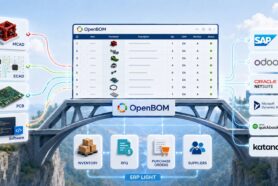
One of the goals behind the new OpenBOM licensing model is very simple:
make it easy to start, even if you are a single engineer or a very small team, and let value grow naturally as more people get involved.
You no longer need to design a full PLM strategy on day one. You can start small, solve a very concrete problem, and then expand OpenBOM usage as your organization sees the benefit.
Below are three practical use cases that new users often explore first. Each of them can be started by one person, without IT projects, and without asking the entire organization to change how they work.
Use Case 1: Making Engineering Data Available to the Entire Organization
Many OpenBOM journeys start with a very common problem:
engineering data exists, but it is fragmented and difficult for others to access.
An engineer creates designs in multiple CAD systems. Files live on local drives, shared folders, email attachments, or cloud storage. Derivative files—PDFs, STEP files, drawings—are scattered even more. Other teams (manufacturing, purchasing, sales, support) constantly ask for “the latest version,” and the engineer becomes the bottleneck.
With OpenBOM, a single user can start solving this problem immediately.
The workflow is straightforward. One person creates an OpenBOM account and connects the CAD tools they already use. Product structures, parts, and assemblies are captured directly from CAD. Alongside native CAD files, derivative files such as PDFs, neutral formats, and documentation are attached to the same items and assemblies.
At this point, something important happens: engineering data stops being “someone’s files” and becomes shared product data.
With the new licensing model, this data can be made available to the entire organization using free read-only access. Manufacturing can view structures and drawings. Purchasing can review parts and quantities. Sales and support can access product information without copying files or requesting exports.
Nothing about the engineer’s daily workflow needs to change dramatically. But suddenly, the organization has a single, consistent place to look for product data—and engineering is no longer acting as a human API.
For many teams, this moment becomes the foundation for wider adoption, because people quickly see how much time and confusion it removes.
Use Case 2: Replacing Excel Cost Rollups with a Single Source of Truth
Cost is always very important for any manufacturing company I ever worked with. But it usually spreads out in multiple files, places, and databases.
Many companies rely on Excel spreadsheets to manage part catalogs, supplier pricing, and cost rollups. Over time, these spreadsheets grow complex and fragile. Versions multiply. Someone forgets to update a cell. A copied formula breaks. And when a design changes, the cost model quietly drifts out of sync.
OpenBOM offers a different approach, and again, it can start with just one user.
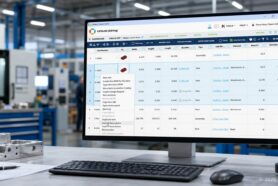
Existing Excel spreadsheets can be imported directly into OpenBOM. Catalogs, items, vendors, pricing, and cost attributes all become structured data rather than loose cells. Once imported, this information is no longer tied to a specific file or person—it becomes reusable product data.
From there, the user can link costs directly to product structures and let OpenBOM calculate automatic cost rollups. When quantities change, when assemblies are restructured, or when parts are replaced, the rollup updates immediately. There is no need to copy formulas or reconcile multiple spreadsheets.
What many users find valuable here is not just accuracy, but confidence. Instead of asking “Which Excel file is correct?”, there is one place where costs live and one model that reflects the current product.
Even if the rest of the organization continues using Excel for other purposes, OpenBOM becomes the system where product cost logic is defined and maintained. Over time, this often evolves into deeper collaboration between engineering, procurement, and finance—but it does not have to start there.
Use Case 3: A Simple, Organization-Wide PDM for All Files
For some teams, the entry point is not BOMs or costs, but file chaos.
CAD files, drawings, specifications, test reports, certificates, and customer documents tend to live in different systems or no system at all. Version naming conventions are informal. People overwrite files or duplicate them “just in case.” Finding the right version becomes harder as the company grows.
OpenBOM can be used as a lightweight PDM that brings all of these files into one place.
A single user can upload CAD files and all related documents, organize them by items, assemblies, or projects, and let OpenBOM manage versions automatically. Each update is tracked. Engineers can check-out/check-in files to lock them from changes to be done by multiple people at the same time. Older versions remain accessible. Files are no longer lost or silently replaced.
What makes this especially powerful under the new licensing model is access. With free read-only users, everyone in the organization can see the same files, the same versions, and the same context. There is no need to duplicate folders or manually sync cloud storage permissions.
This use case often starts very modestly—perhaps with one product or one project. But once teams experience the benefit of having one trusted place for files, it naturally expands. More products are added. More documents are linked. And gradually, file management stops being a daily frustration.
Conclusion: Start Small, Expand When It Makes Sense
All three use cases share an important characteristic: they are low-risk, low-effort starting points.
You do not need a rollout plan. You do not need to migrate everything at once. You do not need to convince the entire company on day one.
One user can start. Data can be captured incrementally. Value appears quickly. And as more people begin to rely on OpenBOM, expanding usage becomes an organic decision rather than a forced one.
That is the intent behind the new OpenBOM licensing model: make it easy to begin, and flexible to grow.
If you are exploring OpenBOM for the first time, these three use cases are often the simplest and most practical way to see how it fits into your daily work—and how it can quietly make collaboration easier across your organization.
REGISTER FOR FREE and give OpenBOM a try.
Best, Oleg
Join our newsletter to receive a weekly portion of news, articles, and tips about OpenBOM and our community.