Every few weeks during onboarding, someone stops me with the same worried question. They have just seen the words “data records” in our pricing, and they assume there is a catch. Does adding fifty properties to a part cost more? Does revising a CAD file ten times multiply the bill? If they reuse the same purchased bracket across forty products, are they paying for that bracket forty times?
The answer to all of those is no. And the reason is worth explaining, because once you understand what a data record actually measures, the pricing stops feeling like a meter you have to watch and starts looking like what it is: a simple count of the structured product data you manage.
A Data Record Is a Unit of Structure, Not a Unit of Storage
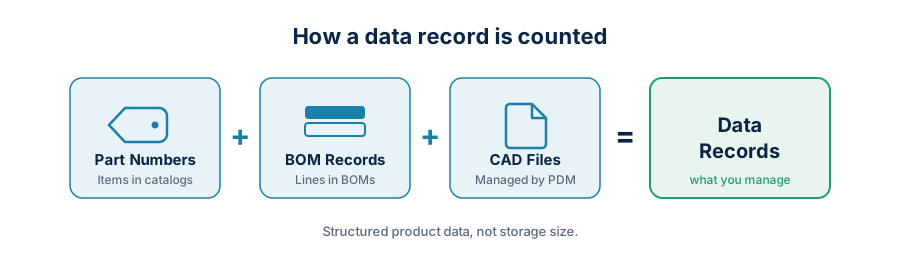
A data record is the unit we use to measure structured product data in your account. We count exactly three things.
The first is unique part numbers, the items you manage in OpenBOM catalogs. The second is BOM records, the lines in your bills of materials. The third is managed CAD files, the files handled by OpenBOM PDM services such as Design Projects and the CAD File Agent.
That is the entire definition. The formula is just the sum of those three:
Data Records = Unique Part Numbers + BOM Records + Managed CAD Files
Data Records Track What You Manage, Not How Many Megabytes You Store
When people hear the word “data,” they reach for megabytes and gigabytes. That instinct is the source of most of the confusion, because data records have nothing to do with file size.
A small shop can carry enormous CAD files and a handful of parts. A contract manufacturer can run tiny files but tens of thousands of purchased components, BOM lines, and configurations. Those two accounts have very different amounts of product structure to manage, and that is the thing data records are built to reflect. Data records measure the structure you manage, not the volume you store.
Properties, Revisions, Versions, and Attachments Stay Unlimited
This is the part that answers the onboarding question directly. The following never increase your data record count:
- File size
- Number of revisions
- Number of versions
- Number of attachments
- Number of properties or attributes
- Number of catalogs
- Number of derivative files
- Number of times a part is used in upper-level assemblies
So you can add fifty properties to a part, attach every supplier datasheet and drawing, carry it through a dozen released revisions, and reuse it across the whole product line. None of that moves the number. Storage is configured per account and can be raised on request, and if your team needs a larger configuration you only need to ask. It includes CAD and any other files attached to an Item.
The idea is simple. Data records measure the structure you manage. Storage holds the full context around that structure. We never wanted a pricing model that punishes teams for doing proper revision control or for keeping rich product context, because that context is exactly what good product data management is for.
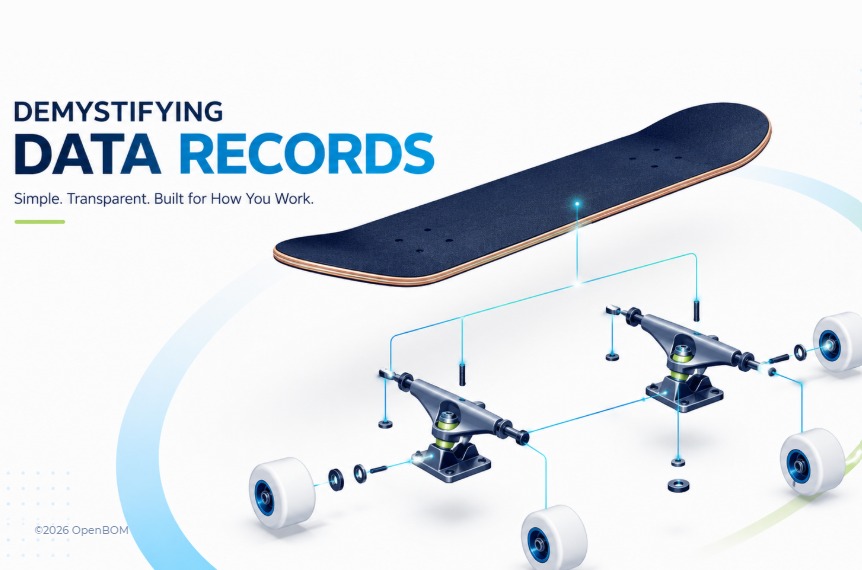
A Skateboard, Counted Three Ways
The fastest way to make this concrete is to count a real product. I will use a skateboard, because almost everyone can picture one and it has just enough structure to show all three categories.
The skateboard is a single top-level assembly. It contains one board and two axle assemblies. Each axle assembly contains one axle and two wheels. That is a two-level product structure, and it is all we need.
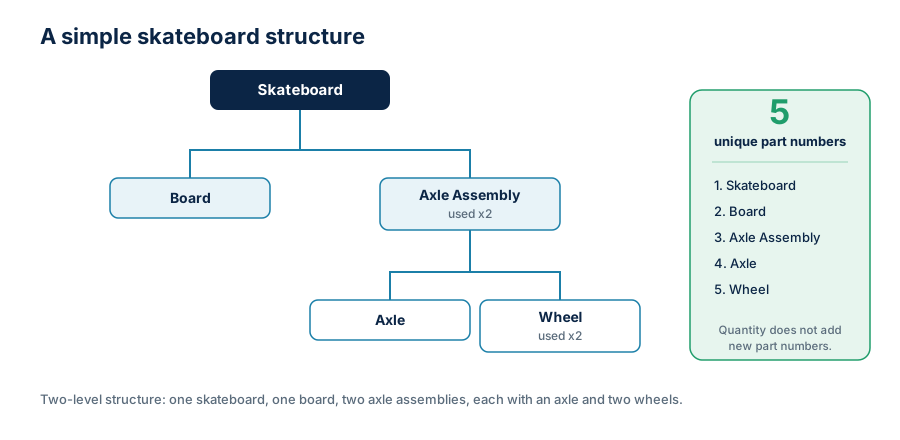
Counting unique part numbers. There are five distinct items here: the skateboard assembly, the board, the axle assembly, the axle, and the wheel. The skateboard uses two axle assemblies and four wheels in total, but each unique item is still one part number. That gives us five part-number records. Worth noting: these records are created when the item itself is created in OpenBOM, not when you define a part numbering rule. Setting up a numbering scheme costs nothing on its own. Creating the items it numbers is what counts. Keep in mind – those items (with Part Numbers) can include an unlimited number of attachments (CAD files, derivative files, specs, etc.) and it will be still one data record for a Part Number.
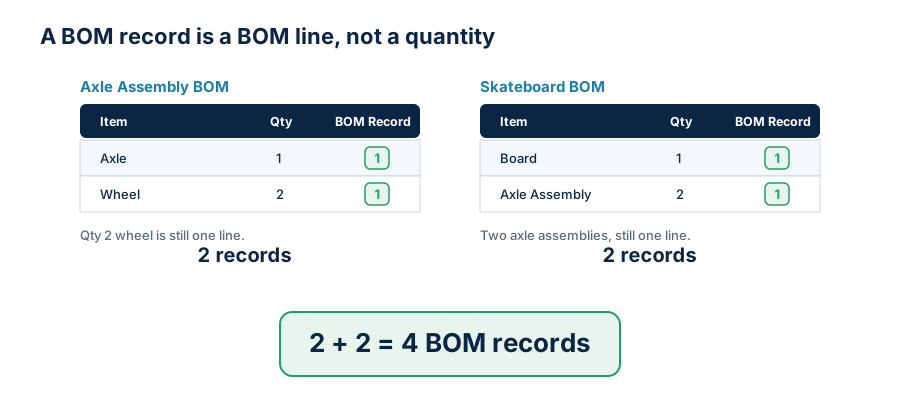
Counting BOM records. A BOM record is a BOM line. The top-level skateboard BOM has two lines, board and axle assembly. The axle assembly BOM has two lines, axle and wheel. Two plus two gives us four BOM records.
Counting managed CAD files. If you let OpenBOM manage your CAD files, each managed file counts once. CAD (and other) files can be managed in Design Folders. Only those files placed in Design Folders are counted towards CAD managed files. One File record in Design Folders = 1 CAD file.
For this skateboard that is four files: the skateboard assembly, the axle assembly, the axle part, and the wheel part. We count the managed file, not its version history, so revising any of them later does not add to the count.

That gives us the full picture for one simple product.


A Quantity of 24 Is Still One Record
The most common misreading is to confuse quantity with count. In the skateboard, the axle assembly uses two wheels, so the line reads “Wheel, quantity 2.” That is still one BOM record, not two.
The reason is that a BOM line describes a relationship between an assembly and a component. The quantity is a property of that relationship, not a separate record for each physical unit. A line that reads “Screw, quantity 24” is exactly one BOM record. Quantity never multiplies the count.
Reuse Does Not Cost You Twice
The second common misreading is to assume that using a part in many places multiplies its records. It does not, and this matters a great deal for any team that builds on shared modules or product platforms.
Suppose you offer two skateboard models. The Simple Skateboard uses the standard skateboard assembly. The Night Package adds a light to that same assembly. You now have two top-level BOMs, and creating those two configurations does add BOM records at the top level, because they are real, distinct structures you created.
But the skateboard assembly underneath them is defined once. Its internal structure, the board and the axle assembly and everything below, is counted where it lives. Pointing two product models at that shared assembly does not duplicate its insides. OpenBOM counts BOM records in the BOMs you create, not once per place an assembly happens to appear. A standard sub-assembly can show up in fifty products and its own structure is still counted a single time.

How Billing Actually Works
Every OpenBOM subscription includes 2,000 data records. While your account stays at or below that number, there is no additional charge. The included amount is yours.
When you cross 2,000, you move to the next data record level. There is no tier in between. The first level above the included amount is 5,000, and from there the levels rise in increments of 5,000: 5,000, then 10,000, then 15,000, and so on. So an account that grows from 1,900 to 2,100 records crosses the included limit and moves onto the 5,000 level. The charge applies at the moment you cross. If you later delete records and drop below a level, the adjustment is reconciled at your next renewal rather than instantly, so the system never thrashes on day-to-day edits.
That gives you a predictable way to grow. You start with 2,000 included, and you step into clear levels as your product data expands. If you would rather not think about levels at all, we also offer an unlimited data records plan. That one is a conversation with our sales team.

You Can See Your Own Number Any Time
You do not have to estimate any of this by hand. The OpenBOM billing dashboard shows your current data record count directly in your account, so an administrator can open it and see exactly where the account stands. No counting parts, no tallying BOM lines, no guessing about CAD files. The number is right there, which is the whole point of making the model transparent in the first place.
Why This Model Scales With Real Teams
Engineering and manufacturing teams do not all grow the same way. Some start with a few BOMs and a pile of CAD files. Others manage thousands of purchased parts before they touch a single assembly. Some lean on OpenBOM mainly for BOM and procurement, while others run PDM, revisions, change management, and supplier collaboration through it.
Data records give all of them the same simple deal. Your count grows with the product structure you actually manage, while properties, attachments, revisions, versions, file size, and reuse stay unlimited. You add the context your product needs, and the number only follows the structure.
Conclusion
OpenBOM data records measure product data complexity, and they count three things: unique part numbers, BOM records, and managed CAD files. They do not count file size, revisions, versions, attachments, attributes, derivative files, or how many times a part is reused.
Our skateboard came to five part numbers, four BOM records, and four managed CAD files, for thirteen data records in total. Every subscription includes 2,000 of them, and accounts that grow past that step into clear 5,000-record levels. Storage and product context stay unlimited the whole way, and your current usage is always visible in the billing dashboard.
The goal was never a meter to watch. It was a pricing model honest enough that you can stop watching it and get back to building products.
REGISTER FOR FREE and check how OpenBOM can help.
Best, Oleg
Data records: billing FAQ
How many data records are included?
Every OpenBOM subscription includes 2,000 data records. While your account stays at or below 2,000, there is no additional charge.
What happens when I go over 2,000?
You move to the next data record level. The first level above the included amount is 5,000, and there is no tier in between. From there, levels rise in increments of 5,000: 5,000, then 10,000, then 15,000, and so on. For example, an account that grows from 1,900 to 2,100 records crosses the included limit and moves onto the 5,000 level.
When is the charge applied?
The charge applies at the moment your account crosses a level. If you later delete records and drop below a level, the adjustment is reconciled at your next renewal rather than instantly.
Is there an unlimited option?
Yes. If you would rather not track levels, OpenBOM offers an unlimited data records plan. Contact OpenBOM sales to set it up.
Join our newsletter to receive a weekly portion of news, articles, and tips about OpenBOM and our community.