
At OpenBOM, we are constantly enhancing our platform to help engineers, manufacturers, and procurement teams manage data more efficiently. One of the most requested improvements is advanced filtering capabilities, and we’re excited to introduce a sneak peek of the upcoming Multiple Filter Conditions feature, set to launch in February 2025.
This powerful enhancement will allow users to apply multiple filter criteria simultaneously, making it easier than ever to navigate large datasets and pinpoint exactly the information they need.

How Does It Work?
The new option will provide additional filtering options that allow users to search and refine their data (BOMs, catalogs, orders, custom data objects, etc) with multiple criteria for each property. So you can be able to do something like Cost is more than $1 and less than $5 in a single filter.
With Multiple Filter Conditions, you can:
✅ Apply AND/OR logic to combine multiple filters
✅ Use custom conditions like greater than, less than, contains, and more
✅ Filter across multiple properties simultaneously
✅ Save and reuse complex filter configurations
Here is how it will look like in the grid.
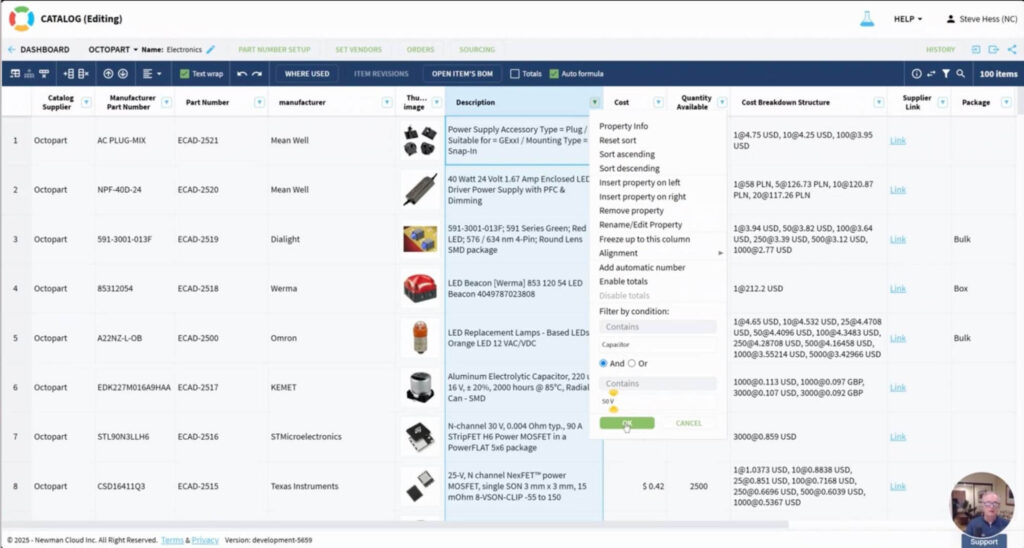
And this is an option for a side panel.
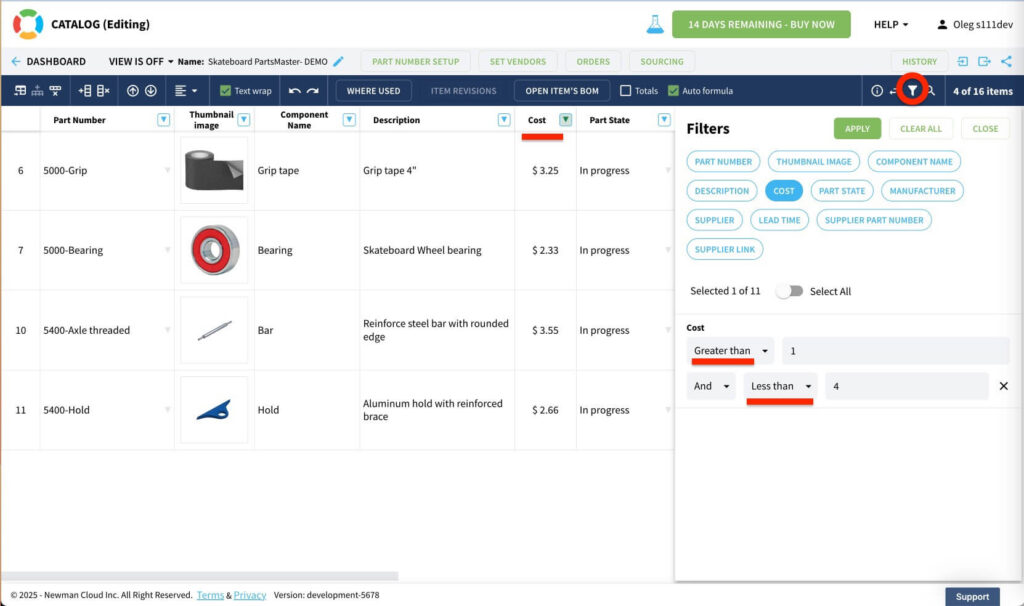
Why Does This Matter?
More efficient data management allows users to narrow down search results based on multiple parameters at once, eliminating the need for multiple searches and speeding up decision-making. Instead of manually sorting through massive datasets, users can quickly filter components that meet specific criteria, such as being in stock, costing less than $50, or being supplied by a particular vendor.
Engineering and procurement workflows are also significantly improved. Teams working with large assemblies or complex supply chains often need to filter data across multiple dimensions. The new feature makes it easier to identify parts from specific suppliers, find out-of-stock components for procurement, locate high-cost items for cost-reduction analysis, and ensure compliance by filtering parts with specific material properties.
Greater customization and usability further enhance this functionality. Users can combine filters using AND/OR conditions, making the filtering process more powerful and adaptable to different needs. Whether requiring simple or complex filters, this feature provides the flexibility to support unique requirements efficiently.
How It Works (A Quick Video Preview)
The new Multiple Filter Conditions feature will be available in the OpenBOM BOM, Catalogs, and Order and other data objects (eg. Custom Objects)
🎥 Watch our sneak peek demo to see how it works in action!
This enhancement will make it much easier to work with large and complex datasets, reducing time spent on data searching and analysis.
Conclusion
I’m super excited to see this option in the Feb 2025 release. In the following release, it will be available in user defined views too. We’re excited to bring you a more powerful, flexible, and efficient way to manage BOMs and product data.
📢 Stay tuned for more updates, and don’t forget to check out our YouTube channel for a full walkthrough when the feature goes live!
🔗 REGISTER FOR FREE and check how OpenBOM can help you: www.openbom.com
Best, Oleg
Join our newsletter to receive a weekly portion of news, articles, and tips about OpenBOM and our community.