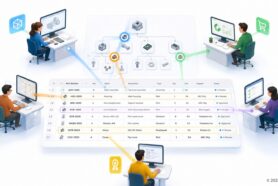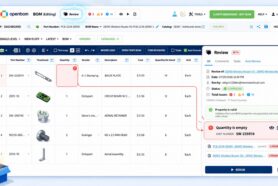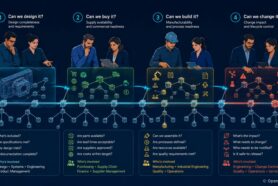
In the evolving landscape of digital transformation, companies are increasingly moving away from traditional, often manual systems towards more sophisticated, digital solutions. This shift is particularly evident in the space of Product Lifecycle Management (PLM) and Product Data Management (PDM), where the limitations of legacy systems are becoming more apparent.
OpenBOM presents itself as an alternative, especially for those transitioning from DIY Excel + file-based systems and legacy database-based systems.
The Challenge with Legacy Systems
PDM and PLM software solutions are notoriously resilient. Once implemented, they tend to remain in place for years, creating a significant challenge for organizations looking to modernize. This longevity can be attributed to several factors, including the sheer inertia of existing systems and the complexity involved in migrating to new platforms.
OpenBOM Gives You A Simple and Modern Solution
OpenBOM offers a fresh perspective on replacing legacy systems that are running out of service, support, and upgrades. Recognizing that “one size doesn’t fit all” in engineering and manufacturing software, OpenBOM provides tailored solutions that are both efficient and cost-effective. Let’s explore three use cases where OpenBOM can be a great replacement for outdated systems.
Scenario 1: Old Client-Server PDM Systems
Many companies rely on outdated, locally installed systems for data vaulting. These systems often lack sophistication and have become costly and cumbersome, especially when global access is needed. OpenBOM offers a straightforward solution by enabling companies to easily register and set up Design Projects, significantly improving accessibility and reducing overhead.
Scenario 2: Complex and Expensive Old PDM/PLM Systems
It’s an open secret that many organizations use only a fraction of their old PDM/PLM systems’ capabilities. OpenBOM addresses this by simplifying the PLM and PDM landscape, offering an easy-to-use, cost-effective solution that doesn’t sacrifice functionality. With the ability to automatically import files and spreadsheets, converting them into OpenBOM data, the transition is streamlined, allowing companies to quickly realize the benefits of a modern PLM system.
Scenario 3: Homegrown and DIY Systems
A surprising number of companies attempt to develop and support their own PDM/PLM software, only to find themselves stuck with unsupported, outdated systems. OpenBOM offers a lifeline by facilitating the re-importation of data through its flexible data model, providing simple and modern PDM/PLM services that can rejuvenate a company’s data management practices.
Conclusion
OpenBOM offers a viable path for companies trapped by legacy or DIY PDM/PLM solutions, bringing a modern solution to the table. Check out more than 500 reviews on G2, the user feedback speaks volumes about OpenBOM’s impact. We invite you to register for free and embark on your OpenBOM journey today. Discover how OpenBOM can transform your organization’s approach to product lifecycle management and data management, making the transition from outdated systems a smooth and beneficial process.
REGISTER FOR FREE and start your instant trial and OpenBOM journey today.
Best, Oleg
Join our newsletter to receive a weekly portion of news, articles, and tips about OpenBOM and our community.