I’m super excited to share with you an early preview of OpenBOM storage functionality for OpenBOM CAD Add-ins. The functionality will be part of every OpenBOM CAD add-in (eg. Solidworks, Autodesk Inventor, Solid Edge) and it will allow storing CAD files and their derivatives in the OpenBOM storage. Before going into more detail, let me step back and remind you what we did in the previous OpenBOM product update – file storage and revisions.
OpenBOM File Storage and Revision Control
As we have learned for the last several years, despite the substantial growth of cloud and SaaS computing, files are not going to disappear as fast as we would like them to. Files are a fundamental data element that is used in so many engineering applications such as CAD and many others. Therefore, we decided to expand OpenBOM with a much more comprehensive and robust mechanism to manage files in OpenBOM integrated file storage. We are now bringing OpenBOM file storage to production!
These storage enhancements allow you to keep a fully representative set of design data. Keep in mind that managing files attached to OpenBOM Items create a very unique and robust mechanism to control CAD files (eg. Solidworks, but not only). However, OpenBOM Storage is completely optional, so if you want to stay with transitional cloud storages (eg. Google Drive, Dropbox, and others), you still can.
Tightly connected to the OpenBOM Revision mechanism, file storage allows managing files attached to items and their revisions by creating a full CAD data file revision storage and history. Right after the new release, you will be able to store CAD and other files in OpenBOM items and preserve their history. Small, but important User experience feature – if a file can be viewed natively using a browser, the file will be automatically displayed in the browser window. Read more about File Storage here.
CAD Add-in OpenBOM File Storage Option
A new option will now be available in OpenBOM CAD Add-in settings. Here is an example of the CAD add-in storage in Solidworks Add-in.
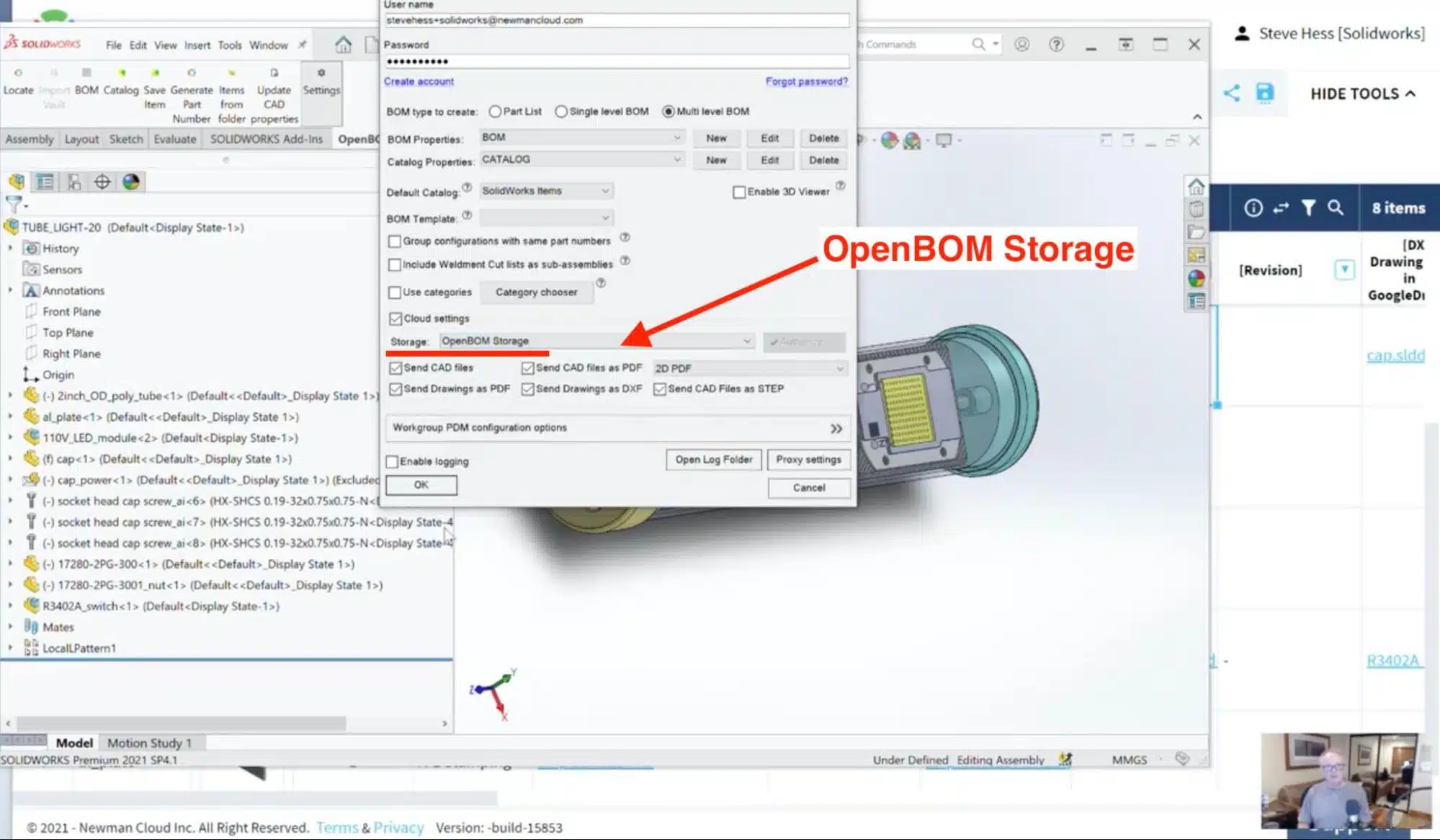
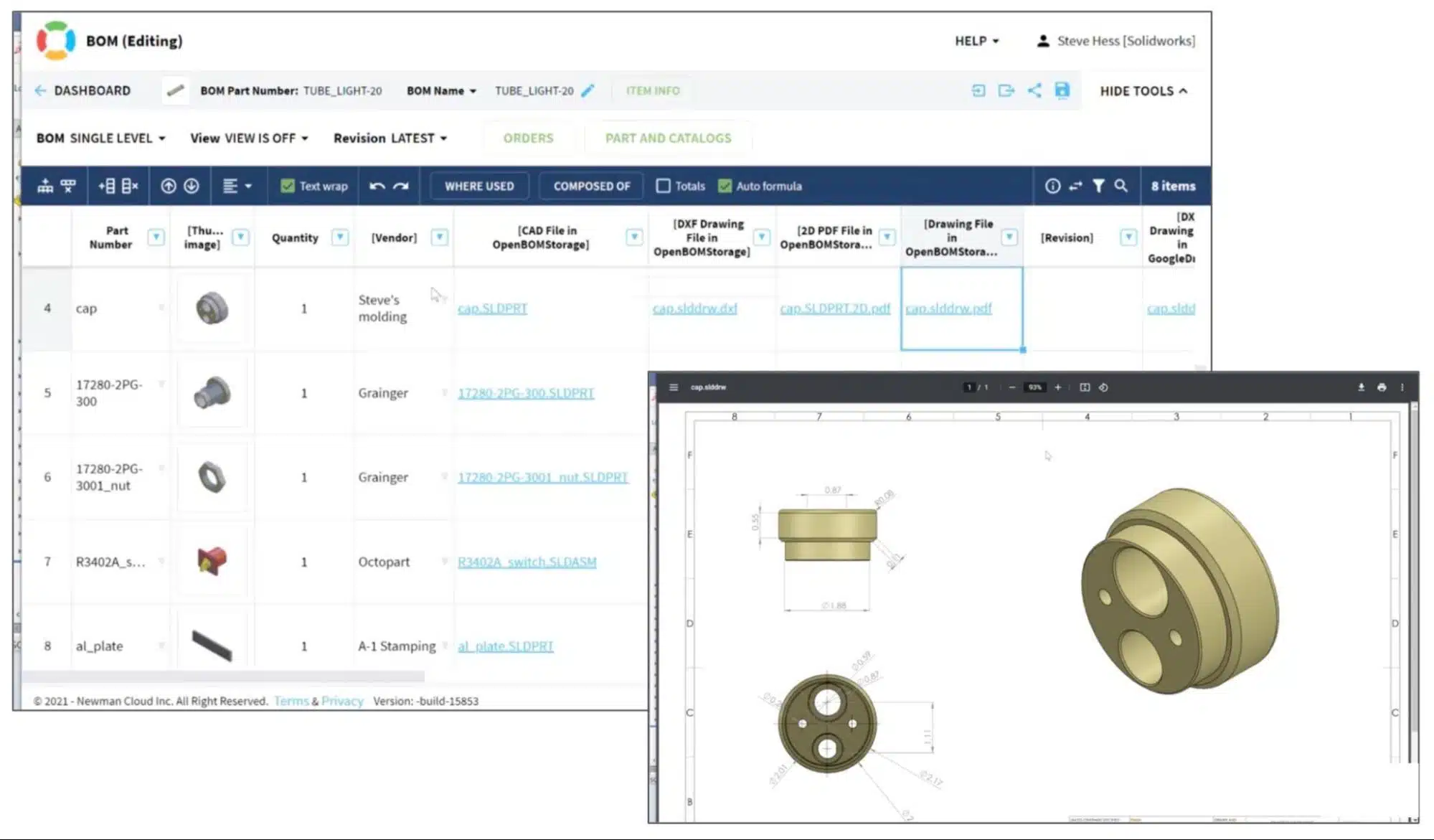
Once this storage option is selected, OpenBOM CAD add-in will send all files to OpenBOM storage and files will become available via OpenBOM reference properties, exactly the way it was done before with Google Drive, Dropbox, Box, and other storage.Video Demo
Check the following video to preview how OpenBOM Storage works together with OpenBOM Solidworks Add-in.
Conclusion
CAD Files Revision History with OpenBOM is super exciting! OpenBOM Storage integration with CAD Add-in opens up a new big set of capabilities in OpenBOM to store and manage CAD file revision history within OpenBOM. Combined with the new Item revision mechanism for OpenBOM catalogs it allows full control of history CAD files for product lifecycle within OpenBOM.
In my next video, I will show you a preview of an example of how to use OpenBOM Revision commands combined with a new file storage support for CAD Add-ins. Stay tuned…
In the meantime, REGISTER for OpenBOM and try out OpenBOM for yourself and see how it can help you organize your CAD data.
Best, Oleg
Join our newsletter to receive a weekly portion of news, articles, and tips about OpenBOM and our community.