As much as we love having information online, not everyone is ready to use a browser to access data. While we like to think of ourselves as being fully in a digital age the truth is that some areas of our lives still benefit from an analog world.
A perfect example would be some documents such as BOMs that can be used on the shop floor that are printed directly on paper. Another example are some financial processes in purchasing that require you to send POs attached to the email or print it.
3 Exporting Formats Coming Your Way!
We’ve been thinking about this a lot at OpenBOM and we’ve come up with a solution which provides an export function to get the data out of OpenBOM in three flexible formats – CSV, XLS and PDF. The last one (PDF) was using some predefined template and we’ve been getting many requests to customize it.
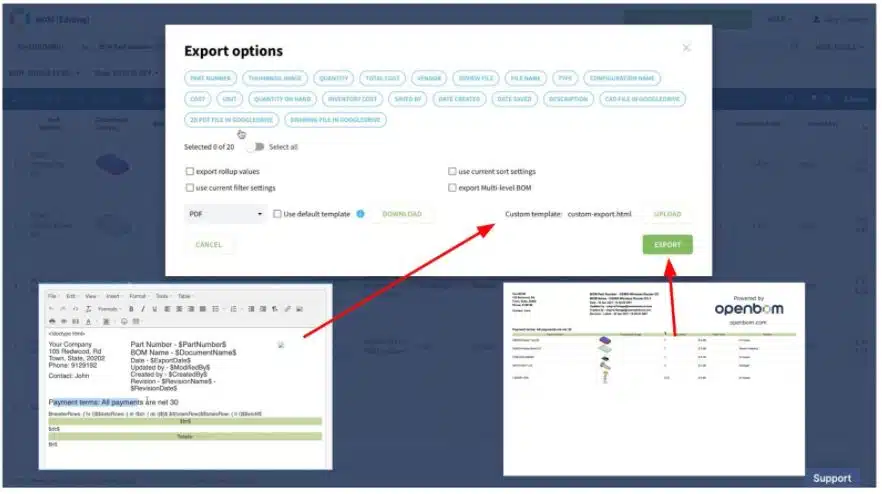
I’m super excited to share that the feature of PDF export customization is coming in the next production update.
How does the PDF Export Customization Work?
When you select the PDF option, you will have a way to download an existing HTML template used for the export and customize it using any HTML editor. Once it is done, you can upload it to OpenBOM and select the option to use a custom template. That’s it! After that, OpenBOM will use a custom HTML template to create a PDF in the new format.
Please watch the video with the preview to give you an idea of how this feature will work.
Conclusion
Flexibility is always top of mind here at OpenBOM. We believe flexibility is the key element of our strategy. Adding a custom HTML template for Export function, we’re solving an important painpoint for many customers – how to use OpenBOM and communicate with the rest of companies and suppliers that are still not ready to work online and need to have custom PDF documents formatted according to their requirements.
Register for FREE to try OpenBOM today.
Best, Oleg
Join our newsletter to receive a weekly portion of news, articles, and tips about OpenBOM and our community.