
I’m super excited about recent data model enhancements introduced in the OpenBOM October 2024 release. Let me share more information about it with you.
From the very beginning of OpenBOM product development, OpenBOM’s flexible data model serves as the backbone for robust and fully customizable product data management and lifecycle management capabilities. At its core, this model includes structured data objects and structured properties capable of representing any type of product information.
OpenBOM includes both system (predefined) data objects and fully customizable custom data objects defined by customers. Additionally, the model incorporates special data properties, like object references, which enable seamless linking between any objects. The combination of system and custom object properties with object references creates a foundation for unlimited data modeling capabilities, helping build a powerful product knowledge graph to support digital thread functionality.
Technological Data Management Foundation
The architecture of OpenBOM’s data management system is built on a modern polyglot persistence database architecture, utilizing multiple databases to maximize performance and scalability.
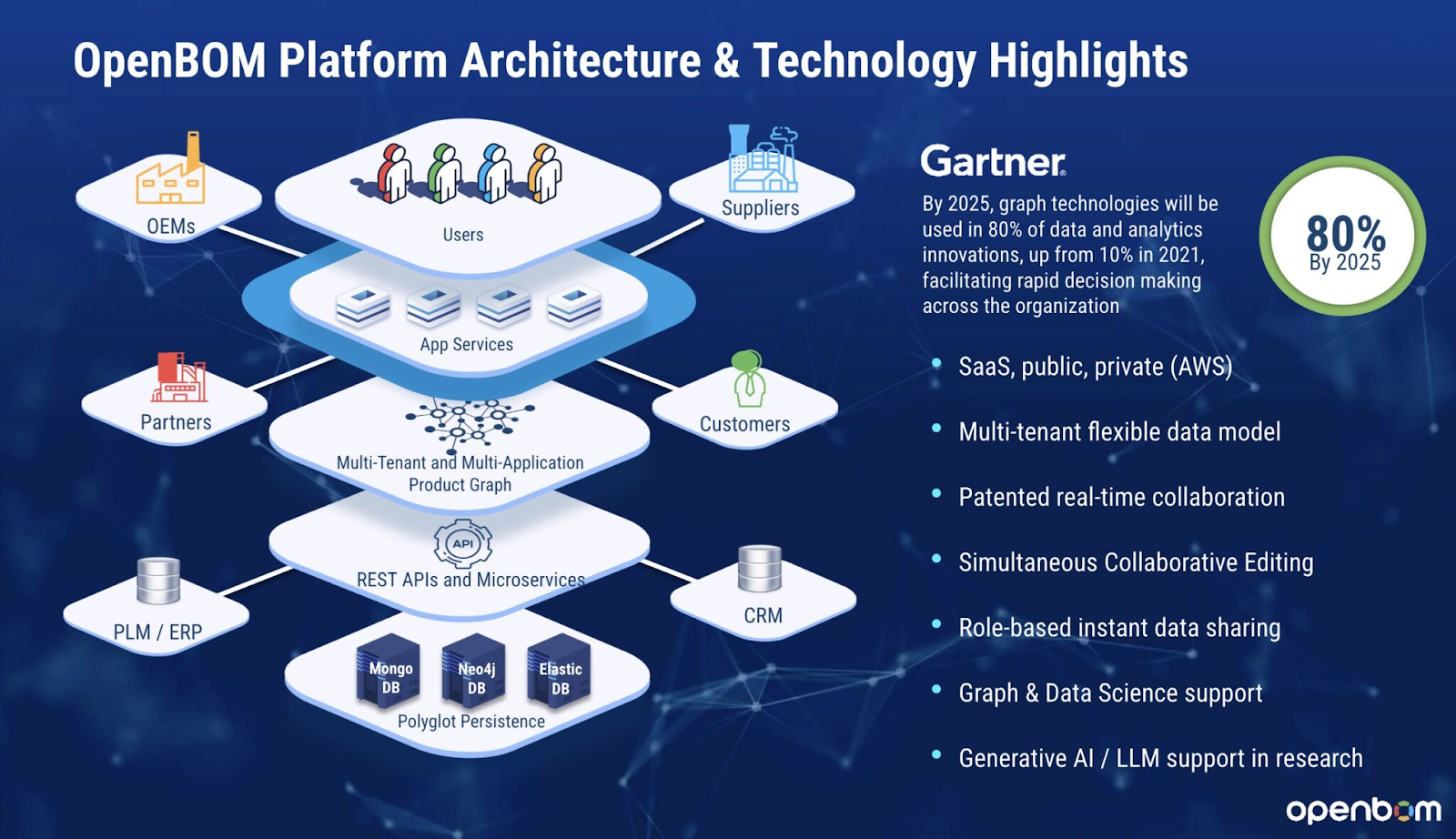
OpenBOM’s platform is underpinned by three key databases:
- Graph Database (Neo4j): Handles relationships and connections between data points.
- NoSQL Document Database (MongoDB): Manages flexible, unstructured data storage.
- Search and Indexing Database (ElasticDB): Supports fast and efficient data search and retrieval.
On top of this robust database layer, OpenBOM offers a scalable system of microservices that support business and application layers, all integrated with a modern, adaptive browser-based user interface.
OpenBOM also provides advanced components and REST APIs to facilitate integration with various systems, making it easier to connect data across different platforms. Its multi-tenant architecture and data model enables efficient sharing and management of data across multiple tenants, ensuring smooth digital thread workflows across companies and supply chains.
Logical Data Model – xBOM and Custom Objects
OpenBOM’s logical data model incorporates both system and custom data objects, equipped with a flexible system of structured properties (e.g., text, lists, multi-select, images, checkboxes, object references, and more). Overall, the data model allows you to create a data representation of objects in different lifecycle stages.

The Design Projects, Product Structure, and xBOM model within OpenBOM support a reference-instance logical model, making it possible to represent product structures that span multiple stages of the product life cycle—such as engineering, manufacturing, and maintenance.
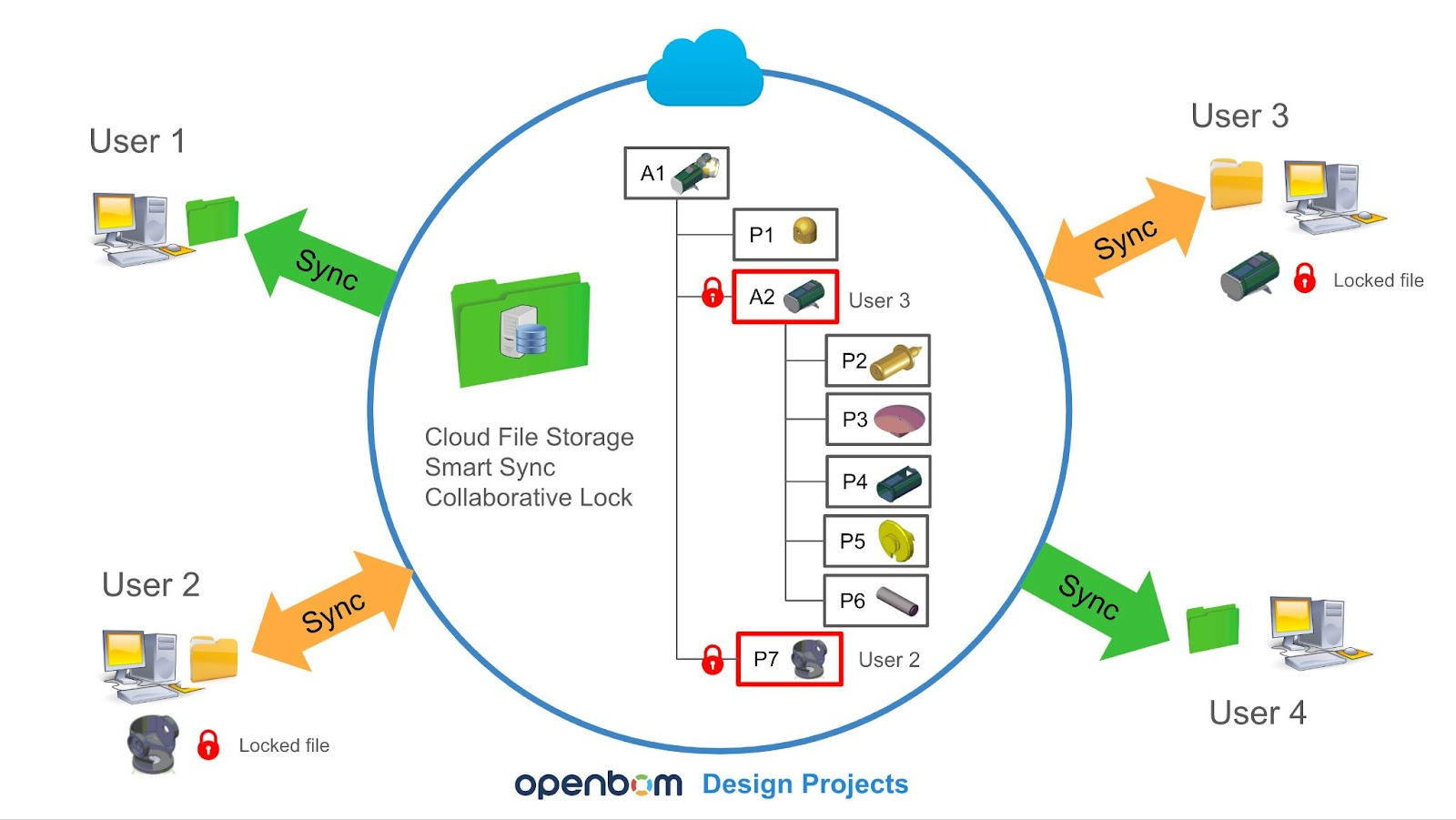
Product structure and xBOM are fundamental to represent data in different lifecycle stages.
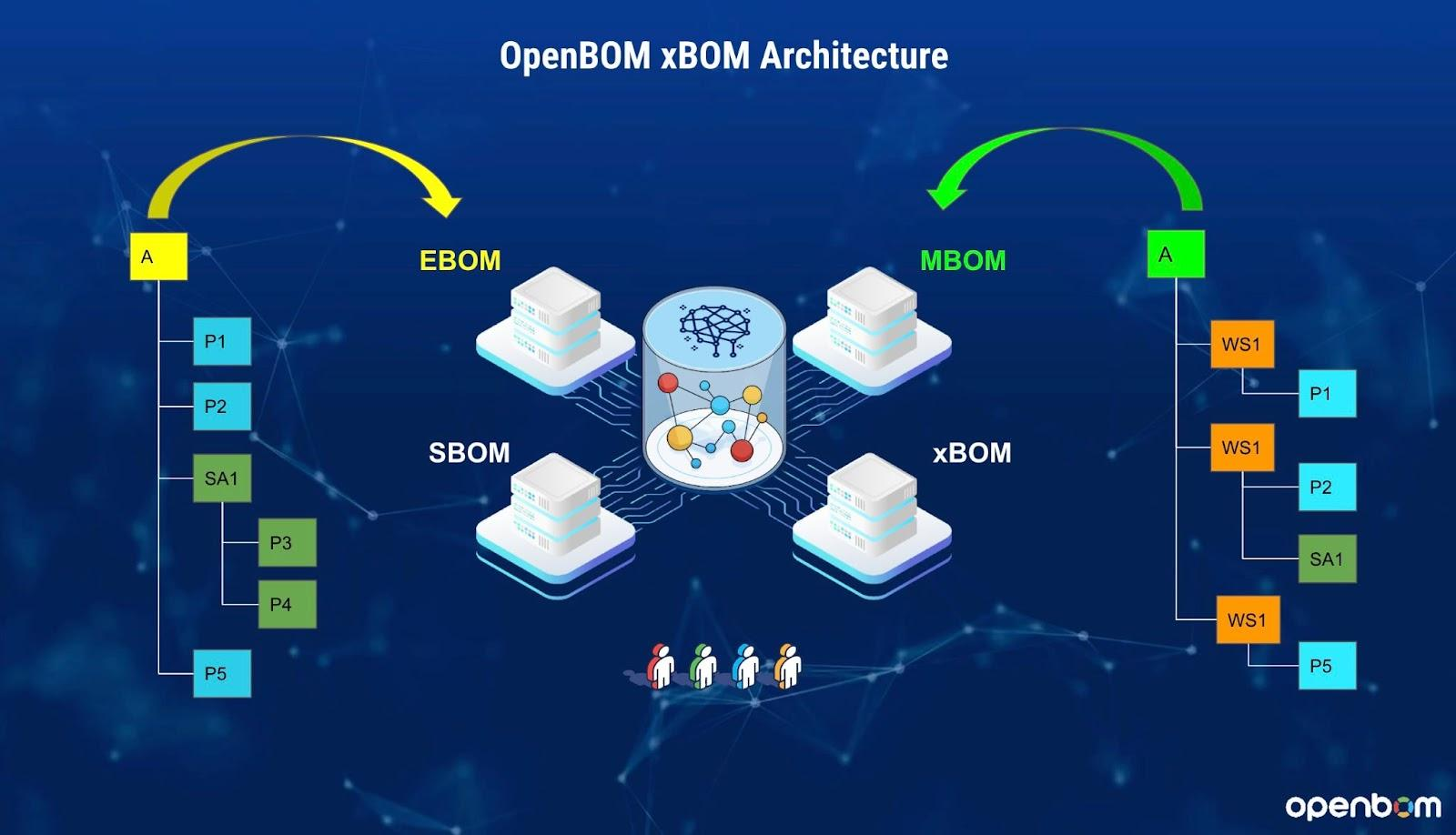
This structure is fundamental to maintaining consistency and continuity in the product data flow, which is essential for enabling a digital thread.
What’s New in the October 2024 Release
The October 2024 release introduces a significant breakthrough: the exposure of object reference properties, which now fully support link creation between both system and custom objects. This enhancement, referred to as Object Reference, enables users to create flexible links between objects with customizable display properties.

For example, customers can now design a customized data model that integrates multiple item catalogs alongside custom objects for Projects, Requirements, and Tasks. This newly enhanced capability enables the seamless building of product data models that align with the unique needs of each organization, expanding the potential for connected data elements and knowledge graph creation within OpenBOM.
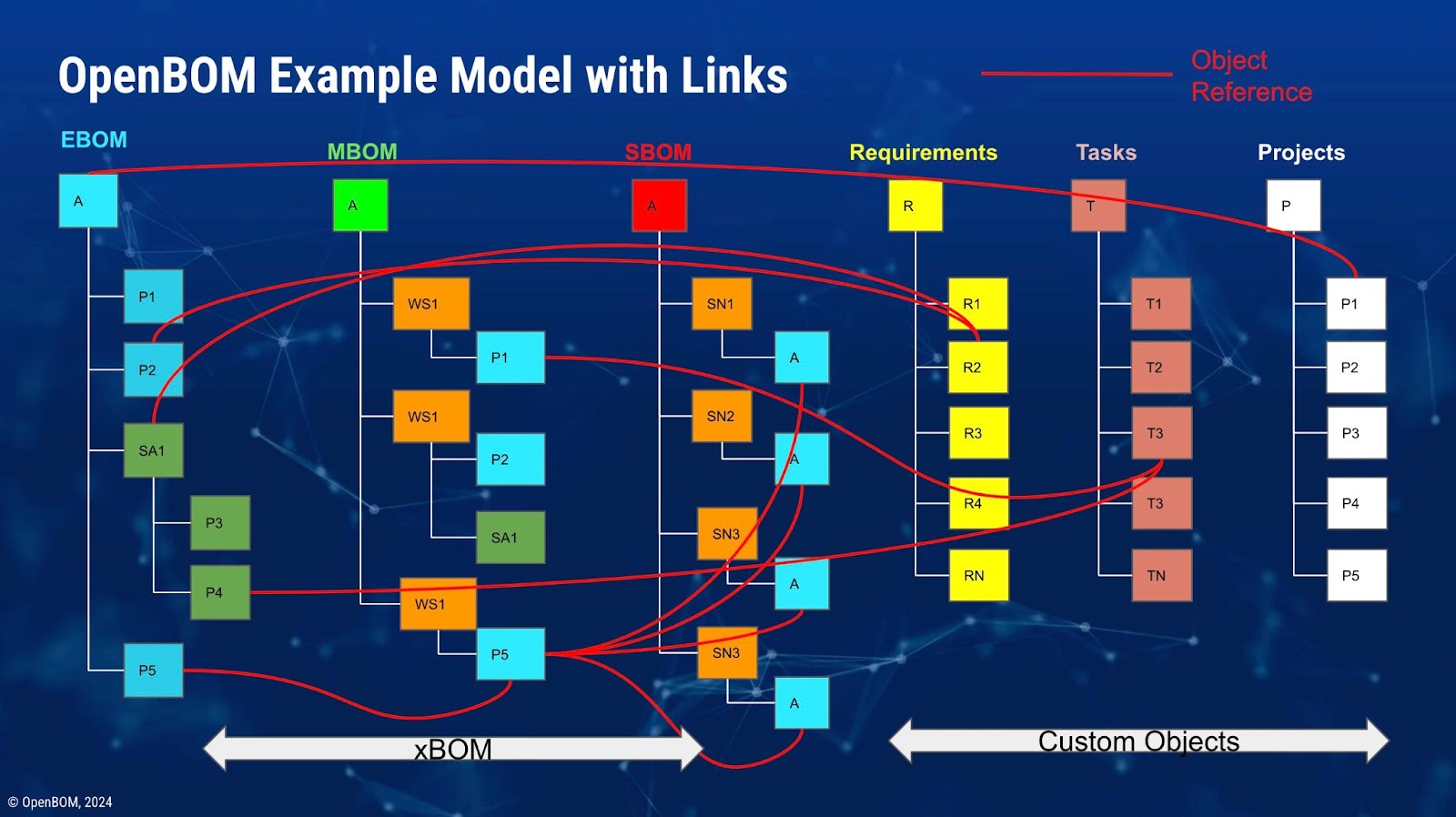
By leveraging Object Reference attributes, users can build complex links between various data objects, creating a rich web of interconnected product data that drives efficiency and clarity across the digital thread.
How to Build Custom Objects and Create Object References
Creating custom objects and object references is straightforward in OpenBOM. Here’s a high-level example:
Navigate to the custom object dashboard to create new object types tailored to the data you need to manage.

Once created, the custom objects will appear in the user interface, just like any system objects. These objects can be customized further by adding specific properties.
To create links between objects, simply use the Object Reference property type:
- Go to “add property.”
- Select a name for the property and specify the other object type it will link to.
- Define the display property that will be used to visualize this link in the interface.
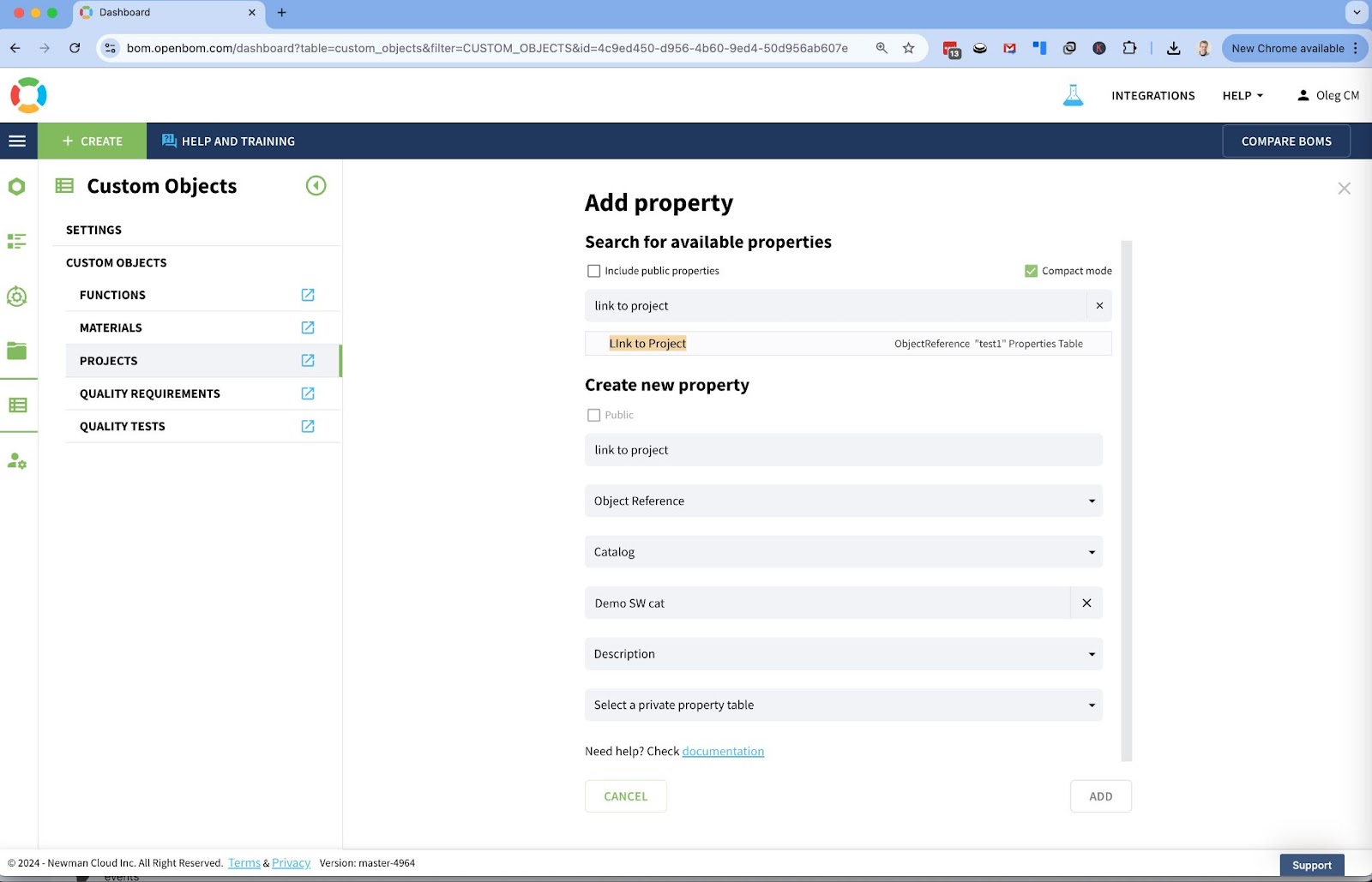
Once established, these object references serve as live links between data, making it easier to navigate between related information in your product data model.
Using Object Reference Properties
Using Object Reference properties is designed to be simple. When you need to link an object, select it from a drop-down list, based on the display attribute you’ve set.

Once selected, the object becomes a clickable link, allowing users to navigate directly to the connected object.
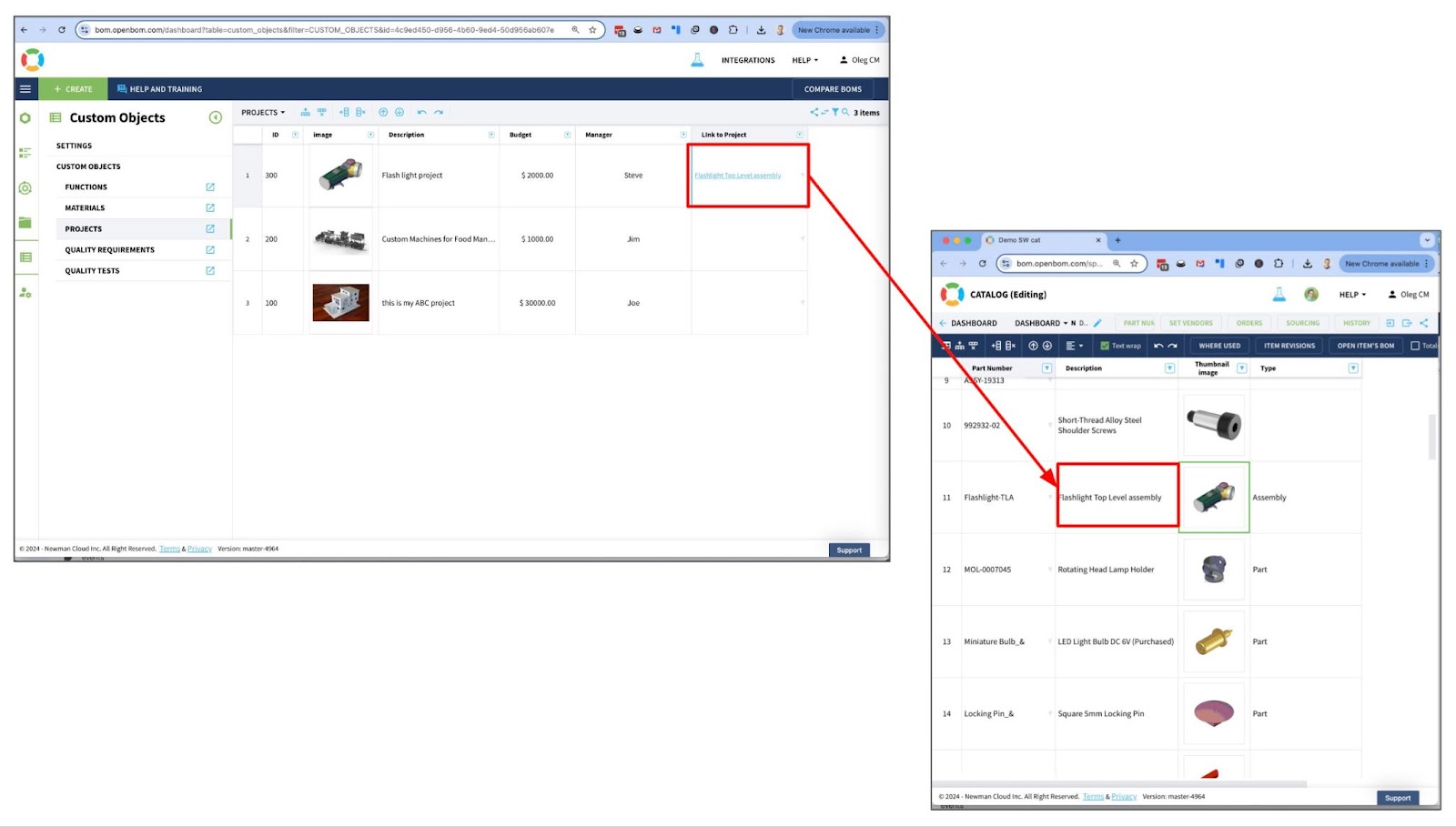
This is especially useful when managing complex product structures or digital threads, as it ensures easy access to relevant data points.
Video Walkthrough of Custom Object Creation and Linking
For a more hands-on demonstration, we’ve created a quick video showing how to create custom objects and link them using the Object Reference feature. This video highlights the simplicity of the process while demonstrating the power of OpenBOM’s flexible data model in action.
Conclusion
I’m super excited about the new capabilities introduced in OpenBOM’s data modeling – custom objects, object references, and links. With these enhancements, customers can now build fully flexible data models tailored to any data management needs, with a special emphasis on supporting digital thread functions.
The introduction of Object Reference properties opens the door to a wide range of use cases, from enhancing existing data objects to creating entirely new data model patterns for future functionality.

(Spoiler alert: In upcoming releases, custom objects, and Object Reference links will be fully supported by OpenBOM’s graph navigation features!)
If you have ideas on how to develop a custom data model but aren’t sure where to start, feel free to contact us—we’d be happy to help!Best,
Oleg
Join our newsletter to receive a weekly portion of news, articles, and tips about OpenBOM and our community.