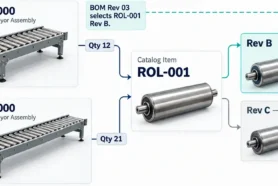
Managing changes in a product’s lifecycle can be a complex process, especially when dealing with multiple stakeholders across various departments. To streamline this process, OpenBOM offers a Collaborative Change Order Approval feature that enables Engineers and Managers to work together to create, review, and approve change orders seamlessly.
Earlier articles about change management
- Demo Change Management: Overview
- Demo Change Management: Revisions
- Demo Change Management: Change Order and Change Request
In my article today, I will show you a demo of a simple collaborative change approval that can be done in OpenBOM using Change Management functionality and collaborative approval workflow. Let’s take a closer look at how this feature works and how it benefits both users.

Administration and Approval Roles Configuration
The administration can be done only by a person with an admin role in OpenBOM. The admin can configure each person’s role and participation level – approve all, mandatory or optional. Admin dashboard allows you to add users to the approval process. You can configure multiple change types using Change Templates.

…and to define their roles.

Creating a Change Request and Change Order
The first step in the Collaborative Change Order Approval process is creating a change request. The Engineer is typically responsible for identifying the need for a change and creating the request in OpenBOM. This process involves documenting the proposed changes, specifying the parts and materials involved, and outlining the reason for the change.
Once the Engineer has created the change request, the Manager can review it and either approve or reject it. If approved, the revision is created.


The Change Order with all attached Change Requests is visible to all parties involved in change approval. To make an approval mechanism the most efficient, OpenBOM provides all users collaborative approval mechanism.
Collaborative Review and Approval
The final stage of the Collaborative Change Order Approval process is collaborative approval. This process involves all stakeholders who need to review and approve the change order, including the Engineer, Manager, and any other relevant team members.
During the collaborative approval process, each stakeholder can provide feedback and suggest changes to the change order. The Engineer can make any necessary adjustments based on this feedback and resubmit the change order for approval.
Once all stakeholders have reviewed and approved the change order, it can be implemented into the product’s lifecycle.

Video Demo
Watch the following video to learn more about the change management process and follow step-by-step instructions.
Conclusion:
Change management is an important process in every engineering and manufacturing organization. OpenBOM offers a simple yet robust and configurable process to manage the change process.
OpenBOM Collaborative Change Order Approval feature enables Engineers and Managers to work together seamlessly to manage changes in a product’s lifecycle. This process ensures that proposed changes are properly reviewed and approved before being implemented, reducing the risk of errors or delays in the product development process.
REGISTER FOR FREE and check how OpenBOM can help you today.
Best, Oleg
Join our newsletter to receive a weekly portion of news, articles, and tips about OpenBOM and our community.