


Speed is crucial in the manufacturing industry. The faster you can get bolts, screws, and other materials to the assembly line, the more products you can produce. Unfortunately, traditional procurement methods are anything but fast. Manufacturing companies are struggling with the complex process of the bill of materials creation, the manual process of generation of neutral geometry derivative files, comparing cost estimation based on multiple suppliers, and keeping inventory between projects.

OpenBOM streamlines the process by letting you quickly source parts and materials from a variety of suppliers. You can also create Bills of Materials (BOMs) and track inventory levels so that you always have what you need on hand. With OpenBOM, manufacturers can speed up their production lines and keep them running at full capacity.
In my article today, I will explain how OpenBOM can make the process of procurement fast and easy, eliminating manual tasks, automating data handover, optimizing the supply chain and purchasing process, and eliminating the need for complex ERP systems to manage inventory between projects. Check this out:
Integrated and Fast Bill of Material Creation
Let’s start from the source of engineering information – CAD systems and other design data. This is where it all starts. Engineers are taking full credit for design optimization, but they are amazingly bad and inefficient when it comes to the point of extracting data from CAD, creating BOMs, organizing the data management processes, and keeping all these processes up and running with every update they do. For engineers, it is an “over-the-wall one-time send”. As a result, the initial BOMs are created later and don’t contain needed information for procurement, which leads to other delays and inefficiency.
OpenBOM CAD integrations automate the process of BOM creation and make it fully integrated with your favorite CAD systems. If you didn’t find your CAD system in the list, please let us know- we will figure out how to build one for you.
Automatically Generate STEP and PDF files
Another very painful process is to capture all design data (files) and make them attached and available for all suppliers, CMs, and other people involved in the process of manufacturing planning and the work the procurement department should do.
Every CAD integration in OpenBOM has an option to get CAD files attached either in the native format or to make them translated into one of the derivative formats. The popular choices are STEP, PDF, DWG, and DXF. Files will be generated automatically and attached to items used in BOMs. OpenBOM allows quick export of data with file attachments when it is needed or sharing data online.
Compare Multiple Sourcing Options and Cost Rollup
Sourcing components was never an easy job. With the recent supply chain shortages and complexity of procurement, companies are taking extra procurement steps to ensure they can bring all components. And it all starts to form the proper definition of item sourcing options, defining vendors, getting vendor information, specs, and files and attaching them to items. In such a way every OpenBOM catalog holding the information about components and outsourced jobs also includes information about multiple sources.
Once the sourcing option is defined and the data is loaded into OpenBOM, Adding cost to BOM allows you to add also a formula to calculate a rollup and total cost including all supplied parts with a preferred vendor. The last one can be selected based on price operationalization.
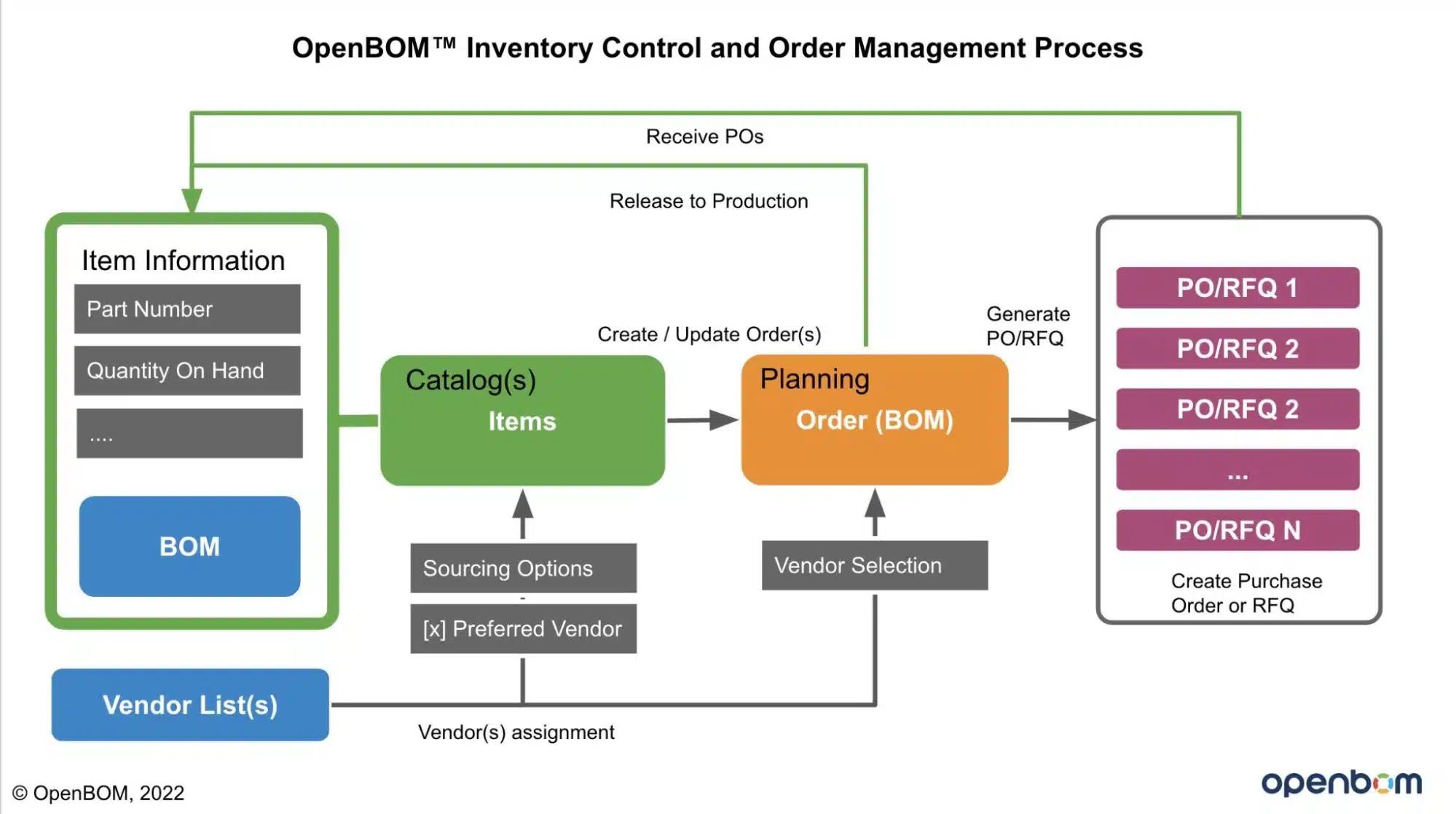
Manage Orders, RFQs/POs, and Keep Inventory Updated
Once suppliers are defined, the bill of materials is passed to the production planning and procurement department. In this step, product development is extremely important to disassemble a bill of materials into multiple components groups that are sourced from multiple vendors. Sometimes, vendors send partial orders, and sometimes, you need to optimize the ordering and make it from multiple suppliers. This is why there is a need for good BOM management software. Without that, your purchasing and planning process will suffer.
Conclusion
OpenBOM optimizes the entire process of design, engineering, production planning, and procurement by automatic BOM generation, efficient collection of all needed information, estimating the cost, and streamlining RFQ and POs supplier sources. The last two are the foundation of efficient procurement activity. OpenBOM makes your RFQ/PO process tightly connected and integrated with engineering data and design activities that shorten the purchasing cycle, eliminates mistakes and increases efficiency.
REGISTER FOR FREE and check out the 14-day trial today.
Best, Oleg
Join our newsletter to receive a weekly portion of news, articles, and tips about OpenBOM and our community.








