From EBOM to Procurement Readiness to Build
Getting a product ready for manufacturing always depends on one thing. The organization must know exactly what needs to be purchased, what is already available, and whether all required components will arrive on time. Engineering may deliver a complete CAD model or a finished EBOM, but the actual build cannot begin until procurement has everything in place. This gap between “engineering done” and “procurement ready” creates delays in almost every company.
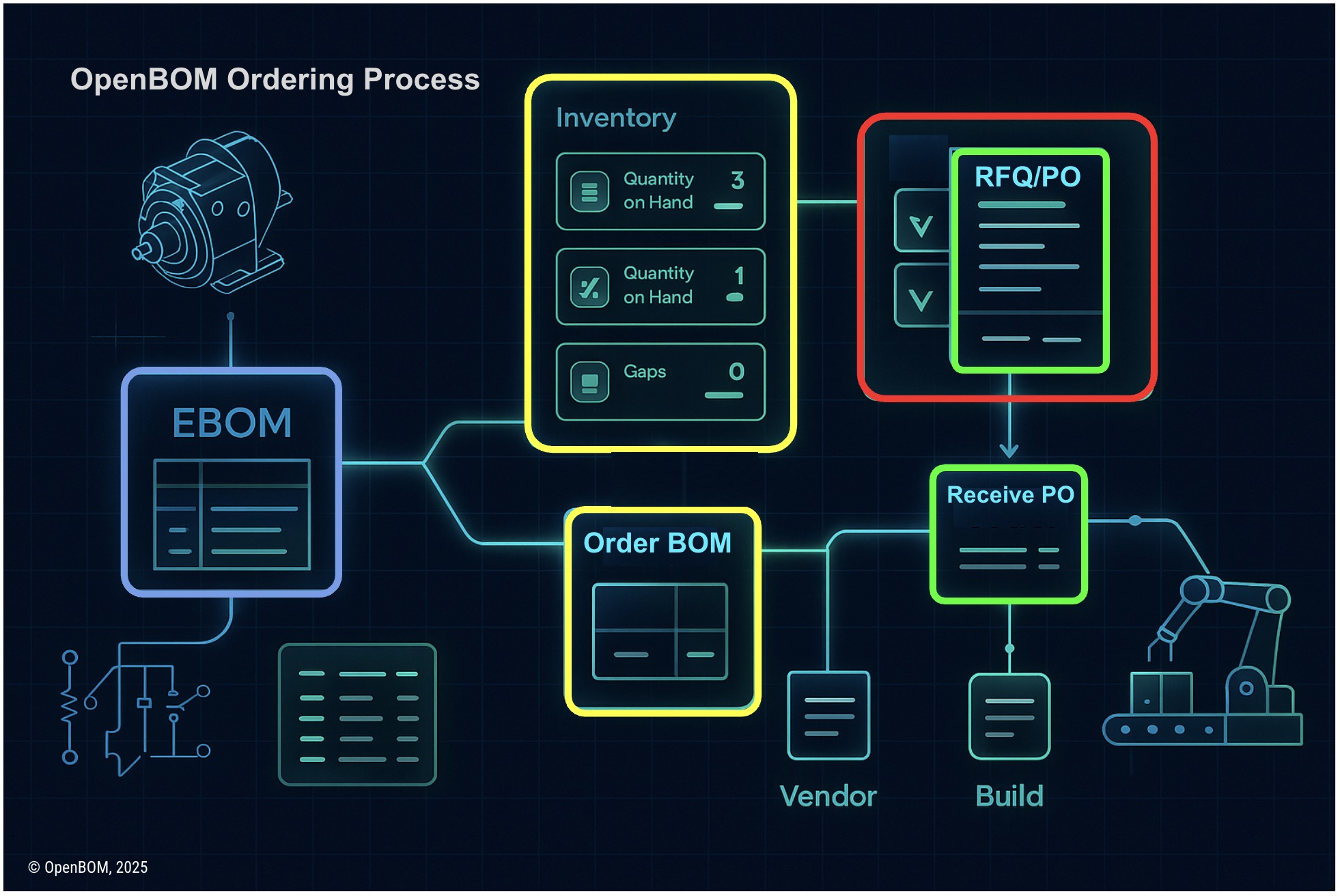
OpenBOM’s ordering workflow is designed to close that gap by providing a clear sequence of steps that begins with an EBOM generated directly from CAD and leads all the way to RFQs, POs, receiving materials, and producing finished goods. The process is repeatable, traceable, and suitable for companies that work with prototypes, small batches, or growing production volumes.
Starting with an EBOM Generated Directly from CAD
The workflow begins when engineering exports an EBOM from their CAD system. OpenBOM integrates with SolidWorks, Autodesk Fusion, Onshape, Altium, and other tools. These integrations extract the full structure of the assembly, including quantities and metadata. For ECAD tools such as Altium or OrCAD, OpenBOM imports component lists, reference designators, and PCB-related details. Software or configuration modules can also be included through catalog entries.
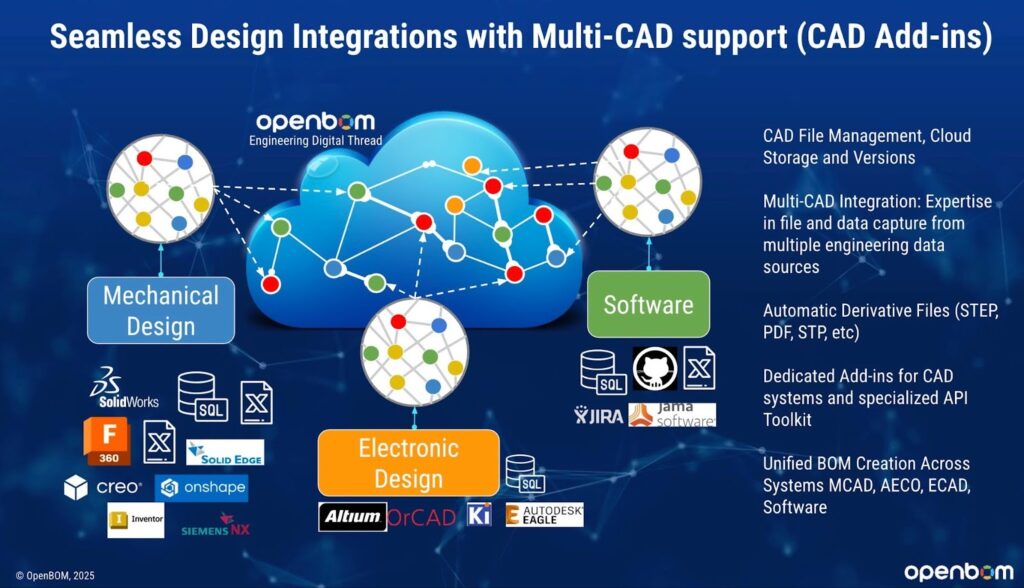
This is the first structured and traceable view of the product. Because it comes directly from design tools, no manual transcription is required. The EBOM becomes a reliable source for everything that follows.
Catalog and Inventory: A Shared View of What Exists
Once the EBOM is in OpenBOM, the next step is to understand existing inventory. The catalog contains item definitions, preferred vendors, costs, alternates, and inventory on hand. When the EBOM references these catalog entries, OpenBOM can immediately compare required quantities with what is currently available.
This eliminates the common practice of checking multiple spreadsheets, shared drives, or ERP exports to determine what needs to be ordered. Engineers and buyers see the same information, and the catalog ensures that item identity, vendor assignments, and cost information stay consistent.
Creating the Order and Identifying Quantity Gaps
With an EBOM and catalog in place, the next step is to create an Order. The Order is a structured object that represents everything required for a specific build. As soon as the Order is created, OpenBOM compares BOM quantities to inventory levels and identifies shortages. It becomes clear which items are fully available, which are partially available, and which must be purchased.
Instead of manually reconciling engineering spreadsheets with procurement records, the system performs this comparison automatically. The Order also includes vendor assignments and provides a clear view of the total material cost for the build. Engineering and procurement teams can now work from a shared, accurate record.
Generating RFQs and Purchase Orders
Once shortages are identified, OpenBOM generates the procurement documents needed to move forward.

For items requiring supplier quotes, OpenBOM creates RFQs that contain item information, quantities, and other relevant data. Multiple suppliers can receive the same RFQ, which makes it possible to compare pricing, lead times, and other variables.
For items with known vendors and established pricing, OpenBOM generates Purchase Orders. These POs contain vendor-specific details, quantities, unit prices, and connections back to the catalog and EBOM. Because RFQs and POs are generated from structured data rather than manually assembled lists, the process is consistent and reliable.
Receiving Materials and Updating Inventory
Once materials arrive, OpenBOM allows quantities to be received against each PO. The system updates inventory immediately, ensuring that catalogs remain accurate. The Order also reflects that previously outstanding items have now been fulfilled. This step closes the loop between procurement activity and inventory records.
At this point, both engineering and procurement have a shared, up-to-date view of material readiness. There is no need for separate lists or email exchanges to verify what has arrived.
Making the Build and Producing Finished Goods
When it is time to build, OpenBOM uses the Order to guide consumption. Components are deducted from inventory as they are used. This prevents confusion during assembly and ensures that inventory always reflects the current state of the operation. Once the build is complete, OpenBOM increments the finished goods inventory. This allows teams to trace the lifecycle of components from design to procurement to assembly.
This step is especially valuable for companies producing prototypes or small batches, where even a minor discrepancy can delay the build. The workflow ensures that material tracking remains structured and predictable.
How This Fits Into the Broader Digital Thread
In the previous article, I described how OpenBOM’s object references connect EBOMs, MBOMs, vendor items, RFQs, and POs into a growing digital thread. Ordering is where the digital thread becomes operational rather than conceptual.
The EBOM links to the MBOM. The MBOM links to vendor items. Vendor items link to RFQs. RFQs and POs link back to the build. Receiving materials updates inventory. Build consumption links the process to finished goods. All of these objects are part of the same product graph. There is no duplication. Nothing is recreated manually.
The digital thread grows naturally as work progresses. Each step adds relationships and context.
Why This Workflow Accelerates Product Launch
A few practical observations highlight why this workflow improves product readiness.
Procurement teams no longer need to rebuild the BOM from static files.
Engineering and procurement work from the same structure.
Quantity gaps are identified automatically.
Lead time risks become visible early.
RFQs and POs are generated consistently.
Inventory is updated in real time.
Assembly teams work with accurate material counts.
The process becomes repeatable rather than improvised.
The result is a smoother transition from design to production and fewer operational surprises.
Conclusion
OpenBOM’s ordering workflow creates a direct and traceable connection between engineering data and procurement activity. It begins with a clean EBOM generated from CAD, continues through catalog and inventory checks, produces RFQs and POs, and ends with material receiving and finished goods. Each stage builds on the previous one, forming a connected workflow that accelerates product readiness.
Day 26 marks the point in this series where engineering structure meets operational execution. Tomorrow, in Day 27, I will describe how OpenBOM’s cloud platform supports these workflows with a secure, scalable, and compliant architecture.
REGISTER FOR FREE to check how OpenBOM can help you.
Best, Oleg
Join our newsletter to receive a weekly portion of news, articles, and tips about OpenBOM and our community.