“You can take the engineer out of Excel… but you can’t take Excel out of the engineer.”
This phrase captures a deep truth in engineering and manufacturing environments. Excel has been the Swiss Army knife of engineers for decades — used for everything from simple calculations to complex BOMs, part tracking, procurement lists, and even change management.
I’m preparing for the first Share PLM 2025 Summit, which focuses on human-centric PLM transformation. Today, I’d like to share OpenBOM’s perspective on designing human-centric interactions — and give you a few insights into the direction we’re taking to support this vision.
Why does human-centric PLM start with understanding the spreadsheet habit — and builds from there?
Let’s face it — Excel is the engineering equivalent of duct tape. Need to design a rocket? Start with a spreadsheet. Planning a BOM for a 1000-part robot? Spreadsheet. Project schedule, cost estimate, pizza tracker for Friday lunch? Spreadsheet.
Ask any engineer what tool they can’t live without. It’s not SolidWorks. It’s not MATLAB. It’s not even coffee (okay, maybe that’s close). The real lifeline is Microsoft Excel (Google Sheet, or similar) — that humble grid of infinite possibilities.
The Spreadsheet Syndrome
At some point in every engineer’s life, there’s an emotional bond formed with Excel. It starts with a simple list — maybe a parts catalog. Before long, it morphs into a labyrinth of tabs, lookup formulas, and data acrobatics that only the original creator understands (and barely).
We’ve all seen it:
- “Final-BOM-v7-REALLY-FINAL.xlsx”
- A nested VLOOKUP so deep it might need a safety harness
- A spreadsheet with 42 tabs, each more mysterious than the last
And still, somehow, it works. Sort of.
Why Excel Sticks
Because Excel bends. It doesn’t complain. It lets you do anything — right or wrong — without judgment. Want to treat it like a CAD vault list, PLM system, procurement tool, and supply chain database in one? Excel says: “Go for it, I believe in you.”
It’s not just software. It’s muscle memory and mental map at the same combined with a full data organization freedom.
You Can’t Rip and Replace Behavior
Here’s the truth most software vendors don’t like to admit: You can’t force engineers to change. Tools don’t change behavior — workflows do. And the best workflows? They’re capturing human-centric operations and build from there.
The goal isn’t to take Excel away. The goal is to meet people where they are, and then help them grow from there.
Instead of yelling “Stop using Excel!”, we ask:
“What if we built on top of it? What if we respected the familiar, but added superpowers on top?”
Data Should Come to People — Not the Other Way Around
One of the biggest myths in enterprise PLM systems is that people should go to “where the data is.” That’s a 1990s idea.
Modern, human-centric systems should bring data to people, in context, in the tools they already use. Whether that’s a CAD plugin, a shared BOM view, or even — yes — a BOM spreadsheet export, the experience should wrap around the user, not the other way around.
It’s not about access. It’s about connection.
It’s not about control. It’s about confidence in the data.
How Do You Actually Make This Work?
Here’s the secret: it’s not magic — it’s architecture. To move from Excel chaos to a connected, human-centric workflow, you need a practical, layered approach.
First, define the human connection points. Who needs what data, and when? Engineers, buyers, planners — each plays a role, and their workflows must be understood before any system can support them. Start with the people, not the features. Engineers passing data to procurement, or sharing drawings for approvals – those are examples of connection points.
Second, introduce a flexible data management layer — one that’s structured enough to organize and version the data, but open enough to interoperate with spreadsheets, tabs, and all the ways people already work. Think of it as the “Excel adapter” for your structured world. The idea of the model that can adapt Excel flexibility and bring semantics – a graph model that is becoming even more powerful with the introduction new LLMs these days.
Third, connect the dots with workflows that follow human behavior — not the other way around. Whether it’s a button to release a revision, share a BOM with a supplier, or trigger a procurement plan, these actions should mirror real-world decisions. When a system is shaped around how people naturally communicate and collaborate, it disappears into the background — and that’s exactly the point.
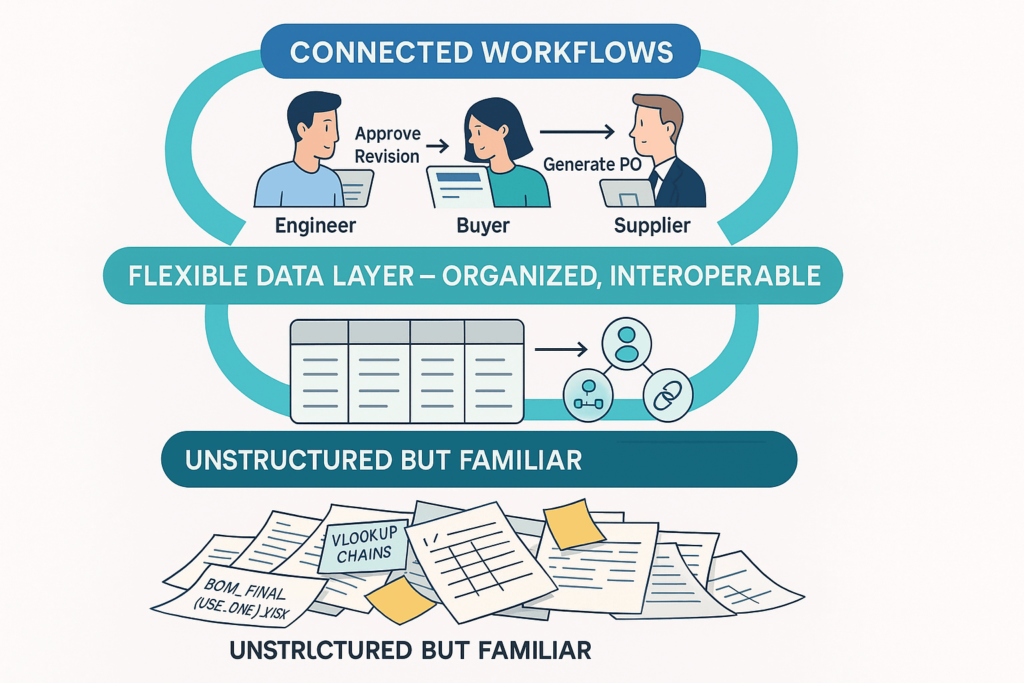
Those are the principles we follow — it’s the direction we’re taking at OpenBOM. It’s a way of designing systems that respect how work actually gets done.
OpenBOM Collaborative Workspace was the first step helping users to share data and collaborate. But this is just a beginning. We are coming with a new capabilities in OpenBOM that allows to map natural human-oriented behaviors at OpenBOM.
Conclusion and Final Thoughts
Excel (spreadsheets) isn’t going away anytime soon. And maybe it shouldn’t. It’s earned its place in the engineering hall of fame — right next to duct tape and WD-40.
When we started OpenBOM, we introduced Collaborative Workspace capabilities that reflected our vision of shared data and simple, intuitive collaboration. Over the past few years, we’ve learned a great deal on this journey. In the coming weeks, we’ll be sharing more about the direction OpenBOM is taking to help users interact with data in a more natural and seamless way.
But if we want to go faster, smarter, and more connected, we need to build systems that respect people, not just data models. The goal is to build tools that fit humans — not force humans to fit tools.
So yes, you can take the engineer out of Excel… But maybe, just maybe, it’s smarter to let Excel come along for the ride — and make it work better for everyone.
We are working on ideas on how to help engineers and everyone else in manufacturing companies move to the next level of working with the data.
Want to discuss it? Contact us.
Best, Oleg
Join our newsletter to receive a weekly portion of news, articles, and tips about OpenBOM and our community.