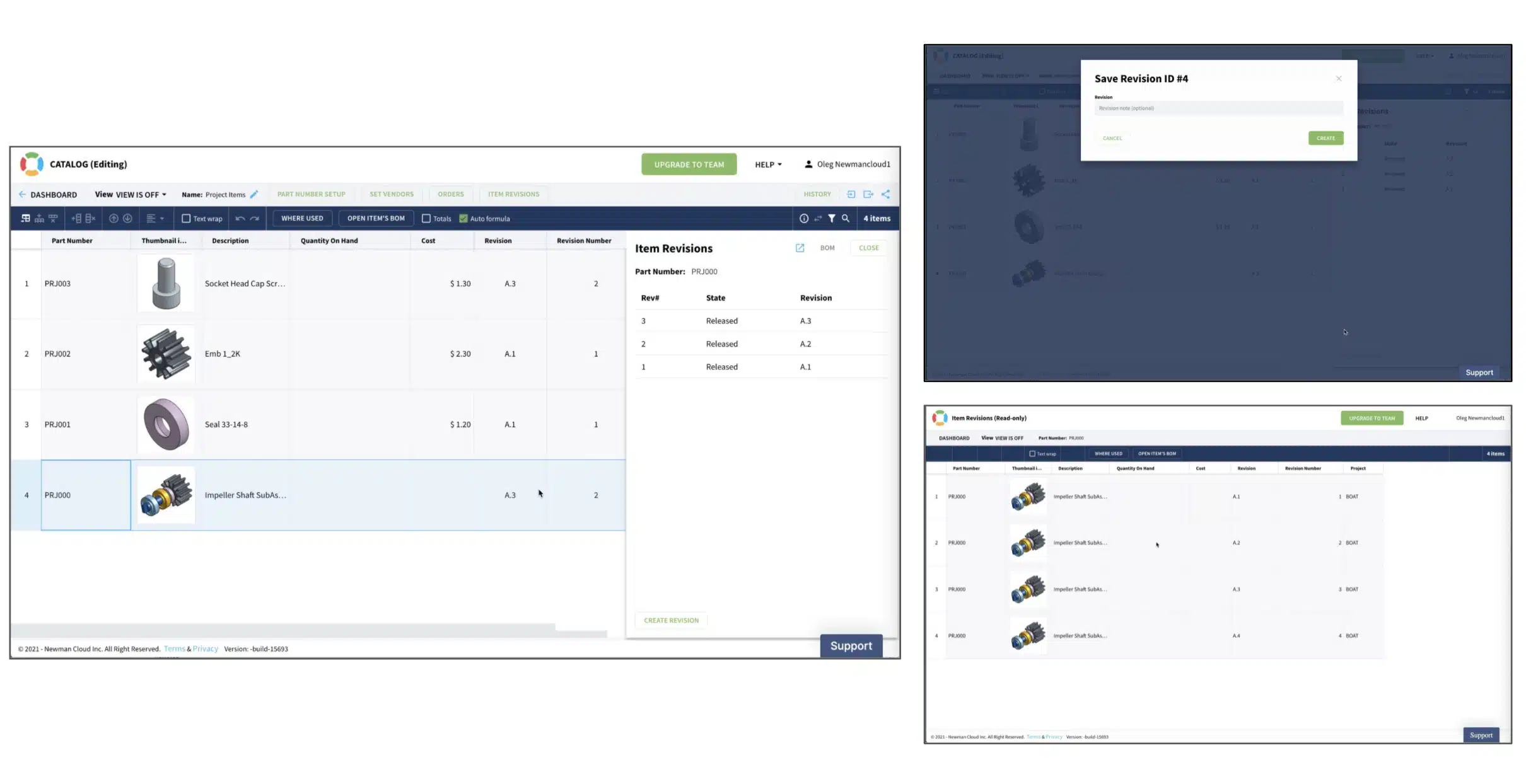
In today’s blog post. I’m going to give you the first preview of OpenBOM’s new Item Revision mechanism support. The purpose of the Item Revisions mechanism is to provide an out of the box support to preserve and manage granular revision history for each item in the catalog. Such support was available for Bill of Materials before and now we have extended and generalized the revision mechanism to catalogs. The next release catalog database in OpenBOM will not only have a history mechanism like before but will also have full support for revisions.
Visually, you will see revisions for each item in the catalog via the Revisions panel and also the revision table.

The revision panel will provide a way to create a new revision. The same command will be available via the popup menu in the catalog.

The full list of revisions is available via the revision table that allows you to get access to the full item revision information and history of all revisions data – properties and files stored with Item revisions (more about file storage in my blog from yesterday – File Storage Features and Item Revisions)

The new revision mechanism operates on 2 levels – (1) for each specific item individually and (2) for product structure. When operating for each item it creates a revision record for a specific item. When you create a revision for an item that has a BOM the revision command will be propagated downstream and will capture the latest revisions of sub-level items (including their BOMs).
Item revision operates in 2 options – (1) top-down and (2) bottom-up in the same way BOM revision mechanism was working until this latest release.
The [x] Save Revisions for All levels is the mechanism that controls the switch between top-down and bottom-up options. When [x] option is selected then OpenBOM will automatically create a new revision not only for an item you selected but for all sub-levels and sub-level items down to the product structure.

Check out our quick video of OpenBOM’s new item revision functionality.
Conclusion
The new item revision mechanism is a substantial enhancement of OpenBOM’s capabilities to manage product information and the lifecycle. It brings a granular revision support level to OpenBOM Catalogs and allows you to track the history of each item level (from previously supported only in Bill of Materials).
Combined with file storage support, the new item revision mechanism allows users to manage full product information including files.
Stay tuned, a new item revision mechanism will be available in the coming OpenBOM release.
In the meantime, check out OpenBOM for yourself, REGISTER FOR FREE, and start a free 14-day trial of any OpenBOM subscription.
Best, Oleg
Join our newsletter to receive a weekly portion of news, articles, and tips about OpenBOM and our community.