


Earlier this week, I initiated a conversation about how OpenBOM can significantly streamline your costing process. Cost management should not be an afterthought; it must be an integral part of the design and engineering process. Unfortunately, for many companies, achieving this can be quite challenging due to information silos and limited accessibility.
Cost Calculation and Management is Not Easy
In our experience working with numerous companies, we have identified five reasons why cost information is often not readily available, hindering the ability to assess costs early in the design process. This challenge extends even to larger companies due to the absence of suitable tools and data silos. However, it is especially pronounced in small and medium-sized manufacturing companies and engineering teams, often trapped in the “Excel kingdom” for cost management, which remains a daunting task.
Here are five reasons why cost management poses challenges for most engineering teams and companies we’ve engaged with:
- Cost information is isolated in Excel and external databases.
- Cost information about components is not updated in real-time.
- Managing multiple sourcing (vendor) information is complicated.
- It is hard to pull an accurate BOM and combine with costing
- Cost rollup is time-consuming and involves multiple steps.

Catalogs and Multi-sourcing
OpenBOM offers a straightforward method for organizing data related to components, materials, and labor required for cost management. It begins with a centralized database with catalogs containing all items. OpenBOM enables you to create catalogs (item classifications) and manage the cost of each item within a catalog, including multiple sources for purchasing that component. Vendor information is separately managed, resulting in a multi-sourcing data structure within each catalog.
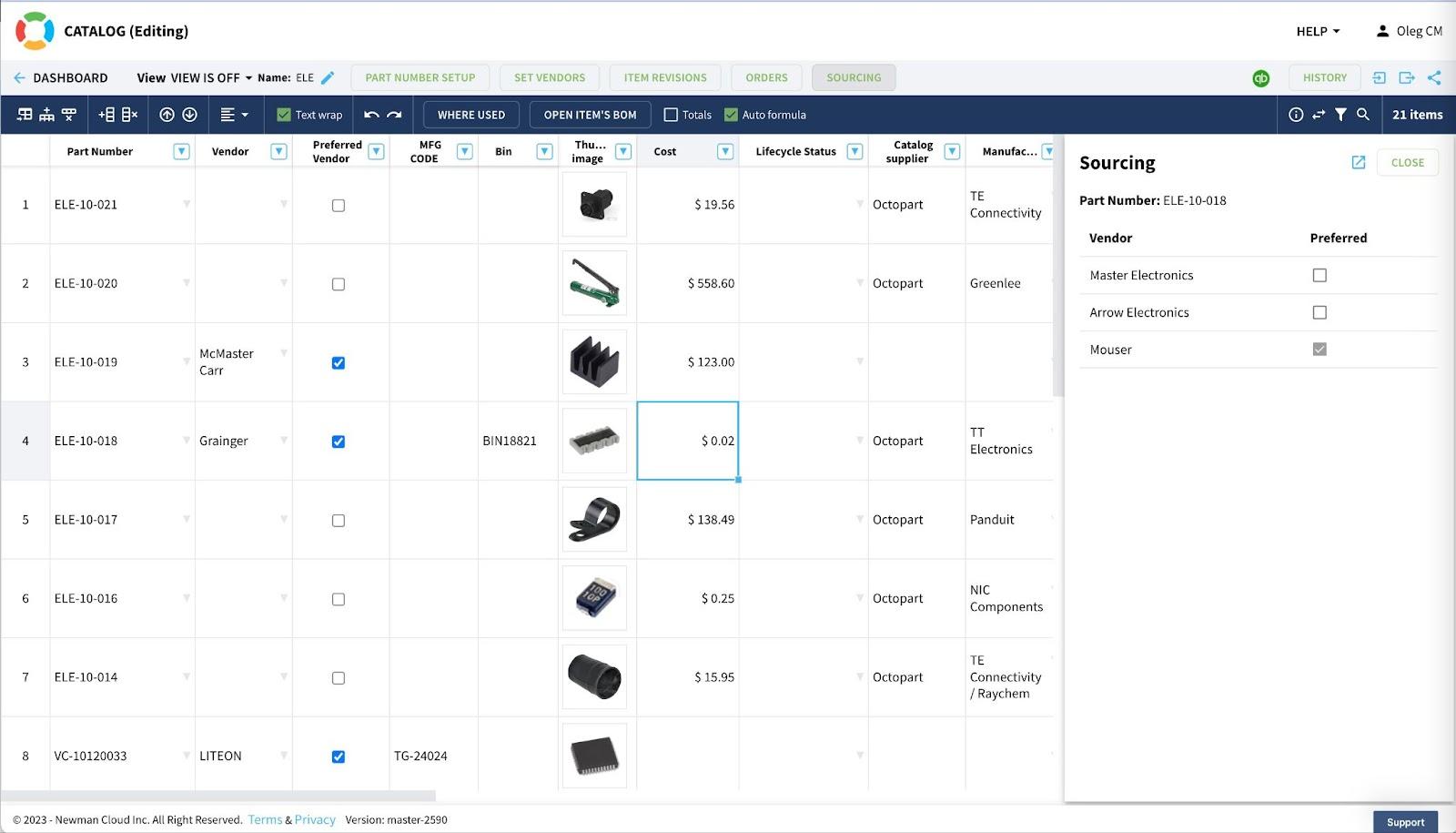
As you can see from the image above, OpenBOM allows you to define items and multiple sourcing options, with one marked as “preferred” for use in the BOM. Full information about each sourcing option is management as well.
OpenBOM also facilitates tracking the history (revisions) of all items, vendors, and sourcing information, providing cost data as available from suppliers.
Product Structures (BOM)
OpenBOM provides a mechanism for organizing product structures (BOM) based on item usage (from the catalog) and managing a comprehensive set of reference-instance relationships, which can be instance-based and quantity-based. Information can be automatically extracted from design (CAD) systems, and then adjusted and validated. Additional components, materials, and other elements can be added, resulting in a complete product data set. Applying formulas to the full product structure allows for cost rollup based on supplier settings, unit cost, and BOM data.
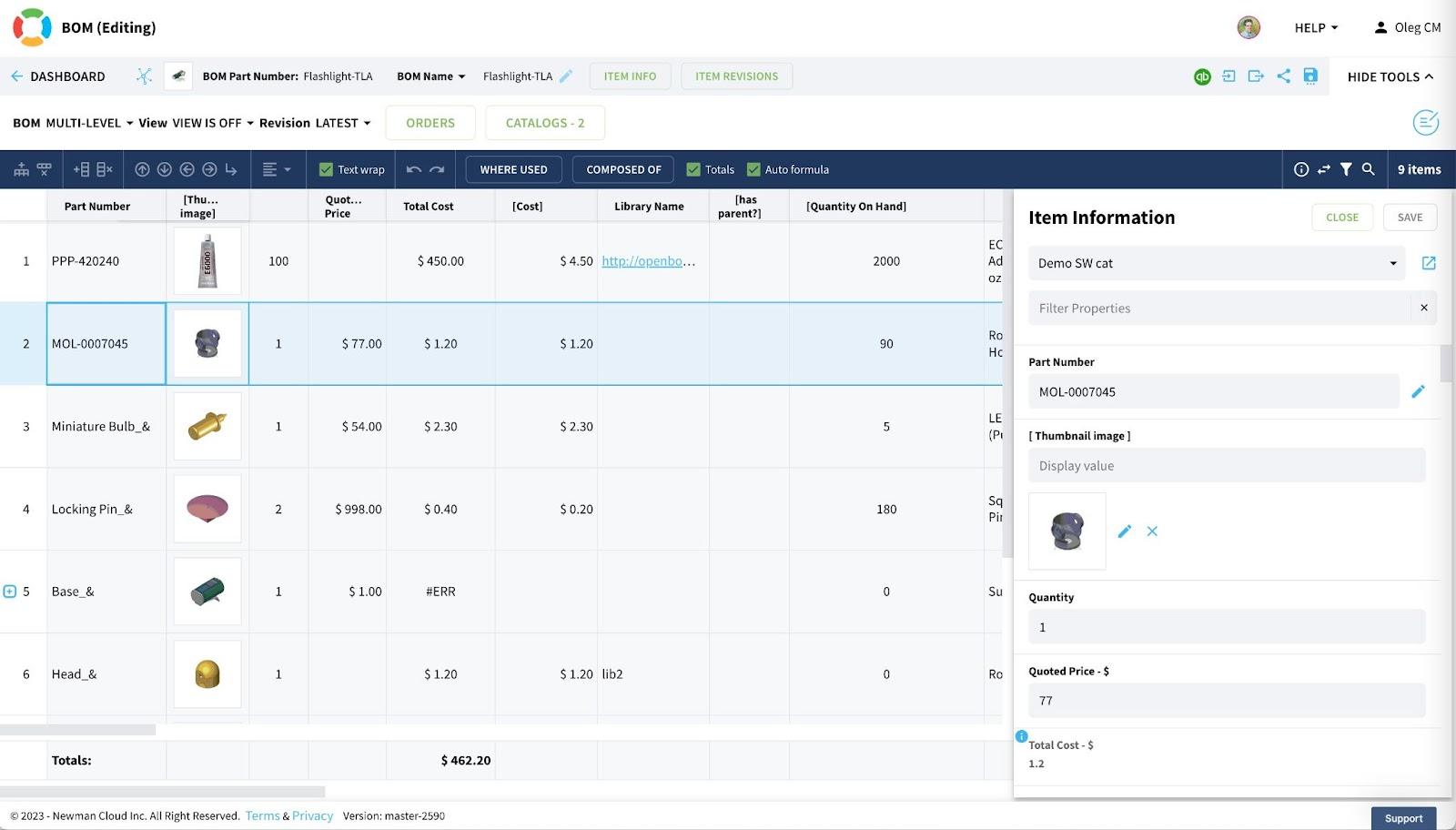
You have immediate access to cost information that recalculates when data changes. Simultaneously, this information can be preserved in revisions, ensuring full traceability of BOM revisions and costs, providing you with costs as initially “planned.”
Purchasing Process
OpenBOM offers a mechanism for managing the purchasing process, including order creation and RFQs (Request for Quotation). This facilitates planning the procurement of all components for a specific production batch and enables order management separately. Procurement managers and purchasers can make changes and adjustments within the context of a specific order. This is where costs can be modified based on specific shipment and supplier information. Ultimately, you will obtain a cost as it was “shipped” for assembly.
I will talk about the purchasing process in my next blog.
Conclusion
In today’s modern digital manufacturing world, Excel is no longer a viable strategy for cost management. What may have worked 10-20 years ago cannot meet the demands of today’s turbulent supply chains and complex products. Each company must transition from outdated Excel documents to a digital format for cost management and sourcing, and this is precisely what OpenBOM offers. There’s no need to install complex systems or set up intricate databases. OpenBOM provides a straightforward way to import data from existing Excel sheets, capture BOMs from CAD, collaborate, validate, calculate, and order parts. It’s simple and user-friendly.
Register for a free trial and experience OpenBOM’s capabilities for yourself for 14 days. Discover how OpenBOM can help your organization today.
Best regards,
Oleg
Join our newsletter to receive a weekly portion of news, articles, and tips about OpenBOM and our community.








